1
OPERATIONS
How to use the Bluetooth speaker
1.
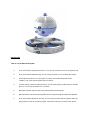
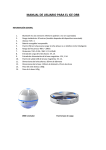
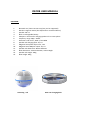
Press and hold the speaker power key “C” for five (5) second to turn on the speaker orb.
2.
Press and hold the Bluetooth key “D” for five (5) seconds to turn on Bluetooth mode.
3.
Search Bluetooth device on smart phone / tablet, then select Bluetooth device
“ICEOrb”, pair smart phone/tablet with this device.
4.
If smart phone/ Tablet have NFC function, put the smart phone/ tablet close to the NFC
point “F” on the top of speaker for 3 seconds.
5.
Bluetooth speaker will pair with smart phone/tablet automatically.
6.
Music played on the Smart phone/Tablet will now play through the Bluetooth Speaker.
7.
Press and hold the Bluetooth pair key “D” for five (5) seconds and the speaker will stop
pairing with current smart phone/ tablet, and will be ready to pair with a new device.