1
Basic setup
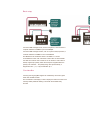
Connect a MIDI message source, such as a keyboard, control surface or
computer interface to theMIDI in port of the MIDIpal.
Connect a MIDI message receiver, such as a synth module, expander, or
computer interface to theMIDI out port of the MIDIpal.
The MIDIpal can be powered by either a 9V battery or a 5V-9V
unregulated DC supply, with a minimum current rating of 150mA. Make
sure that the connector has a center pin (or tip) positive / outer collar (or
sleeve) negative pin polarity. Most universal power supplies allows the
polarity to be selected — the polarity being often represented by a
diagram like this: – (o +, or by the indication tip: +.
User interface
Incoming and outgoing MIDI signals are visualized by the red and green
LEDs near the MIDI sockets.
The 8 characters LCD display is used to display the name and value of the
currently edited parameter. Editing is done with the clickable rotary
encoder.