1
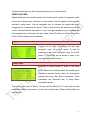
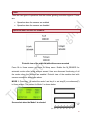
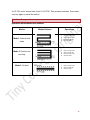
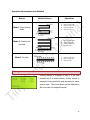
Take the case; the commands are set as following in the setup menu: Motor1 Dir: CCW Motor2 Dir: CCW Press the start-stop switch/key. Motor1, motor for X-axis starts moving in CCW direction. It continues to move until the X-sensor (X-Right/ X-left as per the machine is set by user) is not triggered in CCW direction. As the X-sensor triggers, motor2, the feed motor or motor for Y-axis moves in CCW direction (direction set in Setup menu) the feed distance set in home screen and motor1 starts moving in CW (reverse) direction and continues its motion until the Xsensor is not found triggered in CW direction. As this sensor triggers, Motor2 moves in the CCW direction again and motor1 starts moving in CCW direction again and the process continues. When the Y-sensor (Y-up/ Y-down sensor) at Y-axis is triggered (i.e. feed axis/ Y-axis has been reached to its limit at which Y-sensor is mounted by user), it waits for motor1 to reach at its limit position and then homing of motor2 takes place. When motor2 reaches at its home position, if mode 1S was set in home screen, both the motors stop at home position and direction of motor1 is saved. Press start-stop key to commence the motion and repeat the process again. However, if Mode 1C was set, machine reaches to its home position configured by user, direction for motor1 is saved and all the above process again starts. Press the start-stop key to pause the motion in between the process. MODE 2: Press key2 to select the mode 2 and key4 to select as stop/ Continuous mode in the Home Screen. The pattern for Mode 2 is shown below. Press start-stop key. Motor1 starts moving in CCW direction (direction set for motor1 in Setup menu) and continues to move in same direction until the X-sensor is not triggered (X-Right/ X-left as per the machine is set by user). When the X-sensor triggers, motor1 starts moving in CW direction and moves until the X-sensor in CW triggers. As the X-sensor triggers, motor2 moves the feed distance set in Home screen in CCW direction (direction set for motor1 in Setup menu) and motor1 moves back in CCW direction again and whole process continues 9