1
PC version
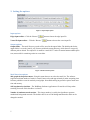
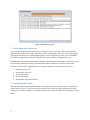
In this section we introduce the user guide for the PC version of the WaRSwapApp. Figure 2 shows the
main window of the WaRSwapApp.
Figure 2: The WaRSwapApp main layout
1- Installation and instructions
1. Make sure you have Java jdk installed on your computer .
2. Download the software from
http://megraw.cgrb.oregonstate.edu/software/WaRSwapSoftwareApplication/
3. Extract the downloaded package to a destination folder.
4. Go into the directory in which you extracted the software and run the WaRSwap Software
Application as follows:
a. For windows: double click on jwarswap.jar
b. For linux and mac: Open a command line terminal and type
cd WaRSwapSoftwareApplication
./startApplication.sh
5. To test with the existing sample input graph, select the edge file and vertex file from the
sample_inputs directory.
6. Change default options if desired, otherwise click on the "Start" button to run the program.
7. Wait while program is running. It may take a few minutes.
8. Find motif discovery output files in given location.
4