1
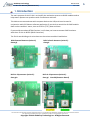
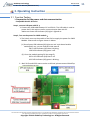
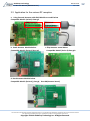
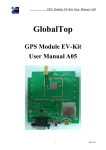
GlobalTop Technology EV-Kit User Manual (MT3333 series) Document # Ver. A02 3. Operating Instruction 3.1 Function Testing Preparation for the power and data communication Compatible Model: All series Step 1, connect USB port with PC: Connect the USB cable between PC and EV-Kit. The USB cable is used to power the EV-Kit and to transfer communication data with PC. Make sure Power LED Indicator (D1) light is lighted on. Step 2, Turn on the power for GNSS module: The Switch turns on the enable of the LDO to supply the power for GNSS Module. Please refer to figure shown in below. (1.) Once Power LED Indicator(D1) lights on and main board enable switch(SW1) on, you can find the initial state 3D Fix LED Indicator (D2) blue is blinking. 1PPS LED Indicator (D3) green is off. (2.) Once the module getting FIX the stage 3D Fix LED Indicator (D2) blue is off. 1PPS LED Indicator (D3) green is blinking. Both 3D fix and 1PPS status can be re-defined, please contact GlobalTop customization service. This document is the exclusive property of GlobalTop Tech Inc. and should not be distributed, reproduced, into any other format without prior permission of GlobalTop Tech Inc. Specifications subject to change without prior notice. Copyright © 2012 GlobalTop Technology Inc. All Rights Reserved. 11