1
Messages are sent to the Cirrus from your online account – once
you’ve signed up, simply log in and type your message. You can also
send messages quickly via a personal email account. Your device will
receive the message within moments!
For complete instructions go to myAmbient.com and follow the
instructions to register your device. You will need to enter your serial
number and security code, which are both printed on a sticker that
can be found on the rear of the device.
receiving a message
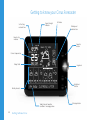
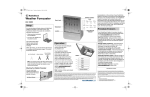
The messaging section of your forecaster’s display is at the very bottom of the screen, When you receive your first message the ‘1’ icon
Additional Features
17