1
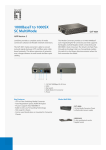
Signamax™ 10/100/1000T/TX to 1000SX/LX
Gigabit Ethernet Media Converter
Connecting to Power
This Converter is a plug-and-play device.
Step 1:
Step 2:
Connect the supplied AC to DC power adapter to the receptacle at
the back of the converter.
Attach the plug into a standard AC outlet with a voltage range from
100 to 240 VAC.
Installing in a Chassis
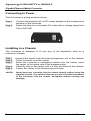
The Converter is designed to fit into any of the expansion slots on a
rackmount chassis.
Step 1:
Step 2:
Step 3:
Step 4:
Step 5:
<NOTE>
6
Unscrew the carrier from the desired expansion slot on the chassis.
Fit the converter onto the carrier.
When the converter is completely seated onto the carrier, insert
the carrier to the guide rails of the expansion slot.
Carefully slide in the carrier until it is fully and firmly fit the chassis.
Fasten the carrier to the chassis by the screws.
Never insert any converter into the chassis directly without using the
supplied carriers. The carriers allow secure and consistent placement
of the converters into the chassis’ backplane without causing any
damage.
User’s Manual