1
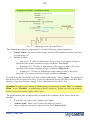
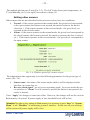
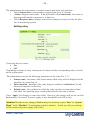
- 30 In order to create such notification:
1. Go to tab «Modules» in the web-interface of monitoring system.
2. Press «Add mailer» in "System menu". A form for creating new notification will appear.
3. In the field «Notification type» select «SNMP-trap».
4. Fill in the fields of the form. All fields are obligatory for filling in.
5. Press button «Send test message» to test the element.
6. Press button «Save and close».
Created notification will appear in the list of notifications in tab "Modules" in the webinterface. To show new notification display mode should be «View groups» or «View
map».
Attention! In order to save settings in Flash memory it is necessary to press “Save” in “System
Menu” in tab “Modules” of monitoring system’s interface. In this case all your settings
will be restored if power supply will be lost.
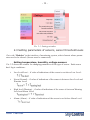
Notification via ICQ or AIM
The element «AIM/ICQ notifications» uses ICQ-message to notify the administrator
about the events occurring in system.
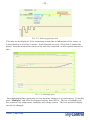
Once you have set up notification, specify the recipient list who will receive notifications,
each user from the list of recipients will receive a copy of system log. Thus, each user
from the list of recipients will be immediately notified about the events via ICQ.
To create AIM/ICQ notifications you need an ICQ or AIM account, which will be free of
use during running of the system. In order to create such notification:
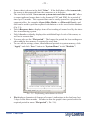
1. Go to tab «Modules» in the web-interface of monitoring system.
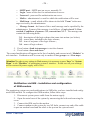
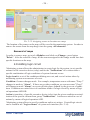
2. Select menu item «AIM/ICQ notifications» in "System menu". A form for
creating new notification will appear (Pic. 2.10).
3. In the field «Subscription list» enter new recipients: ICQ numbers or AIM
names. These accounts will receive notifications.
4. Fill in the field «AIM/ICQ account login», type in the «Account password» of the monitoring system.
5. Press button «Save and close».
User Manual