1
Preface
Copyright
This publication, including all photographs, illustrations and software, is protected under international copyright laws, with all rights reserved. Neither this manual, nor any
of the material contained herein, may be reproduced without written consent of the author.
Version 1.0
Disclaimer
The information in this document is subject to change without notice. The manufacturer makes no representations or warranties with respect to the contents hereof and
specifically disclaims any implied warranties of merchantability or fitness for any particular purpose. The manufacturer reserves the right to revise this publication and to
make changes from time to time in the content hereof without obligation of the manufacturer to notify any person of such revision or changes.
Trademark Recognition
Microsoft, MS-DOS and Windows are registered trademarks of Microsoft Corp.
AMD, Athlon, and Duron are registered trademarks of AMD Corporation.
Other product names used in this manual are the properties of their respective owners
and are acknowledged.
Federal Communications Commission (FCC)
This equipment has been tested and found to comply with the limits for a Class B digital device, pursuant to Part 15 of the FCC Rules. These limits are designed to provide
reasonable protection against harmful interference in a residential installation. This
equipment generates, uses, and can radiate radio frequency energy and, if not installed and used in accordance with the instructions, may cause harmful interference
to radio communications. However, there is no guarantee that interference will not occur in a particular installation. If this equipment does cause harmful interference to
radio or television reception, which can be determined by turning the equipment off
and on, the user is encouraged to try to correct the interference by one or more of the
following measures:
−
−
−
−
Reorient or relocate the receiving antenna.
Increase the separation between the equipment and the receiver.
Connect the equipment onto an outlet on a circuit different from that to which
the receiver is connected.
Consult the dealer or an experienced radio/TV technician for help.
Shielded interconnect cables and a shielded AC power cable must be employed with
this equipment to ensure compliance with the pertinent RF emission limits governing
this device. Changes or modifications not expressly approved by the system's manufacturer could void the user's authority to operate the equipment.
Declaration of Conformity
This device complies with part 15 of the FCC rules. Operation is subject to the following conditions:
−
−
This device may not cause harmful interference, and
This device must accept any interference received, including interference
that may cause undesired operation.
Canadian Department of Communications
This class B digital apparatus meets all requirements of the Canadian Interferencecausing Equipment Regulations.
Cet appareil numérique de la classe B respecte toutes les exigences du Réglement
sur le matériel brouilieur du Canada.
About the Manual
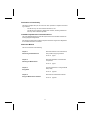
The manual consists of the following:
Chapter 1
Describes features of the motherboard,
and provides a shipping checklist.
Introducing the Motherboard
Go to ⇒ page 1
Chapter 2
Describes installation of motherboard
components.
Installing the Motherboard
Go to ⇒ page 7
Chapter 3
Provides information on using the BIOS
Setup Utility.
Using BIOS
Go to ⇒ page 25
Chapter 4
Describes the motherboard software.
Using the Motherboard Software
Go to ⇒ page 50
ii
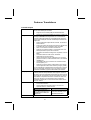
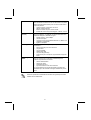
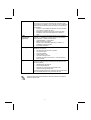
Features Translations
Caractéristiques
Processeur
Chipset
La carte mère utilise un Socket A AMD 462 broches présentant les caractéristiques suivantes:
•
Supporte un bus frontal (FSB) de 200/266/333 MHz
•
Intègre les processeurs AMD Duron, Athlon, et Athlon XP
Le chipset sur KVT400aX-L comprend le KT400/KT400A Northbridge et VT8235 Southbridge basés sur une architecture
novatrice et dimensionnable avec une fiabilité et des performances prouvées. Quelques-unes des caractéristiques avancées du
chipset sont:
•
Support d’adresse indépendante, données, et interfaces
de surveillance
•
Support de modes de transfert 533 MHz 8X, 266 MHz 4X,
et 133 MHz 2X pour signalisation AGP Ad et SBA
•
AGP v3.0 conforme au mode de transfert 8X
•
Supporte une interface d’Hôte V-Link 66 MHz avec une
bande passante de pointe de 533 Mo/sec
•
Contrôleur Fast Ethernet intégré avec capacités 1/10/100
Mbits
•
Contrôleur EIDE de mode maître UltraDMA33/66/100/133 de Canal double
•
Vitesse de transfert jusqu’à 133Mo/sec pour couvrir les
pilotes PIO mode 4, multi-mots DMA mode 2, et interface
UltraDMA-33
•
Compatible USB v2.0 et Interface de Contrôleur d’Hôte
Avancé (EHCI) v1.0
•
Supporte à la fois la gestion d’alimentation ACPI (Advanced Configuration and Power Interface) et legacy (APM)
Les caractéristiques supplémentaires comprennent le support
pour six ports USB, une liaison AC’97 pour audio et modem,
surveillance matérielle, et gestion d’alimentation ACPI/OnNow.
Graphiques
Cette carte mère comprend un logement AGP qui offre huit fois
la bande passante des spécifications AGP d’origine. L’AGP 3.0
(8X AGP) offre une amélioration significative de performances
accompagnée d’améliorations de fonctionnalités sur l’AGP2.0.
Cette interface représente l’évolution naturelle de l’AGP existante pour répondre à une demande toujours croissante
d’interfaces graphiques en environnements de station de travail et de bureau.
Mémoire
•
•
Peut recevoir deux logements sans mémoire tampon en
2.5V de 184 broches.
Chaque logement supporte jusqu'à 1 Go avec une
capacité maximum totale de 2 Go
Chipset KT400 NB
Chipset KT400A NB
Support de module mémoire DDR SDRAM jusqu’à
200/266/333/400 MHz (surfréquencé)
Audio
Support de module mémoire DDR SDRAM jusqu’à
200/266/333/400 MHz
Le Codec Audio VIA VT1612A est conforme aux spécifications
iii
LAN Interne (optionnel)
E/S Intégrées
Microprogramme
BIOS
AC'97 2.2 offrant des performances de résolution en 18 bits.
Avec des sorties à 2 canaux la VIA VT1612A offre une qualité
stéréo de hautes performances pour connexions d’écouteurs
et de haut-parleurs.
•
Codec conforme à l’extension AC’97 2.2
•
Stéréo 18 bits full duplex
•
Extension stéréo 3D pour contour simulé
•
Entrées de niveau de ligne analogique, 2 stéréo, 2 mono
Le VT6103 est un périphérique à Couche Physique pour
Ethernet 10BASE-T et 100BASE-TX utilisant des câbles Non
blindés de catégorie 5, Blindés de Type 1.
•
Double Vitesse – 100/10 Mbps
•
Half et Full Duplex
•
Conforme à tous les Standards IEEE 802.3, 10Base-T et
100Base-Tx Applicables
•
Egaliseur Adaptatif
La carte mère possède un jeu complet de ports d’E/S et de
connecteurs:
•
Deux ports PS/2 pour souris et clavier
•
Un port série
•
Un port parallèle
•
Quatre ports USB
•
Un port LAN (optionnel)
•
Prises audio pour microphone, ligne d’entrée et ligne de
sortie
Cette carte mère utilise Award BIOS qui permet aux utilisateurs de configurer de nombreuses caractéristiques du
système comprenant les suivantes:
•
Gestion d’alimentation
•
Alarmes de réveil
•
Paramètres de CPU
•
Synchronisation de CPU et de mémoire
Le microprogramme peut aussi être utilisé pour définir les
paramètres pour les vitesses d’horloges de différents processeurs.
Certaines spécifications matérielles et éléments de logiciels peuvent être
modifiés sans avertissement.
iv
Features
Prozessor
Chipsatz
Das Motherboard verwendet einen AMD 462-Pin Sockel A mit
den folgenden Eigenschaften:
•
Unterstützung für 200/266/333 MHz FrontSideBus (FSB)
•
Unterstüzung für AMD Duron, Athlon und Athlon XPProzessoren
Der Chipsatz des KVT400aX-L enthält eine KT400/KT400A
Northbridge und eine VT8235 Southbridge, die auf einer
innovativen und skalierbaren Architektur mit bewiesener
Zuverlässigkeit und Leistung basieren. Einige der modernen
Eigenschaften des Chipsatzes:
•
Unterstützt unabhängige Adressen, Daten und Snoop
Interfaces
•
Unterstützt 533 MHz 8X, 266 MHz 4X und 133 MHz 2XDatentransfermodi für Ad- und SBA AGP-Signale
•
Kompatibel mit AGP v3.0 mit 8X-Transfermodus
•
Unterstützung für 66 MHz V-Link Client Interface mit einer
Spitzen-Bandbreite von 533 MB/Sek.
•
Integrierter Fast Ethernet-Controller mit einer Leistung
von 1/10/100 Mbit
•
Dualkanal-UltraDMA-33/66/100/133 Mastermodus EIDEController
•
Transferraten bis zu 133MB/s für PIO-Modus 4, MultiWord DMA-Modus 2-Treiber und UltraDMA-33Interface
•
USB v2.0 und Enhanced Host Controller Interface (EHCI)
v1.0 kompatibel
•
Unterstützt sowohl ACPI (Advanced Configuration and
Power Interface) als auch Legacy- (APM) Energieverwaltung
Zusätzliche Eigenschaften umfassen die Unterstützung für
sechs USB-Ports, ein AC 97-Link für Audio und Modem,
Hardwareüberwachung und ACPI/OnNow-Energieverwaltung.
Grafik
Das Motherboard enthält einen AGP-Steckplatz ausgestattet,
der gegenüber der ursprünglichen AGP-Spezifikation über die
achtfache Bandbreite verfügt. AGP 3.0 (8XAGP) bietet
gegenüber AGP2.0 eine erhebliche Leistungssteigerung und
verbesserte Features. Dieses Interface stellt die natürliche
Weiterentwicklung des bestehenden AGP dar, um den stetig
anwachsenden Anforderungen an die Grafikschnittstellen
innerhalb der Workstations und Desktop-Umgebungen gerecht zu
werden.
Speicher
•
•
Platz für zwei ungepufferte 2.5V 184-Pin-Slots
Jeder Steckplatz unterstützt bis zu 1 GB mit einer
Gesamtkapazität von 2 GB
KT400 NB-Chipsatz
KT400A NB-Chipsatz
Unterstützung bis zu
200/266/333/400
(übertaktet) MHz DDRSDRAMs
v
Unterstützung bis zu
200/266/333/400 MHz
DDR-SDRAMs
Audio
Onboard-LAN
(optional)
Onboard-I/O
BIOS
Firmware
Der VIA VT1612A Audio Codec entspricht der AC'97 2.2Spezifikation für 18-Bit-Auflösung. Mit 2-Kanalausgängen
bietet das VIA VT1612A Hochleistungs-Stereoqualität für
Kopfhörer oder Lautsprecher.
•
Codec entspricht AC'97 2.2 S/PDIF-Erweiterung
•
18-Bit Stereo-Vollduplex
•
3D-Stereoerweiterung für simulierten Surround-Sound
•
2 Stereo-, 2 analoge Mono Line-level-Eingänge
Das VT6103 ist ein Physical-Layer-Gerät für Ethernet
10BASE-T und 100BASE-TX bei Benutzung von nicht
abgeschirmten Kategorie 5-Kabeln, abgeschirmten Typ 1Kabeln und Glasfaserkabeln.
•
Zwei Geschwindigkeiten – 100/10 MB/Sek.
•
Halb- und Vollduplex
•
Entspricht allen geltenden IEEE 802.3, 10Base-T und
100Base-Tx-Standards
•
Einstellbarer Equalizer
Das Motherboard verfügt über einen kompletten Satz von I/OSchnittstellen und Anschlüssen:
•
Zwei PS/2-Schnittstellen für Maus und Tastatur
•
Eine serielle Schnittstellen
•
Eine parallele Schnittstelle
•
Vier USB - Schnittstelle
•
Eine Eine LAN-Schnittstelle (optional)
•
Audiobuchsen für Mikrofon, Line-in und Line-out
Dieses Motherboard verwendet Award BIOS, mit dem
Anwender viele Systemeigenschaften selbst konfigurieren
können, einschließlich der folgenden:
•
Energieverwaltung
•
Wake-up Alarm
•
CPU-Parameter
•
CPU- und Speichertiming
Mit der Firmware können auch die Parameter für verschiedene
Prozessortaktgeschwindigkeiten eingestellt werden.
Bestimmte Hardwarespezifikationen und Teile der Softwareausstattung
können ohne weitere Ankündigung abgeändert werden.
vi
Caratteristiche
Processore
Chipset
La scheda madre è dotata di un socket A AMD a 462 pin che
presenta le seguenti caratteristiche:
•
Supporta il bus di sistema 200/266/333 MHz frontside
(FSB)
•
Possibilità di alloggiare le CPU Amd Athlon Duron, Athlon
e Athlon XP
Il chipset KVT400aX-L è composto dai chipset Northbrigde
KT400/KT400A e Southbridge VT8235 basati su un’architettura
innovativa e facilmente espandibile dall’affidabilità e dalle
prestazioni dimostrate. Ecco alcune delle caratteristiche
principali dei chipset:
•
Supporta interfacce indirizzi, dati e snoop di produttori
indipendenti
•
Supporta le modalità di trasferimento 8X a 533 MHz, 4X a
266 MHz e 2X a 133 MHz per segnali Ad e SBA AGP
•
Compatibilità AGP v3.0 con modalità di trasferimento 8X
•
Supporta interfaccia client V-link 66 MHz con picco di
larghezza di banda di 533 MB/sec
•
Controller Fast Ethernet Integrato con capacità pari a
1/10/100 Mbit
•
Controller Eide modalità master dual channel UltraDMA33/66/100/133
•
Trasferimento dati sino a 133MB/sec per la modalità PIO
mode 4, “multi-word DMA mode 2 drivers” e l’interfaccia
UltraDMA-33
•
Compatibile con lo standard USB v2.0 e Enhanced Host
Controller Interface (EHCI) v1.0
•
Supporta la gestione energia sia ACPI (Advanced
Configuration and Power Interface) che precedenti (APM)
Alcune ulteriori caratteristiche chiave includono il supporto per
sei porte USB, per il collegamento AC 97 per audio e modem, per
il monitoraggio hardware e per il Sistema Risparmio Energetico
ACPI/OnNow..
Grafica
La scheda include uno slot AGP che fornisce otto volte la
larghezza di banda delle specifiche AGP originarie. La tecnologia
AGP 3.0 (8xAGP) offre prestazioni e funzioni superiori rispetto alla
tecnologia AGP 2.0. Questa interfaccia, che rappresenta una
naturale evoluzione di quella esistente, è progettata per assicurare
una completa compatibilità dell'interfaccia grafica con le
applicazioni correnti e future, sia su workstation che su desktop.
Memoria
•
•
Comprende due slot 2.5V da 184 pin senza buffer
Ogni slot supporta sino ad un 1 GB con una capacità
massima pari a 2 G
Chipset KT400 NB
Chipset KT400A NB
Supporta DDR su moduli di
memoria SDRAM DDR fino
a 200/266/333/400
(overclock) MHz.
vii
Supporta DDR su moduli di
memoria SDRAM DDR fino
a 200/266/333/400 MHz.
Audio
LAN integrata
(opzionale)
I/O integrati
BIOS
Firmware
Il VIA VT1612A Audio Codec è conforme alle specifiche AC'97
2.2 che assicurano prestazioni con una risoluzione a 18 bit.
Grazie alle 2 uscite canale, il VIA VT1612A offre una qualità
stereo di alto livello per le connessioni delle cuffie e degli
altoparlanti.
•
Estensione AC'97 2.2 S/PDIF, conforme con Codec,
•
Stereo full duplex a 18 bit
•
Espansione 3D stereo per surround simulato
•
2 ingressi stereo, 2 ingressi mono analogici a livello di
•
linea
La scheda VT6103 è un dispositivo Physical Layer per
Ethernet 10BASE-T e 100BASE-TX che usa cavi della
categoria 5 non schermati, Tipo 1 schermati e ottici.
•
Dual Speed – 100/10 Mbps
•
Half e Full Duplex
•
Conforme a tutti gli standard applicabili IEEE 802.3,
10Base-T e 100Base-Tx
•
Equalizzatore adattivo
La scheda madre è dotata di un set completo di connettori e
porte I/O:
•
Due porte PS/2 per mouse e tastiera
•
Una porta seriale
•
Una porta parallela
•
Quattro porte USB
•
Una porta LAN (opzionale)
•
Jack audio per microfono e connettori ingresso/uscita
Line
Questa scheda madre utilizza il BIOS Award che permette
all’utente di configurare numerose caratteristiche del sistema
tra cui le seguenti:
•
Risparmio energetico
•
Segnali Wake Up
•
Parametri della CPU e sincronizzazione memoria
•
Timing della memoria e della CPU
È possibile inoltre impostare i parametri di velocità del clock
del processore su diversi valori.
Alcune specifiche hardware ed elementi software sono soggetti a variazioni
senza preavviso.
viii
Características
Procesador
Chipset
El panel principal usa un AMD 462-pines Enchufe A que tiene
las siguientes características:
•
Permite 200/266/333 MHz bus de lado frontal (FSB)
•
Adecua procesadores AMD Duron, Athlon, and Athlon XP
El panel principal en KVT400aX-L incluye KT400/KT400A Northbridge y VT8235 Southbridge los cuales están basados en una
innovadora y escalada estructura la cual provee confiabilidad y
rendimiento. Algunas de las características avanzadas del chipset
son:
•
Soporta interfaces de dirección, datos y snoop independientes
•
Soporta modos de transferencia en 533 MHz 8X, 266
MHz 4X, y 133 MHz 2X para la señalización de Ad y SBA
AGP
•
AGP v3.0 convencional con modo de transferencia 8X
•
Soporta 66 MHz V-Link interfaz Usuario con un máximo
de ancho de banda de 533 MB/por segundo
•
Controlador Fast Ethernet integrado con capacidad de
1/10/100 Mbit
•
Canal doble UltraDMA-33/66/100/133 modo maestro
controlador EIDE
•
Valor de transferencia hasta 133MB/por segundo para
cubrir PIO modo 4, conductores multi-palabras DMA
modo 2, e Interfaz UltraDMA-33
•
USB v2.0 y Interfaz de Controlador de Receptor Mejorado (EHCI) v1.0 compatible
•
Permite ambas ACPI (Configuración Avanzada e Interfaz
de Energía) y (APM) antigua administración de energía
Características adicionales incluyen apoyo para seis puertos
USB, un enlaces AC 97 para audio y modem, monitorización
de hardware, y administración de potencia ACPI/OnNow.
Gráficas
La placa principal incluye una ranura AGP que provee ocho
veces el ancho de banda de la especificación original AGP. La
tecnología AGP 3.0 (8XAGP) provee un aumento significativo en
realizar junto con los refuerzos de característica para el
AGP2.0. Esta interfaz representa la evolución natural del AGP
existente para safisfacer las contìnuas exigencies puestas en
las interfaces de gráficas dentro del ordenador y los ambientes
de desktop.
Memoria
•
•
Acomoda dos ranuras 2.5V 184-pin sin buffer
Cada ranura permite hasta 1 GB con una capacidad
máxima total de 2 GB
Chipset KT400 NB
Chipset KT400A NB
Soporta DDR hasta módulo
de memoria 200/266/333/
400 (sobrereloj) MHz DDR
SDRAM.
ix
Soporta DDR hasta modulo
de memoria 200/266/333/
400 MHz DDR SDRAM.
Sonido
LAN
Incorporada
(opcional)
I/O Integrado
BIOS Firmware
El VIA VT1612A Audio Codec se conforma con la especificación AC'97 2.2 que provee rendimiento de resolución 18-bit.
Con salidas de 2 canales el VIA VT1612A provee la calidad en
estéreo de alto rendimiento para auriculares o conexiones de
altoparlantes..
•
Codec con conformidad de extensión AC'97 2.2 S/PDIF
•
Full duplex en estéreo de 18-bit
•
Expansión en estéreo 3D para el surround simulado
•
Entradas a nivel de línea analógicas de 2 estéreo, 2
mono
La VT6103 es un componente Estrato Físico para Ethernet
10BASE-T y 100BASE-TX usando categoría 5 no blindado,
Tipo 1 Blindado, y cables de Fibra óptica.
•
Velocidad Doble – 100/10 Mbps
•
Bidireccional Total y Medio
•
Reúne Todo la Apropiado IEEE 802.3, 10Base-T y
100Base-Tx Convencionales
•
Ecualizador adaptable
El tablero principal tiene un set completo de puertos de Entrada/Salida y conectores:
•
Dos puertos PS/2 para ratón y teclado
•
Un puerto de serie
•
Un puerto paralelo
•
Cuatro puertos USB
•
Un puerto LAN (opcional)
•
Enchufes de audio para micrófono, línea de entrada y
línea de salida
Este panel principal usa el Award BIOS que posibilita a los
usuarios configurar muchas características de sistema incluidas las siguientes:
•
Administración de potencia
•
Alarmas despertadoras
•
Parámetros y memoria de temporizador CPU
•
Memoria de temporizador CPU
El firmware puede también ser usado para ajustar parámetros
para velocidades diferentes de procesador de reloj.
Algunas especificaciones de hardware e ítems de software son sujetos a
cambio sin previo aviso.
x
製品特徴
プロセッサ
当メインボードはAMD 462ピンソケットAを搭載し、次の特長
があります:
•
•
チップセット
200/266/333 MHzフロントサイドバス(FSB)をサポ
ート。
AMD Duron、Athlon、Athlon XPプロセッサに対応。
KVT400aX-Lのチップセットには、最新且つ拡張性の高いア
ーキテクチャを採用し、高い安定性およびパフォーマンスを
兼ね備えたKT400/KT400A Northbridge及びVT8235 Southbridge
が含まれます。チップセットには次の特徴があります:
•
•
•
•
•
•
•
•
アドレスや、データ、スヌープの独立したインターフェ
ースを提供
8X転送モード対応済みにAGP v3.0に準拠
最高帯域幅533 MB/秒で66 MHz V-Linkクライアントイン
ターフェースをサポート
1/10/100 Mbit性能の統合高速Ethernetコントローラを
搭載
デュアルチャンネルUltraDMA-33/66/100/133マスター
モードEIDEコントローラを搭載
PIOモード4、マルチワードDMAモード2ドライバ、Ultra
DMA-33インターフェースに対応するための、最高133MB/
秒転送速度を実現
USB v2.0及びエンハンス ホストコントローラ インター
フェース (EHCI) v1.0対応
ACPI (Advanced Configuration and Power Interface)
と レガシー (APM) パワーマネジメントの両方に対応
その他に、6つのUSBポート、オーディオおよびモデム向けのA
C 97リンク、ハードウェアのモニタ、およびACPI/OnNow
電源管理に対応しています。
グラフィック
本メインボードには、本来のAGP仕様の8倍のバンド幅を提供
するAGPスロットが一つ搭載されています。AGP 3.0 (8XAGP)
は、AGP2.0より優れた機能と性能を持つインターフェースを
実現しました。この画期的なインターフェースは、ワークス
テーションやデスクトップ環境いおいて絶えずさらに高性能
なグラフィックインターフェースへのニーズに応えるために
、進化をを遂げたものです。
メモリ
•
•
非バッファー2.5V 184ピンスロットを2つ搭載
各々のスロットは1GBまで対応可能で、トータルでメモリ
を2 GBまでサポートします。
KT400 NB チップセット
KT400A NB チップセット
DDR機能について、最大 200
/266/333/400 (オーバー
クロック) MHz DDR SDRAM
メモリモジュールをサポー
ト。
xi
DDR機能について、最大
200/266/333/400 MHz DDR
SDRAM メモリモジュールを
サポート。
オーディオ
VIA VT1612A オーディオコダックは、AC'97 2.2 規格に適
合することによって、18ビットの解像度パフォーマンスを実
現。また、2チャンネルの出力で、イヤホンやスピーカーを通
じて、高品質のステレオをお届けします。さらに、次の特徴
があります:
•
•
•
•
オンボードLAN
(オプション)
VT6103はカテゴリ5案シールド、Type 1 シールド、光ファイ
バーケーブルを使ったEthernet 10BASE-Tと100BASE-TXのた
めの物理レイヤーです。
•
•
•
•
統合の入出力ポー
ト
デュアルスピード – 100/10 Mbps
半/全二重
すべてのIEEE 802.3、10Base-T、100Base-Tx標準に対応
適応エコライザ
このメインボードにはフルセットのI/Oポートおよびコネクタ
が搭載しています。
•
•
•
•
•
•
BIOS
ファームウェア
AC'97 2.2 S/PDIF 拡張規格に適合
18ビットステレオ全二重機能をサポート
3Dステレオ拡張機能でのサラウンド擬似効果を実現
2つのステレオ入力と、 2つモノ アナログのラインレベ
ル入力を設けています
2つのマウスおよびキーボード向けPS/2ポート
1つのシリアルポート
1つのパラレルポート
4つのUSBポート
1つのLANポート(オプション)
マイクロフォンやラインイン、ラインアウト向けのオーデ
ィオジャック
本メインボードは次のシステム機能を含めた設定をすること
ができるAward BIOSを採用しています:
•
•
•
•
電源管理
Wake-up警告
CPUパラメータおよびメモリのタイミング
CPUおよびメモリのタイミング
その他に、各種プロセッサクロック速度のパラメータを設定
することができます。
一部のハードウェア仕様及びソフトウェアアイテムは予告なく変更されるこ
とがあります。
xii
기능
프로세서
이 메인보드는 AMD 462 핀 소켓 A 를 사용하며 다음과 같은
특징을 지닌다:
•
•
칩셋
200/266/333 MHz frontside bus (FSB) 지원
AMD Duron, Athlon, Athlon XP 프로세서 사용
KVT400aX-L 의 칩셋은 혁신적이고 범위성을 지닌 아키텍쳐를
기초로 한 KT400/KT400A Northbridge 및 VT8235
Southbridge 를 포함하여 인정된 신뢰성과 성능을 지닌다. 이
칩셋이 지닌 주요 고급 특징은 다음과 같다:
•
•
•
•
•
•
•
•
•
독립 어드레스, 데이터, 스눕 인터페이스 지원
Ad 와 SBA AGP 시그널링을 위한 533 MHz 8X, 266
MHz 4X, 및 133 MHz 2X 전송 모드 지원
AGP v3.0의 8X 전송 모드와 호환
최고 대역폭 533 MB/sec의 66 MHz V-Link 클라이언트
인터페이스
1/10/100 Mbit 의 통합 패스트 이더넷 컨트롤러
듀얼 채널 UltraDMA-33/66/100/133 마스터 모드 EIDE
컨트롤러
PIO 모드 4, multi-word DMA 모드 2 드라이버, UltraDMA-33 인터페이스를 커버하는 최대 전송 속도
133MB/sec
USB v2.0 및 Enhanced Host Controller Interface
(EHCI) v1.0 호환
ACPI (Advanced Configuration and Power Interface)
및 legacy (APM) 전원 관리 지원
이외의 주요 기능으로 6-개의 USB 포트, 오디오와 모뎀을
위한 AC 97 링크와 하드웨어 모니터링 및 ACPI/OnNow 전력
관리 지원이 포함되어 있다.
그래픽
본 메인보드에는 기존 AGP 사양보다 8 배의 대역폭을
제공하는AGP 슬롯이 포함되어 있다. AGP 3.0 (8XAGP) 은
AGP2.0 보다 강화된 기능과 고성능을 제공한다. 이
인터페이스는 워크 스테이션 및 데스크탑 환경에서 최신
그래픽 인터페이스의 요구에 부합하도록 개선된 기존 AGP의
발전을 의미한다.
메모리
•
•
2 개의 unbuffered 2.5V 184 핀 슬롯 사용
각 슬롯은 최대 1 GB, 총 최대 용량은 2 GB 지원
KT400 NB 칩셋
KT400A NB 칩셋
DDR 을 최대 200/266/333
/400 (오버 클록) MHz DDR
SDRAM 메모리 모듈 지원.
xiii
DDR 을 최대 200/266/333
/400 MHz DDR SDRAM
메모리 모듈 지원.
오디오
VIA VT1612A 오디오 코덱은18 비트 해결 성능을 제공하는
AC'97 2.2 사양과 일치한다. 2-채널 출력을 지닌 VIA
VT1612A 는 해드폰 또는 스피커 연결에 고성능의 스테레오
품질을 제공한다.
•
•
•
•
Onboard LAN
(선택 사항)
VT6103 는 카테고리 5 언실드, 타입 1 실드, 유리 섬유
케이블을 사용한 Ethernet 10BASE-T와 100BASE-TX 를
위한 물리적 레이어 장치이다.
•
•
•
•
통합 I/O
AC'97 2.2 확장 부합 코덱
18 비트 스테레오 풀 듀플렉스
시뮬레이트 서라운드를 위한 3D 스테레오 확장
2 스테레오, 2 모노 아날로그 라인 입력
듀얼 스피드 – 100/10 Mbps
Half 및 Full Duplex
IEEE 802.3, 10Base-T 및 100Base-Tx 표준 부합
적용 가능한이콸라이저
메인보드는 풀 세트의 I/O 포트와 커넥터가 있다:
BIOS 펌웨어
•
•
•
•
•
마우스와 키보드용 PS/2 포트 2 개
시리얼 포트1개
패러럴 포트 1 개
USB 포트 4 개
LAN 포트 1 개 (선택 사항)
•
마이크 용 오디오 잭, line-in 과 line-out
이 메인보드는 Award BIOS 를 사용하여 사용자는 다음과
같은 시스템 기능을 구성할 수 있다:
•
•
•
•
전원 관리
기상 알람
CPU 파라미터
CPU 및 메모리 타이밍
펌웨어는 다른 프로세서 클럭 속도의 파라미터를 설정하는데
도 사용될 수 있다.
하드웨어 사양 및 소프트웨어 아이템은 사전 통보 없이 변경될 수 있음.
xiv
性能
處理器
晶片組
本主機板採用了具有下列功能之AMD 462針Socket A:
•
支援高達200/266/333 MHz之系統匯流排 (FSB)
•
支援AMD Athlon Duron、Athlon、及 Athlon XP 處理器
本KVT400aXL主機板搭載了KT400/KT400A北橋及VT8235南橋晶片
組,採用了獨創且具有擴充性之架構,可提供您滿足之穩定性及
效能。本晶片組的特點包含如下:
•
支援獨立定址、資料、及監看 (snoop) 介面
•
針對Ad及SBA AGP信號傳輸,提供533MHz 8X、266MHz
4X、及133MHz 2X 傳輸模式的支援
•
AGP v3.0相容,支援8X傳輸模式
•
支援66MHz V-Link主介面,提供533MB/秒之頻寬
•
整合了快速乙太網路控制器 (Fast Ethernet Controller)
,提供 1/10/100 Mbit之連線功能
•
內建雙通道UltraDMA- 33/66/100/133 主態EDIE控制器
•
傳輸速率高達133MB/sec,可支援 PIO mode 4、多字元
DMA mode 2 驅動器、及 UltraDMA-33 介面
•
USB v2.0 及加強型主控控制器介面 (EHCI) v1.0相容
•
皆支援ACPI (Advanced Configuration and Power Interface, PC97新電源管理標準) 以及舊型(APM,
先進電源管理) 之電源管理介面
其他重要功能包括:支援6個USB埠、音效及數據機連接用的
AC 97連接埠 、硬體監視功能、及ACPI/OnNow 電源管理功能。
繪圖卡
主機板配有一個AGP插槽,其可提供舊型AGP規格八倍之頻寬
。此AGP
3.0
(8X
AGP)
在性能及特性上遠高於AGP2.0。本介面係順
應工作站與個人電腦環境中對圖形介面不斷升高之要求,由既
有之AGP規格所發展出來的成果。
記憶體
•
配備有2個非緩衝型2.5V 184針插槽
•
各插槽支援1GB,共可支援2GB之記憶體
KT400 NB 晶片組
KT400A NB 晶片組
支援 200/266/333/400
支援 200/266/333/400MHz
(超頻) MHz DDR SDRAM
DDR SDRAM 記憶體模組
記憶體模組之DDR功能。
之DDR功能。
xv
音訊
VIA VT1612A 音訊編解碼器符合AC'97 2.2
規格,提供18位元的
解析效能。藉由2通路輸出,不論是耳機或喇叭,均可享受到
VIA VT1612A提供的高效能的立體聲品質 。此外,尚提供:
•
符合AC'97 2.2 S/PDIF 擴充規格的編解碼功能
•
18位元立體聲全雙工功能
•
以3D 立體音效擴充功能模擬的環場音效
•
2個立體聲用、 2個單音用的類比線級輸入端子
內建網路功能
VT6103係為乙太10BASE-T 和 100BASE-TX之實體層元件,
(選購)
使用 Category 5(速率100 Mbps) 無遮蔽式雙絞線, Type
1屏蔽電纜以
及光纖電纜。
•
雙倍速 – 100/10 Mbps 傳輸速率
•
支援半或全雙工運作模式
•
適用於所有可用之IEEE 802.3, 10BaseT和100BaseTx雙絞線, 等之標準
•
已整合的I/O
BIOS 韌體
自適均衡器
本主機板完整地支援各種 I輸出入及連接器:
•
2個 PS/2 埠,分供滑鼠及鍵盤連接
•
1個串列埠
•
1個平行埠
•
4個USB埠
•
1個LAN埠(選項)
•
麥克風、line-in及line-out音效端
本主機板使用了Award BIOS ,使用者可藉此對包括下列之系統
功能進行設定:
•
電源管理功能
•
喚醒警示功能
•
CPU參數
•
CPU及記憶體時序
本BIOS也可用以設定各種有關處理器時脈的參數。
xvi
有些硬體規格以及軟體物件將視狀況適當調整,不予另行通知。
特性
处理器
主板使用一个 AMD 462-pin Socket A 插座,此插座具有以
下特点:
•
•
芯片组
支持 200/266/333 MHz 前端总线 (FSB)
支持 AMD Duron、Athlon 和 Athlon XP 处理器
KVT400aX-L 上的芯片组包括 KT400/KT400A 北桥和 VT8235
南桥,它基于一种新型的、可扩展的架构,能提供已经证明的
可靠性和高性能。此芯片组具有以下一些高级功能:
•
•
•
•
•
•
•
•
支持独立地址、数据和窥探接口
8X 传输模式兼容 AGP v3.0
支持峰值带宽为 533MB/sec 的 66MHz V-Link Host 接口
集成 1/10/100 Mbit智能高速乙太网控制器
双通道 UltraDMA-33/66/100/133 主控模式 EIDE 控制器
传输速率可达 133MB/sec,支持 PIO 模式 4、多字 DMA
模式 2 驱动程序和 UltraDMA-33 接口
兼容 USB v2.0 和增强主控器接口 (EHCI) v1.0
支持 ACPI(高级配置电源接口)和传统 (APM) 电源管理
其它功能包括支持 6 个 USB 端口、用于音频和调制解调器的
AC 97 连接、硬件监测和 ACPI/OnNow 电源管理。
图形
该主板包括一个 AGP 插槽,可提供普通 AGP 规格 8-倍的带
宽。AGP 3.0 (8XAGP) 在增强了 AGP2.0 功能的同时极大地
提高了性能。此接口反映了 AGP 的发展规律,它进一步满
xvii
足了在工作站和桌面环境中对图形接口的不断增长的要求。
•
•
内存
它有 2 个非缓冲 2.5V 184 pin 插槽
每个插槽支持 1 GB,总共最大可支持 2 GB
KT400 NB 芯片组
KT400A NB 芯片组
支持 200/266/333/400
(超频)MHz DDR SDRAM
内存条。
音频
VIA VT1612A 音频编解码器符合 AC'97 2.2 规格,能够提供18
位分辨率性能。VIA VT1612A 带有 2 通道输出,能够为耳机
或扬声器连接提供高性能的立体声音质。
•
•
•
•
Onboard
LAN(可选)
•
集成 I/O
符合 AC'97 2.2 扩展的编解码器
18 位立体声全双工
用于模拟环绕的 3D 立体声扩展
2 路立体声、2 路单声道线路电平输入
VT6103 是一种物理层设备,可用于使用 5 类非屏蔽线、1
类屏蔽线的以太网 10BASE-T 和 100BASE-TX。
•
•
•
双速 – 100/10 Mbps
半双工和全双工
符合所有相应的 IEEE 802.3、10Base-T 和 100Base-Tx
标准
自适应均衡器
此主板具有完整的 I/O 端口和插孔:
•
•
•
•
•
•
BIOS
支持 200/266/333/400MHz
DDR SDRAM 内存条。
2 个用于连接鼠标和键盘的 PS/2 端口
1 个串口
1 个并口
4 个 USB 端口
1 个 LAN 端口(可选)
麦克风、线入和线出声音插孔
此主板使用 Award BIOS,可以让用户自己配置以下系统功能:
•
•
•
•
电源管理
唤醒报警
CPU 参数
CPU 和记忆定时
还可用于设置不同处理器时钟速度的参数。
部分硬件规格和软件项目若有更改恕不另行通知。
xviii
TABLE OF CONTENTS
Preface
i
Features Translations
iii
CHAPTER 1
1
Introducing the Motherboard
1
Introduction .................................................................................................1
Features .....................................................................................................2
Choosing a Computer Case .......................................................................4
Motherboard Components ..........................................................................5
CHAPTER 2
7
Installing the Motherboard
7
Safety Precautions......................................................................................7
Quick Guide ................................................................................................7
Installing the Motherboard in a Case ..........................................................8
Checking Jumper Settings ..........................................................................8
xix
Setting Jumpers ............................................................................................... 8
Checking Jumper Settings ............................................................................... 9
Jumper Settings ............................................................................................... 9
Connecting Case Components .................................................................10
Front Panel Connector ....................................................................................11
Installing Hardware ...................................................................................12
Installing the Processor.................................................................................. 12
Installing Memory Modules .......................................................................... 15
Installing a Hard Disk Drive/CD-ROM......................................................... 16
Installing a Floppy Diskette Drive................................................................. 18
Installing Add-on Cards................................................................................. 19
Connecting Optional Devices ........................................................................ 21
Connecting I/O Devices ............................................................................24
CHAPTER 3
25
Using BIOS
25
About the Setup Utility ..............................................................................25
The Standard Configuration .......................................................................... 25
Starting Setup ................................................................................................ 26
Updating the BIOS ........................................................................................ 27
Using BIOS ...............................................................................................28
Standard CMOS Features .............................................................................. 28
Advanced BIOS Setup................................................................................... 30
Advanced Chipset Setup................................................................................ 33
Integrated Peripherals .................................................................................... 37
Power Management Setup ............................................................................. 41
PNP/PCI Configurations................................................................................ 45
PC Health Status............................................................................................ 46
Frequency Control ......................................................................................... 47
Load Fail-Safe Defaults Option..................................................................... 48
Load Optimized Defaults Option................................................................... 48
Set Password Option...................................................................................... 48
Save & Exit Setup Option ............................................................................. 49
Exit Without Saving ...................................................................................... 49
CHAPTER 4
50
Using the Motherboard Software
50
About the Software CD-ROM ...................................................................50
Auto-installing under Windows 98/ME/2000/XP .......................................50
Running Setup ............................................................................................... 51
Manual Installation....................................................................................53
Utility Software Reference ........................................................................53
xx
Chapter 1
Introducing the Motherboard
Introduction
Thank you for choosing the KVT400aX-L motherboard. The KVT400aX-L is
designed to fit the advanced AMD processors in the 462-pin package. Based
on the ATX form factor, this motherboard incorporates one of the following
chipset: VIA KT400/KT400A Northbridge and VT8235 Southbridge chipsets.
This motherboard provides the standard 200/266/333 MHz front side bus with
extra capability.
The KT400/KT400A Northbridge provides superior performance between the
CPU, DRAM, AGP bus, and 8X V-Link bus with pipelined, burst, and concurrent operation. It supports four banks of DDR Synchronous DRAMs up to 2
GB and full AGP 3.0 capability bus utilization including 2X, 4X, and 8X mode
transfers, SideBand Addressing, Flush/Fence commands and pipelined
grants.
The VT8235 Southbridge supports standard intelligent peripheral controllers
such as USB v2.0/1.1 and Universal HCI v2.0/1.1 compliant, real time clock
with 256 byte extended CMOS, integrated bus-mastering dual full-duplex direct-sound AC’97 link compatible sound system and full System Management
Bus (SMBus) interface.
Sufficient expansion is provided for with one AGP slot, five 32-bit PCI slot and
one CNR slot. It also comes with a built-in Enhanced PCI Bus Master PCI IDE
controller that provides high-speed connections to full range of IDE devices
such as HDD and CD-ROM. This motherboard is designed in a standard ATX
form factor using a 4-layer printed circuit board and measures 305 mm x 190
mm.
Features
Processor
Chipset
The motherboard uses an AMD 462-pin Socket A that has the
following features:
•
Supports 200/266/333 MHz frontside bus (FSB)
•
Accommodates AMD Duron, Athlon, and Athlon XP processors
The chipset on KVT400aX-L includes the KT400/KT400A
Northbridge and VT8235 Southbridge which are based on an
innovative and scalable architecture with proven reliability and
performance. A few of the chipset’s advanced features are:
•
Support independent address, data, and snoop interfaces
•
Support 533 MHz 8X, 266 MHz 4X, and 133 MHz 2X
transfer modes for Ad and SBA AGP signaling
•
AGP v3.0 compliant with 8X transfer mode
•
Supports 66 MHz V-Link Host interface with peak bandwidth of 533 MB/sec
•
Integrated Fast Ethernet Controller with 1/10/100 Mbit
capability
•
Dual channel UltraDMA-33/66/100/133 master mode
EIDE controller
•
Transfer rate up to 133MB/sec to cover PIO mode 4,
multi-word DMA mode 2 drivers, and UltraDMA-33 interface
•
USB v2.0 and Enhanced Host Controller Interface (EHCI)
v1.0 compatible
•
Supports both ACPI (Advanced Configuration and Power
Interface) and legacy (APM) power management
Additional features include support for six USB ports, an AC’97
link for audio and modem, hardware monitoring, and
ACPI/OnNow power management.
Graphics
This motherboard includes an AGP slot that provides eight
times the bandwidth of the original AGP specification. The
AGP 3.0 (8X AGP) offers a significant increase in performance
along with feature enhancements to AGP2.0. This interface
represents the natural evolution from the existing AGP to meet
the ever-increasing demands placed on the graphic interfaces
within the workstation and desktop environments.
Memory
•
•
Accommodates two unbuffered 2.5V 184-pin slots
Each slot supports up to 1 GB with a total maximum capacity of 2 GB
KT400 NB chipset
KT400A NB chipset
Supports DDR up to
200/266/333/400 (overclock) MHz DDR SDRAM
memory module.
2
Supports DDR up to
200/266/333/400 MHz DDR
SDRAM memory module.
Audio
Onboard LAN
(optional)
Integrated I/O
BIOS
Firmware
The VIA VT1612A Audio CODEC conforms to the AC'97 2.2
specification providing 18-bit resolution performance. With 2
channel outputs the VIA VT1612A provides high-performance
stereo quality for headphones or speaker connections.
•
AC'97 2.2 extension compliant CODEC
•
18-bit stereo full duplex
•
3D stereo expansion for simulated surround
•
2 stereo, 2 mono analog line-level inputs
The VT6103 is a Physical Layer device for Ethernet 10BASE-T
and 100BASE-TX using category 5 Unshielded and Type 1
Shielded.
•
Dual Speed – 100/10 Mbps
•
Half And Full Duplex
•
Meet All Applicable IEEE 802.3, 10Base-T and 100BaseTx Standards
•
Adaptive Equalizer
The motherboard has a full set of I/O ports and connectors:
•
Two PS/2 ports for mouse and keyboard
•
One serial port
•
One parallel port
•
Four USB ports
•
One LAN port (optional)
•
Audio jacks for microphone, line-in and line-out
This motherboard uses Award BIOS that enables users to
configure many system features including the following:
•
Power management
•
Wake-up alarms
•
CPU parameters
•
CPU and memory timing
The firmware can also be used to set parameters for different
processor clock speeds.
Some hardware specifications and software items are subject to change
without prior notice.
3
Choosing a Computer Case
There are many types of computer cases on the market. The motherboard
complies with the specifications for the ATX system case. Some features on
the motherboard are implemented by cabling connectors on the motherboard
to indicators and switches on the system case. Ensure that your case supports all the features required. The motherboard can support one or two floppy
diskette drives and four enhanced IDE drives. Ensure that your case has sufficient power and space for all the drives that you intend to install.
Most cases have a choice of I/O templates in the rear panel. Make sure that
the I/O template in the case matches the I/O ports installed on the rear edge
of the motherboard.
This motherboard has an ATX form factor of 305 x 190 mm. Choose a case
that accommodates this form factor.
4
Motherboard Components
5
Table of Motherboard Components
Label
AGP1
ATX1
AUDIO1
CASFAN1
CD1
CNR1
CPUFAN1
CPU Socket
DDR1~DDR2
FDD1
IDE 1
IDE 2
JP1
JP2 & JP3
PANEL1
PCI1 ~ PCI5
SPDIFO1*
SPK1
USB3
USBCR1
Component
Accelerated Graphics Port
Power connector
Front-oriented microphone/line-out port header
Auxiliary case cooling fan
CD-in connector
Communications Networking Riser slot
Cooling fan for CPU
Socket A for AMD Athlon processor
Two 184 pin DDR SDRAM sockets
Floppy disk drive connector
Primary IDE channel
Secondary IDE channel
Clear CMOS jumper
CPU Frequency jumpers
Connector for case front panel switches and LED indicators
Five 32-bit add-in card slots
SPDIF out header
Speaker connector
Front panel USB headers
USB card reader connector
* Optional component
This concludes Chapter 1. The next chapter explains how to install the motherboard.
6
Chapter 2
Installing the Motherboard
Safety Precautions
Follow these safety precautions when installing the motherboard:
•
•
•
•
Wear a grounding strap attached to a grounded device to avoid
damage from static electricity.
Discharge static electricity by touching the metal case of a safely
grounded object before working on the motherboard.
Leave components in the static-proof bags they came in.
Hold all circuit boards by the edges. Do not bend circuit boards.
Quick Guide
This Quick Guide suggests the steps you can take to assemble your system
with the motherboards.
The following table provides a reference for installing specific components:
Locating Motherboard Components
Go to page 5
Installing the Motherboard in a Case
Go to page 8
Setting Jumpers
Go to page 8
Installing Case Components
Go to page 10
Installing the Processor
Go to page 12
Installing Memory
Go to page 15
Installing an HDD and CD-ROM Drive
Go to page 16
Installing an FDD
Go to page 18
Installing Add-on Cards
Go to page 19
Connecting Options
Go to page 21
Connecting Peripheral (I/O) Devices
Go to page 24
Installing the Motherboard in a Case
Refer to the following illustration and instructions for installing the motherboard in a case:
This illustration shows an example of a motherboard being
installed in a tower-type case:
Note:
2. Secure the mainboard with
screws where appropriate.
Do not overtighten
the screws as this
can stress the motherboard.
Most system cases have
mounting brackets installed in
the case, which correspond to
the holes in the motherboard.
Place the motherboard over
the mounting brackets and
secure the motherboard onto
the mounting brackets with
screws.
1. Place the mainboard
over the mounting brackets.
Ensure that your case has an I/O template that supports the I/O ports and
expansion slots on your motherboard.
Checking Jumper Settings
This section explains how to set jumpers for correct configuration of the motherboard.
Setting Jumpers
Use the motherboard jumpers to set system configuration options. Jumpers
with more than one pin are numbered. When setting the jumpers, ensure that
the jumper caps are placed on the correct pins.
The illustrations below show a 2-pin jumper.
When the jumper cap is placed on both pins,
the jumper is SHORT. If you remove the
jumper cap, or place the jumper cap on just
one pin, the jumper is OPEN.
Short
This illustration shows a 3-pin
jumper. Pins 1 and 2 are SHORT.
1 2
3
Open
8
Checking Jumper Settings
The following illustration shows the location of the motherboard jumpers. Pin 1
is labeled.
Jumper Settings
Jumper
Type
JP1
3 pin
Description
Setting (default)
Clear CMOS
1-2: Normal
JP1
2-3: Clear CMOS
1
JP2 & JP3
3-pin
CPU Frequency
select jumper
See table on following page for
settings.
1
1
JP2
JP3
Jumper 1 – enables you to clear the BIOS. Follow these instructions:
1.
2.
3.
4.
Turn the system off.
Short pins 2 and 3 on JP1.
Return the jumper to the normal setting.
Turn the system on. The BIOS is returned to the default settings.
9
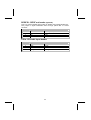
JP2 & JP3 – This jumper enables you to set the CPU frequency.
JP2
JP3
CPU Frequency
Short 1-2
Short 1-2
100MHz
Short 2-3
Short 1-2
133MHz
Short 1-2
Short 2-3
Not Applicable
Short 2-3
Short 2-3
166MHz
Connecting Case Components
After you have installed the motherboard into a case, you can begin connecting the motherboard components. Refer to the following:
1.
2.
3.
4.
5.
Connect the CPU
cooling fan cable to
CPUFAN1.
Connect the case
cooling fan connector
to CASFAN1.
Connect the case
speaker cable to
SPK1.
Connect the case
switches and indicator
to PANEL1.
Connect the case
power supply
connector to ATX1.
CPUFAN1/CASFAN1: FAN Power Connectors
Pin
1
2
3
Signal Name
Function
GND
+12V
Sense
System Ground
Power +12V
Sensor
SPK1: Internal speaker
Pin
1
2
3
4
Signal Name
Signal
NC
Ground
VCC
10
ATX1: ATX 20-pin Power Connector
Pin
Signal Name
Pin
Signal Name
1
2
3
4
5
6
7
8
9
10
+3.3V
+3.3V
Ground
+5V
Ground
+5V
Ground
PWRGD
+5VSB
+12V
11
12
13
14
15
16
17
18
19
20
+3.3V
-12V
Ground
PS ON#
Ground
Ground
Ground
-5V
+5V
+5V
Front Panel Connector
The front panel connector (PANEL1) provides a standard set of switch and
LED connectors commonly found on ATX or micro-ATX cases. Refer to the
table below for information:
Pin
1
3
5
7
9
Function
Hard disk LED
(positive)
Hard disk active LED
(negative)
Reset Switch
Reset Switch
Reserved
Pin
2
4
6
8
10
Function
MSG LED [dual color
or single color (-)]
MSG LED [dual color
or single color (+)]
Power Switch
Power Switch
No pin
PANEL1
Hard Drive Activity LED
Connecting pins 1 and 3 to a front panel mounted LED provides visual indication that data is being read from or written to the hard drive. For the LED to
function properly, an IDE drive should be connected to the onboard IDE interface.
Power / Sleep LED
Connecting pins 2 and 4 to a single- or dual-color, front panel mounted LED
provides power on/off, sleep, and message waiting indication.
S0
Green
S1
Green blinking
S4/S5
Dark
11
Reset Switch
Supporting the reset function requires connecting pins 5 and 7 to a momentary-contact switch that is normally open. When the switch is closed, the board
resets and runs POST.
Power Switch
Supporting the power on/off function requires connecting pins 6 and 8 to a
momentary-contact switch that is normally open. The switch should maintain
contact for at least 50 ms to signal the power supply to switch on or off. The
time requirement is due to internal debounce circuitry. After receiving a power
on/off signal, at least two seconds elapses before the power supply recognizes another on/off signal.
Installing Hardware
Installing the Processor
Caution: When installing a CPU heatsink and cooling fan make sure that
you DO NOT scratch the motherboard or any of the surface-mount resistors with the clip of the cooling fan. If the clip of the cooling fan scrapes
across the motherboard, you may cause serious damage to the motherboard or its components.
On most motherboards, there are small surface-mount resistors near the
processor socket, which may be damaged if the cooling fan is carelessly
installed.
Avoid using cooling fans with sharp edges on the fan casing and the
clips. Also, install the cooling fan in a well-lit work area so that you can
clearly see the motherboard and processor socket.
Before installing the Processor
This motherboard automatically determines the CPU clock frequency and
system bus frequency for the processor. You may be able to change these
settings by making changes to jumpers on the motherboard, or changing the
settings in the system Setup Utility. We strongly recommend that you do not
overclock processors or other components to run faster than their rated
speed.
Warning: Overclocking components can adversely affect the reliability of
the system and introduce errors into your system. Overclocking can permanently damage the motherboard by generating excess heat in
components that are run beyond the rated limits.
This motherboard has a Socket 462 processor socket. When choosing a
processor, consider the performance requirements of the system. Performance is based on the processor design, the clock speed and system bus
frequency of the processor, and the quantity of internal cache memory and
external cache memory.
12
CPU Installation Procedure
This motherboard is built with Socket 462 processor socket. When choosing a
processor, consider the performance requirements of the system. The following illustration shows CPU installation components:
Step 1
Step 2
Step 3
Step 4
Orient the CPU so the odd corner matches the odd corner of the socket. With
the lever in an upright position, gently place the CPU on the socket; make
sure that all pins line up with the socket holes. When pins are aligned, the
CPU should seat itself in the socket. Apply very light pressure to ensure the
CPU is evenly seated. Push the lever down and ensure it latches firmly.
Note: Remember to apply thermal grease on top of the CPU.
13
Installing CPU Fan and Fan Connector
CPU fan and heatsink installation procedures may vary with the type of CPU
fan/heatsink supplied. The form and size of fan/heatsink may also vary. Without an effective cooling fan, the CPU can overheat and cause damage to both
CPU and the motherboard.
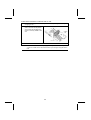
1.
Lower the CPU cooling
fan/heatsink assembly onto
the CPU.
2.
Secure the two retention clips
on either side of the
fan/heatsink unit onto the
Socket 462 base.
3.
Connect the CPU Cooling
Fan power cable connector to
the CPUFAN connector.
14
Installing Memory Modules
This motherboard accommodates two 184-pin 2.5V unbuffered Double Data
Rate (DDR) SDRAM memory modules. Each module can be installed with
128 MB to 1 GB of memory; total memory capacity is 2GB.
Note: DDR SDRAM uses additional power and ground lines and requires 184pin DIMM modules rather than the 168-pin DIMMs used by SDRAM.
Do not remove any memory module from its antistatic packaging until
you are ready to install it on the motherboard. Handle the modules only
by their edges. Do not touch the components or metal parts. Always
wear a grounding strap when you handle the modules.
Refer to the following to install the memory modules.
1.
This motherboard supports unbuffered DDR SDRAM only. Do not attempt
to insert any other type of DDR SDRAM into the slots.
2.
Push the latches on each side of the DIMM slot down.
3.
Align the memory module with the slot. The DIMM slots are keyed with
notches and the DIMMs are keyed with cutouts so that they can only be
installed correctly.
4.
Check that the cutouts on the DIMM module edge connector match the
notches in the DIMM slot.
5.
Install the DIMM module into the slot and press it firmly down until it seats
correctly. The slot latches are levered upwards and latch on to the edges
of the DIMM.
6.
Install any remaining DIMM modules.
15
Installing a Hard Disk Drive/CD-ROM
This section describes how to install IDE devices such as a hard disk drive
and a CD-ROM drive.
Your motherboard has a primary and secondary IDE channel interface (IDE1 and
IDE2). An IDE ribbon cable supporting two IDE devices is bundled with the motherboard.
If you want to install more than two IDE devices, get a second IDE cable and
you can add two more devices to the secondary IDE channel.
IDE1: Primary IDE Connector
The first hard drive should always be connected to IDE1.
IDE2: Secondary IDE
The second drive on this controller must be set to slave mode. The configuration is the same as IDE1.
You must orient the cable connector so that the pin 1 (color) edge of the
cable corresponds to the pin 1 of the I/O port connector.
16
IDE devices have jumpers or switches that are used to set the IDE device as
MASTER or SLAVE. Refer to the IDE device user’s manual. When installing two
IDE devices on one cable, ensure that one device is set to MASTER and the
other device is set to SLAVE. The documentation of your IDE device explains
how to do this.
About UltraDMA
This motherboard supports UltraDMA 66/100/133. UDMA is a technology that
accelerates the performance of devices in the IDE channel. To maximize performance, install IDE devices that support UDMA and use 80-pin IDE cables
that support UDMA 66/100/133.
17
Installing a Floppy Diskette Drive
The motherboard has a floppy diskette drive (FDD) interface and ships with a
diskette drive ribbon cable that supports one or two floppy diskette drives. You
can install a 5.25-inch drive and a 3.5-inch drive with various capacities. The
floppy diskette drive cable has one type of connector for a 5.25-inch drive and
another type of connector for a 3.5-inch drive.
FDD1: Floppy Disk Connector
This connector supports the provided floppy drive ribbon cable. After connecting the single end to the onboard floppy connector, connect the remaining
plugs on the other end to the floppy drives correspondingly.
You must orient the cable connector so that the pin 1 (color) edge of the
cable corresponds to the pin 1 of the I/O port connector.
18
Installing Add-on Cards
The slots in this motherboard are designed to hold expansion cards and connect them to the system bus. Expansion slots are a means of adding or
enhancing the motherboard’s features and capabilities. With these efficient
facilities, you can increase the motherboard’s capabilities by adding hardware
which performs tasks that are not part of the basic system.
PCI Slots
PCI slots are used to install expansion cards that have the 32-bit
PCI interface.
AGP Slot
The AGP slot is used to install a graphics adapter that supports
AGP 1.5V and AGP 3.0 signaling.
CNR Slot
This slot is used to insert CNR cards with Modem functionality.
Note: Before installing an add-on card, check the documentation for the card
carefully. If the card is not Plug and Play, you may have to manually configure the card before installation.
19
Follow these instructions to install an add-on card:
1.
2.
3.
Remove a blanking plate from the system case corresponding to the slot you
are going to use.
Install the edge connector of the
add-on card into the expansion
slot. Ensure that the edge connector is correctly seated in the
slot.
Secure the metal bracket of the card to the system case with a screw.
Note: For some add-on cards, for example graphics adapters and network adapters,
you have to install drivers and software before you can begin using the add-on
card.
20
Connecting Optional Devices
Refer to the following for information on connecting the motherboard’s optional devices:
AUDIO1: Front Panel Audio header
This header allows the user to install auxiliary front-oriented microphone and
line-out ports for easier access.
Pin
Signal Name
Function
1
2
3
4
5
6
AUD_MIC
AUD_GND
AUD_MIC_BIAS
AUD_VCC
AUD_FPOUT_R
AUD_RET_R
7
8
9
10
NC
KEY
AUD_FPOUT_L
AUD_RET_L
Front Panel Microphone input signal
Ground used by Analog Audio Circuits
Microphone Power
Filtered +5 V used by Analog Audio Circuits
Right Channel Audio signal to Front Panel
Right Channel Audio signal to Return from
Front Panel
Not connected
No Pin
Left Channel Audio signal to Front Panel
Left Channel Audio signal Return from
Front Panel
21
USB3: Front panel USB connectors
The motherboard has four USB ports installed on the rear edge I/O port array.
Additionally, some computer cases have USB ports at the front of the case. If
you have this kind of case, use auxiliary USB connectors USB3 to connect the
front-mounted ports to the motherboard.
Pin
Signal Name
Function
1
2
3
4
5
6
7
8
9
10
USBVCC
USBVCC
USBP4USBP5USBP4+
USBP5+
GND
GND
Key
NC
+5V
+5V
Data signal port 4 Data signal port 5 Data signal port 4 +
Data signal port 5 +
Ground
Ground
Cut away
No connection
Note: Please make sure that the USB cable has the same pin assignment as indicated above. A different pin assignment may cause damage or system
hang-up.
USBCR1: USB Card Reader connector
This connector is for connecting internal USB card reader. You can use a card
reader to read or transfer files and digital images to your computer.
Pin
1
2
3
4
5
Signal Name
Function
USBVCC
USB1USB1+
GND
Key
+5V
Data signal port 1Data signal port 1+
Ground
No pin
Note: The USBCR1 is shared with one of the USB ports of the I/O back panel.
See “Connecting I/O Devices” for more information.
Please check the pin assignment of the cable and the USB header on
the motherboard. Make sure the pin assignment will match before plugging in. Any incorrect usage may cause unexpected damage to the
system.
22
SPDIFO1: SPDIF out header (optional)
This is an optional header that provides an S/PDIF (Sony/Philips Digital Interface) output to digital multimedia device through optical fiber or coaxial
connector.
Pin
1
2
3
4
Signal Name
Function
SPDIF
+5V
Key
GND
SPDIF digital output
5V power
No pin
Ground
CD-in: CD Audio Input header
Pin
1
2
3
4
Signal Name
Function
CD in_L
GND
GND
CD in_R
CD In left channel
Ground
Ground
CD In right channel
23
Connecting I/O Devices
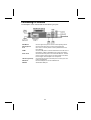
The backplane of the motherboard has the following I/O ports:
PS/2 Mouse
PS/2 Keyboard
LPT1
COM1
Audio Ports
LAN Port (optional)
USB Ports
USBCR1
Use the upper PS/2 port to connect a PS/2 pointing device.
Use the lower PS/2 port to connect a PS/2 keyboard.
Use LPT1 to connect printers or other parallel communications devices.
Use the COM ports to connect serial devices such as mice or
fax/modems. COM1 is identified by the system as COM1/3.
Use the three audio ports to connect audio devices. The first
jack is for stereo line-in signal. The second jack is for stereo
line-out signal. The third jack is for microphone.
Connect an RJ-45 jack to the LAN port to connect your computer to the Network.
Use the USB ports to connect USB devices.
Shared with USB port.
24
Chapter 3
Using BIOS
About the Setup Utility
The computer uses the latest Award BIOS with support for Windows Plug and
Play. The CMOS chip on the motherboard contains the ROM setup instructions for configuring the motherboard BIOS.
The BIOS (Basic Input and Output System) Setup Utility displays the system's
configuration status and provides you with options to set system parameters.
The parameters are stored in battery-backed-up CMOS RAM that saves this
information when the power is turned off. When the system is turned back on,
the system is configured with the values you stored in CMOS.
The BIOS Setup Utility enables you to configure:
•
•
•
•
Hard drives, diskette drives, and peripherals
Video display type and display options
Password protection from unauthorized use
Power management features
The settings made in the Setup Utility affect how the computer performs. Before using the Setup Utility, ensure that you understand the Setup Utility
options.
This chapter provides explanations for Setup Utility options.
The Standard Configuration
A standard configuration has already been set in the Setup Utility. However,
we recommend that you read this chapter in case you need to make any
changes in the future.
This Setup Utility should be used:
•
•
•
•
•
when changing the system configuration
when a configuration error is detected and you are prompted to
make changes to the Setup Utility
when trying to resolve IRQ conflicts
when making changes to the Power Management configuration
when changing the password or making other changes to the Security Setup
25
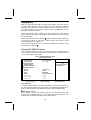
Starting Setup
The BIOS is immediately activated when you first turn on the computer. The
BIOS reads system configuration in CMOS RAM and begins the process of
checking out the system and configuring it through the power-on self test
(POST).
When these preliminaries are finished, the BIOS seeks an operating system
on one of the data storage devices (hard drive, floppy drive, etc.). The BIOS
launches the operating system and hands control of system operations to it.
During POST, you can start the Setup program in one on two ways:
1.
2.
By pressing Del immediately after switching the system on, or
By pressing Del or pressing Ctrl+Alt+Esc when the following message
appears briefly at the bottom of the screen during POST:
TO ENTER SETUP BEFORE BOOT PRESS DEL KEY
If the message disappears before you respond and you still wish to enter Setup, restart
the system to try again by turning it OFF then ON or pressing the RESET button on the
system case. You may also restart by simultaneously pressing Ctrl+Alt+Del. If you do
not press the keys at the correct time and the system does not boot, an error message
appears and you are again asked to:
PRESS F1 TO CONTINUE, DEL TO ENTER SETUP
Phoenix – AwardBIOS CMOS Setup Utility
Standard CMOS Features
Frequency/Voltage Control
Advanced BIOS Features
Load Fail-Safe Defaults
Advanced Chipset Features
Load Optimized Defaults
Integrated Peripherals
Set Supervisor Password
Power Management Setup
Set User Password
PnP/PCI Configurations
Save & Exit Setup
Exit Without Saving
PC Health Status
↑ ↓ → ← :
Esc : Quit
F10 : Save & Exit Setup
Time, Date, Hard Disk Type . . .
26
Select Item
BIOS Navigation Keys
The BIOS navigation keys are listed below:
Key
Function
Esc
Exits the current menu
←↑↓→
+/–/PU/PD
F10
Scrolls through the items on a menu
Modifies the selected field's values
Saves the current configuration and exits setup
F1
Displays a screen that describes all key functions
F5
Loads previously saved values to CMOS
F6
Loads a minimum configuration for troubleshooting.
F7
Loads an optimum set of values for peak performance
Updating the BIOS
You can download and install updated BIOS for this motherboard from the
manufacturer's Web site. New BIOS provides support for new peripherals,
improvements in performance, or fixes for known bugs. Install new BIOS as
follows:
1.
2.
3.
4.
5.
6.
7.
8.
If your motherboard has a BIOS protection jumper, change the setting to
allow BIOS flashing.
If your motherboard has an item called Firmware Write Protect in Advanced
BIOS features, disable it. (Firmware Write Protect prevents BIOS from being
overwritten.)
Create a bootable system disk. (Refer to Windows online help for information on creating a bootable system disk.)
Download the Flash Utility and new BIOS file from the manufacturer's
Web site. Copy these files to the system diskette you created in Step 3.
Turn off your computer and insert the system diskette in your computer's
diskette drive. (You might need to run the Setup Utility and change the boot
priority items on the Advanced BIOS Features Setup page, to force your
computer to boot from the floppy diskette drive first.)
At the A:\ prompt, type the Flash Utility program name and press <Enter>.
Type the filename of the new BIOS in the “File Name to Program” text
box. Follow the onscreen directions to update the motherboard BIOS.
When the installation is complete, remove the floppy diskette from the
diskette drive and restart your computer. If your motherboard has a
Flash BIOS jumper, reset the jumper to protect the newly installed BIOS
from being overwritten.
27
Using BIOS
When you start the Setup Utility, the main menu appears. The main menu of
the Setup Utility displays a list of the options that are available. A highlight
indicates which option is currently selected. Use the cursor arrow keys to
move the highlight to other options. When an option is highlighted, execute
the option by pressing <Enter>.
Some options lead to pop-up dialog boxes that prompt you to verify that you
wish to execute that option. Other options lead to dialog boxes that prompt
you for information.
Some options (marked with a triangle
) lead to submenus that enable you
to change the values for the option. Use the cursor arrow keys to scroll
through the items in the submenu.
In this manual, default values are enclosed in parenthesis. Submenu items
are denoted by a triangle .
Standard CMOS Features
In the Standard CMOS menu you can set the system clock and calendar, record disk drive parameters and the video subsystem type, and select the type
of errors that stop the BIOS POST.
Phoenix – AwardBIOS CMOS Setup Utility
Standard CMOS Features
Date (mm:dd:yy)
Time (hh:mm:ss)
Tue, July 11 2001
12 : 8 : 59
IDE Primary Master
IDE Primary Slave
IDE Secondary Master
IDE Secondary Slave
Menu Level
Change the day, month,
year and century.
Drive A
Drive B
[1.44M, 3.5 in.]
[None]
Video
Halt On
[EGA/VGA]
[All, But keyboard]
Base Memory
Extended Memory
Total Memory
640K
31744K
32768K
↑ ↓ → ← : Move
Enter : Select
F5:Previous Values
Item Help
+/-/PU/PD:Value: F10: Save ESC: Exit F1:General Help
F6:Fail-Safe Defaults
F7:Optimized Defaults
Date and Time
The Date and Time items show the current date and time on the computer. If
you are running a Windows OS, these items are automatically updated whenever you make changes to the Windows Date and Time Properties utility.
IDE Devices (None)
Your computer has two IDE channels (Primary and Secondary) and each
channel can be installed with one or two devices (Master and Slave). Use
these items to configure each device on the IDE channel.
28
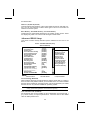
Press <Enter> to display the IDE submenu:
CMOS Setup Utility – Copyright © 1984 – 2001 Award Software
IDE Primary Master
IDE HDD Auto-Detection
[Press Enter]
IDE Primary Master
Access Mode
[Auto]
[Auto]
Capacity
0 MB
Cylinder
Head
Precomp
Landing Zone
Sector
0
0
0
0
0
↑ ↓ → ← : Move
Enter : Select
F5:Previous Values
Item Help
Menu Level
To auto-detect the
HDD’s size, head . . . on
this channel
+/-/PU/PD:Value: F10: Save ESC: Exit F1:General Help
F6:Fail-Safe Defaults
F7:Optimized Defaults
IDE HDD Auto-Detection
Press <Enter> while this item is highlighted to prompt the Setup Utility to
automatically detect and configure an IDE device on the IDE channel.
Note: If you are setting up a new hard disk drive that supports LBA mode, more
than one line will appear in the parameter box. Choose the line that lists
LBA for an LBA drive.
IDE Primary/Secondary Master/Slave (Auto)
Leave this item at Auto to enable the system to automatically detect and configure
IDE devices on the channel. If it fails to find a device, change the value to Manual
and then manually configure the drive by entering the characteristics of the drive in
the items described below.
Refer to your drive's documentation or look on the drive casing if you need to obtain this information. If no device is installed, change the value to None.
Note: Before attempting to configure a hard disk drive, ensure that you have the
configuration information supplied by the manufacturer of your hard
drive. Incorrect settings can result in your system not recognizing the installed hard disk.
Access Mode
This item defines ways that can be used to access IDE hard disks such as
LBA (Large Block Addressing). Leave this value at Auto and the system will
automatically decide the fastest way to access the hard disk drive.
Press <Esc> to return to the Standard CMOS Features screen.
Drive A/Drive B (1.44M, 3.5 in./None)
These items define the characteristics of any diskette drive attached to the
system. You can connect one or two diskette drives.
Video (EGA/VGA)
This item defines the video mode of the system; you must leave this item at
29
the default value.
Halt On (All, But keyboard)
This item defines the operation of the system POST (Power On Self Test) routine. You can use this item to select which types of errors in the POST are
sufficient to halt the system.
Base Memory, Extended Memory, and Total Memory
These items are automatically detected by the system at start up time. These
are display-only fields. You cannot make changes to these fields.
Advanced BIOS Setup
This screen contains industry-standard options additional to the core PC AT
BIOS.
Phoenix – AwardBIOS CMOS Setup Utility
Advanced BIOS Setup
Virus Warning
CPU Internal Cache
External Cache
CPU L2 Cache ECC Checking
Processor Number Feature
Quick Power On Self Test
First Boot Device
Second Boot Device
Third Boot Device
Boot Other Device
Swap Floppy Drive
Boot Up Floppy Seek
Boot Up NumLock Status
Gate A20 Option
ATA 66/100 IDE Cable Msg
Typematic Rate Setting
x Typematic Rate (Chars/Sec)
x Typematic Delay (Msec)
Security Option
OS Select for DRAM>64MB
↑ ↓ → ← : Move
Enter : Select
F5:Previous Values
[Disabled]
[Enabled]
[Enabled]
[Enabled]
[Enabled]
[Enabled]
[Floppy]
[HDD-0]
[CD-ROM]
[Enabled]
[Disabled]
[Enabled]
[On]
[Fast]
[Enabled]
[Disabled]
6
250
[Setup]
[Non-OS2]
Item Help
Menu Level
Allows you to choose
the VIRUS warning
feature for IDE Hard
Disk boot sector
protection. If this
function is enabled
and someone attempts
to write data into this
area, BIOS will show a
warning message on
screen and alarm beep
+/-/PU/PD:Value: F10: Save ESC: Exit F1:General Help
F6:Fail-Safe Defaults
F7:Optimized Defaults
Virus Warning (Disabled)
When enabled, this item provides protection against viruses that try to write to
the boot sector and partition table of your hard disk drive. You need to disable
this item when installing an operating system. We recommend that you enable
this item as soon as you have installed an operating system.
Note: For complete protection against viruses, install virus software in your operating system and update the virus definitions regularly.
CPU Internal Cache (Enabled)
All processors that can be installed in this motherboard use internal level 1
(L1) cache memory to improve performance. Leave this item at the default
value for better performance.
30
External Cache (Enabled)
Most processors that can be installed in this system use external level 2 (L2)
cache memory to improve performance. Leave this item at the default value
for better performance.
CPU L2 Cache ECC Checking (Enabled)
This item enables or disables ECC (Error Correction Code) error checking on
the CPU cache memory. We recommend that you leave this item at the default value.
Processor Number Feature (Enabled)
Some new processors are installed with a unique processor number. This
number may be used for verification in Internet transactions and e-commerce.
If you prefer not to use or distribute the unique processor number, disable this
item to suppress the processor number.
Quick Power On Self Test (Enabled)
Enable this item to shorten the power on testing (POST) and have your system start up faster. You might like to enable this item after you are confident
that your system hardware is operating smoothly.
First/Second/Third Boot Device (Floppy/HDD-0/CD-ROM)
Use these three items to select the priority and order of the devices that your
system searches for an operating system at start-up time.
Boot Other Device (Enabled)
When enabled, the system searches all other possible locations for an operating system if it fails to find one in the devices specified under the First,
Second, and Third boot devices.
Swap Floppy Drive (Disabled)
If you have two floppy diskette drives in your system, this item allows you to
swap the assigned drive letters so that drive A becomes drive B, and drive B
becomes drive A.
Boot Up Floppy Seek (Enabled)
If this item is enabled, it checks the size of the floppy disk drives at start-up
time. You don't need to enable this item unless you have a legacy diskette
drive with 360K capacity.
Boot Up NumLock Status (On)
This item defines if the keyboard Num Lock key is active when your system is
started.
Gate A20 Option (Fast)
This item defines how the system handles legacy software that was written for
an earlier generation of processors. Leave this item at the default value.
ATA 66/100 IDE Cable Msg (Enabled)
Enables or disables the ATA 66/100 IDE Cable Msg. This message will appear
during reboot when you use 40-pin cable on your 66/100 hard disks.
31
Typematic Rate Setting (Disabled)
If this item is enabled, you can use the following two items to set the typematic
rate and the typematic delay settings for your keyboard.
•
•
Typematic Rate (Chars/Sec): Use this item to define how many
characters per second are generated by a held-down key.
Typematic Delay (Msec): Use this item to define how many milliseconds must elapse before a held-down key begins generating
repeat characters.
Security Option (Setup)
If you have installed password protection, this item defines if the password is
required at system start up, or if it is only required when a user tries to enter
the Setup Utility.
OS Select For DRAM > 64 MB (Non-OS2)
This item is only required if you have installed more than 64 MB of memory
and you are running the OS/2 operating system. Otherwise, leave this item at
the default.
HDD S.M.A.R.T Capability (Disabled)
The S.M.A.R.T. (Self-Monitoring, Analysis, and Reporting Technology) system
is a diagnostics technology that monitors and predicts device performance.
S.M.A.R.T. software resides on both the disk drive and the host computer.
The disk drive software monitors the internal performance of the motors, media, heads, and electronics of the drive. The host software monitors the overall
reliability status of the drive. If a device failure is predicted, the host software,
through the Client WORKS S.M.A.R.T applet, warns the user of the impending
condition and advises appropriate action to protect the data.
Video BIOS Shadow (Enabled)
This function, when enabled allows VGA BIOS to be copied to the system
DRAM for enhanced performance.
Small Logo (EPA) Show (Disabled)
Determines whether or not the EPA logo appears during boot up.
32
Advanced Chipset Setup
The parameters in this screen are for system designers, service personnel,
and technically competent users only. Do not reset these values unless you
understand the consequences of your changes.
Phoenix – AwardBIOS CMOS Setup Utility
Advanced Chipset Setup
DRAM Clock/Drive Control
AGP & P2P Bridge Control
CPU & PCI Bus Control
System BIOS Cacheable
Video RAM Cacheable
BIOS Flash PROTECT
↑ ↓ → ← : Move
Enter : Select
F5:Previous Values
[Press Enter]
[Press Enter]
[Press Enter]
[Disabled]
[Disabled]
[Disabled]
Item Help
Menu Level
+/-/PU/PD:Value: F10: Save ESC: Exit F1:General Help
F6:Fail-Safe Defaults
F7:Optimized Defaults
DRAM Clock/Drive Control
Scroll to this item and press <Enter> to view the following screen:
CMOS Setup Utility – Copyright (C) 1984 – 2001 Award Software
DRAM Clock/Drive Control
x
x
x
x
x
Current FSB Frequency
Current DRAM Frequency
DRAM Clock
DRAM Timing
DRAM CAS Latency
Bank Interleave
Precharge to Active (Trp)
Tras Non-DDR400/DDR 400
Active to CMD (Trcd)
DRAM Burst Length
DRAM Command Rate
↑ ↓ → ← : Move
Enter : Select
F5:Previous Values
Item Help
[By SPD]
[Auto By SPD]
2.5
Disabled
3T
7T/10T
3T
[4]
[2T Command]
Menu Level
+/-/PU/PD:Value: F10: Save ESC: Exit F1:General Help
F6:Fail-Safe Defaults
F7:Optimized Defaults
Current FSB Frequency
This item displays the frontside bus (FSB) frequency. This is a display-only
item. You cannot make changes to this field.
Current DRAM Frequency
This item displays the memory (DRAM) frequency. This is a display-only item.
You cannot make changes to this field.
DRAM Clock (100 MHz)
This item enables you to manually set the DRAM Clock. We recommend that
33
you leave this item at the default value.
DRAM Timing (Manual)
Set this to the default value to enable the system to automatically set the
SDRAM timing by SPD (Serial Presence Detect). SPD is an EEPROM chip on
the DIMM module that stores information about the memory chips it contains,
including size, speed, voltage, row and column addresses, and manufacturer.
If you disable this item, you can use the following three items to manually set
the timing parameters for the system memory
DRAM CAS Latency (2.5)
Enables you to select the CAS latency time in HCLKs of 2/2 or 3/3. The value
is set at the factory depending on the DRAM installed. Do not change the values in this field unless you change specifications of the installed DRAM or the
installed CPU. The options are "2" and "2.5" default.
Bank Interleave (Disabled)
Enable this item to increase memory speed. When enabled, separate memory
banks are set for odd and even addresses and the next byte of memory can
be accessed while the current byte is being refreshed.
Precharge to Active (3T/4T)
This item is used to designate the minimum Row Precharge time of the
SDRAM devices on the module.
DRAM must continually be refreshed or it will lose its data. Normally, DRAM is
refreshed entirely as the result of a single request. This option allows you to determine the number of CPU clocks allocated for the Row Address Strobe (RAS) to
accumulate its charge before the DRAM is refreshed. If insufficient time is allowed,
refresh may be incomplete and data lost.
Tras Non-DDR400/DDR400 (7T/10T)
This item specifies the minimum required timing delay for Non-DDR400 and
DDR400.
Active to CMD (3T)
This item specifies the minimum required delay between activation of different
rows.
DRAM Burst Length (4)
This item describes which burst lengths are supported by the devices on the
motherboard. 1 level can provide faster performance but may result in instability whereas 8 level gives the most stable but slowest performance.
DRAM Queue Depth (4 level)
This item sets the depth of the DRAM queue used for CPU’s cache.
DRAM Command Rate (2T Command)
This item enables you to specify the waiting time for the CPU to issue the next
command after issuing the command to the DDR memory. We recommend
that you leave this item at the default value.
Press <Esc> to return to the Advanced Chipset Setup screen.
34
AGP & P2P Bridge Control
Scroll to this item and press <Enter> to view the following screen:
CMOS Setup Utility – Copyright (C) 1984 – 2001 Award Software
AGP & P2P Bridge Control
x
AGP Aperture Size
AGP Mode
AGP Driving Control
AGP Driving Value
AGP 3.0 Calibration Cycle
↑ ↓ → ← : Move Enter : Select
F5:Previous Values
[128M]
[2X]
[Auto]
DA
[Enabled]
Item Help
Menu Level
+/-/PU/PD:Value: F10: Save ESC: Exit F1:General Help
F6:Fail-Safe Defaults
F7:Optimized Defaults
AGP Aperture Size (128 MB)
This item defines the size of the aperture if you use an AGP graphics adapter.
The AGP aperture refers to a section of the PCI memory address range used
for graphics memory. We recommend that you leave this item at the default
value.
AGP Mode (2X)
This item allows you to enable or disable the caching of display data for the
processor video memory. Enabling AGP-2X Mode can greatly improve the
display speed. Disable this item if your graphics display card does not support
this feature.
AGP Driving Control (Auto)
This item is used to signal driving current on AGP cards to auto or manual.
Some AGP cards need stronger than normal driving current in order to operate. We recommend that you set this item to the default.
•
AGP Driving Value: When AGP Driving Control is set to Manual,
use this item to set the AGP current driving value.
AGP 3.0 Calibration Cycle (Enabled)
This item is used to implement dynamic compensation to recalibrate the AGP
bus over time for AGP 3.0 compatible chipset.
Press <Esc> to return to the Advanced Chipset Setup screen.
35
CPU & PCI Bus Control
Scroll to this item and press <Enter> to view the following screen:
CMOS Setup Utility – Copyright (C) 1984 – 2001 Award Software
CPU & PCI Bridge Control
PCI1 Master 0 WS Write
PCI2 Master 0 WS Write
PCI1 Post Write
PCI2 Post Write
PCI Delay Transaction
↑ ↓ → ← : Move Enter : Select
F5:Previous Values
[Enabled]
[Enabled]
[Enabled]
[Enabled]
[Enabled]
Item Help
Menu Level
+/-/PU/PD:Value: F10: Save ESC: Exit F1:General Help
F6:Fail-Safe Defaults
F7:Optimized Defaults
PCI 1/2 Master 0 WS Write (Enabled)
When enabled, writes to the PCI bus are executed with zero wait states, providing faster data transfer.
PCI 1/2 Post Write (Enabled)
When enabled, writes from the CPU to PCU bus are buffered, to compensate
for the speed differences between the CPU and PCI bus. When disabled, the
writes are not buffered and the CPU must wait until the write is complete before starting another write cycle.
PCI Delay Transaction (Enabled)
The motherboard’s chipset has an embedded 32-bit post write buffer to support delay transactions cycles. Select Enabled to support compliance with PCI
specification version 2.1.
Press <Esc> to return to the Advanced Chipset Setup screen.
System BIOS/Video RAM Cacheable (Disabled)
These items allow the video and system to be cached in memory for faster
execution. Leave these items at the default value for better performance.
BIOS Write Protect (Disabled)
Use this item to enable or disable the BIOS Write Protect.
36
Integrated Peripherals
These options display items that define the operation of peripheral components on the system's input/output ports.
Phoenix – AwardBIOS CMOS Setup Utility
Integrated Peripherals
VIA OnChip IDE Device
VIA OnChip PCI Device
Super I/O Device
Init Display First
↑ ↓ → ← : Move
Enter : Select
F5:Previous Values
[Press Enter]
[Press Enter]
[Press Enter]
[PCI Slot]
Item Help
Menu Level
+/-/PU/PD:Value: F10: Save ESC: Exit F1:General Help
F6:Fail-Safe Defaults
F7:Optimized Defaults
VIA OnChip IDE Device
Scroll to this item and press <Enter> to view the following screen:
CMOS Setup Utility – Copyright (C) 1984 – 2001 Award Software
VIA OnChip IDE Device
OnChip IDE Channel0
OnChip IDE Channel1
IDE Prefetch Mode
Primary Master
PIO
Primary Slave
PIO
Secondary Master PIO
Secondary Slave
PIO
Primary Master
UDMA
Primary Slave
UDMA
Secondary Master UDMA
Secondary Slave
UDMA
IDE HDD Block Mode
↑ ↓ → ← : Move
Enter : Select
F5:Previous Values
[Enabled]
[Enabled]
[Enabled]
[Auto]
[Auto]
[Auto]
[Auto]
[Auto]
[Auto]
[Auto]
[Auto]
[Enabled]
Item Help
Menu Level
+/-/PU/PD:Value: F10: Save ESC: Exit F1:General Help
F6:Fail-Safe Defaults
F7:Optimized Defaults
On-Chip IDE Channel 0/1 (Enabled)
Use these items to enable or disable the PCI IDE channels that are integrated
on the motherboard.
IDE Prefetch Mode (Enabled)
The onboard IDE drive interfaces supports IDE prefetching, for faster drive
access. If you install a primary and secondary add-in IDE interface, set this
37
field to Disabled if the interface does not support prefetching.
IDE Primary/Secondary Master/Slave PIO (Auto)
Each IDE channel supports a master device and a slave device. These four
items let you assign which kind of PIO (Programmed Input/Output) is used by
IDE devices. Choose Auto to let the system auto detect which PIO mode is
best, or select a PIO mode from 0-4.
IDE Primary/Secondary Master/Slave UDMA (Auto)
Each IDE channel supports a master device and a slave device. This motherboard supports UltraDMA technology, which provides faster access to IDE
devices.
If you install a device that supports UltraDMA, change the appropriate item on
this list to Auto. You may have to install the UltraDMA driver supplied with this
motherboard in order to use an UltraDMA device.
IDE HDD Block Mode (Enabled)
Enable this field if your IDE hard drive supports block mode. Block mode enables BIOS to automatically detect the optimal number of block read and
writes per sector that the drive can support and improves the speed of access
to IDE devices.
Press <Esc> to return to the Integrated Peripherals screen.
VIA OnChip PCI Device
Scroll to this item and press <Enter> to view the following screen:
CMOS Setup Utility – Copyright (C) 1984 – 2001 Award Software
VIA OnChip PCI Device
AC’97 Audio
MC97 Modem
OnChip LAN
Onboard LAN Boot ROM
On chip USB Controller
USB Keyboard Support
USB Mouse Support
↑ ↓ → ← : Move
Enter : Select
F5:Previous Values
[Auto]
[Auto]
[Enabled]
[Auto]
[Enabled]
[Disabled]
[Disabled]
Item Help
Menu Level
+/-/PU/PD:Value: F10: Save ESC: Exit F1:General Help
F6:Fail-Safe Defaults
F7:Optimized Defaults
AC’97 Audio (Auto)
Enables and disables the onboard audio chip. Disable this item if you are going to install a PCI audio add-in card.
MC97 Modem (Auto)
Enables and disables the onboard modem. Disable this item if you are going
to install an external modem.
38
OnChip LAN (Enabled)
Enables and disables the onboard LAN chip.
Onboard LAN Boot ROM (Disabled)
Use this item to enable and disable the booting from the onboard LAN or a
network add-in card with a remote boot ROM installed.
OnChip USB Controller (Enabled)
Enable this item if you plan to use the Universal Serial Bus ports on this
motherboard.
USB Keyboard/Mouse Support (Disabled)
Enable this item if you plan to use a keyboard/mouse connected through the
USB port in a legacy operating system (such as DOS) that does not support
Plug and Play.
Press <Esc> to return to the Integrated Peripherals screen.
SuperIO Device
Scroll to this item and press <Enter> to view the following screen:
CMOS Setup Utility – Copyright (C) 1984 – 2001 Award Software
SuperIO Device
Onboard FDC Controller
Onboard Serial Port 1
Onboard Parallel Port
Parallel Port Mode
ECP Mode Use DMA
↑ ↓ → ← : Move Enter : Select
F5:Previous Values
[Enabled]
[3F8/IRQ4]
[378/IRQ7]
[ECP]
[3]
Item Help
Menu Level
+/-/PU/PD:Value: F10: Save ESC: Exit F1:General Help
F6:Fail-Safe Defaults
F7:Optimized Defaults
Onboard FDC Controller (Enabled)
This option enables the onboard floppy disk drive controller.
Onboard Serial Port 1 (3F8/IRQ4)
This option is used to assign the I/O address and interrupt request (IRQ) for
the onboard serial port 1 (COM1).
Onboard Parallel Port (378/IRQ7)
This option is used to assign the I/O address and interrupt request (IRQ) for
the onboard parallel port.
Parallel Port Mode (ECP)
Enables you to set the data transfer protocol for your parallel port. There are
39
four options: SPP (Standard Parallel Port), EPP (Enhanced Parallel Port),
ECP (Extended Capabilities Port) and ECP+EPP.
SPP allows data output only. Extended Capabilities Port (ECP) and Enhanced
Parallel Port (EPP) are bi-directional modes, allowing both data input and output.
ECP and EPP modes are only supported with EPP- and ECP-aware peripherals.
ECP Mode Use DMA (3)
When the onboard parallel port is set to ECP mode, the parallel port can use
DMA 3 or DMA 1.
Press <Esc> to return to the Integrated Peripherals screen.
Init Display First (PCI Slot)
Use this item to specify whether your graphics adapter is installed in one of
the PCI slots or is integrated on the motherboard.
40
Power Management Setup
The Power Management Setup Menu option is used to change the values of
the chipset registers for system power management.
Power Management Timeouts
The power-saving modes can be controlled by timeouts. If the system is inactive for a time, the timeouts begin counting. If the inactivity continues so that
the timeout period elapses, the system enters a power-saving mode. If any
item in the list of Reload Global Timer Events is Enabled, then any activity on
that item will reset the timeout counters to zero.
Wake Up Calls
If the system is suspended, or has been powered down by software, it can be
resumed by a wake up call that is generated by incoming traffic to a modem, a
LAN card, a PCI card, or a fixed alarm on the system realtime clock.
Phoenix – AwardBIOS CMOS Setup Utility
Power Management Setup
ACPI function
Power Management Option
HDD Power Down
Suspend Mode
Video Off Option
Video Off Method
MODEM Use IRQ
Soft-Off by PWRBTN
PWRON After Power Failure
IRQ/Event Activity Detect
↑ ↓ → ← : Move Enter : Select
Help F5:Previous Values
[Enabled]
[User Define]
[Disable]
[Disable]
[Suspend --> Off]
[DPMS Support]
[3]
[Instant-Off]
[Off]
[Press Enter]
Item Help
Menu Level
+/-/PU/PD:Value: F10: Save ESC: Exit F1:General
F6:Fail-Safe Defaults
F7:Optimized Defaults
ACPI Function (Enabled)
This motherboard supports ACPI (Advanced Configuration and Power management Interface). Use this item to enable or disable the ACPI feature.
Note: ACPI is a power management specification that makes hardware status information available to the operating system. ACPI enables a PC to turn its
peripherals on and off for improved power management. It also allows the
PC to be turned on and off by external devices, so that mouse or keyboard
activity wakes up the computer.
41
Power Management Option (User Define)
This item acts like a master switch for the power-saving modes and hard disk
timeouts. If this item is set to Max Saving, power-saving modes occur after a
short timeout. If this item is set to Min Saving, power-saving modes occur after
a longer timeout. If the item is set to User Define, you can insert your own
timeouts for the power-saving modes.
HDD Power Down (Disable)
The IDE hard drive will spin down if it is not accessed within a specified length
of time. Options are from 1 Min to 15 Min and Disable.
Suspend Mode (Disable)
The CPU clock will be stopped and the video signal will be suspended if no
Power Management events occur for a specified length of time. Full power
function will return when a Power Management event is detected. Options are
from 1 Min to 1 Hour and Disable.
Video Off Option (Suspend --> Off)
This option defines if the video is powered down when the system is put into
suspend mode.
Video Off Method (DPMS Support)
This item defines how the video is powered down to save power. This item is
set to DPMS (Display Power Management Software) by default.
MODEM Use IRQ (3)
If you want an incoming call on a modem to automatically resume the system
from a power-saving mode, use this item to specify the interrupt request line
(IRQ) that is used by the modem. You might have to connect the fax/modem
to the motherboard Wake On Modem connector for this feature to work.
Soft-Off by PWRBTN (Instant-Off)
Under ACPI (Advanced Configuration and Power management Interface) you
can create a software power down. In a software power down, the system can
be resumed by Wake Up Alarms. This item lets you install a software power
down that is controlled by the power button on your system. If the item is set
to Instant-Off, then the power button causes a software power down. If the
item is set to Delay 4 Sec. then you have to hold the power button down for
four seconds to cause a software power down.
PWRON After PWR-Fail (Off)
This item enables your computer to automatically restart or return to its last
operating status after power returns from a power failure.
42
IRQ/Event Activity Detect
Scroll to this item and press <Enter> to view the following screen:
Phoenix – AwardBIOS CMOS Setup Utility
IRQ/Event Activity Detect
x
x
VGA
LPT & COM
HDD & FDD
PCI Master
PowerOn by PCI Card
Modem Ring Resume
RTC Alarm Resume
Date (of Month)
Resume Time (hh:mm:ss)
IRQs Activity Monitoring
↑ ↓ → ← : Move
Enter : Select
F5:Previous Values
[OFF]
[LPT/COM]
[ON]
[OFF]
[Enabled]
[Disabled]
[Disabled]
0
0 0 0
[Press Enter]
Item Help
Menu Level
+/-/PU/PD:Value: F10: Save ESC: Exit F1:General Help
F6:Fail-Safe Defaults
F7:Optimized Defaults
This item opens a submenu that enables you to set events that will resume
the system from a power saving mode.
VGA (Off)
When set to On, the system power will resume the system from a power saving mode if there is any VGA activity.
LPT & COM (LPT/COM )
When this item is enabled, the system will restart the power-saving timeout
counters when any activity is detected on the serial ports, or the parallel port.
HDD & FDD (ON)
When this item is enabled, the system will restart the power-saving timeout
counters when any activity is detected on the hard disk drive or the floppy
diskette drive.
PCI Master (OFF)
When set to Off, any PCI device set as the Master will not power on the system.
PowerOn by PCI Card (Enabled)
Use this item to enable PCI activity to wakeup the system from a power saving mode.
Modem Ring Resume (Disabled)
Enable Modem Ring-in to resume the system.
RTC Alarm Resume (Disabled)
When set to Enabled, additional fields become available and you can set the
date (day of the month), hour, minute and second to turn on your system.
When set to 0 (zero) for the day of the month, the alarm will power on your
system every day at the specified time.
43
IRQs Activity Monitoring
Scroll to this item and press <Enter> to view the following screen:
Phoenix – AwardBIOS CMOS Setup Utility
IRQs Activity Monitoring
Primary INTR
IRQ 3
(COM2)
IRQ 4
(COM1)
IRQ 5
(LPT2)
IRQ 6
(Floppy Disk)
IRQ 7
(LPT1)
IRQ 8
(RTC Alarm)
IRQ 9
(IRQ2 Redir)
IRQ 10 (Reserved)
IRQ 11 (Reserved)
IRQ 12 (PS/2 Mouse)
IRQ 13 (Coprocessor)
IRQ 14 (Hard Disk)
IRQ 15 (Reserved)
↑ ↓ → ← : Move Enter : Select
F5:Previous Values
[ON]
[Enabled]
[Enabled]
[Enabled]
[Enabled]
[Enabled]
[Disabled]
[Disabled]
[Disabled]
[Disabled]
[Enabled]
[Enabled]
[Enabled]
[Disabled]
Item Help
Menu Level
+/-/PU/PD:Value: F10: Save ESC: Exit F1:General Help
F6:Fail-Safe Defaults
F7:Optimized Defaults
This screen enables you to set IRQs that will resume the system from a power
saving mode.
Set any IRQ to Enabled to allow activity at the IRQ to wake up the system
from a power saving mode.
Press <Esc> to return to the Power Management Setup screen.
44
PNP/PCI Configurations
This section describes configuring the PCI bus system. PCI (Peripheral Component Interconnect) is a system, which allows I/O devices to operate at
speeds nearing CPU’s when they communicate with own special components.
All the options describes in this section are important and technical and it is
strongly recommended that only experienced users should make any changes
to the default settings.
Phoenix - AwardBIOS CMOS Setup Utility
PnP/PCI Configurations
x
PNP OS Installed
Reset Configuration Data
[No]
[Disabled]
Resources Controlled by
IRQ Resources
[Auto(ESCD)]
Press Enter
PCI/VGA Palette Snoop
Assign IRQ For VGA
Assign IRQ For USB
[Disabled]
[Enabled]
[Enabled]
↑ ↓ → ← : Move
Enter : Select
F5:Previous Values
Item Help
Menu Level
Default is Disabled.
Select Enabled to reset
Extended System Configuration Data (ESCD)
when you exit Setup if you
have installed a new addon and the system reconfiguration has caused
such a serious conflict
that the OS cannot boot
+/-/PU/PD:Value: F10: Save ESC: Exit F1:General Help
F6:Fail-Safe Defaults
F7:Optimized Defaults
PNP OS Installed (No)
Setting this option to Yes allows the PnP OS (instead of BIOS) to assign the
system resources such as IRQ and I/O address to the ISA PnP device. The
default setting is No.
Reset Configuration Data (Disabled)
If you enable this item and restart the system, any Plug and Play configuration
data stored in the BIOS setup is cleared from memory. New updated data is
created.
Resources Controlled By (Auto(ESCD))
You should leave this item at the default Auto(ESCD). Under this setting, the
system dynamically allocates resources to plug and play devices as they are
required.
If you cannot get a legacy ISA (Industry Standard Architecture) expansion card
to work properly, you might be able to solve the problem by changing this item
to Manual, and then opening up the IRQ Resources and Memory Resources
sub-menus.
In the IRQ Resources sub-menu, if you change any of the IRQ assignations to
Legacy ISA, then that Interrupt Request Line is reserved for a legacy ISA expansion card. Press <Esc> to close the IRQ Resources sub-menu.
In the Memory Resources sub menu, use the first item Reserved Memory
Base to set the start address of the memory you want to reserve for the ISA
45
expansion card. Use the second item Reserved Memory Length to set the
amount of reserved memory. Press <Esc> to close the Memory Resources
sub-menu.
PCI/VGA Palette Snoop (Disabled)
This item is designed to overcome some problems that can be caused by
some non-standard VGA cards. This board includes a built-in VGA system that
does not require palette snooping so you must leave this item disabled.
Assign IRQ for VGA/USB (Enabled)
Names the interrupt request (IRQ) line assigned to the USB/VGA (if any) on
your system. Activity of the selected IRQ always awakens the system.
PC Health Status
On motherboards that support hardware monitoring, this item lets you monitor
the parameters for critical voltages, critical temperatures, and fan speeds.
Phoenix – AwardBIOS CMOS Setup Utility
PC Health Status
Shutdown Temperature
CPU Vcore
+ 2.5V
Current CPU Temp
CPU FAN speed
CAS FAN Speed
↑ ↓ → ← : Move Enter : Select
F5:Previous Values
[Disabled]
Item Help
Menu Level
+/-/PU/PD:Value: F10: Save ESC: Exit F1:General Help
F6:Fail-Safe Defaults
F7:Optimized Defaults
Shutdown Temperature (Disabled)
Enables you to set the maximum temperature the system can reach before
powering down.
System Component Characteristics
These fields provide you with information about the systems current operating
status. You cannot make changes to these fields.
46
Frequency Control
This item enables you to set the clock speed and system bus for your system.
The clock speed and system bus are determined by the kind of processor you
have installed in your system.
Phoenix – AwardBIOS CMOS Setup Utility
Frequency Control
Auto Detect DIMM/PCI Clk
Spread Spectrum
CPU Clock
↑ ↓ → ← : Move
Enter : Select
F5:Previous Values
[Enabled]
[Enabled]
[Default]
Item Help
Menu Level
+/-/PU/PD:Value: F10: Save ESC: Exit F1:General Help
F6:Fail-Safe Defaults
F7:Optimized Defaults
Auto Detect DIMM/PCI Clk (Enabled)
When this item is enabled, BIOS will disable the clock signal of free DIMM and
PCI slots.
Spread Spectrum (Enabled)
If you enable spread spectrum, it can significantly reduce the EMI (ElectroMagnetic Interference) generated by the system.
CPU Host Clock (Default)
This item is used for overclocking only.
47
Load Fail-Safe Defaults Option
This option opens a dialog box that lets you install fail-safe defaults for all appropriate items in the Setup Utility:
Press <Y> and then <Enter> to install the defaults. Press <N> and then <Enter> to not install the defaults. The fail-safe defaults place no great demands
on the system and are generally stable. If your system is not functioning correctly, try installing the fail-safe defaults as a first step in getting your system
working properly again. If you only want to install fail-safe defaults for a specific option, select and display that option, and then press <F6>.
Load Optimized Defaults Option
This option opens a dialog box that lets you install optimized defaults for all
appropriate items in the Setup Utility. Press <Y> and then <Enter> to install
the defaults. Press <N> and then <Enter> to not install the defaults. The optimized defaults place demands on the system that may be greater than the
performance level of the components, such as the CPU and the memory. You
can cause fatal errors or instability if you install the optimized defaults when
your hardware does not support them. If you only want to install setup defaults
for a specific option, select and display that option, and then press <F7>.
Set Password Option
This item can be used to install a password. To install a password, follow
these steps:
1.
2.
Highlight the item Set Password on the main menu and press <Enter>.
The password dialog box appears.
Enter Password:
3.
If you are installing a new password, type in the password. You cannot
use more than eight characters or numbers. The Set Password item differentiates between upper and lower case characters. Press <Enter>
after you have typed in the password. If you are deleting a password that
is already installed press <Enter> when the password dialog box appears. You see a message that indicates that the password has been
disabled.
PASSWORD DISABLED !!!
Press any key to continue . . .
4.
Press any key. You are prompted to confirm the password:
Confirm Password:
5.
6.
Type the password again and press <Enter>, or press <Enter> if you are
deleting a password that is already installed.
If you typed the password correctly, the password will be installed.
48
Save & Exit Setup Option
Highlight this item and press <Enter> to save the changes that you have
made in the Setup Utility and exit the Setup Utility. When the Save and Exit
dialog box appears, press <Y> to save and exit, or press <N> to return to the
main menu:
Exit Without Saving
Highlight this item and press <Enter> to discard any changes that you have
made in the Setup Utility and exit the Setup Utility. When the Exit Without Saving dialog box appears, press <Y> to discard changes and exit, or press <N>
to return to the main menu.
Note: If you have made settings that you do not want to save, use the "Exit
Without Saving" item and press <Y> to discard any changes you have
made.
This concludes Chapter 3. Refer to the next chapter for information on the
software supplied with the motherboard.
49
Chapter 4
Using the Motherboard Software
About the Software CD-ROM
The support software CD-ROM that is included in the motherboard package
contains all the drivers and utility programs needed to properly run the bundled products. Below you can find a brief description of each software
program, and the location for your motherboard version. More information on
some programs is available in a README file, located in the same directory
as the software.
Note: Never try to install software from a folder that is not specified for use with
your motherboard.
Before installing any software, always inspect the folder for files named README.TXT, INSTALL.TXT, or something similar. These files may contain
important information that is not included in this manual.
Auto-installing under Windows 98/ME/2000/XP
The Auto-install CD-ROM makes it easy for you to install the drivers and software for your motherboard.
Note: If the Auto-install CD-ROM does not work on your system, you can still install drivers through the file manager for your OS (for example, Windows
Explorer). Refer to Utility Folder Installation Notes later in this chapter.
The support software CD-ROM disc loads automatically under Windows
98/ME/2000/XP. When you insert the CD-ROM disc in the CD-ROM drive, the
autorun feature will automatically bring up the install screen. The screen has
three buttons on it, Setup, Browse CD and Exit.
Note: If the opening screen doesn't appear, double-click the file "setup.exe" in
the root directory.
Setup Tab
Setup
Click the Setup button to run the software installation program.
Select from the menu which software you want to install.
Browse
CD
The Browse CD button is the standard Windows command that
allows you to open Windows Explorer and show the contents of
the support CD.
Before installing the software from Windows Explorer, look for a
file named README.TXT, INSTALL.TXT or something similar.
This file may contain important information to help you install the
software correctly.
Some software is installed in separate folders for different operating systems, such as DOS, WIN NT, or WIN98/95. Always go
to the correct folder for the kind of OS you are using.
To install the software, execute a file named SETUP.EXE or
INSTALL.EXE by double-clicking the file and then following the
instructions on the screen.
Exit
The Exit button closes the Auto Setup window.
Application Tab
Lists the software utilities that are available on the CD.
Read Me Tab
Displays the path for all software and drivers available on the CD.
Running Setup
Follow these instructions to install device drivers and software for the motherboard:
1.
Click Setup. The installation program begins:
51
Note: The following screens are examples only. The screens and driver lists will
be different according to the motherboard you are installing.
The motherboard identification is located in the upper left-hand corner.
2.
Click Next. The following screen appears:
3.
Check the box next to the items you want to install. The default options
are recommended.
Click Next run the Installation Wizard. An item installation screen appears:
4.
5.
Follow the instructions on the screen to install the items.
Drivers and software are automatically installed in sequence. Follow the onscreen instructions, confirm commands and allow the computer to restart a
few times to complete the installation.
52
Manual Installation
Insert the CD in the CD-ROM drive and locate the PATH.DOC file in the root
directory. This file contains the information needed to locate the drivers for
your motherboard.
Look for the chipset and motherboard model; then browse to the directory and
path to begin installing the drivers. Most drivers have a setup program
(SETUP.EXE) that automatically detects your operating system before installation. Other drivers have the setup program located in the operating system
subfolder.
If the driver you want to install does not have a setup program, browse to the
operating system subfolder and locate the readme text file (README.TXT or
README.DOC) for information on installing the driver or software for your
operating system.
Utility Software Reference
All the utility software available from this page is Windows compliant. They are
provided only for the convenience of the customer. The following software is
furnished under license and may only be used or copied in accordance with
the terms of the license.
Note: These software(s) are subject to change at anytime without prior notice.
Please refer to the support CD for available software.
AWARD Flash Memory Utility
This utility lets you erase the system BIOS stored on a Flash Memory chip on
the motherboard, and lets you copy an updated version of the BIOS to the
chip. Proceed with caution when using this program. If you erase the current
BIOS and fail to write a new BIOS, or write a new BIOS that is incorrect, your
system will malfunction. Refer to Chapter 3, Using BIOS for more information.
WinFlash Utility
The Award WinFlash utility is a Windows version of the DOS Award BIOS
flash writer utility. The utility enables you to flash the system BIOS stored on a
Flash Memory chip on the motherboard while in a Windows environment. This
utility is currently available for WINXP\ME\2000\98SE. To install the WinFlash
utility, run WINFLASH.EXE from the following directory:
\UTILITY\WINFLASH 1.51
PC-CILLIN 2002
The PC-CILLIN 2002 software program provides anti-virus protection for your
system. This program is available for Windows 2000/ME/98SE/XP and Windows NT. Be sure to check the readme.txt and install the appropriate anti-virus
software for your operating system.
We strongly recommend users to install this free anti-virus software to help
protect your system against viruses.
This concludes Chapter 4.
53