1
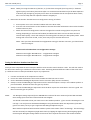
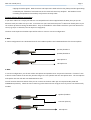
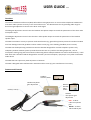
WHI User Guide (V 2.2) Page 3 2. Check the dive radio jacks and determine what adapters you will need. Connect the appropriate dive radio adapters to the WHI’s ¼” TRS male plugs (if required). Connect RED to RED (microphone) and BLACK to BLACK (headphone). Helle and some older Nautronics dive radios will accept the two ¼” TRS male plugs and will not require adapters. Banana Plug Adapter 3-‐Wire Y-‐Adapter Initial Set Up (first use) NOTE: The volume controls on the diver radio and the wireless headset base unit are fine tune controls only for adjustments within each unit’s specific operating range. The Wireless Headset Interface MIC and EAR gain controls provide coarse adjustment to match the operating range of the wireless headset to the diver radio in use. 1. Connect your Wireless Headset to mains power and conduct the set up as per the manufacturer’s instructions. Ensure the wireless headset is fully charged. Do not try to set the base unit configuration switch yet – this is covered later. NOTE: It is recommended that you set the wireless range to LOW to maximise battery life and talk time. Ensure your wireless headset is paired to the base unit. 2. Set the controls on the Wireless Headset as follows: a. Headset Selector Switch to 2 (this switch should always be set to 2) b. MIC gain at half-‐way c. EAR gain at half-‐way 3. Connect the Wireless Headset to the Wireless Headset Interface, then to the Diver Radio as per the Connection Diagram Steps 1 and 2 above. 4. On the Wireless Headset base unit set the microphone and speaker volume controls to mid-‐range (see manufacturer’s instructions). 5. Switch on the diver radio and set all volume controls to half-‐way or mid-‐range. Ensure the diver radio speaker is off. 6. Leave everything connected and on for about 5 minutes before continuing with the set up.