1
Chapter 2: Assembly and testing
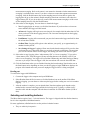
3. With a crescent wrench, remove the dome nut from the stuffing gland in the sensor port.
Dome nut
Stuffing gland slit insert
Stuffing gland on sensor port
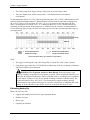
4. Push the slit insert out from the inside of case. You may need to push the slit insert out using a
pen (capped end), pencil (eraser end), or other blunt instrument.
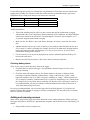
5. Some sensors have an anti-snag device on the connector as shown below. If any of your sensors
has this device, check that the connector fits through the stuffing gland.
Anti-snag device on
some external sensor
connectors
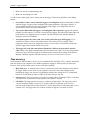
If the connector does not fit through the stuffing gland, you will need to trim the anti-snag device
with a knife so that the connector looks like the one below.
Anti-snag device
removed from the
external sensor
connector
4
Distributed by MicroDAQ.com, Ltd.
HOBO Micro Station User’s Manual
www.MicroDAQ.com
(603) 746-5524