1
The software may also be supplied on two floppy disks. If this is the case please follow
the instructions below: ¾ Insert ‘DISK 1’ (Audiometer Program) into drive A.
¾ Open the navigation window for drive A, and double-click on the SETUP.EXE icon.
¾ When installation is complete remove DISK 1 from drive A and replace it
¾ with DISK 2 (Batch Utility Program).
¾ Open the navigation window for drive A, and double-click on the SETUP.EXE icon.
¾ When installation is complete remove DISK 2 from drive A and refer to the chapter
on FILE EDITING.
FILE EDITING
The following files should be edited after installing the Audiometer Software.
This can be achieved using “Text Editors” such as Notepad or Edit.
To find these files click on the “My Computer” icon and then on the drive
where you installed Audiometer Software. Then open the Audio folder and
double click on files to be changed.
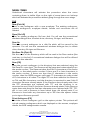
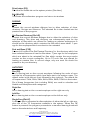
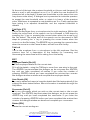
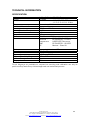
The three files to be changed are noted below: 1. AUDW32.INI
Open this file to set the com port value to the correct number and to add title
lines 2 and 3 for your company name and department respectively.
OPTIONS
DEFAULT VALUE
MaximumResponseTime=1500
Maximum Response Time 0 to 4000 ms
0 to 4000 mS
ToneLength=1000
Tone Length
1,2,3,4
COMPort=1
COM Port
1,2,3,4
FrequencyList=1
Frequency List (kHz)
1 = 1,2,3,4,5,6,8,0.5.
2 = 1,2,3,4,6,8,0.5,0.25.
3 = 1,1.5,2,3,4,6,8,12,0.75,0.5,0.25,0.125.
4 = 1,2,1
0 = Off, 1 = On
PulseOnOff=0
Pulsed Tone
0 = Off, 1 = On
Categories678=1
Categories 6, 7, 8
ASRA AUDIOMETER
Title 1
Insert the name of your company
Title 2
and address.(or Occ. Health Dept.)
Title 3
Network Folder Address
C:\AUDIO\RESULTS
Save Directory
Network Folder Address
C:\AUDIO\RESULTS
Passive Directory
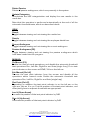
2. AUDLETR.TXT
Open this file to replace XXXXXXXX with the employees’ company name and
to add a relevant Nurses/Doctors name beside last line of letter. For more
information on this option, see ‘Print Letter’ section later in this manual.
3. AUDPRW32.INI
Open this file to add your company name at PrintHeader2, and address or
department at PrintHeader3. The Display of categories 6, 7, and 8 can also
be switched off, if required, as shown in the AUDW32.INI file table above.
Castle Group Ltd
Salter Road, Scarborough, North Yorkshire, YO11 3UZ
Tel: +44 (0) 1723 584250, Fax: +44 (0) 1723 583728
Email: [email protected] Internet: http://www.castlegroup.co.uk
6