1
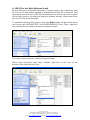
Next, close or minimise the Audio folder, move to the desktop and right click
on it to produce a menu box. Click on Paste from the menu to create a
desktop copy of the shortcut.
Repeat this Copy and Paste operation for the second shortcut file.
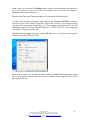
To set up the hot-key operation, right-click on the desktop AUDHELP shortcut
and from the menu click Properties. Place the cursor in the Shortcut Key
dialogue box and select by clicking in it. Then press and hold the Ctrl and Alt
keys and press the H key. This will appear as “CTRL+ALT+H” in the dialogue
box. Click on Apply and then OK.
Repeat this operation for the audprw32 shortcut, but when entering the
shortcut key use CTRL+ALT+B.
Once this is done this, you will be able to call the ASRA testing program help
file at any time by typing Ctrl+Alt+H or the batch-utility program help file by
typing Ctrl+Alt+B
Castle Group Ltd
Salter Road, Scarborough, North Yorkshire, YO11 3UZ
Tel: +44 (0) 1723 584250, Fax: +44 (0) 1723 583728
Email: [email protected] Internet: http://www.castlegroup.co.uk
8