1
CAPTAIN 6 User Guide
4
Access and Operation Codes
The following codes are used to access and operate the
CAPTAIN-i Alarm System:
♦
Master Code: Use this code when programming system
parameters. The default factory Master Code is 5555. For security
reasons, it is not recommended to use the default code to arm or
disarm the system.
IMPORTANT!
For better protection, the default factory Master Code must be changed.
♦
User Code: 4-6 digit code. Up to eight User Codes can be
programmed, User Code 1 to User Code 8.
♦
Short Code: A convenient, two-digit code used only to arm the
system.
♦
Duress Code: 4-6 digit code used for disarming the system in case
it is armed, and sending duress event to MS, or sends silent duress
event to MS in case system is disarmed.
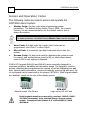
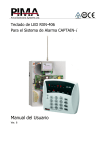
PIMA’s LCD keypads RXN-400 and RXN-410 were especially designed for
maximum simplicity, durability and decorative design. The keypad is used for
arming, disarming and programming the system as well as displaying time and
date, system status information, events and defaults, memory log and more. Up
to six keypads can be connected to the system CAPTAIN-i. Both keypad models
are identical, except for the size of the display screen:
RXN-400
Normal screen 15 x 60 mm
RXN-410
Large screen 23 x 97 mm
Both keypads must be powered by nominal 12VDC (9VDC13.8VDC tolerance) from Limited Power Source power
supply. Compliant with Clause 2.5 of EN 60950-1:2006
Standard.