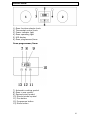
1
The end of cooking function
This function is similar to the semi-automatic function, however
instead of setting a countdown time, you select the time of day that
you want the oven to switch off at.
o Place the food that you want to cook inside of the oven and close
the door.
o Select an oven function and cooking temperature using the relevant
control knobs.
o Press the programme button (12) four times. The decimal point
starts to flash, and the oven in use symbol (8) and the Automatic
cooking symbol (7) will light on the LED display.
o The display will show the current time of day which will flash. Use
the plus (11) and minus (13) buttons to set the cooking end time
that you require.
o The maximum end time that can be set is 10 hours into the future.
o When the correct end time appears on the LED display, release the
plus and minus buttons. Cooking will begin immediately, after a few
seconds the countdown time will start.
o At the end of the cooking time the oven will turn off and an audible
signal will sound. The automatic cooking symbol (7) and the Minute
Minder symbol (10) will flash on the LED display.
o To reset the oven and cancel the audible alarm, press any button
once to stop the alarm. Then press and hold the programme button
twice for 3 seconds. After the first press the oven time will flash,
and on the second press the oven in use symbol appears on the
LED display and the automatic cooking (7) symbol goes out.
o IMPORTANT: If you have not turned the oven function selector
knob and thermostat control knob to their OFF positions, when you
reset the oven it will continue to heat.
14