1
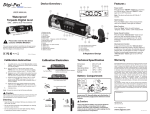
Dual Axis Bull's Eye
Measured Value
(Vertical Axis)
Measured Value
(Horizontal Axis)
Unit Conversion
Higher Side
Angle Graph
Measured Value:
H. : Horizontal Axis
V. : Vertical Axis
Recorded Data
Bubble Meter
Features
Freeze or Unfreeze
the measurement
Data Logging
Control Panel
Unit Conversion:
Click the unit conversion button to change to other units
(degree, mm/M, In/Ft).
Data Logging Control Panel:
To start data logging, select the number of samples by pressing the up down arrow. Next, select the time
duration per capture accordingly. Click START button to initiate data logging. Click STOP button to halt
data logging and click CLEAR button to erase or click SAVE button to store the data. The SETTING
button can be used to configure the row visibility window of the recorded data. EXIT button is used to
quit the Dual Axis Bubble window.
© 2012 JSB TECH Pte Ltd. All rights reserved.