1
DIAGENODE BIORUPTOR® PLUS USER MANUAL
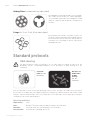
Controlling the Sonication
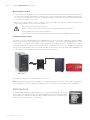
Digital Timer:
Allows the user to easily program
the sonication of samples (ON/OFF
pulse time & total time). See use of
digital timer in next section below
Stop Button:
Ends sonication
Intensity Setting Button:
Adjusts intensity of the
ultrasonic waves generated
Intensity Level Meter:
Indicates the sonication
intensity
Start Button:
Begins sonication
Power Switch: Turns
Bioruptor on and off
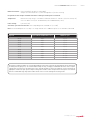
CYCLE NUMBER, TIME ON and TIME OFF and SONICATION INTENSITY are the parameters controlling the sonication.
First press + or - depending on the value to be modified. The five flashing black squares move up or down. Once you
have selected the parameter to be modified, press OK again. The five flashing black squares disappear and 2 digits
start flashing. The digits can be changed by pressing + or -. To select and save the correct number, press OK to
confirm or ESC to escape without saving the change.
IMPORTANT NOTE: Minimum time of the off cycle: 30 seconds.
Digital Timer
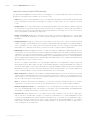
After the introductory message, the control screen shows the main sonication parameters in the first three lines (CYCLE
Number, Time ON, Time OFF) and summary of actions in the last line (see example below).
CYCLE Num :
10
Time ON :
30sec
Time OFF :
30sec
Press OK = Modify
BIORUPTOR RUNNING
*****************
CYCLE Num :
04/10
ON
Bath 1
OFF
TIME
ON
TIME
OFF
Cycle number reached
(4 cycles in this example)
CYCLE
START
The display shows cycle 4 of 10.
Bioruptor® NGS will sonicate as shown.
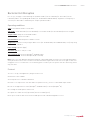
Buttons and their functions
Button A: Pause / restart after pausing
Button B: Press and hold this button during sonication to display T1 (total on time per cycle) and T2 (total off time per cycle).
ESC: Cancels previous selection
OK: Validate selection
- : Decrease selected parameter/move down
+ : Increase selected parameter/move up
Once all parameters are selected and confirmed, press START.
Once the run is started, “BIORUPTOR RUNNING” is displayed on the control screen.
www.diagenode.com |
PAGE 13