Transcript
INSTRUCTIONS MANUAL
XA901
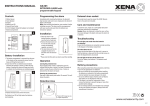
Controls
Programming the alarm
WIRELESS ALARM
with motion sensor
1. Motion Sensor
2. Alarm Speaker
3. LED Indicator
3. Programme button
5.
6. RF Keyfob
7.
8.
Simply press ‘On’ or ‘Off’ button on RF key fob to armor
disarm the unit.
There is one black button on the right side of the XA901
alarm unit. This is the Programme button (not the
ON/OFF button). To programme the unit, press the
Programme button and ‘ON’ button of keyfob
simultaneously.
A
1
4
2
5
3
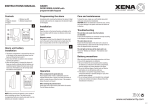
Installation
1. Place the alarm in the desired location, using rotary wall
mount bracket provided.
2. Fix bracket to the wall using the screws supplied.
Please note that this alarm can also be used free
standing.
6
Operation
3
7
8
When exiting from the protected area
Press the ‘On’ button of RF remote control at the distance
of 10 meters, a confirmation tone will indicate that the
alarm is armed and you have 30 seconds in which to
vacate the area. After this time, if motion is detected then
the alarm will sound.
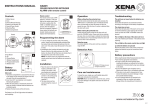
Battery installation
Leaving the protected area
1. The battery compartment is accessed from the rear
of the alarm unit by removing the back cover.
2. Insert two (2) ‘AA’ size batteries (not included)
following the polarity.
3. When the last battery is inserted the alarm will
beep very loudly to indicate that the batteries are
installed properly. If no beep sound, it means the
batteries are not installed properly.
4. Re-place the back cover again.
needed to be replaced.
RF Key Fob
The key fob uses one A23S battery (included). If
the low battery indicator is ‘On’, simply remove and
replace with fresh battery.
The main unit can operate with (7) Key Fob.
Troubleshooting
The unit does not sound when the batteries are
installed
Ensure that the batteries are connected correctly according
to the diagram in the battery compartment
The alarm does not arm
Ensure that the back plate of the alarm unit is secure to
hold the batteries in place and that the red light comes on
when the keypad buttons are pressed
The red light located in the middle of the alarm (3) is on
This is the low battery warning indicator light.
The batteries need replacing
Battery precautions
When using this product follow these precautions at all times.
batteries as indicated in the battery compartment.
Incorrect polarity may cause damage to the alarm.
and Carbon-zinc or old batteries with new.
the batteries to prevent damage or injury from possible
battery leakage.
as they can overheat and rupture. (Always follow the
manufacturer's directions.)
When entering the protected area
Simply press the ‘Off’ button of the RF remote control
within the distance of 10 meters to disarm the unit. Please
note that on entering the area, there is a short beep to
indicate that motion has been detected and a 4 second
delay before the alarm will sound to allow it to be
disarmed.
Detection range
The motion detector of the alarm unit has a 6 meter (20ft)
with approximate angles of 30º vertical and 60º horizontal.
Care and maintenance
To clean the case, simply use a soft slightly damp cloth
with water and wipe dry immediately.
Caution: Never use chemicals to clean the case, as they
may cause damage to the plastic and cause the alarm not
to function.
www.xenasecurity.com
061107