1
Hardware Manual
Basic Connections
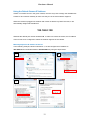
Follow the procedures below to connect the IP device to the respective apparatuses.
Please use a PoE (Power over Ethernet) supported switch or injector:
1) Connect your IP Camera to the PoE Switch / Injector by CAT5 or CAT6 cables with RJ45
connector.
2) Connect your PoE Switch / Injector to PC with another CAT5 / CAT6 network cable.
8