1
Genelec 8040B and 8050B Active Monitoring Systems
Mounting considerations
System
Crossover
The GENELEC 8040B and 8050B are
two way active monitoring loudspeakers
designed to produce high SPL output, low
coloration and broad bandwidth in a small
enclosure size. They are suitable for a wide
variety of tasks, such as near field monitoring, mobile vans, broadcast and TV control
rooms, surround sound systems and home
studios. Designed as active loudspeakers, they contain drivers, power amplifiers,
The active crossover network consists of two
parallel bandpass filters. The crossover frequency is 3.0 kHz on the 8040B and 1.8 kHz
on the 8050B. The active crossover controls
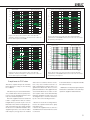
(“treble tilt”, “desktop low frequency”, “bass tilt”
and “bass roll-off”) allow precise matching of
the loudspeakers to any room environment.
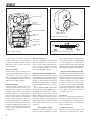
Always place the loudspeakers so that
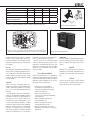
their acoustic axes (see figure 2) are aimed
towards the listening position. Vertical placement is preferable, as it minimises acoustical
cancellation problems around the crossover
frequency.
Amplifiers
Check that the loudspeakers are placed symmetrically and at an equal distance from the
active crossover filters and protection circuitry. The Minimum Diffraction Enclosure™
(MDE™) and advanced Directivity Control
Waveguide™ (DCW™) technologies provide
excellent frequency balance even in difficult
acoustic environments.
Drivers
The bass driver dimensions are 165 mm (6
1/2”) and 205 mm (8”) for 8040B and 8050B
respectively. The long, flow optimized reflex
tube has a large cross sectional area and
terminates with a wide flare at the back of
the enclosure. The high frequency driver is a
19 mm (3/4”) metal dome on the 8040B and
a 25 mm (1”) metal dome on the 8050B. Both
drivers are magnetically shielded.
2
The amplifier unit is mounted in the rear of the
loudspeaker enclosure. The unit incorporates
special circuitry for driver thermal overload
protection. Variable input sensitivity allows
accurate level matching to console output
section.
Align the loudspeakers correctly
Maintain symmetry
listening position. If possible, place the system
so that the listening position is on the centerline of the room and the loudspeakers are
placed at an equal distance from the centerline.
Connections
Minimise reflections
Each loudspeaker is supplied with a mains
cable and an operating manual. Before connecting up, ensure that the mains switch
is off (see figure 1). Audio input is via a
10 kOhm balanced XLR connector, but unbalanced leads may be used as long as pin 3 is
grounded to pin 1 of the XLR (see figure 3).
Once the connections have been made, the
loudspeakers are ready to be switched on.
Acoustic reflections from objects close to the
loudspeakers like desks, cabinets, computer
monitors etc. can cause unwanted colouration
and blurring of the sound image. These can be
minimised by placing the loudspeaker clear of
reflective surfaces. For instance, putting the
loudspeakers on stands behind and above the
mixing console usually gives a better result
than placing them on the meter bridge.