1
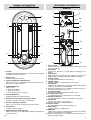
PRIMARY INFORMATION
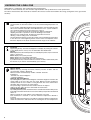
CONTROLS INTERFACE
SECONDARY INFORMATION
DISPLAY
1
9
4
2
10
11
3
1
5
12
6
13
°C
4
5
14
7
6
2
8
7
3
9
8
1
2
1
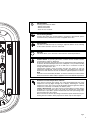
Info key
Enables the function that allows the access to some information
regarding the boiler operation.
3
2
Memory key
Enables the Memory function.
4
5
3
Heating temperature adjustment key
Allows the access to the adjustment of the heating water temperature by using the selector.
6
4
ON/OFF/RESET key
Allows you to:
● switch on the boiler
● switch off the boiler
● restart the boiler after a fault stop.
7
8
9
10
5
Heating ON/OFF key
Enables/disables the heating function
6
Dedicated to the Technical Assistance Service
Enables or disables the boiler’s self-operation.
12
7
Encoder (adjustment selector)
Allows you to increase or decrease the preset values.
13
14
8
Comfort key
Enables Comfort function.
15
9
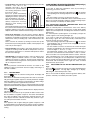
DHW temperature adjustment key
Allows the access to the adjustment of DHW temperature by
using the selector.
fig. 1
11
16
17
15
16
17
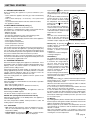
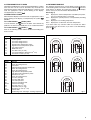
Reset symbol
Indicates when it is necessary to restart the boiler (please read
page 42 for details).
Key symbol
Indicates the presence of a fault (please read page 42 for
details).
Drop symbol
Displaying that the system pressure is under the correct level
Displaying the operating temperature (DHW or heating).
Memory symbol
It is displayed when Memory function is on.
Heating symbol
Flashing, indicates a heating request in the room.
Heating layer
Indicates the position of the set heating temperature (position
relative to the maximum and minimum).
When the heating flame is on, it indicates that the burner is on
following a heat request in the room.
Anti-freeze symbol
It is displayed when the anti-freeze function is on.
External probe symbol
It is displayed when the external probe is connected.
Remote control panel
It is displayed when a remote control panel is connected.
Service icon
Indicates the boiler is self-operating.
Pressure value of the heating installation.
Comfort symbol
It is displayed when the Comfort function is on.
DHW symbol
Flashing, indicates a DHW request.
DHW layer
Indicates the position of the DHW temperature set (position
relative to the maximum and minimum).
When the DHW flame is on, it indicates that the burner is on
following a DHW request.
3