1
Introduction
Zemana AntiLogger is designed to be intuitive to learn and use. This documentation provides additional information
about its operation.
Zemana AntiLogger is a new, powerful way to protect your PC from malware attacks. We don't rely on virus
signature updates and file scanning like the traditional anti-virus programs do. Our unique technology detects
when malware runs on your computer, and we shut it down - before it can steal your identity or hurt your
computer. Zemana AntiLogger eliminates threats from keyloggers, SSL banker trojans, spyware, and more.
In This Section
I have security software, so why do I need AntiLogger?
I have security software, so why do I need AntiLogger?
Zemana AntiLogger is dramatically better than other antivirus products.
How conventional security software grants a window of opportunity to malware
Conventional antivirus products usually only look for virus "fingerprints," which must first be identified by antivirus
researchers working in a lab:
This creates a large time window during which threats are undetected and can therefore infect your PC - even when
you have antivirus software installed.
Why AntiLogger is better
AntiLogger, instead of identifying known malware, understands how malware runs inside your computer. It can
detect running malware, and stop it from hurting your computer.
See Also
Introduction
Installation
Zemana AntiLogger has a standard installation program. You can use this to install the product for the first time, or
to repair an existing installation.
System requirements
For seamless operation of Zemana AntiLogger, the system should meet the following hardware and software
requirements:
Supported operating systems:
Windows XP\Vista\7\8 (32bit and 64bit)
Hardware requirements:
Intel Pentium 300 MHz or higher (or equivalent)
256 MB available RAM
50 MB free space on the hard drive
CD-ROM (for installation of the program from CD)
Procedure
The installation wizard offers you a choice of language support. You can change this later using the General
Settings.
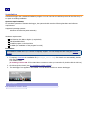
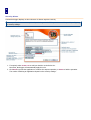
1. If required, download the installation file (AntiLogger_version.exe). If it doesn't run automatically, doubleclick the file.
The installer starts.
(If installing from the CD: If the wizard does not autorun when you insert the CD, double click the CD icon.)
2. Click through the wizard. (See The Installation wizard in detail.)
3. The AntiLogger Icon appears in the toolbar. You can double-click this to access AntiLogger.
In This Chapter
The installation wizard in detail
The installation wizard in detail
The installation wizard takes you through each step of the installation.
1. Start the wizard by doing one of the following:
Download the file and either select Run or double-click it.
Insert the CD. (If it doesn't autorun, double-click the CD icon.)
2. Select a language and click OK. You can change the language later - see General Settings.
Installation begins. (If you have an existing installation, the wizard attempts to repair this.)
3. Click Next.
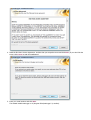
The wizard displays the End User License Agreement:
3.
4. Read the End User License Agreement. Confirm that you accept the terms and click Next. (If you don't like the
terms, click Cancel to end the installations.)
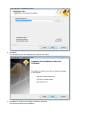
5. Enter your serial number and click Next.
The Wizard installs AntiLogger to C:\Program Files\AntiLogger" (or similar).
5.
6. Click Next.
The wizard gives you the opportunity to change your mind:
7. Click Back to change your settings, otherwise click Next.
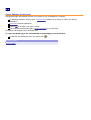
The wizard completes the installation.
7.
8. Wait a few moments. (Alternatively, to halt the installation, click Cancel.)
The wizards announces that installation is complete.
9. Click Finish to restart your computer to complete the installation. (You can also restart your computer later by
unchecking Restart now.)
9.
See Also
Installation
Using Zemana AntiLogger
Zemana AntiLogger automatically protects your system as soon as installation is complete:
On detecting suspicious activity, issues a security alert enabling you to "Block" or "Allow" the suspect
application.
Quarantines blocked applications.
Keeps a log of all "Block" and "Allow" rulings.
Can create and automatically apply a list of rules based on your decisions.
Normally, the AntiLogger runs in minimized from.
To open the AntiLogger for customizing and managing your protection
Double-click the AntiLogger icon in the system tray (
In This Chapter
Security Alerts
).
Security Alerts
Zemana AntiLogger displays an alert whenever it detects suspicious activity.
You can specify what counts as suspicious by switching on and off the protection modules , and by configuring
the security settings .
1. If required, select Create rule to add your decision to the Rules List .
Next time, AntiLogger will automatically apply this rule.
2. Click Allow to permit the application to continue the suspect operation, or Block to halt the operation.
The results of blocking an application depend on the security settings .
Protection Console
Use the Protection Console to switch on and off the modules protecting against an ever expanding list of security
threats. When active, each module watches for specific threats and issues a security alert when it detects one.
To customize your protection
1. If you haven't already done so, click the SystemTray icon (
) to open AntiLogger.
2. Click the Protection Console link.
The Protection Console Opens.
3. To stop all protection, click Stop All.
The display updates to reflect your choice. Your system is no longer protected.
4. To switch off an individual protection module, select it from the list and click Stop.
The display updates to reflect your choice. Your system is no longer protected from that particular threat.
You can switch back on all protection by clicking Start All.
In This Chapter
Anti-KeyLogger Module
Anti-Screen Logger Module
Anti-WebCam Logger Module (WORLD FIRST!)
Anti-Clipboard Logger Module
System Defense Module
Anti-KeyLogger Module
All the encryption in the world is no good if somebody's watching your fingers as you type! That's what keyloggers
do—record every single keystroke you make, and pass it back to people who can use it to harm your privacy and
your finances.
Keyloggers are malware specifically designed to steal the high-value information you give out while using the
Internet for e-shopping, e-commerce, e-banking and email. Keylogger attacks are becoming more complex with
newly designed keylogging and monitoring methods.
Until Zemana Anti-Keylogger, there was no adequate protection against this. Some banks now display a clickable
keyboard on-screen... a great idea until you realize that there are also screen-loggers out there. (A good thing
Zemana also has an Anti-ScreenLogger Module.)
The Anti-KeyLogger module proactively detects keyloggers at work and shuts them down.
Proactively looks for suspicious activity.
No need to know or detect the malware's signature.
No need to wait for updates from a virus lab.
Catches not just the usual suspects, but also sophisticated "zero day" malware.
Future-proof.
See Also
Protection Console
Anti-Screen Logger Module
Anti-WebCam Logger Module
(WORLD FIRST!)
Anti-Clipboard Logger Module
System Defense Module
Anti-Screen Logger Module
Would you review sensitive data with somebody looking over your shoulder? That's what you're doing if your PC has
been infected by screen-logger malware!
A screen logger takes snapshots of your screen. It sends these back to the kind of people you would not want to
have watching as you—say—opened an email containing your login details for a 'secure' Internet site, or read a
commercially sensitive message.
Needless to say, screen-loggers are designed to grab the right information, while you shop and bank online. They
also make a mockery of all that laborious clicking on virtual keyboards.
The Anti-ScreenLogger module proactively detects screen loggers at work and shuts them down:
Proactively looks for suspicious activity.
No need to know or detect the malware's signature.
No need to wait for updates from a virus lab.
Catches not just the usual suspects, but also sophisticated "zero day" malware.
Future-proof.
See Also
Protection Console
Anti-KeyLogger Module
Anti-WebCam Logger Module
(WORLD FIRST!)
Anti-Clipboard Logger Module
System Defense Module
Anti-WebCam Logger Module (WORLD FIRST!)
Is Big Brother Watching you? Probably not. But if you have a webcam, then somebody who is not your brother may
well be spying on you... even if you think the thing's switched off!
Many PCs have them, they're standard to most laptops—webcams are part of modern life. We use webcams for
business purposes that are private, and sometimes for private purposes that are... very private. And when we're not
using our webcams, we forget they exist. We hang confidential blueprints on nearby walls, check email in our
bathrobes, or potter around enjoying our privacy.
If it infects your PC, a webcam logger can take real-time snapshots of whatever your webcam sees, and share them
with criminals, blackmailers, stalkers and other unscrupulous people. Some of this hi-tech spyware can even switch
on your webcam, without triggering the "on" light. (Think about that for a moment.)
Webcam loggers have around for nearly half a decade. Zemana AntiLogger is the first commercial software to offer
real protection against this threat to privacy.
The Anti-WebCam Logger module proactively detects webcam loggers at work and shuts them down:
Proactively looks for suspicious activity.
No need to know or detect the malware's signature.
No need to wait for updates from a virus lab.
Catches not just the usual suspects, but also sophisticated "zero day" malware.
Future-proof.
See Also
Protection Console
Anti-KeyLogger Module
Anti-Screen Logger Module
Anti-Clipboard Logger Module
System Defense Module
Anti-Clipboard Logger Module
Do you sometimes copy and paste your login details? Then you're trusting the clipboard with your username and
password. The same goes for when you move files around.
Whatever you cut or copy ends up in the Windows clipboard. This creates a potentially serious threat, and the
traditional methods simply don't offer enough protection.
If it infects your PC, a clipboard logger can get around most security software to spy on your clipboard and report
back to its masters. Too bad if it finds your unencrypted electronic banking details...
The Anti-ClipboardLogger module proactively detects clipboard-loggers at work and shuts them down:
Proactively looks for suspicious activity.
No need to know or detect the malware's signature.
No need to wait for updates from a virus lab.
Catches not just the usual suspects, but also sophisticated "zero day" malware.
Future-proof.
See Also
Protection Console
Anti-KeyLogger Module
Anti-Screen Logger Module
Anti-WebCam Logger Module
(WORLD FIRST!)
System Defense Module
System Defense Module
The System Defense Module guards your computer's important system areas from instability and worse in the event
of an attack.
Malware produced by vandals and people with more sinister motives often goes for the important parts of your PC.
Attack methods include...
Rootkit Installations
Thread Context
Changing Direct Physical Memory Access
Global Hook Installation
Remote Thread Creation
DLL Code Injection
Kernel Driver Loading
Program State and Memory Modification
System Registry Modification
At best, your system will become unstable and crash-prone. At worst... well you might get away with just losing
valuable data, or suffer financial damage, but there's always the possibility of your hijacked PC being used for
something illegal.
The System Defense Module prevents all this by constantly policing your system:
Proactively looks for suspicious activity.
No need to know or detect the malware's signature.
No need to wait for updates from a virus lab.
Catches not just the usual suspects, but also sophisticated "zero day" malware.
Future-proof.
In addition, the System Defense Module
Prevents malware from knocking out any of AntiLogger components, making our product self-healing.
See Also
Protection Console
Anti-KeyLogger Module
Anti-Screen Logger Module
Anti-WebCam Logger Module
(WORLD FIRST!)
Anti-Clipboard Logger Module
Management Console
Use the Management Console to modify any rules created by your response to security alerts, review the contents of
the Quarantine, and check the log. You can also use our support and licence services.
1. If you haven't already done so, click the SystemTray icon (
2. Click the Management Console link.
The Management Console Opens
In This Chapter
Rules List
Quarantine
Log
Services
) to open AntiLogger.
Rules List
The Rules List displays any rules that you made when responding to security alerts.
To change a rule
1. If you haven't already done so, click the Rules List link.
The Rules List opens.
2. Click in an item's Ruling field, e.g. to allow access for a legitimate application.
Other actions
You can also right-click to...
Copy a rule.
Export or import rules as comma-separated values (.csv).
Delete all rules.
For further customization, see Security Settings.
See Also
Management Console
Quarantine
Log
Services
Quarantine
The Quarantine traps any suspicious programs caught by Zemana AntiLogger so they cannot harm or spy on your
computer.
It is impossible to quarantine some key critical applications.
To release an item
1. If you haven't already done so, click the Quarantine link.
The Quarantine opens.
2. Right-click to release or delete an item.
Once an item is released, it can operate as normal.
Other actions
You can also right-click to...
Release all quarantined items.
See Also
Management Console
Rules List
Log
Services
Log
What the log records depends on your Log Settings.
To manage the Log
1. If you haven't already done so, click the Log link.
The Log opens.
2. Right-click to delete an item.
Other actions
You can also right-click to...
Copy a log item.
Save all items as comma-separated values (.csv).
Clear all items.
See Also
Management Console
Rules List
Quarantine
Services
Services
This is the place to change your license key, to update the software, or to get technical support.
To access the Services
1. If you haven't already done so, click the Services link.
The Services section opens.
2. Click one of the buttons: Licence, Updates, or Support.
In This Section
See Also
Licence
Management Console
Updates
Rules List
Support
Quarantine
Log
Licence
The licence pane displays your current license details.
To enter a new licence
1. Enter the licence number.
2. Click the Renew License button.
If you don't already have a license, click Purchase Licence.
See Also
Services
Updates
Support
Updates
Zemana AntiLogger can check for updates and install them without affecting your system's normal operation.
The standard licence covers updates, including new full versions, for one year.
To check for updates
Click the button the Check for updates button.
AntiLogger checks for a new version and installs it if available. Your system will operate as normal during this
operation.
See Also
Services
Licence
Support
Support
The Support pane provides access to all Zemana AntiLogger technical support.
The standard licence covers support for one year.
See Also
Services
Licence
Updates
About
The About window provides detailed information about your version of AntiLogger, including numbers that our
technical support team may require.
1. If you haven't already done so, click the SystemTray icon (
2. Click the About link.
The About window opens.
) to open AntiLogger.
Settings
Use the Settings window to tailor AntiLogger's operation to meet your needs.
1. If you haven't already done so, click the SystemTray icon (
) to open AntiLogger.
2. Click the Settings link.
The Settings window opens.
3. To configure AntiLogger for detailed real-time user control, click Expert mode.
AntiLogger will ask for conformation for most actions.
4. To switch on all recommended settings, click Default mode.
5. Use the tabs to make any further changes.
6. Click Save.
In This Chapter
General Settings
Security Settings
Log Settings
General Settings
Use the General Settings to change the basic ways in which Zemana AntiLogger operates.
Change Language: Select a new language for the interface.
Automatically launch protection at system start up: Switch this off if you prefer to launch AntiLogger manually.
Always display Security Alert window with 'Create rule' selected: Switch this on if you want Anti-Logger to send
you security alerts with "Create rule " automatically selected.
Use the Internet to check digital Authenticode signature: Switch this on to check whether a suspicious
application's digital signature is current and accurate. If you switch this off, AntiLogger will use its database of
cancelled digital signatures instead.
Activate Anti-SLLLogger™ technology: Switch this on to enjoy protection from SSL Loggers. The protection is
available for applications that use the Microsoft SSL coding method (Internet Explorer, Outlook, etc), but not for
those using the Mozilla SSL coding method (e.g. Firefox and Thunderbird).
Use ZWLST (Zemana White List Technology): Switch this on to ignore all activity by programs on Zemana's
carefully considered White List.
Caution: From time to time, the White List may contain drivers, free programs or older versions of programs
that never had, or do not have current digital signatures.
Ask for confirmation before exiting: Switch this on to have AntiLogger ask for confirmation before exiting. This
helps ensure that the program is not accidentally or maliciously switched off.
See Also
Settings
Security Settings
Log Settings
Security Settings
Use the Security Settings to specify how AntiLogger provides security.
Microsoft-certified applications & All other certified applications
Specify how AntiLogger treats digital certificates.
Automatically allow: Ignore the activities of an application with this kind of certificate.
Ask for confirmation: Ignore this kind of certificate and issue an alert when applicable. If required, AntiLogger can
remember your ruling so that you need not confirm the same application twice.
Uncertified applications
Specify how AntiLogger treats uncertified applications.
Ask for confirmation: Issue a security alert when applicable. If required, AntiLogger can remember your ruling so
that you need not confirm the same application twice.
Always block: Always block uncertified applications.
Effect of blocking an application
Terminate it: Terminate the application.
Let it run but block suspicious activities: The application continues to run, but cannot do anything harmful.
(Other)
Block an application's attempt at registry access, but don't terminate it: The application continues to run, but
cannot access the registry. This feature is provided for fine-tuning installation of applications, e.g. to prevent them
from configuring themselves to run at startup.
Ignore certificates and ask for conformation for all Remote Administration Tools: This feature generates
security alerts for all remote tools (e.g. TeamViewer, Radmin).
See Also
Settings
General Settings
Log Settings
Log Settings
Use the Log Settings to control operation of the Log.
Log Settings: Specify what to log.
Maximum Log count: Only store this many log items. The oldest items are deleted first.
See Also
Settings
General Settings
Security Settings
Glossary of Terms
Adware
Adware is short for "advertising-supported software". All applications displaying advertising material fall under this
category. These are often bundled with freeware, enabling the producer to cover the development costs.
Adware often...
Automatically opens a new pop-up window containing advertisements in an Internet browser,
Changes your homepage to one preferred by the adware developer.
Adware itself is usually annoying, rather than dangerous. However, it may also perform tracking functions in a
similar manner to spyware.
If you decide to use a freeware product, pay particular attention to the installation program. Honest installers
tell you when they include extra adware or spyware. If you have the option to install without these, do so.
Otherwise, it is better to be safe than sorry!
Malware
"Malware" is the correct term (as opposed to "virus") for any malicious software, whether it steals information,
damages your computer, or merely replicates itself using your system.
Potentially unsafe applications
The special category "Potentially unsafe applications" is our way of flagging legitimate network administration tools
that could potentially be misused for malicious purposes.
This category includes commercial, legitimate software such as remote access tools, password-cracking applications,
and keyloggers (a program recording each keystroke a user types).
It's up to you how AntiLogger treats these potential threats.
Rootkits
"Rootkits" are parasitical programs that grant Internet attackers unlimited access to a system, while concealing their
presence.
After gaining access (usually exploiting a system vulnerability), rootkits use the system itself to avoid detection by
antivirus software, for example hiding in processes, files and Windows registry data. For this reason, it is almost
impossible to detect them using ordinary testing techniques.
Spyware
"Spyware" covers any application that sends private information without user consent/awareness.
Typical information stolen by spyware includes...
Various statistical data
Lists of visited websites
Email addresses from your contact list
Keystrokes
Critical data such as security codes, PINs, bank account numbers
The authors of spyware claim that these techniques help them supply better-targeted advertising. However, there is
no clear distinction between useful and malicious applications... and you can't be sure that the information will not
be misused.
Spyware is often bundled with free versions of a program in order to generate revenue or encourage people to
purchase the software.
If you decide to use a freeware product, pay particular attention to the installation program. Honest installers
tell you when they include extra adware or spyware. If you have the option to install without these, do so.
Otherwise, it is better to be safe than sorry!
Trojan horses
Though it once referred to malicious applications that presented themselves as useful programs, nowadays, "Trojan
horse" is very general term describing any infiltration not falling under a specific class. Modern Trojan horses don't
always use a disguise - their sole purpose is to infiltrate your system as easily as possible and accomplish their
malicious goals.
The best known sub-categories are...
Backdoor: Communicates with remote attackers, allowing them to access and seize control of the system.
Dialer: Connects to premium-rate numbers. It's hard to notice when this happens, especially if you've
forgotten that your modem is plugged in.
Downloader: Downloads other infiltrations from the Internet.
Dropper: Drops other types of malware onto compromised computers.
Keylogger: Also known as a "keystroke logger", this records each keystroke that a user types and sends the
information to remote attackers.
Trojan horses: Usually executable files with the extension ".exe". If a file on your computer is detected as a
trojan horse, it is advisable to delete it, since it most likely contains malicious code.
Viruses
A "virus" is a malicious program that corrupts existing files on your computer. Some are extremely dangerous
because of they delete files. Others, written to show off, cause no real damage – they're just annoying. Example
viruses are "Jeefo", "Gummo", and "Tpecid".
Similar to their biological namesakes, computer viruses replicate and spread from one computer to another. They do
this by attaching copies of themselves to the end of a document or executable file. When these are opened or run,
the virus activates and performs its predefined task.
Only after that, the original application runs. A virus cannot infect a computer unless a user (either accidentally or
deliberately) runs or opens the malicious program by him/herself.
Viruses, when compared to trojans or spyware, are gradually becoming a rarity, since they are not commercially
enticing for malware authors. However, the term is often misused to refer to malware in general.
If your computer is infected with a virus, it is necessary to restore infected files to their original state – i.e. to
clean them by using an antivirus program.
Worms
A "worm" is a program that attacks host computers and spreads via a network. The basic difference between a virus
and a worm is that worms have the ability to replicate and travel by themselves, and are not dependent on host files
(or boot sectors). This makes them more dangerous than other types of malware. Examples of well-known worms
are: Lovsan/Blaster, Stration/Warezov, Bagle, and Netsky.
A worm can cause a number of inconveniences:
Delete files.
Degrade system performance.
Deactivate some programs.
Serve as a "means of transport" for other, more sinister, infiltrations.
Worms proliferate in two ways:
Email – distributing themselves to the user's contact list.
Network - exploiting security vulnerabilities in various applications.
Since they are self-propagating, worms are much more viable than computer viruses. Thanks to the Internet, they
can spread across the globe within hours of their release – in some cases, even in minutes.
If your computer is infected with a computer worm, it is recommended that you delete infected files, because
they probably contain malicious code.
Zero-day malware
New or undiscovered malware, not yet included in any signature files used by conventional security software.