1
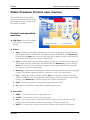
Static Pressure Control user manual Phason SYSTEM FAULT – is on when the internal control voltage is below an acceptable level. If the LED is on, the Normal Operation LED will be off. The control requires servicing. Manual Operation – is on when the control is in manual mode. In manual mode, the inlet opens or closes only by pressing Open or Close. Normal Operation – is on when the control is in normal mode. In normal mode, the control automatically opens or closes the inlet. Pressure Set Point – is on when the Func button has been pressed to select the pressure set parameter. The display shows the set point, which you can adjust by pressing Up or Down. The range is 0 to 0.250 inches of water. Open/Close “on” Time – is on when the Func button has been pressed to select the open/close “on” time parameter. The display shows the set point, which you can adjust by pressing Up or Down. The “on” time is the duration the inlet takes to either open or close. The range is 1 to 900 seconds. Keep the duration short to prevent excessive pressure changes from occurring. Open/Close “idle” Time – is on when the Func button has been pressed to select the open/close “idle” time parameter. The display shows the set point, which you can adjust by pressing Up or Down. The “idle” time is the duration the inlet pauses before opening or closing. The purpose of the idle duration is to filter out pressure pulses. The range is 1 to 900 seconds. Keep the time as short as possible, without the control responding to normal building fluctuations such as wind gusts, fans starting, and so on. Differential Pressure – is on when the Func button has been pressed to select the differential pressure parameter. The display shows the set point, which you can adjust by pressing Up or Down. The ambient pressure must be higher or lower than the pressure set point by this amount before the open or close cycle will start. The range is 0.000 to 0.250 inches of water. High Pressure Alert Point – is on when the Func button has been pressed to select the high pressure alert parameter. The display shows the set point, which you can adjust by pressing Up or Down. The alert activates when the ambient pressure rises above this setting. The range is 0.000 to 0.250 inches of water, but must be higher than the pressure set point. To disable the alert, set it to 0.250. Low Pressure Alert Point – is on when the Func button has been pressed to select the low pressure alert parameter. The display shows the set point, which you can adjust by pressing Up or Down. The alert activates when the ambient pressure falls below this setting. The range is 0.000 to 0.250 inches of water, but must be lower than the pressure set point. To disable the alert, set it to 0.000. If the control has been left in programming mode and no key has been pressed for two minutes, the control resets without saving any changes. If the ambient pressure reaches the high or low pressure alert setting, the control bypasses the idle range and goes to the open or close “on” time. 2 2009-09-23