1
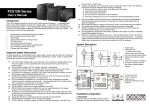
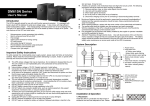
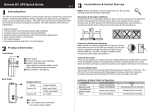
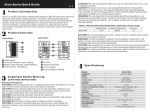
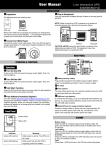
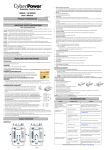
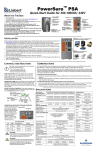
ME-650-VU/850-VU ME-1000-VU/2000-VU USER MANUAL Thank you for purchasing this UPS. To safely operate this uninterruptible power supply system, please read and follow all instructions carefully. Please read this manual thoroughly before attempting to unpack, install, or operate UPS, and keep this manual for further reference. IMPORTANT SAFETY INSTRUCTIONS This UPS utilizes voltages that may be hazardous. DO NOT attempt to disassemble the unit. The unit contains no user serviceable parts. Only factory service personnel may perform repairs. Internal battery voltage is 12VDC. Connection to any other type of receptacle other than a two-pole, three-wire grounded receptacle may result in shock hazard as well as violate local electrical codes. In the event of an emergency, press the OFF button and disconnect the power cord from the AC power supply to properly disable the UPS. DO NOT allow liquids or any foreign object to enter the UPS. Do not place beverages or any other liquid-containing vessels on or near the unit. This unit intended for installation in a controlled environment (temperature controlled, indoor area free of conductive contaminants). Avoid installing the UPS in locations where there is standing or running water, or excessive humidity. DO NOT plug the UPS input into its own output. DO NOT attach a power strip or surge suppressor to the UPS. DO NOT attach non-computer-related items, such as medical equipment, life-support equipment, microwave ovens, or vacuum cleaners to UPS To reduce the risk of overheating the UPS, do not cover the UPS’ cooling vents and avoid exposing the unit to direct sunlight or installing the unit near heat emitting appliances such as space heaters or furnaces. Unplug the UPS prior to cleaning and do not use liquid or spray detergent. DO NOT dispose of batteries in a fire as they may explode. DO NOT open or mutilate the battery or batteries. Released electrolyte is harmful to the skin and eyes. It may be toxic. A battery can present a risk of electrical shock and high short circuit current. The following precautions should be observed when working on batteries: 1) Remove watches, rings, or other metal objects from the hands. 2) Use tools with insulated handles. 3) Wear rubber gloves and boots. 4) DO NOT lay tools or metal parts on top of batteries. 5) Disconnect charging source prior to connecting or disconnecting batteries terminals. Servicing of batteries should be performed or supervised by personnel knowledgeable of batteries and the required precautions. Keep unauthorized personnel away from batteries. When replacing batteries, replace with the same number and type of sealed lead-acid battery. This pluggable type A equipment with battery already installed by the supplier is operator installable and may be operated by laymen. During the installation of this equipment it should be assured that the sum of the leakage currents of the UPS and the connected loads does not exceed 3.5mA Attention, hazardous through electric shock. Also with disconnection of this unit from the mains, hazardous voltage still may be accessible through supply from battery. The battery supply should be therefore disconnected in the plus and minus pole at the connectors of the battery when maintenance or service work inside the UPS is necessary. The mains socket outlet that supplies the UPS shall be installed near the UPS and shall be easily accessible. PRODUCT OVERVIEW ME-650-VU/850-VU Fault: red lighting Power switch AC mode: green lighting Batt. mode: yellow flashing USB port Modem/phone surge protection Output receptacles AC input Modem/phone surge protection ME-1000-VU Batt. mode: yellow flashing Power switch AC mode: green lighting Fault: red lighting Output receptacles USB port AC input ME-2000-VU Fault: red lighting AC mode: indicating load level Batt. mode: indicating battery capacity Power switch AC mode: green lighting Batt. mode: green flashing USB port Modem/phone surge protection AC input Output receptacles ME-650-VU/850-VU ME-1000-VU/2000-VU USER MANUAL QUICK INSTALLATIONS & OPERATION TROUBLE SHOOTING Inspection Remove UPS from its package and inspect it for damage before installation. If any damage is found, re-pack and return the unit to the place of purchase. Problem No LED display on the front panel. Placement Install the UPS in a protected area that is free of excessive dust and has adequate air flow. DO NOT operate the UPS where the temperature and humidity is outside the specific limits. Connect to Utility & Charging Plug in the AC input cord to the wall outlet. For the best results, suggest to charge the battery at least 4 hours before initial use. The unit automatically charges ts battery while connecting to the utility. Connect the Loads Plug in the loads to output receptacles on the rear panel of the UPS. Simply turn on the power switch of UPS unit, then devices connected to the UPS will be protected by the UPS. CAUTION: NEVER connect a laser printer or scanner to the UPS unit. This may cause the damage of the unit. Connect Modem/Phone Line Connect a single modem/phone line into surge-protected “IN” outlet on the rear panel of the UPS unit. Connect from “OUT” outlet to the computer with phone line cable. Connect Communication Cable To allow for unattended UPS shutdown/start-up and status monitoring, connect the communication cable one end to the USB port and the other to the communication port of your PC. With the monitoring software installed, you can schedule UPS shutdown / start-up and monitor UPS status through PC. Turning On/Off the Unit Turn on the UPS unit by pressing the power switch. Turn off the UPS unit by pressing again the power switch. You may check the front LED indicators for the status. Cold Start Function When the UPS is off and there is no power utility, it’s still possible to cold start the UPS unit to power the loads. Monitoring Software Setup Please follow steps below to install the software: 1. Insert the included CD into CD-ROM drive and then follow the on-screen instructions. If there no screen shows when inserting the CD after 1 minute, please execute setup.exe for initiating software installation. 2. After computer restarts, the monitoring software will appear as an orange plug icon located in the system tray. UPS always on battery mode During power failure, backup time is shorten. Possible Cause Battery voltage is too low Solutions Charge the UPS unit up to 4 hours. Battery failure. Replace with the same type of battery. Power cord loose Re-plug the power cord. Fuse is burned. Replace the same type of fuse AC utility is too high or too low, Normal condition or there is a blackout Overload of the UPS. Remove some noncritical load. Battery voltage is too low. Charge battery 4 hours or more. Battery defect due to high Replace with the same temperature operation type of battery. environment, or improper operation to battery. SPECIFICATIONS MODEL INPUT Capacity ME-650-VU ME-850-VU ME-1000-VU ME-2000-VU 650VA / 360W Voltage Voltage Range OUTPUT AC Voltage Regulation (Batt. Mode) Frequency Range (Batt. Mode) Transfer Time Waveform (Batt. Mode) BATTERY Battery Type & Number Typical Recharge Time ALARM Battery Mode Low Battery Overload Fault PHYSICAL Dimension, DXWXH (mm) Net Weight (kgs) ENVIRONMENT Humidity Noise Level INTERFACE USB Port 850VA / 1000VA / 2000VA / 480W 600W 1200W 110/120 VAC or 220/230/240 VAC 81-145 VAC or 162-290 VAC ±10% 50Hz or 60Hz ± 1 Hz Typical 2-6 ms, 10 ms max. Simulated Sine Wave 12 V/7 Ah x 12 V/9 Ah x 12 V/7 Ah x 2 12 V/9 Ah x 2 1 1 4-6 hours recover to 90% capacity Sounding every 10 seconds Sounding every second Sounding every 0.5 second Continuously sounding 287 x 100 x142 4.25 4.9 350 x 146 x 160 8.0 397 x 146 x 205 11.5 0-90 % RH @ 0- 40°C (non-condensing) Less than 40dB Windows2000/2003/XP/Vista/2008/7, Linux, Unix, and MAC * Product specifications are subject to change without further notice.