1
RESETTING THE SYSTEM SETUP MENU TO FACTORY DEFAULT
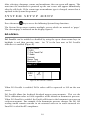
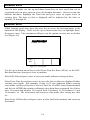
To reset the Pro20 settings to factory default, press the down arrow key until the
Reset - 4 box is highlighted, then press enter. The instrument will ask you to
confirm the reset. Highlight Yes and press enter to continue with the reset or
highlight No and press enter to cancel the reset. A Factory Reset will not affect
data saved in the unit’s memory.
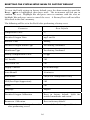
The following will be set in the Pro20 after performing a factory reset:
Parameter
Reset Defaults
Temperature Units
o
Dissolved Oxygen Units
mg/L and %
Pressure Units
mmHg
Dissolved Oxygen Sensor Type
Last Setting Confirmed
Membrane Type
Last Setting Confirmed
Salinity Compensation Value
0.0 ppt
DO Local%
Off
One Touch Cal
On
Display Contrast
Set to mid range
Auto Shutoff
30 minutes
Auto Stable
Off (0.0 % Change and 10 secs)
LDS (Last Digit Suppression)
Off
Audio
On
Language
English
Dissolved Oxygen Calibration
Reset to factory default, 100% for
enabled membrane and sensor*
Barometer Calibration
Reset to factory default*
C
*It is recommended to perform a barometer and dissolved oxygen calibration
after performing a reset.
16