1
CIO-EXP32 User's Guide
Installing the CIO-EXP32
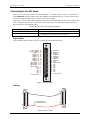
Connecting to a DAS08 Series A/D board
Leave the A/D BOARD TYPE jumper in the default DAS08 position. Use a C37FF-x cable to connect to DAS08
series boards.
Connecting to a DAS16 Series A/D Board
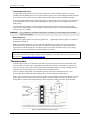
Set the A/D BOARD TYPE jumper to the DAS16 position.
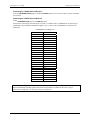
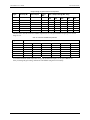
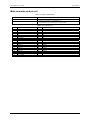
Connection to a DAS16 series board requires a special 37-conductor cable (C-EXP2DAS16-10) since the pin
relationship of the CIO-EXP32 and DAS16 signals is not 1:1. Refer to the C-EXP2DAS16-10 cable pin out
table below.
C-EXP2DAS16-10 cable pin out
P1 (MUX)
P2
7
8
9
10
11
12
13
14
15
16
17
18
19
28
29
30
31
32
33
34
35
36
37
N/C
23
4
22
3
11
12
13
14
15
16
17
18
19
7
1
30
31
32
33
34
35
36
37
Shell Shield
Information on signal connections
General information regarding signal connection and configuration is available in the Guide to Signal
Connections (available at www.mccdaq.com/signals/signals.pdf).
11