Download User & Setup Guide

Transcript
•
If you store your bicycles, kayaks or other gear
with Gear Tags in your garage, the Sign detects
that they are present and ignores them for
deciding when an alert is needed. A Gear Tag and
Alerter need to both be away from your Alert Sign
for more than 30 seconds to trigger an alert when
you return home.
•
Your Gear Tags should always be with the gear
you want to protect. A Tags can easily be
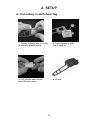
mounted on your bike by wrapping the silicon
strap around any tube on your bike as shown in
the Installation instructions above. If you have a
saddle bag that always stays on your bike, you
can just tuck a Gear Tag in that instead. For
kayaks, canoes or cargo carriers, you can either
use the silicon strap to attach a Gear Tag to the
inside of your gear, or simply place it in your
watercraft storage bin. The silicon housing on the
Gear Tag is water-resistant, but if your tag is likely
to sit in water for extended periods, we suggest
placing it in a zip-seal bag first.
•
If, for some reason, you are carrying your gear
with a Gear Tag in your trunk instead of on the roof
rack, the alert will still go off (although the alert
range may be reduced). The Alert Sign senses
when you return home in your vehicle with your
gear, whether or not the gear is on the roof.
•
More than one vehicle with a roof rack? No
problem: extra InCar Alerters are available
individually at headsupsystems.com and at many
retailers that carry the HeadsUp System.
•
More than two bicycles or other gear you want
to protect? No problem: extra Gear Tags are
available individually at headsupsystems.com and
at many retailers that carry the HeadsUp System.
10