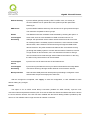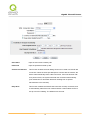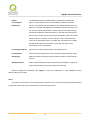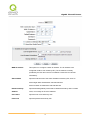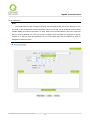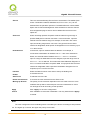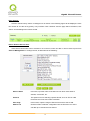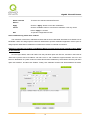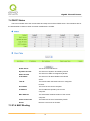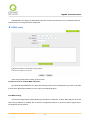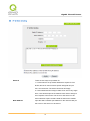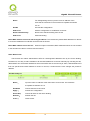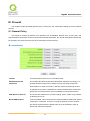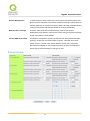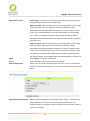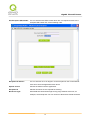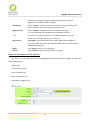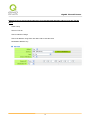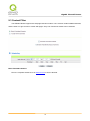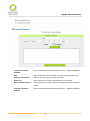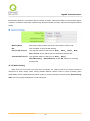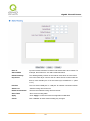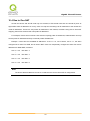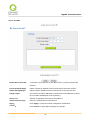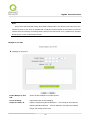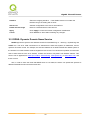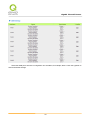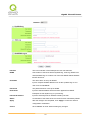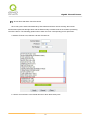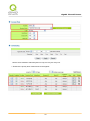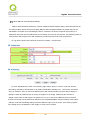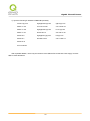
1
8WAN 5LAN Gigabit Firewall Router Load Balance, Bandwidth Management, and Network Security English User’s Manual Gigabit Firewall Router Content I. Introduction ............................................................................................................................................... 4 II. Multi- WAN QoS Router Installation ...................................................................................................... 6 2.1 Systematic Setting Process ....................................................................................................................... 6 2.2 Setting Flow Chart ........................................................................................................................................ 6 III. Hardware Installation ............................................................................................................................. 9 3.1 LED Signal....................................................................................................................................................... 9 3.2 Router Network Connection ..................................................................................................................... 11 IV. Login Router ........................................................................................................................................... 12 V. Device Spec Verification, Status Display and Login Password and Time Setting .............................. 14 5.1 Home Page .................................................................................................................................................... 14 5.1.1 WAN Status .............................................................................................................................................. 14 5.1.2 Physical Port Status .................................................................................................................................. 15 5.1.3 System Information .................................................................................................................................. 16 5.1.4 Firewall Status ......................................................................................................................................... 17 5.1.5 Log Setting Status .................................................................................................................................... 18 5.2 Change and Set Login Password and Time ......................................................................................... 19 5.2.1 Password Setting ...................................................................................................................................... 19 5.2.2 Time ......................................................................................................................................................... 20 VI. Network ................................................................................................................................................... 22 6.1 Network Connection ................................................................................................................................... 22 6.1.1 Host Name and Domain Name ................................................................................................................ 23 6.1.2 LAN Setting ............................................................................................................................................. 23 6.1.3 WAN & DMZ Settings ............................................................................................................................. 25 6.2 Multi- WAN Setting ...................................................................................................................................... 39 6.2.1 Load Balance Mode ................................................................................................................................. 40 6.2.2 Network Detection Service ...................................................................................................................... 44 6.2.3 Protocol Binding ...................................................................................................................................... 48 VII、Intranet Configuration ....................................................................................................................... 57 7.1 Port Management ........................................................................................................................................ 57 7.2 Port Status .................................................................................................................................................... 59 7.3 IP/ DHCP ........................................................................................................................................................ 60 7.4 DHCP Status ................................................................................................................................................. 62 7.5 IP & MAC Binding ........................................................................................................................................ 62 7.6 IP Group Management ............................................................................................................................... 66 I Gigabit Firewall Router 7.7 Port Group Management ........................................................................................................................... 68 VIII. QoS (Quality of Service) ..................................................................................................................... 69 8.1 Bandwidth Management (QoS) ................................................................................................................ 70 8.1.1 Bandwidth Management .......................................................................................................................... 71 8.1.2 QoS .......................................................................................................................................................... 71 8.1.3 Smart QoS ................................................................................................................................................ 75 8.1.4 Bandwidth Management Scheduling ....................................................................................................... 76 8.1.5 Exception IP address ................................................................................................................................ 77 8.2 Session control ............................................................................................................................................ 79 IX. Firewall ................................................................................................................................................... 82 9.1 General Policy .............................................................................................................................................. 82 9.2 Access Rule .................................................................................................................................................. 87 9.2.1 Default Access Rule ................................................................................................................................. 87 9.3.2 Add New Access Rule .............................................................................................................................. 89 9.3 Content Filter ................................................................................................................................................ 92 X. Advanced Function .................................................................................................................................. 97 10.1 DMZ/Forwarding ........................................................................................................................................ 97 10.1.1 DMZ Configuration ............................................................................................................................... 97 10.1.2 Port Range Forwarding .......................................................................................................................... 98 10.2 UPnP ........................................................................................................................................................... 101 10.3 Routing ...................................................................................................................................................... 101 10.3.1 Dynamic Routing ................................................................................................................................. 102 10.3.2 Static Routing....................................................................................................................................... 103 10.4 One to One NAT ....................................................................................................................................... 105 10.5 DDNS- Dynamic Domain Name Service ............................................................................................ 108 10.6 MAC Clone ................................................................................................................................................ 114 XI、System Tool ......................................................................................................................................... 115 11.1 Diagnostic ................................................................................................................................................. 115 11.2 Firmware Upgrade ................................................................................................................................... 117 11.3 Configuration Backup ............................................................................................................................ 118 11.4 SNMP .......................................................................................................................................................... 119 11.5 System Recover ....................................................................................................................................... 120 11.6 High Availability ....................................................................................................................................... 122 XII、Log ..................................................................................................................................................... 127 12.1 System Log ............................................................................................................................................... 127 II Gigabit Firewall Router 12.2 System Statistic ....................................................................................................................................... 131 12.3 Traffic Statistic ......................................................................................................................................... 132 12.4 IP/ Port Statistic ....................................................................................................................................... 134 12.5 QRTG (Qno Router Traffic Graphic) ................................................................................................... 137 XIII. Log out ............................................................................................................................................... 142 Appendix I: User Interface and User Manual Chapter Cross Reference .............................................. 143 Appendix II: Troubleshooting ................................................................................................................... 146 (1) Block BT Download ................................................................................................................................. 146 (2) Shock Wave and Worm Virus Prevention ................................................................................................. 147 (3) Block QQLive Video Broadcast Setting ................................................................................................... 149 (4) ARP Virus Attack Prevention.................................................................................................................... 151 Appendix III: Qno Technical Support Information .............................................................................. 160 III Gigabit Firewall Router Product Manual Using Permit Agreement [Product Manual (hereafter the "Manual") Using Permit Agreement] hereafter the "Agreement" is the using permit of the Manual, and the relevant rights and obligations between the users and Qno Technology Inc (hereafter "Qno"), and is the exclusion to remit or limit the liability of Qno. The users who obtain the file of this manual directly or indirectly, and users who use the relevant services, must obey this Agreement. Important Notice: Qno would like to remind the users to read the clauses of the "Agreement" before downloading and reading this Manual. Unless you accept the clauses of this "Agreement", please return this Manual and relevant services. The downloading or reading of this Manual is regarded as accepting this "Agreement" and the restriction of clauses in this "Agreement". 【1】 Statement of Intellectual Property Any text and corresponding combination, diagram, interface design, printing materials or electronic file are protected by copyright of our country, clauses of international copyright and other regulations of intellectual property. When the user copies the "Manual", this statement of intellectual property must also be copied and indicated. Otherwise, Qno regards it as tort and relevant duty will be prosecuted as well. 【2】Scope of Authority of "Manual" The user may install, use, display and read this "Manual on the complete set of computer. 【3】User Notice If users obey the law and this Agreement, they may use this "Manual" in accordance with "Agreement". The "hardcopy or softcopy" of this Manual is restricted using for information, non-commercial and personal purpose. Besides, it is not allowed to copy or announce on any network computer. Furthermore, it is not allowed to disseminate on any media. It is not allowed to modify any part of the "file". Using for other purposes is prohibited by law and it may cause serious civil and criminal punishment. The transgressor will receive the accusation possibly. 【4】Legal Liability and Exclusion 2 Gigabit Firewall Router 【4-1】Qno will check the mistake of the texts and diagrams with all strength. However, Qno, distributors, and resellers do not bear any liability for direct or indirect economic loss, data loss or other corresponding commercial loss to the user or relevant personnel due to the possible omission. 【4-2】In order to protect the autonomy of the business development and adjustment of Qno, Qno reserves the right to adjust or terminate the software / Manual any time without informing the users. There will be no further notice regarding the product upgrade or change of technical specification. If it is necessary, the change or termination will be announced in the relevant block of the Qno website. 【4-3】All the set parameters are examples and they are for reference only. You may also purpose your opinion or suggestion. We will take it as reference and they may be amended in the next version. 【4-4】This Manual explains the configuration of all functions for the products of the same series. The actual functions of the product may vary with the model. Therefore, some functions may not be found on the product you purchased. 【4-5】Qno reserves the right to change the file content of this Manual and the Manual content may not be updated instantly. To know more about the updated information of the product, please visit Qno official website. 【4-6】Qno (and / or) distributors hereby declares that no liability will be born for any guarantee and condition of the corresponding information. The guarantee and condition include tacit guarantee and condition about marketability, suitability for special purposes, ownership, and non-infringement. The name of the companies and products mentioned may be the trademark of the owners. Qno (and/or) the distributors do not provide the product or software of any third party company. Under any circumstance, Qno and / or distributors bear no liability for special, indirect, derivative loss or any type of loss in the lawsuit caused by usage or information on the file, no matter the lawsuit is related to agreement, omission, or other tort. 【5】Other Clauses 【5-1】The potency of this Agreement is over any other verbal or written record. The invalidation of part or whole of any clause does not affect the potency of other clauses. 【5-2】The power of interpretation, potency and dispute are applicable for the law of Taiwan. If there is any dissension or dispute between the users and Qno, it should be attempted to solve by consultation first. If it is not solved by consultation, user agrees that the dissension or dispute is brought to trial in the jurisdiction of the court in the location of Qno. In Mainland China, the "China International Economic and Trade Arbitration Commission" is the arbitration organization. 3 Gigabit Firewall Router I. Introduction New generation GIGABIT Firewall Router is a high efficiency flagship router owing to the market requirement. It is designed as economical, high efficiency with all functions integrated for Firewall Router that fulfills the requirement of large scale internet café increase and bandwidth management. New generation GIGABIT Firewall Router focuses on multiple ISP environment and user bandwidth management requirement to integrate the gigabit backbone networking, it can support hardware port mirror, smart QoS, Multi-WAN load balance, gateway redundancy, and Intelligent Firewall. GIGABIT Firewall Router uses a high-level processor and maximum 2Gbps-two way forwarding rate that can support several hundred thousand session connections, built-in high- capacity RAM allows the stability and reliability for long-time operation. It provides 8 Gigabit WAN port and high-efficiency load balance mode for out-bound load balance. WAN side outbound connection performance can fulfill most of the standards for broadband market. In addition, configurable DMZ port can connect to the public server by public IP address. It has a built-in 5 Gigabit backbone LAN port to appropriate for 10/100/1000Mbps Ethernet switch and each port can connect with other switches for more network devices that can build up a Gigabit backbone conveniently to accelerate the network availability and scalable bandwidth enterprise. In addition, there are 2 USB interfaces that can support other device connections, enlarge storage capacity, and other future functions. Individual QoS bandwidth management with powerful and easy-to-setup functions allows manager to arrange the limited network resource rational and efficiently. It is not needed to extend the bandwidth to unlimited settings which would increase spending cost; it can also avoid the complaint of few people to force whole bandwidth. Simple user configuration can be the best efficiency application; it allows the optimization of bandwidth utilization based on the whole utility rate without setting rules step-by-step and only to limit the users who occupy the bandwidth for resource savings. Moreover, intelligence bandwidth management is provided, through the simple deployment to complete LAN side bandwidth management for efficiency utility rate, simple management and improvement performance. Load balancing function supports Auto Load Balance mode, Specify WAN Binding mode and Strategy Routing mode to allow deployment of flexible network connection required to control traffic flow to guarantee that whole connections are unobstructed. Strategy Routing mode is simply to configure the network without the input of IP address. It can automatically detect outbound packets and filter telecom connection to ensure quick response and packet pass through without obstruction, and it can aggregate the same ISP bandwidth for load balancing control and increase flexibility of network resource. 4 Gigabit Firewall Router Built-in Firewall system can fulfill market requirement in defense of internet attacks for most enterprise. Initiative packet inspection via the network layer dynamic detection denies or blocks non-standard protocol connections. It can easily employ complete protection functions to ensure network security, as required for any kind of hack attacks, worm & Virus and ARP attacks by one-way control. Firewall system has not only NAT function but also DoS attack. Complete Functions of Access Rules can allow managers to select the network service levels to deny or allow accesses, and it can also limit or deny LAN users to use the network and to avoid the network resource being occupied or threatened due to improper uses. NAT function can provide the translation between private IP and public IP, which can allow multi-user to connect the internet with one public IP at the same time. LAN IP supports four Class C connections, and DHCP server is also supported, as well as an easy configuration of IP-MAC binding function allowing network structure to be flexible and easy to deployed and managed. You can log on to our Web site www.Qno.com.tw, and find the latest Qno product information and technical support. The device is an FCC Class A product, it may cause radio interference in the living environment. User may need to take feasible measures in this condition. 5 Gigabit Firewall Router II. Multi- WAN QoS Router Installation In this chapter we are going to introduce hardware installation. Through the understanding of multi-WAN setting process, users can easily setup and manage the network,making Router functioning and having best performance. 2.1 Systematic Setting Process Users can set up and enable the network by utilizing bandwidth efficiently. The network can achieve the ideal efficientness, block attacks, and prevent security risks at the same time. Through the process settings, users can install and operate the router easily. This simplifies the management and maintenance, making the user network settings be done at one time. The main process is as below: 1、 Hardware installation 2、 Login 3、 Verify device specification and set up password and time 4、 Set WAN connection 5、 Set LAN connection: physical port and IP address settings 6、 Set QoS bandwidth management: avoid bandwidth occupation 7、 Set Firewall: prevent attack and improper access to network resources 8、 Other settings: UPnP, DDNS, MAC Clone 9、 Management and maintenance settings: Syslog, SNMP, and configuration backup 10、 Logout 2.2 Setting Flow Chart Below is the description for each setting process, and the crospondent contents and purposes. detailed functions, please refer to Appendix I: Setting Inferface and Chapter Index. 6 For Gigabit Firewall Router # 1 Setting Hardware installation 2 Login Content Purpose Configure the Install Router hardware based on user network to meet physical requirements. user’s demand. Login the device with Login Router web-based UI. Web Browser. 3 Verify device Verify Firmware Verify Router specification, firmware specification version and working version and working status. status. Set password and Set time and re-new Modify the login password considering time password. safe issue. Synchronize the Router time with WAN. 4 Set WAN connection Verify WAN Connect to WAN. Configure bandwidth to connection setting, optimize data transmission. bandwidth allocation, and protocol binding. 5 Set LAN connection: physical port and Set mirror port and Provide mirror port, port management VLAN. Allocate and and VLAN setting functions. Support manage LAN IP. Static/DHCP IP allocation to meet different needs. IP group will simplize the IP address settings 6 Set QoS bandwidth management: avoid bandwidth occupation 7 Set Firewall: prevent attack and improper access to management work. Restrict bandwidth To assure transmission of important and session of WAN information, manage and allocate the ports, LAN IP and bandwidth further to achieve best application. efficiency. Block attack, Set Administrators can block BT to avoid Access rule and bandwidth occupation, and enable access restrict Web access. rules to restrict employee accessing internet improperly or using MSN, QQ and network resources Skype during working time. They can also protect network from Worm or ARP attacking. 7 Gigabit Firewall Router 8 Advanced DMZ/Forwarding, DMZ/Forwarding, UpnP, Routing Mode, Settings: UpnP, Routing Mode, multiple WAN IP, DDNS and MAC Clone DMZ/Forwarding, multiple WAN IP, UPnP, DDNS, MAC DDNS and MAC Clone Clone 9 Management and maintenance settings: Syslog, SNMP, and Monitor Router Administrators can look up system log and working status and monitor system status and configuration inbound/outbound flow in real time. backup. configuration backup 10 Logout Close configuration Logout Router web-based UI. window. We will follow the process flow to complete the network setting in the following chapters. 8 Gigabit Firewall Router III. Hardware Installation In this chapter we are going to introduce hardware interface as well as physical installation. 3.1 LED Signal LED Signal Description LED Color Description Power Green Green LED on: Power ON DIAG Amber Amber LED on: System self-test is running. Amber LED off: System self-test is completed successfully. Link/Act Green Green LED on: Ethernet connection is fine. Green LED blinking: Packets are transmitting through Ethernet port. Amber Amber LED on: Ethernet is running at 100Mbps. Amber LED off: Ethernet is running at 10Mbps. Green Green LED on: Ethernet is running at 1000Mbps. Green Green LED on: WAN is connected and gets the IP address. (Green light at the right of the LAN port) 100M- Speed (Amber light at th left of the port) 1000M- Speed (Green light at th left of the port) WAN Connect Reset Action Press Reset Button For 5 Secs Description Warm Start DIAG indicator: Amber LED flashing slowly. Press Reset Button Over 10 Secs Factory Default DIAG indicator: Amber LED flashing quickly. System Built-in Battery A system timing battery is built into Router. The lifespan of the battery is about 1~2 years. If the battery life is over or it can not be charged, Router will not be able to record time correctly, nor synchronize with internet NTP time server. Please contact your system supplier for information on how to replace the battery. 9 Gigabit Firewall Router Attention! Do not replace the battery yourself; otherwise irreparable damage to the product may be caused. Installing Router on a Standard 19” Rack We suggest to either place Router on a desk or install it in a rack with attached brackets. Do not place other heavy objects together with Router on a rack. Overloading may cause the rack to fail, thus causing damage or danger. Each Router comes with a set of rack installation accessories, including 2 L-shaped brackets and 8 screws. Users can rack-mount the device onto the chassis. Please refer to the figure below for the installation onto a 19” rack: Attention! In order for the device to run smoothly, wherever users install it, be sure not to obstruct the vent on each side of the device. Keep at least 10cm space in front of both the vents for air convection. 10 Gigabit Firewall Router 3.2 Router Network Connection WAN connection:A WAN port can be connected with xDSL Modem, Fiber Modem, Switching Hub, or through an external router to connect to the Internet. LAN Connection: The LAN port can be connected to a Switching Hub or directly to a PC. Users can use servers for monitoring or filtering through the port after “Physical Port Mangement” configuration is done. DMZ : The DMZ port can be connected to servers that have legal IP addresses, such as Web servers, mail servers, etc. 11 Gigabit Firewall Router IV. Login Router This chapter is mainly introducing Web-based UI after connecting Router. First, check up Router IP address by connecting to DOS through the LAN PC under Router. Go to Start → Run, enter cmd to commend DOS, and enter ipconfig for getting Default Gateway address, as the graphic below, 192.168.1.1. Make sure Default Gateway is also the default IP address of Router. Attention! When not getting IP address and default gateway by using “ipconfig”, or the received IP address is 0.0.0.0 and 169.X.X.X, we recommend that users should check if there is any problem with the circuits or the computer network card is connected nicely. 12 Gigabit Firewall Router Then, open webpage browser, IE for example, and key in 192.168.1.1 in the website column. The login window will appear as below: Router default username and password are both “admin”. Users can change the login password in the setting later. Attention! For security, we strongly suggest that users must change password after login. Please keep the password safe, or you can not login to Router. Press Reset button for more than 10 sec, all the setting will return to default. After login, Router web-based UI will be shown. Select the language on the upper right corner of the webpage. The language chosen will be in blue. Please select “English” as below. 13 Gigabit Firewall Router V. Device Spec Verification, Status Display and Login Password and Time Setting This chapter introduces the device specification and status after login as well as change password and system time settings for security. 5.1 Home Page In the Home page, all Router parameters and status are listed for users’ reference. 5.1.1 WAN Status 14 Gigabit Firewall Router IP Address: Indicates the current IP configuration for WAN port. Default Gateway: Indicates current WAN gateway IP address from ISP. DNS Server: Indicates the current DNS IP configuration. Session: Indicates the current session number for each WAN in Router. Downstream Bandwidth Indicates the current downstream bandwidth usage (%) for each Usage (%): WAN. Upstream Bandwidth Usage Indicates the current upstream bandwidth usage (%) for each WAN. (%): DDNS: Quality of Service: Manual Connect: Indicates if Dynamic Domain Name is activated. The default configuration is “Off”. Indicates how many QoS rules are set. When “Obtain an IP automatically” is selected, two buttons (Release and Renew) will appear. If a WAN connection, such as PPPoE or PPTP, is selected, “Disconnect” and “Connect” will appear. DMZ IP Address: Indicates the current DMZ IP address. 5.1.2 Physical Port Status The status of all system ports, including each connected and enabled port, will be shown on this Home page (see above table). Click the respective status button and a separate window will appeare to show detailed data (including setting status summary and statisitcs) of the selected port. 15 Gigabit Firewall Router The current port setting status information will be shown in the Port Information Table. Examples: type (10Base-T/100Base-TX/1000Base-T), interface (WAN/ LAN/ DMZ), link status (Up/ Down), physical port status (Port Enabled/ Port Disabled), priority (high or normal), speed status (10Mbps/100Mbps/1000Mbps), duplex status (Half/ Full), auto negotiation (Enabled or Disabled). The table also shows statistics of Receive/ Transmit Packets, Receive/Transmit Packets Byte Count as well as Error Packets Count. 5.1.3 System Information 16 Gigabit Firewall Router Device IP Address/ Subnet Mask:Identifies the current device IP address and subnet mask. The default is 192.168.1.1 and 255.255.255.0 Working Mode:Indicates the current working mode. Can be Gateway or Router mode. The default is “Gateway” mode. System active time: Indicates how long the device has been running. Serial Number: This number is the device serial number. Firmware Version:Information about the device present software version. Current Time: Indicates the device present time. Please note: To have the correct time, users must synchronize the device with the remote NTP server first. CPU Usage: Indicates the current usage(%) of CPU. Memory Usage: Indicates the memory usage(%). Total Session: Indicates the current numbers of total session. 5.1.4 Firewall Status SPI (Stateful Packet Inspection):Indicates whether SPI (Stateful Packet Inspection) is on or off. The default configuration is “On”. DoS (Denial of Service):Indicates if DoS attack prevention is activated. The default configuration is “On”. Block WAN Request:Indicates that denying the connection from Internet is activated. The default configuration is “On”. Prevent ARP Virus Attack:Indicates that preventing Arp virus attack is acitvated. 17 The default Gigabit Firewall Router configuration is “Off”. Remote Management: Indicates if remote management is activated (on or off). Click the hyperlink to enter and manage the configuration. The default configuration is “Off”. Access Rule:Indicates the number of access rule applied in Router. 5.1.5 Log Setting Status Syslog Server: Indicates if Syslog Server is Enabled or Disabled. 18 Gigabit Firewall Router 5.2 Change and Set Login Password and Time 5.2.1 Password Setting When you login Router setting window every time, you must enter the password. The default value for Router username and password are both “admin”. For security reasons, we strongly recommend that you must change your password after first login. Please keep the password safe, or you might not login to Router. You can press Reset button for more than 10 sec, Router will return back to default. User Name: The default is “admin”. Old Password: Input the original password.(The default is “admin”.) New User Name: Input the new user name. i.e.Qno New Password: Input the new password. Confirm New Input the new password again for verification. Password: Apply: Click “Apply” to save the configuration. Cancel: Click “Cancel" to leave without making any change. This action will be effective before ”Apply” to save the configuration. If users have modified user name and password and need to return back to default. Users have to login with current user name and input new user name and password as “admin”, and click “Apply” to save the configuration. As the folling figure: 19 Gigabit Firewall Router 5.2.2 Time Router can adjust time setting. Users can know the exact time of event occurrences that are recorded in the System Log, and the time of closing or opening access for Internet resources. You can either select the embedded NTP Server synchronization function or set up a time reference. Synchronize with external NTP server:Router has embedded NTP server, which will update the time spontaneously. Time Zone: Select your location from the pull-down time zone list to show correct local time. Daylight Saving: If there is Daylight Saving Time in your area, input the date range. The device will adjust the time for the Daylight Saving period automatically. External NTP If you have your own preferred time server, input the server IP address. Server: Apply: After the changes are completed, click “Apply” to save the configuration. Cancel: Click “Cancel" to leave without making any change. This action will be effective before ”Apply” to save the configuration. 20 Gigabit Firewall Router Select the Local Time Manually: Input the correct time, date, and year in the boxes. After the changes are completed, click “Apply” to save the configuration. Click “Cancel" to leave without making any change. This action will be effective before ”Apply” to save the configuration. 21 Gigabit Firewall Router VI. Network This Network page contains the basic settings. For most users, completing this general setting is enough for connecting with the Internet. However, some users need advanced information from their ISP. Please refer to the following descriptions for specific configurations. 6.1 Network Connection 22 Gigabit Firewall Router 6.1.1 Host Name and Domain Name Device name and domain name can be input in the two boxes. Though this configuration is not necessary in most environments, some ISPs in some countries may require it. 6.1.2 LAN Setting This is configuration information for the device current LAN IP address. Unified IP Management: User can configure LAN IP and the range of dynamic IP (DHCP). 23 Gigabit Firewall Router LAN Setting: The default configuration is 192.168.1.1 and the default Subnet Mask is 255.255.255.0. It can be changed according to the actual network structure. Multiple-Subnet Setting: Click “Add/Edit” to enter the configuration page, as shown in the following figure. Input the respective IP addresses and subnet masks. This function enables users to input IP segments that differ from the router network segment to the multi-net segment configuration; the Internet will then be directly accessible. In other words, if there are already different IP segment groups in the Intranet, the Internet is still accessible without making any changes to internal PCs. Users can make changes according to their actual network structure. Dynamic IP: There are four Class C DHCP servers. The default is “enable.” The PC in the LAN will obtain IP automatically. IP Range Start The default four IP segments start from 192.168.1.100, 192.168.2.100, 192.168.3.100 and 192.168.4.100. Users can configure according to actual requirement. IP Range End: The default four IP segments end from 192.168.1.149, 192.168.2.149, 192.168.3.149 and 192.168.4.149. There are 50 IPs issued in every segment. Users can configure according to actual requirement. 24 Gigabit Firewall Router 6.1.3 WAN & DMZ Settings WAN Setting: Interface: An indication of which port is connected. Connection Type: Obtain an IP automatically, Static IP connection, PPPoE (Point-to-Point Protocol over Ethernet), PPTP (Point-to-Point Tunneling Protocol) or Transparent Bridge. Config.: A modification in an advanced configuration: Click Edit to enter the advanced configuration page. Obtain an Automatic IP automatically: This mode is often used in the connection mode to obtain an automatic DHCP IP. This is the device system default connection mode. It is a connection mode in which DHCP clients obtain an IP address automatically. If having a different connection mode, please refer to the following introduction for selection of appropriate configurations. Users can also set up their own DNS IP address. Check the options and input the user-defined DNS IP addresses. 25 Gigabit Firewall Router Use the following DNS Server Select a user-defined DNS server IP address. Addresses DNS Server Input the DNS IP address set by ISP. At least one IP group should be input. The maximum acceptable groups is two IP groups. Enable Line-Dropped The WAN disconnection schedule will be activated by checking this Scheduling option. In some areas, there is a time limitation for WAN connection service. For example: the optical fiber service will be disconnected from 0:00 am to 6:00 am. Although there is a standby system in the device, at the moment of WAN disconnection, all the external connections that go through this WAN will be disconnected too. Only after the disconnected lines are reconnected can they go through the standby system to connect with the Internet. Therefore, to avoid a huge number of disconnection, users can activate this function to arrange new connections to be made through another WAN to the Internet. In this way, the effect of any disconnection can be minimized. Line-Dropped Period Input the time rule for disconnection of this WAN service. 26 Gigabit Firewall Router Line-Dropped Scheduling Input how long the WAN service may be disconnected before the newly added connections should go through another WAN to connect with the Internet. Select another WAN port as link backup when port binding is configured. Backup Interface Users should select the port that employs the same ISP. After the changes are completed, click “Apply” to save the configuration, or click “Cancel" to leave without making any changes. Static IP: If an ISP issues a static IP (such as one IP or eight IP addresses, etc.), please select this connection mode and follow the steps below to input the IP numbers issued by an ISP into the relevant boxes. WAN IP address: Input the available static IP address issued by ISP. Subnet Mask: Input the subnet mask of the static IP address issued by ISP, such as: Issued eight static IP addresses: 255.255.255.248 Issued 16 static IP addresses: 255.255.255.240 27 Gigabit Firewall Router Default Gateway: Input the default gateway issued by ISP. For ADSL users, it is usually an ATU-R IP address. As for optical fiber users, please input the optical fiber switching IP. DNS Server: Input the DNS IP address issued by ISP. At least one IP group should be input. The maximum acceptable is two IP groups. Enable The WAN disconnection schedule will be activated by checking this option. In Line-Dropped some areas, there is a time limitation for WAN connection service. For Scheduling example: the optical fiber service will be disconnected from 0:00 am to 6:00 am. Although there is a standby system in the device, at the moment of WAN disconnection, all the external connections that go through this WAN will be disconnected too. Only after the disconnected lines are reconnected can they go through the standby system to connect with the Internet. Therefore, to avoid a huge number of disconnection, users can activate this function to arrange new connections to be made through another WAN to the Internet. In this way, the effect of any disconnection can be minimized. Line-Dropped Input the time rule for disconnection of this WAN service. Period Line-Dropped Input how long the WAN service may be disconnected before the newly added Scheduling connections should go through another WAN to connect with the Internet. Backup Interface Select another WAN port as link backup when port binding is configured. Users should select the port that employs the same ISP. After the changes are completed, click “Apply” to save the configuration, or click “Cancel" to leave without making any changes. PPPoE: This option is for an ADSL virtual dial-up connection (suitable for ADSL PPPoE). Input the user connection name and password issued by ISP. Then use the PPP Over-Ethernet software built into the device to connect with the Internet. If the PC has been installed with the PPPoE dialing software provided by ISP, remove it. This software will no longer be used for network connection. 28 Gigabit Firewall Router User Name Input the user name issued by ISP. Password Input the password issued by ISP. Connect on Demand This function enables the auto-dialing function to be used in a PPPoE dial connection. When the client port attempts to connect with the Internet, the device will automatically make a dial connection. If the line has been idle for a period of time, the system will break the connection automatically. (The default time for automatic break-off resulting from no packet transmissions is five minutes). Keep Alive This function enables the PPPoE dial connection to keep connected, and to automatically redial if the line is disconnected. It also enables a user to set up a time for redialing. The default is 30 seconds. 29 Gigabit Firewall Router Enable The WAN disconnection schedule will be activated by checking this Line-Dropped option. In some areas, there is a time limitation for WAN connection Scheduling service. For example: the optical fiber service will be disconnected from 0:00 am to 6:00 am. Although there is a standby system in the device, at the moment of WAN disconnection, all the external connections that go through this WAN will be disconnected too. Only after the disconnected lines are reconnected can they go through the standby system to connect with the Internet. Therefore, to avoid a huge number of disconnection, users can activate this function to arrange new connections to be made through another WAN to the Internet. In this way, the effect of any disconnection can be minimized. Line-Dropped Period Input the time rule for disconnection of this WAN service. Line-Dropped Input how long the WAN service may be disconnected before the newly Scheduling added connections should go through another WAN to connect with the Internet. Backup Interface Select another WAN port as link backup when port binding is configured. Users should select the port that employs the same ISP. After the changes are completed, click “Apply” to save the configuration, or click “Cancel" to leave without making any change. PPTP: This option is for the PPTP time counting system. Input the user’s connection name and password issued by ISP, and use the built-in PPTP software to connect with the Internet. 30 Gigabit Firewall Router WAN IP Address This option is to configure a static IP address. The IP address to be configured could be one issued by ISP. (The IP address is usually provided by the ISP when the PC is installed. Contact ISP for relevant information). Subnet Mask Input the subnet mask of the static IP address issued by ISP, such as: Issued eight static IP addresses: 255.255.255.248 Issued 16 static IP addresses: 255.255.255.240 Default Gateway Input the default gateway of the static IP address issued by ISP. For ADSL Address users, it is usually an ATU-R IP address. User Name Input the user name issued by ISP. Password Input the password issued by ISP. 31 Gigabit Firewall Router Connect on Demand This function enables the auto-dialing function to be used for a PPTP dial connection. When the client port attempts to connect with the Internet, the device will automatically connect with the default ISP auto dial connection; when the network has been idle for a period of time, the system will break the connection automatically. (The default time for automatic break off when no packets have been transmitted is five minutes). Keep Alive This function enables the PPTP dial connection to redial automatically when the connection has been disconnected. Users can set up the redialing time. The default is 30 seconds. Enable The WAN disconnection schedule will be activated by checking this Line-Dropped option. In some areas, there is a time limitation for WAN connection Scheduling service. For example: the optical fiber service will be disconnected from 0:00 am to 6:00 am. Although there is a standby system in the device, at the moment of WAN disconnection, all the external connections that go through this WAN will be disconnected too. Only after the disconnected lines are reconnected can they go through the standby system to connect with the Internet. Therefore, to avoid a huge number of disconnection, users can activate this function to arrange new connections to be made through another WAN to the Internet. In this way, the effect of any disconnection can be minimized. Line-Dropped Period Input the time rule for disconnection of this WAN service. Line-Dropped Input how long the WAN service may be disconnected before the newly Scheduling added connections should go through another WAN to connect with the Internet. Backup Interface Select another WAN port as link backup when port binding is configured. Users should select the port that employs the same ISP. After the changes are completed, click “Apply” to save the configuration, or click “Cancel" to leave without making any changes. 32 Gigabit Firewall Router Transparent Bridge: If all Intranet IP addresses are applied as Internet IP addresses, and users don’t want to substitute private network IP addresses for all Intranet IP addresses (ex. 192.168.1.X), this function will enable users to integrate existing networks without changing the original structure. Select the Transparent Bridge mode for the WAN connection mode. In this way, users will be able to connect normally with the Internet while keeping the original Internet IP addresses in Intranet IP configuration. If there are two WANs configured, users still can select Transparent Bridge mode for WAN connection mode, and load balancing will be achieved as usual. WAN IP Address Input one of the static IP addresses issued by ISP. Subnet Mask Input the subnet mask of the static IP address issued by ISP, such as: Issued eight static IP addresses: 255.255.255.248 static IP addresses: 255.255.255.240 33 Issued 16 Gigabit Firewall Router Default Gateway Input the default gateway of the static IP address issued by ISP. For Address ADSL users, it is usually an ATU-R IP address. DNS Server Input the DNS IP address set by ISP. At least one IP group should be input. The maximum acceptable is two IP groups. Internal LAN IP Input the available IP range issued by ISP. If ISP issued two Range discontinuous IP address ranges, users can input them into Internal LAN IP Range 1 and Internal LAN IP Range 2 respectively. Enable The WAN disconnection schedule will be activated by checking this Line-Dropped option. In some areas, there is a time limitation for WAN connection Scheduling service. For example: the optical fiber service will be disconnected from 0:00 am to 6:00 am. Although there is a standby system in the device, at the moment of WAN disconnection, all the external connections that go through this WAN will be disconnected too. Only after the disconnected lines are reconnected can they go through the standby system to connect with the Internet. Therefore, to avoid a huge number of disconnection, users can activate this function to arrange new connections to be made through another WAN to the Internet. In this way, the effect of any disconnection can be minimized. Line-Dropped Period Input the time rule for disconnection of this WAN service. Line-Dropped Input how long the WAN service may be disconnected before the Scheduling newly added connections should go through another WAN to connect with the Internet. Backup Interface Select another WAN port as link backup when port binding is configured. Users should select the port that employs the same ISP. After the changes are completed, click “Apply” to save the configuration, or click “Cancel" to leave without making any changes. Router Plus NAT Mode: When you apply a public IP address as your default gateway, you can setup this public IP address into a LAN PC, and this PC can use this public IP address to reach the Internet. Others PCs can use NAT mode to reach the Internet. If this WAN network is enabled the Router plus NAT mode, you can still use load balancing function in this WAN network. 34 Gigabit Firewall Router WAN IP address Enter the public IP address. Subnet mask Enter the public IP address subnet mask. WAN default gateway Enter the WAN default gateway, which provided by your ISP. DNS Servers Enter the DNS server IP address, you must have to enter a DNS server IP address, maximum two DNS servers IP addresses available.. Intranet routing default Enter one of IP addresses that provide by the ISP as your default gateway gateway. 35 Gigabit Firewall Router Intranet IP addresses Enter your IP addresses range, which IP addresses are provided by range ISP. If you have multiple IP ranges, you need setup group1 and group 2. You can also setup the default gateway and IP range in the group 2. Click “Apply” to save the configuration, or click “Cancel" to leave without making any changes. DMZ Setting: For some network environments, an independent DMZ port may be required to set up externally connected servers such as WEB and Mail servers. Therefore, the device supports a set of independent DMZ ports for users to set up connections for servers with real IP addresses. The DMZ ports act as bridges between the Internet and LANs. For this models, the WAN8 and DMZ port can be configurable each other. You can depend on the real environment to choose which the port is WAN8 or DMZ. IP address: Indicates the current default static IP address. Config.: Indicates an advanced configuration modification: Click Edit to enter the advanced configuration page. The DMZ configuration can be classified by Subnet, Range and DMZ IP ranges are the same with WAN IP ranges in Router Plus NAT mode: Subnet: The DMZ and WAN located in different Subnets For example: If the ISP issued 16 real IP addresses: 220.243.230.1-16 with Mask 255.255.255.240, users have to separate the 16 IP addresses into two groups: 220.243.230.1-8 with Mask 255.255.255.248, and 220.243.230.9-16 with Mask 255.255.255.248 and then set the device and the gateway in the same group with the other group in the DMZ. 36 Gigabit Firewall Router Specify DMZ IP Address Enter the DMZ Port IP Address Subnet Mask Enter the DMZ Port Subnet Mask Range: DMZ and WAN are within same Subnet Interface Select a WAN Port witch is the same subnet with DMZ IP Range for DMZ port Input the IP range located at the DMZ port. DMZ IP ranges are the same with WAN IP ranges in Router Plus NAT mode: 37 Gigabit Firewall Router LAN Default Gateway Enter the LAN Default Gateway that you configured at Router Plus NAT Mode LAN IP Range Enter the usable static IP range that provide by ISP into the DMZ service IP range. If you have other IP range, you can setup the default gateway and IP range into group 2. After the changes are completed, click “Apply” to save the configuration, or click “Cancel" to leave without making any changes. 38 Gigabit Firewall Router 6.2 Multi- WAN Setting When you have multiple WAN gateways, you can use Traffic Management and Protocol Binding function to fulfill WAN road balancing, so that we can have highest network bandwidth efficiency. 39 Gigabit Firewall Router 6.2.1 Load Balance Mode Auto Load Balance Mode: When Auto Load Balance mode is selected, the device will use sessions or IP and the WAN bandwidth automatically allocate connections to achieve load balancing for external connections. The network bandwidth is set by what users input for it. For example, if the upload bandwidth of both WANs is 512Kbit/sec, the automatic load ratio will be 1:1; if one of the upload bandwidths is 1024Kbit/sec while the other is 512Kbit/sec, the automatic load ratio will be 2:1. Therefore, to ensure that the device can balance the actual network load, please input real upload and download bandwidths. Session Balance: If “By Session” is selected, the WAN bandwidth will automatically allocate connections based on session number to achieve network load balance. IP Session Balance: If “By IP” is selected, the WAN bandwidth will automatically allocate connections based on IP amount to achieve network load balance. Note! For either session balancing or IP connection balancing, collocation with Protocol Binding will provide a more flexible application for bandwidth. Users can assign a specific Intranet IP to go through a specific service provider for connection, or assign an IP for a specific destination to go through the WAN users assign to connect with the Internet. For example, if users want to assign IP 192.168.1.100 to go through WAN 1 when connecting with the Internet, or assign all Intranet IP to go through WAN 2 when connecting with servers with port 80, or assign all Intranet IP to go through WAN 1 when connecting with IP 211.1.1.1, users can do that by configuring “Protocol Binding”. Attention! When the Auto Load Balance mode is collocated with Protocol Binding, only IP 40 Gigabit Firewall Router addresses or servers that are configured in the connection rule will follow the rule for external connections; those which are not configured in the rule will still follow the device Auto Load Balance system. Please refer to the explanations in 6.2.3 Configuring Protocol Binding for setting up Protocol Binding and for examples of collocating router modes with Protocol Binding. Un-binding WAN Balance Mode: This mode enables users to assign specific intranet IP addresses, destination application service ports or destination IP addresses to go through an assigned WAN for external connection. After being assigned, the specific WAN will only support those assigned Intranet IP addresses, specific destination application service ports, or specific destination IP addresses. Intranet IP, specific destination application service ports and specific destination IP that is not configured under the rules will go through other WANs for external connection. For unassigned WANs, users can select Load Balance mode and select session or IP for load balancing. If you don’t specified IP address、TCP/UDP port or destination IP addresses in WAN ports, you can still use “Session Balance” and “IP Balance” mechanisms to fulfill load balancing. Detail of these two mechanisms are as following. Session Balance: If “By Session” is selected, the WAN bandwidth will automatically allocate connections based on session number to achieve network load balance. IP Balance: If “By IP” is selected, the WAN bandwidth will automatically allocate connections based on the number of IP addresses to achieve network load balance. Note! Only when a device assignment is collocated with Protocol Binding can the balancing function be brought into full play. For example, an assignment requiring all Intranet IP addresses to go through WAN 1 when connecting with service port 80, or go through WAN 1 when connecting with IP 211.1.1.1, must be set up in the Protocol Binding Configuration. Attention: When assigning mode is selected, as in the above example, the IP(s) or service provider(s) configured in the connection rule will follow the rule for external connections, but those which are not configured in the rule will still follow the device Load Balance system to go through other WAN ports to connect with the Internet. Please refer to the explanations in 6.2.3 Configuring Protocol Binding for setting up Protocol Binding and for examples of collocating router mode with Protocol Binding. 41 Gigabit Firewall Router Strategy Routing Mode: If strategy Routing is selected, the device will automatically allocate external connections based on routing policy (Division of traffic between Telecom and Netcom is to be used in China) embedded in the device. All you have to do is to select the WAN (or WAN group) which is connected with Netcom; the device will then automatically dispatch the traffic for Netcom through that WAN to connect with the Internet and dispatch traffic for Telecom to go through the WAN connected with Telecom to the Internet accordingly. In this way, the traffic for Netcom and Telecom can be divided. Set WAN Grouping: If more than one WAN is connected with Netcom, to apply a similar division of traffic policy to these WANs, a combination for the WANs must be made. Click “Set WAN Grouping”; an interactive window as shown in the figure below will be displayed. Name To define a name for the WAN grouping in the box, such as “Education” etc. The name is for recognizing different WAN groups. Interface Check the boxes for the WANs to be added into this combination. Add To List To add a WAN group to the grouping list. Delete selected To remove selected WANs from the WAN grouping. 42 Gigabit Firewall Router Apply Click “Apply” to save the modification. Cancel Click “Cancel” to cancel the modification. This only works before “Apply” is clicked. Exit To quit this configuration windows. After the configuration is completed, in the China Netcom Policy window users can select WANs in combination to connect with Netcom. Import Strategy: A division of traffic policy can be defined by users too. In the “Import IP Range” window, select the WAN or WAN group (ex. WAN 1) to be assigned and click the “Import IP Range” button; the dialogue box for document importation will be displayed accordingly. A policy document is an editable text document. It may contain a destination IP users designated. After the path for document importation has been selected, click “Import”, and then at the bottom of the configuration window click “Apply”. The device will then dispatch the traffic to the assigned destination IP through the WAN (ex. WAN 1) or WAN grouping users designated to the Internet. To build a policy document users can use a text-based editor, such as Notepad, which is included with Windows system. Follow the text format in the figure below to key in the destination IP addresses users want to assign. For example, if the destination IP address range users want to designate is 140.115.1.1 ~ 140.115.1.255, key in 140.115.1.1 ~ 140.115.1.255 in Notepad. The next destination IP address range should be keyed in the next line. Attention! Even if only one destination IP address is to be assigned, it should follow the same format. For example, if the destination IP address is 210.66.161.54, it should be keyed in as 210.66.161.54~210.66.161.54. After the document has been saved (the extension file name is .txt), users can 43 Gigabit Firewall Router import the IP range of self-defined strategy. Note! China Netcom strategy and self-defined strategy can coexist. However, if a destination IP is assigned by both China Netcom strategy and self-defined strategy, China Netcom strategy will take priority. In other words, traffic to that destination IP will be transmitted through the WAN (or WAN group) under China Netcom strategy. 6.2.2 Network Detection Service This is a detection system for network external services. If this option is selected, information such “Retry” or “Retry Timeout” will be displayed. If two WANs are used for external connection, be sure to activate the NSD system, so as to avoid any unwanted break caused by the device misjudgment of the overload traffic for the WAN. 44 Gigabit Firewall Router Interface Select the WAN Port that enables Network Service Detection. Enable Enable the NDS system. Retry count This selects the retry times for network service detection. The default is five times. If there is no feedback from the Internet in the configured “Retry Times", it will be judged as “External Connection Disconnected”. Retry Timeout Delay time for external connection detection latency. The default is 30 seconds. After the retry timeout, external service detection will restart. 45 Gigabit Firewall Router When Fail (1) Generate the Error Condition in the System Log: If an ISP connection failure is detected, an error message will be recorded in the System Log. This line will not be removed; therefore, the some of the users on this line will not have normal connections. This option is suitable under the condition that one of the WAN connections has failed; the traffic going through this WAN to the destination IP cannot shift to another WAN to reach the destination. For example, if users want the traffic to 10.0.0.1 ~ 10.254.254.254 to go only through WAN1, while WAN2 is not to support these destinations, users should select this option. When the WAN1 connection is disconnected, packets for 10.0.0.1~10.254.254.254 cannot be transmitted through WAN 2, and there is no need to remove the connection when WAN 1 is disconnected. (2) Keep System Log and Remove the Connection: If an ISP connection failure is detected, no error message will be recorded in the System Log. The packet transmitted through this WAN will be shifted to the other WAN automatically, and be shifted back again when the connection for the original WAN is repaired and reconnected. This option is suitable when one of the WAN connections fails and the traffic going through this WAN to the destination IP should go through the other WAN to reach the destination. In this way, when any of the WAN connections is broken, other WANs can serve as a backup; traffic can be shifted to a WAN that is still connected. Detecting Feedback Servers: Default Gateway The local default communication gateway location, such as the IP address of an ADSL router, will be input automatically by the device. Therefore, users just need to check the option if this function is needed. Attention! Some gateways of an ADSL network will not affect packet detection. If users have an optical fiber box, or the IP issued by ISP is a public IP and the gateway is located at the port of the net café rather than at the IP provider’s port, do not activate this option. ISP Host This is the detected location for the ISP port, such as the DNS IP address of ISP. When configuring an IP address for this function, make sure this IP is capable of receiving feedback stably and speedily. (Please input the DNS IP of the ISP port) 46 Gigabit Firewall Router Remote Host This is the detected location for the remote Network Segment. This Remote Host IP should better be capable of receiving feedback stably and speedily. (Please input the DNS IP of the ISP port). DNS Lookup Host This is the detect location for DNS. (Only a web address such as www.hinet.net is acceptable here. Do not input an IP address.) In addition, do not input the same web address in this box for two different WANs. Apply Click “Apply” to save the configuration. Cancel Click “Cancel” to cancel the modification. This only works before “Apply” is clicked. Note! In the load balance mode for Assigned Routing, the first WAN port (WAN1) will be saved for the traffic of the IP addresses or the application service ports that are not assigned to other WANs (WAN2~ WAN8). Therefore, in this mode, we recommend assigning one of the connections to the first WAN. When other WANs (WAN2~ WAN8) are broken and connection error remove (Remove the Connection) has been selected for the connection detection system, traffic will be shifted to the first WAN (WAN1). In addition, if the first WAN (WAN1) is broken, the traffic will be shifted to other WANs in turn. For example, the traffic will be shifted to WAN2 first; if WAN2 is broken too, the traffic will be shifted to WAN3, and so on. 47 Gigabit Firewall Router 6.2.3 Protocol Binding Interface Configuration GIGABIT Router allows maximum four WAN interface, the bandwidth and real connection of every WAN will impact the load balance mechanism; therefore you need to set the Bandwidth and the Network service detection by each WAN Port correctly. In “Interface Configuration”, click “Edit” to enter the WAN port configuration. Bandwidth Configuration When Auto Load Balance mode is selected, the device will select sessions or IP and the WAN bandwidth will automatically allocate connections to achieve load balancing for external connections. The network bandwidth is set by what users input for it. For example, if the upload bandwidth of both WANs is 512Kbit/sec, the automatic load ratio will be 1:1; if one of the upload bandwidths is 1024Kbit/sec, while the other is 512Kbit/sec, the automatic load ratio will be 2:1. Therefore, to ensure that the device can balance the actual network load, please input real upload and download bandwidths. The section refers to QoS configuration. Therefore, it should be set in QoS page. Please refer to 8.1 QoS bandwidth configuration. Protocol Binding Users can define specific IP addresses or specific application service ports to go through a user-assigned WAN for external connections. For any other unassigned IP addresses and services, WAN load balancing will 48 Gigabit Firewall Router still be carried out. Note! In the load balance mode of Assigned Routing, the first WAN (WAN1) cannot be assigned. It is to be saved for the IP addresses and the application Service Ports that are not assigned to other WANs (WAN2~WAN8) for external connections. In other words, the first WAN (WAN1) cannot be configured with the Protocol Binding rule. This is to avoid a condition where all WANs are assigned to specific Intranet IP or Service Ports and destination IP. No more WAN ports will be available for other IP addresses and Service Ports. 49 Gigabit Firewall Router Service This is to select the Binding Service Port to be activated. The default (such as ALL-TCP&UDP 0~65535, WWW 80~80, FTP 21 to 21, etc.) can be selected from the pull-down option list. The default Service is All 0~65535. Option List for Service Management: Click the button to enter the Service Port configuration page to add or remove default Service Ports on the option list. Source IP Users can assign packets of specific Intranet virtual IP to go through a specific WAN port for external connection. In the boxes here, input the Intranet virtual IP address range; for example, if 192.168.1.100~150 is input, the binding range will be 100~150. If only specific Service Ports need to be designated, while specific IP designation is not necessary, input “0” in the IP boxes. Destination IP In the boxes, input an external static IP address. For example, if connections to destination IP address 210.11.1.1 are to be restricted to WAN1, the external static IP address 210.1.1.1 ~ 210.1.1.1 should be input. If a range of destinations is to be assigned, input the range such as 210.11.1.1 ~ 210.11.255.254. This means the Class B Network Segment of 210.11.x.x will be restricted to a specific WAN. If only specific Service Ports need to be designated, while a specific IP destination assignment is not required, input “0” into the IP boxes. Interface Select the WAN for which users want to set up the binding rule. Enable To activate the rule. Add To List To add this rule to the list. Delete selected item To remove the rules selected from the Service List. Moving Up & Down The priority for rule execution depends on the rule order in the list. A rule located at the top will be executed prior to those located below it. Users can arrange the order according to their priorities. Apply Click “Apply” to save the configuration. Cancel Click “Cancel” to cancel the modification. This only works before “Apply” is clicked. Note! The rules configured in Protocol Binding will be executed by the device according to their priorities too. The higher up on the list, the higher the priority of execution. 50 Gigabit Firewall Router Show Priority: Click the “Show Priority” button. A dialogue box as shown in the following figure will be displayed. Users can choose to sort the list by priority or by interface. Click “Refresh” and the page will be refreshed; click “Close” and the dialogue box will be closed. Add or Remove Service Port: If the Service Port users want to activate is not in the list, users can add or remove service ports from “Service Management” to arrange the list, as described in the following: Service Name In this box, input the name of the Service Port which users want to activate, such as BT, etc. Protocol This option list is for selecting a packet format, such as TCP or UDP for the Service Ports users want to activate. Port range In the boxes, input the range of Service Ports users want to add. Add To List Click the button to add the configuration into the Services List. Users can add up to 100 services into the list. 51 Gigabit Firewall Router Delete selected To remove the selected activated Services. Service Apply Click the “Apply” button to save the modification. Cancel Click the “Cancel” button to cancel the modification. This only works before “Apply” is clicked. Exit To quit this configuration window. Auto Load Balancing mode when enabled The collocation of the Auto Load Balance Mode and the Auto Load Mode will enable more flexible use of bandwidth. Users can assign specific Intranet IP addresses to specific destination application service ports or assign specific destination IP addresses to WAN users choose for external connections. Example 1:How do I set up Auto Load Balance Mode to assign the Intranet IP 192.168.1.100 to WAN1 for the Internet? As in the figure below, select “All Traffic” from the pull-down option list “Service”, and then in the boxes of “Source IP” input the source IP address “192.168.1.100” to “100”. Retain the original numbers “0.0.0.0” in the boxes of “Destination IP” (which means to include all Internet IP addresses). Select WAN1 from the pull-down option list “Interface”, and then click “Enable”. Finally, click “Add New” and the rule will be added to the mode. 52 Gigabit Firewall Router Example 2:How do I set up Auto Load Balance Mode to keep Intranet IP 192.168.1.150 ~ 200 from going through WAN2 when the destination port is Port 80? As in the figure below, select “HTTP [TCP/80~80]” from the pull-down option list “Service”, and then in the boxes for “Source IP” input “192.168.1.150” to “200”. Retain the original numbers “0.0.0.0” in the boxes of “Destination IP” (which means to include all Internet IP addresses). Select WAN2 from the pull-down option list “Interface”, and then click “Enable”. Finally, click “Add New” and the rule will be added to the mode. Example 3:How do I set up Auto Load Balance Mode to keep all Intranet IP addresses from going through WAN2 when the destination port is Port 80 and keep all other services from going through WAN1? As in the figure below, there are two rules to be configured. The first rule: select “HTTP [TCP/80~80]” from the pull-down option list “Service”, and then in the boxes of Source IP input “192.168.1.0” to “0” (which means to include all Intranet IP addresses). Retain the original numbers “0.0.0.0” in the boxes of “Destination IP” (Which means to include all Internet IP addresses). Select WAN2 from the pull-down option list “Interface”, and then click “Enable”. Finally, click “Add New” and the rule will be added to the mode. The device will transmit packets to Port 80 through WAN2. However, with only the above rule, packets that do not go to Port 80 may be transmitted through WAN2; therefore, a second rule is necessary. The second rule: Select “All Ports [TCP&UDP/1~65535]” from the pull-down option list “Service”, and then input “192.168.1.2 ~ 254” in the boxes of “Source IP”. Retain the original numbers “0.0.0.0” in the boxes of “Destination IP” (which means to 53 Gigabit Firewall Router include all Internet IP addresses). Select WAN1 from the pull-down option list “Interface”, and then click “Enable”. Finally, click “Add New” and the rule will be added to the mode. The device will transmit packets that are not going to Port 80 to the Internet through WAN1. Configure “Assigned Routing Mode” for Load Balance IP Group: This function allows users to assign packets from specific Intranet IP addresses or to specific destination Service Ports and to specific destination IP addresses through an assigned WAN to the Internet. After being assigned, the specific WAN will only support those assigned Intranet IP addresses, destination Service Ports, or destination IP addresses. Those which are not configured will go through other WANs for external connection. Only when this mode is collocated with “Assigned Routing” can it bring the function into full play. Example 1:How do I set up the Assigned Routing Mode to keep all Intranet IP addresses from going through WAN2 when the destination is Port 80, and keep all other services from going through WAN1? As in the figure below, select “HTTP[TCP/80~80]” from the pull-down option list “Service”, and then in the boxes of “Source IP” input “192.168.1.0 ~ 0” (which means to include all Intranet IP addresses). Retain the original numbers “0.0.0.0” in the boxes of “Destination IP” (Which means to include all Internet IP addresses). Select WAN2 from the pull-down option list “Interface”, and then click “Enable”. Finally, click “Add New” and the rule will be added to the mode. After the rule is set up, only packets that go to Port 80 will be transmitted 54 Gigabit Firewall Router through WAN2, while other traffics will be transmitted through WAN1. Example 2:How do I configure Protocol Binding to keep traffic from all Intranet IP addresses from going through WAN2 when the destinations are IP 211.1.1.1 ~ 211.254.254.254 as well as the whole Class A group of 60.1.1.1 ~ 60.254.254.254, while traffic to other destinations goes through WAN1? As in the following figure, there are two rules to be configured. The first rule: Select “All Port [TCP&UDP/1~65535]” from the pull-down option list “Service”, and then in the boxes of “Source IP” input “192.168.1.0 ~ 0” (which means to include all Intranet IP addresses). In the boxes for “Destination IP” input “211.1.1.1 ~ 211.254.254.254”. Select WAN2 from the pull-down option list “Interface”, and then click “Enable”. Finally, click “Add New” and the rule will be added to the mode. The second rule: Select “All Port [TCP&UDP/1~65535]” from the pull-down option list “Service”, and then in the boxes of “Source IP” input “192.168.1.0 ~ 0” (which means to include all Intranet IP addresses). In the boxes of “Destination IP” input “211.1.1.1 ~ 60,254,254,254”. Select WAN2 from the pull-down option list “Interface”, and then click “Enable”. Finally, click “Add New”, and the rule will be added to the mode. After the rule has been set up, all traffic that is not going to the assigned destinations will only be transmitted through WAN1. 55 Gigabit Firewall Router 56 Gigabit Firewall Router VII、Intranet Configuration This chapter introduces how to configure ports and understand how to configure intranet IP addresses. 7.1 Port Management Through the GIGABIT Router, users can easily manage the setup for WAN ports, LAN ports and the DMZ port by choosing the number of ports, speed, priority, duplex and enable/disable the auto-negotiation feature for connection setting of each port. Mirror Port:Users can configure LAN 1 as mirror port by choosing “Enable Port 1 as Mirror Port”. All the traffic from LAN to WAN will be copied to mirror port. Administrator can control or filter the traffic through mirror port. Once this function is enabled, LAN 1 will be shown as Mirror Port in Physical Port Status, Home page. 57 Gigabit Firewall Router Disabled This feature allows users turn on/off the Ethernet port. If selected, the Ethernet port will be shut down immediately and no connection can be made. The default value is "on". Priority This feature allows users to set the high/low priority of the packet delivery for the Ethernet port. If it is set as High, the port has the first priority to deliver the packet. The default value is “Normal”. Speed This feature allows users to select the network hardware connection speed for the Ethernet port. The options are 10Mbps 、100Mbps and 1000Mbps. Duplex Status This feature allows users to select the network hardware connection speed working mode for the Ethernet. The options are full duplex and half duplex. Auto Neg. The Auto-Negotiation mode can enable each port to automatically adjust and gather the connection speed and duplex mode. Therefore, if Enabled Auto-Neg. selected, the ports setup will be done without any manual setting by administrators. VLAN This feature allows administrators to set the LAN port to be one or more disconnected network sessions. All of them will be able to log on to the Internet through the device. Members in the same network session (within the same VLAN) can see and communicate with each other. Members in different VLAN will not know the existence of other members. VLAN All Set VLAN All port to be the public area of VLAN so that it can be connected to other VLAN networks. A server should be constructed for the intranet so that all VLAN group can visit this server. Set one of the network ports as VLAN All. Connect the server to VLAN All so that computers of different VLAN groups can be connected to this server. Moreover, the port where the administrator locates must be set as VLAN All so that it can be connected to the entire network to facilitate network management. 58 Gigabit Firewall Router 7.2 Port Status This function allows network managers to review the detail information of each port. introduces how to configure ports and understand how to configure intranet IP addresses. Summary: There are Network Connection Type, Interface(LAN/WAN1~4/DMZ), Link Status (Up/Down), Port Activity (Port Enabled), Priority Setting (High or Normal), Speed Status (10Mbps or 100Mbps), Duplex Status (half duplex or full duplex), Auto Neg. (Enabled/Disabled), and VLAN(VLAN1~8/VLAN All). Statistics: The packet data of this specific port will be displayed. Data include receive/ transmit packet count, receive/ transmit packet Byte count and error packet count. Users may press the refresh button to update all real-time messages. 59 Gigabit Firewall Router 7.3 IP/ DHCP With an embedded DHCP server, it supports automatic IP assignation for LAN computers. (This function is similar to the DHCP service in NT servers.) It benefits users by freeing them from the inconvenience of recording and configuring IP addresses for each PC respectively. When a computer is turned on, it will acquire an IP address from the device automatically. This function is to make management easier. 60 Gigabit Firewall Router Dynamic IP: Client lease This is to set up a lease time for the IP address which is acquired by a Time PC. The default is 1440 minutes (a day). Client PC will acquire again after the lease time is expiration. Users can change it according to their needs. The time unit is minute. Range Start This is to set up a lease time for the IP address which is acquired by a PC. The default is 1440 minutes (a day). Users can change it according to their needs. The time unit is minute. Range End This is an initial IP automatically leased by DHCP. It means DHCP will start the lease from this IP. The default initial IP is 192.168.1.100. DNS (Domain Name Service): This is for checking the DNS from which an IP address has been leased to a PC port. Input the IP address of this server directly. DNS Server (Required) 1 Input the IP address of the DNS server. DNS Server (Required) 2 Input the IP address of the DNS server. WINS: If there is a WIN server in the network, users can input the IP address of that server directly. WINS Server Input the IP address of WINS. Apply Click “Apply” to save the network configuration modification. Cancel Click “Cancel" to leave without making any changes. Show Table: This is for the status of showing whole MAC/IP binding list that has configured and you can chose “Edit” to modify it. 61 Gigabit Firewall Router 7.4 DHCP Status This is an indication list of the current status and setup record of the DHCP server. The indications are for the administrator’s reference when a network modification is needed. DHCP Server This is the current DHCP IP. Dynamic IP Used The amount of dynamic IP leased by DHCP. Static IP Used The amount of static IP assigned by DHCP. IP Available The amount of IP still available in the DHCP server. Total IP The total IP which the DHCP server is configured to lease. Host Name The name of the current computer. IP Address The IP address acquired by the current computer. MAC Address The actual MAC network location of the current computer. Client Lease Time The lease time of the IP released by DHCP. Delete Remove a record of an IP lease. 7.5 IP & MAC Binding 62 Gigabit Firewall Router Administrators can apply IP & MAC Binding function to make sure that users can not add extra PCs for Internet access or change private IP addresses. There are two methods for setting up this function: Provide services to allowed MAC addresses: Only allowed MAC addresses can obtain IPs issued by DHCP server. Remember to input 0.0.0.0 in Static IP and check “Block MAC address not on the list. As the following figure: IP & MAC Binding The function enable specific MAC address get the same IP. Otherwise, if “Block MAC address on the list with wrong IP address” is enabled, the PC which is configured as static IP or specif PC without right IP won’t be allowed to access internet. 63 Gigabit Firewall Router Static IP There are two ways to input static IP: 1. If users want to set up a MAC address to acquire IP from DHCP, but the IP need not be a specific assigned IP, input 0.0.0.0 in the boxes. The boxes cannot be left empty. 2. If users want DHCP to assign a static IP for a PC every single time, users should input the IP address users want to assign to this computer in the boxes. The server or PC which is to be bound will then acquire a static virtual IP whenever it restarts. MAC Address Input the static real MAC (the address on the network card) for the server or PC which is to be bound. 64 Gigabit Firewall Router For distinguishing clients, input the name or address of the Name client that is to be bound. The maximum acceptable characters are 12. Enable Activate this configuration. Add to list Add the configuration or modification to the list. Delete selected Entry Remove the selected binding from the list. Add to list Add new binding. Block MAC address on the list with wrong IP address: This method only allows MAC addresses on the list to receive IP addresses from DHCP and have Internet access. Block MAC address not on the list: When this option is activated, MAC addresses which are not included in the list will not be able to connect with the Internet. Show New IP user: This function can reduce administrator’s effort on checking MAC addresses one by one for the binding. Furthermore, it is easy to make mistakes to fill out MAC addresses on the list manually. By checking this list, administrator can see all MAC addresses which have traffic and are not bound yet. Also, if administrators find that one specific bound MAC address is shown on the list, it means that the user changes the private IP address. Name: Input the name or address of the client that is to be bound. The maximum acceptable characters are 12. Enabled: Choose the item to be bound. Apply: Activate the configuration. Select All: Choose all items on the list for binding. Refresh: Refresh the list. Close: Close the list. 65 Gigabit Firewall Router 7.6 IP Group Management IP Group function can combine several IP addresses or IP address ranges into several groups. When you manage user internet access privileges by IP address, you can set up every management functions for users who have same internet access privileges in the same IP group in order to decrease the effort of setting rules for each IP address. For example, you can choose to set up QoS or Access Rule by IP grouping. Thus, you will simplify setting rules. IP Grouping consists of Local IP Group and Remote IP Group. Local IP Group refers to LAN IP groups, and remote IP Group refers to WAN IP groups. Local IP Group list will automatically learn IP addresses having packets that pass through firewall. Moreover, if user changes the IP address, the IP in the list will change accordingly well. For IP information which is in group list, it won't update automatically along with IP list of the left side. Administrators need to modify it manually. User Edit IP The IP list will show the list which learns the IP addresses automatically on the left under side. You can also modify IP addresses manually. Name Input the name of IP address (or range) showed below. IP Address Input IP address (or range). For example, 192.168.1.200 ~ 250. Add to IP List After setting name and IP address, push this button to add the information into the IP list below. If this IP (or range) is already in the list, you can not add it again. Local Group Set You can choose from the IP list on the left side to set up a local IP group. 66 Gigabit Firewall Router Choose IP Group that you would like to modify. If you would like to add new IP Group groups, please push “Add new group” button. Group Name When you add new groups, please note if the group name is in the column. Delete Group Choose the group that you would like to delete from the pull- down list, and push the “Delete Group” button. System will ask you again if you would like to delete the group. After pushing the confirmation button, the group will be deleted. You can choose several IPs from IP list on the left side, and push this button to button have them added into the group the right side. Delete Delete self- defined IP or IP range. Apply Click “Apply” to save the network configuration modification Cancel Click “Cancel" to leave without making any changes. Remote IP Group Management: Basically, Remote IP Group setups are exactly the same as Local IP Group setups. However, remote IP group does not have automatically learning functions. Instead, you need to define addresses, ranges and groups manually. For an example, 220.130.188.1 to 200 (range). It is the same setting methods. You should set the IP address or the range of remote IP from the left side first, and choose to add IP address information from the left side into the remote group. 67 Gigabit Firewall Router 7.7 Port Group Management Service ports can be grouping as IP grouping. It is convenient to set QoS, firewall access rules, and other functions. User edit port Input the name, protocol, and port range for the specific service port. Name Name the Port in order to identify its property. For example, Virus 135. Protocol Choose the port protocol form the pull down list like TCP, UDP or TCP and UDP. Port Range Input the port range. For example, 135 to 135. Add to Port List After setting name, protocol and port range, push this button to add the information into the Port list below. This port can be from some port groups. Group Name When you add new groups, please note if the group name is in the column. For example, Virus. Delete Group Choose the group that you would like to delete from the pull- down list, and push the “Delete Group” button. System will ask you again if you would like to delete the group. After pushing the confirmation button, the group will be deleted. You can choose several ports from Port list on the left side, and push this button button to have them added into the group the right side. Delete Delete self- defined port or port range. Apply Click “Apply” to save the network configuration modification Cancel Click “Cancel" to leave without making any changes. 68 Gigabit Firewall Router VIII. QoS (Quality of Service) QoS is an abbreviation for Quality of Service. The main function is to restrict bandwidth usage for some services and IP addresses to save bandwidth or provide priority to specific applications or services, and also to enable other users to share bandwidth, as well as to ensure stable and reliable network transmission. To maximize the bandwidth efficiency, network administrators should take account of the practical requirements of a company, a community, a building, or a café, etc., and modify bandwidth management according to the network environment, application processes or services. 69 Gigabit Firewall Router 8.1 Bandwidth Management (QoS) 70 Gigabit Firewall Router 8.1.1 Bandwidth Management In the boxes for WAN1 and WAN2 bandwidth, input the upstream and downstream bandwidth which users applied for from bandwidth supplier. The bandwidth QoS will make calculations according to the data users input. In other words, it will guarantee a minimum rate of upstream and downstream for each IP and Service Port based on the total actual bandwidth of WAN1 and WAN2. For example, if the upstream bandwidths of both WAN1 and WAN2 are 512Kbit/Sec, the total upstream bandwidth will be: WAN1 + WAN2 = 1024Kbit/Sec. Therefore, if there are 50 IP addresses in the Intranet, the minimum guaranteed upstream bandwidth for each IP would be 1024Kbit/50=20Kbit/Sec. Thus, 20Kbit/Sec can be input for “Mini. Rate” Downstream bandwidth can be calculated in the same way. Note! The unit of calculation in this example is Kbit. Some software indicates the downstream/upstream speed with the unit KB. 1KB = 8Kbit. 8.1.2 QoS To satisfy the bandwidth requirements of certain users, the device enables users to set up QoS: Rate Control and Priority Control. Users can select only one of the above QoS choices. 71 Gigabit Firewall Router Rate Control: The network administrator can set up bandwidth or usage limitations for each IP or IP range according to the actual bandwidth. The network administrator can also set bandwidth control for certain Service Ports. A guarantee bandwidth control for external connections can also be configured if there is an internal server. Interface Select on which WAN the QoS rule should be executed. It can be a single selection or multiple selections. Service Select what bandwidth control is to be configured in the QoS rule. If the bandwidth for all services of each IP is to be controlled, select “All (TCP&UDP) 1~65535”. If only FTP uploads or downloads need to be controlled, select “FTP Port 21~21”. Refer to the Default Service Port Number List. 72 Gigabit Firewall Router IP Address This is to select which user is to be controlled. If only a single IP is to be restricted, input this IP address, such as “192.168.1.100 to 100”. The rule will control only the IP 192.168.1.100. If an IP range is to be controlled, input the range, such as “192.168.1.100 ~ 150”. The rule will control IP addresses from 192.168.1.100 to 150. If all Intranet users that connect with the device are to be controlled, input “0” in the boxes of IP address. This means all Intranet IP addresses will be restricted. QoS can also control the range of Class B. Direction Upstream: Means the upload bandwidth for Intranet IP. Downstream: Means the download bandwidth for Intranet IP. Server in LAN, Upstream: If a Server for external connection has been built in the device, this option is to control the bandwidth for the traffic coming from outside to this Server. Server in LAN, Downstream: If there are web sites built in the Intranet, this option is to control the upload bandwidth for the connections from outside to this Server. For example, game servers have been built in many Internet cafés. This rule can be used to control the bandwidth for connections from outside to the game server of a café to update data. In this way, game players inside the café will not be affected. Min. & Max. The minimum bandwidth: The rule is to guarantee minimum available Rate (Kbit/Sec) bandwidth. The maximum bandwidth: This rule is to restrict maximum available bandwidth. The maximum bandwidth will not exceed the limit set up under this rule. Attention! The unit of calculation used in this rule is Kbit. Some software indicates download/upload speed by the unit KB. 1KB = 8Kbit. 73 Gigabit Firewall Router Bandwidth Sharing total bandwidth with all IP addresses: If this option is selected, all IP Sharing addresses or Service Ports will share the bandwidth range (from minimum to maximum bandwidth). Assign bandwidth for each IP address: If this option is selected, every IP or Service Port in this range can have this bandwidth (minimum to maximum.). For example, If the rule is set for the IP of each PC, the IP of each PC will have the same bandwidth. Note! If “Share-Bandwidth” is selected, be aware of the actual usage conditions and avoid an improper configuration that might cause a malfunction of the network when the bandwidth is too small. For example, if users do not want an FTP to occupy too much bandwidth, users can select the “Share-Bandwidth Mode”, so that no matter how much users use FTPs to download information, the total occupied bandwidth is fixed. Enabled Activate the rule. Add to list Add this rule to the list. Move up & QoS rules will be executed from the bottom of the list to the top of the list. In down other words, the lower down the list, the higher the priority of execution. Users can arrange the sequence according to their priorities. Usually the service ports which need to be restricted, such as BT, e-mule, etc., will be moved to the bottom of the list. The rules for certain IP addresses would then be moved upward. Delete selected Remove the rules selected from the Service List. items Show Table Display all the Rate Control Rules users made for the bandwidth. Click “Edit" to modify. Apply Click “Apply" to save the configuration Cancel Click “Cancel" to leave without making any change. Show Table: Click “Show Table” button, you can get a window as below. You can select “Rule” to display rules, or select Interface to display rules. Click update can re-flash window. Click “Close” can close this window. You can also click “Edit” to modify parameters. 74 Gigabit Firewall Router 8.1.3 Smart QoS With Smart QoS, you can reach the traffic management without setup IP addresses in the traffic management rule. This function detects LAN users automatically, fewer LAN users can use higher bandwidth, and too many LAN users can use user lower bandwidth, so that all LAN users can use bandwidth at average. This function is flexible and simplifies the management effort. Enable Smart QoS Click Enable Intelligent QoS When the utility of any WAN’s When the bandwidth usage is over the condition, the dynamic bandwidth is over _%, Enable intelligent QoS will auto start. The default condition is 60%. Smart QoS (0: Always Enabled) Each IP’s upstream bandwidth Setup the Upstream bandwidth threshold. threshold Each IP’s downstream Setup the Downstream bandwidth threshold. bandwidth threshold 75 Gigabit Firewall Router Each IP's maximum When an IP address usage over above upstream or downstream bandwidth thresholds, the penalty is triggered. Please setup penalty upstream / downstream bandwidth. Penalty mechanism Select the second penalty, if one user triggered the internal condition, this user will has a second penalty. Show Penalty IP Display penalty IP addresses, upstream limit, downstream limit and second penalty information. 8.1.4 Bandwidth Management Scheduling You can use Time Schemer function to deploy difference traffic management scripts in difference time, so that we can use maximum bandwidth efficiency. Enable Bandwidth Management Enable Bandwidth Management Scheduling Scheduling Date From Sunday to Saturday Schedule We have three time ranges can setup in one day, and the clock formula is 24H. If you select “All day” in the first time range, then others time range will blank and unable to setup. The time ranges can’t overlap. We have “shutdown”, QoS and Smart QoS methods can be used. 76 Gigabit Firewall Router Beside schedule Other unspecified time, we still can deploy “shutdown”, ”QoS” or “Smart QoS” methods for traffic management. Apply Click “Apply” button to saving configuration. Cancel Click “Cancel” button to reject modification. Close Click “Close” button to leaving this configuration page without saving. 8.1.5 Exception IP address If some users are allowed to avoid traffic management control, you can use this function to fulfill the requirement. 77 Gigabit Firewall Router WAN Select WAN ports. Source IP Enter the exempted IP range, or select the exempted IP group. Do not control Select do not control upload, download, or both of them. Direction Enabled Enable this policy. Add to List Add this policy into the exempted list. Delete Selected Delete selected list. item Apply Click “Apply” button to saving configuration. Cancel Click “Cancel” button to reject modification. 78 Gigabit Firewall Router 8.2 Session control Session management controls the acceptable maximum simultaneous sessions of Intranet PCs. This function is very useful for managing connection quantity when P2P software such as BT, Thunder, or emule is used in the Intranet causing large numbers of sessions. Setting up proper limitations on sessions can effectively control the sessions created by P2P software. It will also have a limiting effect on bandwidth usage. In addition, if any Intranet PC is attacked by a virus like Worm.Blaster and sends a huge number of session requests, session control will restrict that as well. Session Control and Scheduling: Disabled Disable Session Control function. Single IP cannot This option enables the restriction of maximum external sessions to each exceed _ session Intranet PC. When the number of external sessions reaches the limit, to allow new sessions to be built, some of the existing sessions must be closed. For example, when BT or P2P is being used to download information and the sessions exceed the limit, the user will be unable to connect with other services until either BT or P2P is closed. 79 Gigabit Firewall Router When single IP exceed _ session If this function is selected, when the user’s port session reach the limit, this user will not be able to make a new session for five minutes. Even if the previous session has been closed, new sessions cannot be made until the setting time ends. If this function is selected, when the user’s port connections reach the limit, all the lines that this user is connected with will be removed, and the user will not be able to connect with the Internet for five minutes. New connections cannot be made until the delay time ends. Scheduling If “Always” is selected, the rule will be executed around the clock. If “From…” is selected, the rule will be executed according to the configured time range. For example, if the time control is from Monday to Friday, 8:00am to 6:00pm, users can refer to the following figure to set up the rule. Apply Click “Apply” to save the configuration. Cancel Click “Cancel" to leave without making any change. Exempted Service Port or IP Address Some IP addresses or specified services should be free in a environment, for example: SMTP service, you can use this function to avoid the session control. 80 Gigabit Firewall Router Service Choose the service port. IP Address Input the IP address range or IP group. Enabled Activate the rule. Add to list Add this rule to the list. Delete selected Remove the rules selected from the Service List. item Apply Click “Apply” to save the configuration. Cancel Click “Cancel" to leave without making any change. 81 Gigabit Firewall Router IX. Firewall This chapter introduces firewall general policy, access rule, and content filter settings to ensure network security. 9.1 General Policy The firewall is enabled by default. If the firewall is set as disabled, features such as SPI, DoS, and outbound packet responses will be turned off automatically. Meanwhile, the remote management feature will be activated. The network access rules and content filter will be turned off. Firewall This feature allows users to turn on/off the firewall. SPI (Stateful Packet This enables the packet automatic authentication detection technology. The Inspection) Firewall operates mainly at the network layer. By executing the dynamic authentication for each connection, it will also perform an alarming function for application procedure. Meanwhile, the packet authentication firewall may decline the connections which use non-standard communication protocol. DoS (Denial of Service) This averts DoS attacks such as SYN Flooding, Smurf, LAND, Ping of Death, IP Spoofing and so on. Block WAN Request If set as Enabled, then it will shut down outbound ICMP and abnormal packet responses in connection. If users try to ping the WAN IP from the external, this will not work because the default value is set as activated in order to decline the outbound responses. 82 Gigabit Firewall Router Remote Management To enter the device web- based UI by connecting to the remote Internet, this feature must be activated. In the field of remote browser IP, a valid external IP address (WAN IP) for the device should be filled in and the modifiable default control port should be adjusted (the default is set to 80, modifiable). Multicast Pass Through There are many audio and visual streaming media on the network. Broadcasting may allow the client end to receive this type of packet message format. This feature is off by default. Prevent ARP Virus Attack This feature is designed to prevent the intranet from being attacked by ARP spoofing, causing the connection failure of the PC. This ARP virus cheat mostly occurs in Internet cafes. When attacked, all the online computers disconnect immediately or some computers fail to go online. Activating this feature may prevent the attack by this type of virus. 83 Gigabit Firewall Router Advanced Function Packet Type: This device provides three types of data packet transmission: TCP-SYN-Flood, UDP-Flood and ICMP-Flood. WAN Threshold: When all packet values from external attack or from single external IP attack reach the maximum amount (the default is 15000 packets/Sec and 2000 packets/Sec respectively), if these conditions above occurs, the IP will be blocked for 5 minutes ( the default is 5 minutes OBJ 176 ). Users can adjust the threshold value and the blocking duration to effectively deal with external attack. The threshold value should be adjusted from high to low. LAN Threshold: When all packet values from internal attack or from single internal IP attack reach the maximum amount (the default is 15000 packets/Sec and 2000 packets/Sec respectively), if these conditions above occurs, the IP will be blocked for 5 minutes (the default is 5 minutes). Users can adjust the threshold value and the blocking duration to effectively deal with external attack. The threshold value should be adjusted from high to low. Apply Click “Apply” to save the configuration. Cancel Click “Cancel" to leave without making any change. Restrict Application Users may check the following item and then enter the specific IP address or IP address session to use the services which are checked above. Skype-Exception IP/Group Blocking Skype might affect some website visits or logins. When blocking Skype application, it is recommended to add the websites which are frequently visited or necessary into the exception list to avoid from visiting or login to the websites. 84 Gigabit Firewall Router QQ- Exception QQ Number You can add the user QQ accounts which are not required to block to the exception QQ number list, as the following chart. Exception IP address You can add user IP or IP ranges in to the exception IP list. These intranet users won’t have the application block above. Special service Choose the blocked service application. Exception IP Add the IPs which are not required for blocking. Block Filte Type Some data format transmits might occupy huge network resources, for example, exe and zip files. You can choose to block these format transmits. 85 Gigabit Firewall Router Exception IP address You can add user IP or IP ranges in to the exception IP list. These intranet users won’t have the application block above. 86 Gigabit Firewall Router 9.2 Access Rule Users may turn on/off the setting to permit or forbid any packet to access internet. Users may select to set different network access rules: from internal to external or from external to internal. Users may set different packets for IP address and communication port numbers to filter Internet access rules. Network access rule follows IP address, destination IP address, and IP communications protocol status to manage the network packet traffic and make sure whether their access is allowed by the firewall. 9.2.1 Default Access Rule The device has a user-friendly network access regulatory tool. Users may define network access rules. They can select to enable/ disable the network so as to protect all internet access. The following describes the internet access rules: All traffic from the LAN to the WAN is allowed - by default. All traffic from the WAN to the LAN is denied - by default. All traffic from the LAN to the DMZ is allowed - by default. All traffic from the DMZ to the LAN is denied - by default. All traffic from the WAN to the DMZ is allowed - by default. All traffic from the DMZ to the WAN is allowed - by default. Users may define access rules and do more than the default rules. However, the following four extra service items are always on and are not affected by other user-defined settings. * HTTP Service (from LAN to Device) is on by default (for management) * DHCP Service (from LAN to Device) is set to on by default (for the automatic IP retrieval) * DNS Service (from LAN to Device) is on by default (for DNS service analysis) * Ping Service (from LAN to Device) is on by default (for connection and test) 87 Gigabit Firewall Router In addition to the default rules, all the network access rules will be displayed as illustrated above. Users may follow or self- define the priority of each network access rule. The device will follow the rule priorities one by one, so please make sure the priority for all the rules can suit the setting rules. Edit Define the network access rule item Delete Remove the item. Add New Rule Create a new network access rule Return to Default Restore all settings to the default values and delete all the self-defined Rule settings. 88 Gigabit Firewall Router 9.3.2 Add New Access Rule Action Allow: Permits the pass of packets compliant with this control rule Deny: Prevents the pass of packets not compliant with this control rule Service From the drop-down menu, select the service that users grant or do not give permission. Service If the service that users wish to manage does not exist in the drop-down Management menu, press – Service Management to add the new service. From the pop-up window, enter a service name and communications protocol and port, and then click the “Add to list” button to add the new service. Log No Log: There will be no log record. Create Log when matched: Event will be recorded in the log. Source Interface Select the source port whether users are permitted or not (for example: LAN, WAN1, WAN2 or Any). Select from the drop-down menu. Source IP Select the source IP range (for example: Any, Single, Range, or preset IP group name). If Single or Range is selected, please enter a single IP address or an IP address within a session. Dest. IP Select the destination IP range (such as Any, Single, Range, or preset IP 89 Gigabit Firewall Router group name) If Single or Range is selected; please enter a single IP address or an IP address within a session. Scheduling Select “Always” to apply the rule on a round-the-clock basis. Select “from”, and the operation will run according to the defined time. Apply this rule Select "Always" to apply the rule on a round-the-clock basis. If “From” is selected, the activation time is introduced as below … to … This control rule has time limitation. The setting method is in 24-hour format, such as 08:00 ~ 18:00 (8 a.m. to 6 p.m.) Day Control ”Everyday” means this period of time will be under control everyday. If users only certain days of a week should be under control, users may select the desired days directly. Apply Click “Apply” to save the configuration. Cancel Click “Cancel" to leave without making any change. Example1: How to block TCP 135-139 ports? First, add a new TCP 135-139 service port object(please refer the service port chapter), and the finish below configurations. Action: Deny Service: TCP135-139 Source Interface: Any Source IP address: Any Destination IP address: Any 90 Gigabit Firewall Router Example2: How to block LAN IP addresses from 192.168.1.200-192.168.1.230 to access the TCP 80 port ? Action: Deny Service: TCP 80 Source Interface: Range Source IP address: range from 192.168.1.200 to 192.168.1.230 Destination address: Any 91 Gigabit Firewall Router 9.3 Content Filter The GIGABIT Router supports two webpage restriction modes: one is to block certain forbidden domains, and the other is to give access to certain web pages. Only one of these two modes can be selected. Block Forbidden Domain: Fill in the complete website such as www.sex.com to have it blocked. 92 Gigabit Firewall Router Forbidden Domains Click to enable the forbidden domains function. Default is Disabled. Enabled Add Input the website to be controlled. For example, www.playboy.com Exception IP Address Input the IP or IP ranges not to be controlled. Add to list Click ”Add to list” to create a new website to be controlled. Delete selected domain Click to select one or more controlled websites and click this option to delete. Forbidden Domains Click to enable the forbidden domains function. Enabled 93 Default is Disabled. Gigabit Firewall Router Website Blocking by Keywords: Enable Website Click to activate this feature. The default setting is disabled. For Blocking by example: If users enter the string ”sex”, any websites containing ”sex” Keywords will be blocked. Add Enter keywords. Only for English keyword. Exception IP address Input the IP or IP ranges not to be controlled. Add to List Add this new service item content to the list. Delete selected item Delete the service item content from the list Apply Click “Apply” to save the modified parameters. Cancel Click “Cancel” to cancel all the changes made to the parameters. Accept Allowed Domains: In some companies or schools, employees and students are only allowed to access some specific websites. This is the purpose of the function. Select “Accept Allowed Domains” check box, you will see below setup windows: 94 Gigabit Firewall Router Allowed Domains Activate the function. The default setting is “Disabled.” Enabled Add Input the allowed domain name, etc. www.google.com Add to list Add the rule to list. Delete selected item Users can select one or more rules and click to delete. Exception IP address: You can exempted some IP addresses or IP group from the “Allow Domain”. 95 Gigabit Firewall Router Enter the exempted IP addresses or IP group. Exception IP address/Group Add to list Click this button to add exempted IP addresses or IP group. Delete selected range Click this button to delete selected exempted IP address or IP group. Content Filter Scheduling: Select “Always” to apply the rule on a round-the-clock basis. Select “from”, and the operation will run according to the defined time. For example, if the control time runs from 8 a.m. to 6 p.m., Monday to Friday, users may control the operation according to the following illustrated example. Always Select “Always” to apply the rule on a round-the-clock basis. Select “from”, and the operation will run according to the defined time. …to… Select "Always" to apply the rule on a round-the-clock basis. If “From” is selected, the activation time is introduced as below Day Control This control rule has time limitation. The setting method is in 24-hour format, such as 08:00 ~ 18:00 (8 a.m. to 6 p.m.) 96 Gigabit Firewall Router X. Advanced Function This chapter will introduce to you the advance router settings In the advance settings, you can: 1. Setup DMZ servers forwarding to WAN, for example, the Web or FTP servers. 2. Setup static routing entries or dynamic routing protocol. 3. Setup one to one NAT function to mapping public IP address and private IP address. 4. Setup dynamic DNS service. 5. Setup MAC address in interfaces. 10.1 DMZ/Forwarding 10.1.1 DMZ Configuration When the NAT mode is activated, sometimes users may need to use applications that do not support virtual IP addresses such as network games. We recommend that users map the device actual WAN IP 97 Gigabit Firewall Router addresses directly to the Intranet virtual IP addresses, as follows: If the “DMZ Host” function is selected, to cancel this function, users must input "0” in the following “DMZ Private IP”. This function will then be closed. After the changes are completed, click “Apply” to save the network configuration modification, or click “Cancel" to leave without making any changes. 10.1.2 Port Range Forwarding Setting up a Port Forwarding Virtual Host: If the server function (which means the server for an external service such as WWW, FTP, Mail, etc) is contained in the network, we recommend that users use the firewall function to set up the host as a virtual host, and then convert the actual IP addresses (the Internet IP addresses) with Port 80 (the service port of WWW is Port 80) to access the internal server directly. In the configuration page, if a web server address such as 192.168.1.50 and the Port 80 has been set up in the configuration, this web page will be accessible from the Internet by keying in the device actual IP address such as, http://211.243.220.43. At this moment, the device actual IP will be converted into “192.168.1.50” by Port 80 to access the web page. In the same way, to set up other services, please input the server TCP or UDP port number and the virtual host IP addresses. 98 Gigabit Firewall Router Service To select from this option the default list of service ports of the virtual host that users want to activate. Such as: All (TCP&UDP) 0~65535, 80 (80~80) for WWW, and 21~21 for FTP. Please refer to the list of default service ports. IP Address Input the virtual host IP address. Enable Activate this function. Service Port Add or remove service ports from the list of service ports. Management Add to list Add to the active service content. Service Port Management The services in the list mentioned above are frequently used services. If the service users want to activate is not in the list, we recommend that users use “Service Port Management” to add or remove ports, as follows: Service Name Input the name of the service port users want to activate on the list, such as E-donkey, etc. Protocol To select whether a service port is TCP or UDP. 99 Gigabit Firewall Router Port Range To activate this function, input the range of the service port locations users want to activate such as 500~500 or 2300~2310, etc. Add to list Add the service to the service list. Delete selected item To remove the selected services. Apply Click the “Apply” button to save the modification. Cancel Click the “Cancel” button to cancel the modification. This only works before “Apply” is clicked. Exit Quit this configuration window. 100 Gigabit Firewall Router 10.2 UPnP UPnP (Universal Plug and Play) is a protocol set by Microsoft. If the virtual host supports UPnP system (such as Windows XP), users could also activate the PC UPnP function to work with the device. Service Port: Select the UPnP service number default list here; for example, WWW is 80~80, FTP is 21~21. Please refer to the default service number list. Host Name or IP Address: Input the Intranet virtual IP address or name that maps with UPnP such as 192.168.1.100. Enabled: Activate this function. Service Port Management: Add or remove service ports from the management list. Add to List: Add to active service content. Delete Selected Item: Remove selected services. Show Table: This is a list which displays the current active UPnP functions. Apply: Click “Apply” to save the network configuration modification. Cancel: Click “Cancel" to leave without making any change. 10.3 Routing In this chapter we introduce the Dynamic Routing Information Protocol and Static Routing Information Protocol. 101 Gigabit Firewall Router 10.3.1 Dynamic Routing The abbreviation of Routing Information Protocol is RIP. There are two kinds of RIP in the IP environment – RIP I and RIP II. Since there is usually only one router in a network, ordinarily just Static Routing will be used. RIP is used when there is more than one router in a network, and if an administrator doesn’t want to assign a path list one by one to all of the routers, RIP can help refresh the paths. RIP is a very simple routing protocol, in which Distance Vector is used. Distance Vector determines 102 Gigabit Firewall Router transmission distance in accordance with the number of routers, rather than based on actual session speed. Therefore, sometimes it will select a path through the least number of routers, rather than through the fastest routers. Working Mode Select the working mode of the device: NAT mode or router mode. RIP Click “Enabled” to open the RIP function. Receive RIP versions Use Up/Down button to select one of “None, RIPv1, RIPv2, Both RIPv1 and v2” as the “TX” function for transmitting dynamic RIP. Transmit RIP versions Use Up/Down button to select one of “None, RIPv1, RIPv2-Broadcast, RIPv2-Multicast” as the “RX” function for receiving dynamic RIP. 10.3.2 Static Routing When there are more than one router and IP subnets, the routing mode for the device should be configured as static routing. Static routing enables different network nodes to seek necessary paths automatically. It also enables different network nodes to access each other. Click the button “Show Routing Table” (as in the figure) to display the current routing list. 103 Gigabit Firewall Router Dest. IP Input the remote network IP locations and subnet that is to be routed. For Subnet Mask example, the IP/subnet is 192.168.2.0/255.255.255.0. Default Gateway The default gateway location of the network node which is to be routed. Hop Count This is the router layer count for the IP. If there are two routers under the device, users should input “2” for the router layer; the default is “1”. (Max. is 15.) Interface This is to select “WAN port” or “LAN port” for network connection location. Add to List Add the routing rule into the list. Delete Selected Item Remove the selected routing rule from the list. Show Table Show current routing table. Apply Click “Apply” to save the network configuration modification Cancel Click “Cancel" to leave without making any changes. 104 Gigabit Firewall Router 10.4 One to One NAT As both the device and ATU-R need only one actual IP, if ISP issued more than one actual IP (such as eight ADSL static IP addresses or more), users can map the remaining real IP addresses to the intranet PC virtual IP addresses. These PCs use private IP addresses in the Intranet, but after having One to One NAT mapping, these PCs will have their own public IP addresses. For example, if there are more than 2 web servers requiring public IP addresses, administrators can map several public IP addresses directly to internal private IP addresses. Example:Users have five available IP addresses - 210.11.1.1~5, one of which, 210.11.1.1, has been configured as a real IP for WAN, and is used in NAT. Users can respectively configure the other four real IP addresses for Multi-DMZ, as follows: 210.11.1.2 192.168.1.3 210.11.1.3 192.168.1.4 210.11.1.4 192.168.1.5 210.11.1.5 192.168.1.6 Note! The device WAN IP address can not be contained in the One-to-One NAT IP configuration. 105 Gigabit Firewall Router One to One NAT: Enable One to One NAT To activate or close the One-to-One NAT function. (Check to activate the function). Private IP Range Begin Input the Private IP address for the Intranet One-to-One NAT function. Public IP Range Begin Input the Public IP address for the Internet One-to-One NAT function. Range Length The numbers of final IP addresses of actual Internet IP addresses. (Please do not include IP addresses in use by WANs.) Add to List Add this configuration to the One-to-One NAT list. Delete Selected range Remove a selected One-to-One NAT list. Apply: Click “Apply” to save the network configuration modification. Cancel: Click “Cancel" to leave without making any changes. 106 Gigabit Firewall Router Note! One-to-One NAT mode will change the firewall working mode. If this function has been set up, the Internet IP server or PC which is mapped with a LAN port will be exposed on the Internet. To prevent Internet users from actively connecting with the One-on-One NAT server or PC, please set up a proper denial rule for access, as described Firewall. Multiple to One NAT: Enable Multiple to One Click to enable multiple to one NAT function. NAT Private IP Range Input intranet IPs for NAT mapping. Respective Public IP Input the respective public IP addresses. following interface selection. If the IP address is not within the interface ranges, the setting will not work. 107 This should go along with the Gigabit Firewall Router Interface Select the mapping interface. If the WAN IP above is not within the interface range, the setting will not work. Add to List Add this configuration to the One-to-One NAT list. Delete selected range Remove a selected One-to-One NAT list. Apply Click “Apply” to save the network configuration modification. Cancel Click “Cancel" to leave without making any changes. 10.5 DDNS- Dynamic Domain Name Service DDNS supports the dynamic web address transfer for QnoDDNS.org.cn、3322.org、DynDNS.org and DtDNS.com. This is for VPN connections to a website that is built with dynamic IP addresses, and for dynamic IP remote control. For example, the actual IP address of an ADSL PPPoE time-based system or the actual IP of a cable modem will be changed from time to time. To overcome this problem for users who want to build services such as a website, it offers the function of dynamic web address transfer. This service can be applied from www.qno.cn/ddns, www.3322.org, www.dyndns.org, or www.dtdns.com, and these are free. Also, in order to solve the issue that DDNS server is not stable, the device can update the dynamic IP address with different services at the same time. 108 Gigabit Firewall Router Select the WAN port to which the configuration is to be edited, for example, WAN 1. Click the hyperlink to enter and edit the settings. 109 Gigabit Firewall Router Interface This is an indication of the WAN port the user has selected. DDNS Check either of the boxes before DynDNS.org, 3322.org, DtDNS.com and QnoDDNS.org.cn to select one of the four DDNS website address transfer functions. Username The name which is set up for DDNS. Input a complete website address such as abc.qnoddns.org.cn as a user name for QnoDDNS. Password The password which is set up for DDNS. Host Name Input the website address which has been applied from DDNS. Examples are abc.dyndns.org or xyz.3322.org. Internet IP Address Input the actual dynamic IP address issued by the ISP. Status An indication of the status of the current IP function refreshed by DDNS. Apply After the changes are completed, click “Apply” to save the network configuration modification. Cancel Click “Cancel" to leave without making any changes. 110 Gigabit Firewall Router Register for QnoDDNS 1. Please go to Qno website and register the product at http://www.qno.cn/en/register/ 111 Gigabit Firewall Router 2. Input the e-mail address which users used to register this product and the serial number of the product to log in to the QnoDDNS Service System. Be sure to input an available e-mail address so that the password sent from the system to activate QnoDDNS service can be received after the domain name registration. 3. Rules for Applying a Domain Name: ●The Domain should have at least 4 letters and no more than 63 letters. ●The Domain name should only consist of a-z (lowercase letter) and 0-9 (numerals) and the first character should be an English letter. ●For products with two WANs, users can apply no more than two DDNS configurations. ●For products with two WANs, users can apply no more than two DDNS configurations. ●For products with eight WANs (or over), users can apply no more than four DDNS configurations. 112 Gigabit Firewall Router 113 Gigabit Firewall Router 10.6 MAC Clone Some ISP will request for a fixed MAC address (network card physical address) for distributing IP address, which is mostly suitable for cable mode users. Users can input the network card physical address (MAC address: 00-xx-xx-xx-xx-xx) here. The device will adopt this MAC address when requesting IP address from ISP. Select the WAN port to which the configuration is to be edited; click the hyperlink to enter and edit its configuration. Users can input the MAC address manually. Press “Apply” to save the setting, and press “Cancel” to remove the setting. Default MAC address is the WAN MAC address. 114 Gigabit Firewall Router XI、System Tool This chapter introduces the management tool for controlling the device and testing network connection. For security consideration, we strongly suggest to change the password. Password and Time setting is in Chapter 5.2. 11.1 Diagnostic GIGABIT router provides a simple online network diagnostic tool to help users troubleshoot network-related problems. This tool includes DNS Name Lookup (Domain Name Inquiry Test) and Ping (Packet Delivery/Reception Test). DNS Name lookup On this test screen, please enter the host name of the network users want to test. For example, users may enter www.abc.com and press "Go" to start the test. The result will be displayed on this page. 115 Gigabit Firewall Router Ping This item informs users of the status quo of the outbound session and allows the user to know the existence of computers online. On this test screen, please enter the host IP that users want to test such as 192.168.5.20. Press "Go" to start the test. The result will be displayed on this screen. 116 Gigabit Firewall Router 11.2 Firmware Upgrade Users may directly upgrade the GIGABIT Router firmware on the Firmware Upgrade page. Please confirm all information about the software version in advance. Select and browse the software file, click "Firmware Upgrade Right Now" to complete the upgrade of the designated file. Note! Please read the warning before firmware upgrade. Users must not exit this screen during upgrade. Otherwise, the upgrade may fail. 117 Gigabit Firewall Router 11.3 Configuration Backup Import Configuration File: This feature allows users to integrate all backup content of parameter settings into the GIGABIT Router. Before upgrade, confirm all information about the software version. Select and browse the backup parameter file: "config.exp." Select the file and click "Import" to import the file. Export Configuration File: This feature allows users to backup all parameter settings. Click "Export" and select the location to save the "config.exp" file. Export Configuration File: This feature allows users to backup IP&MAC binding, QoS, and Protocol Binding setting rules. separately export the rules or import these rules from “Import Configuration File” above. 118 You can Gigabit Firewall Router 11.4 SNMP Simple Network Management Protocol (SNMP) refers to network management communications protocol and it is also an important network management item. Through this SNMP communications protocol, programs with network management (i.e. SNMP Tools-HP Open View) can help communications of real-time management. The device supports standard SNMP v1/v2c and is consistent with SNMP network management software so as to get hold on to the operation of the online devices and the real-time network information. Enabled Activate SNMP feature. The default is activated. System Name Set the name of the device such as Qno. System Contact Set the name of the person who manages the device (i.e. John). System Location Define the location of the device (i.e. Taipei). Get Community Name Set the name of the group or community that can view the device SNMP data. The default setting is "Public". Set Community Name Set the name of the group or community that can receive the device SNMP data. The default setting is "Private". Trap Community Name Set user parameters (password required by the Trap-receiving host computer) to receive Trap message. 119 Gigabit Firewall Router Send SNMP Trap to Set one IP address or Domain Name for the Trap-receiving host computer. Apply Press “Apply” to save the settings. Cancel Press “Cancel” to keep the settings unchanged. 11.5 System Recover Users can restart the GIGABIT Router with System Recover button. Restart As the figure below, if clicking “Restart Router” button, the dialog block will pop out, confirming if users would like to restart the device. 120 Gigabit Firewall Router Return to Factory Default Setting If clicking “Return to Factory Default Setting, the dialog block will pop out, if the device will return to factory default. We suggest you backup your router configuration before upgrade firmware, after upgraded firmware, you can reset router configuration to default for check the router stability, and then restore original router configuration. (About backup and restore router configuration, you can refer to Chapter 12.3) 121 Gigabit Firewall Router 11.6 High Availability High Availability is adopted in the network that requires fault tolerance and backup mechanism. Two similar devices are used to be the backup for each other. One of these devices is employed for major network transmitting, and the other redundant device will take over when the master device fails to assure that network transmitting and services never break down. Therefore, administrators will have more opportunity and time to deal with the master device problems. Besides general HA, Qno also provides advanced HA function that enables two devices to operate simultaneously. It brings full cost efficiency without making another device idle. It does not have to be the same model. All of Qno devices which support HA can achieve the function. High Availability Enable: Activate HA function. Disable: Disable HA function. Mode (1) Hardware Backup Mode It is the general backup mode. The master device takes responsibility of network transmitting and the other one is set as idle. When the master device fails transmitting, it will send out the message to the idle device for taking over network transmitting immediately. (2) Two devices are operating simultaneously Two devices operate outbound linking simultaneously, but they are still separated as Master 122 Gigabit Firewall Router device and Backup device. In normal situation, Master device is major DHCP IP issuer, and Backup device will disable DHCP issuing automatically. When Master device fails transmitting, the Backup device will take over all outbound links and enable DHCP server to provide IP addresses. Following is the description of the two different modes. Hardware Backup ※ Operation-Master Mode Indicates the master device will operate for all outbound links. When the master device fails transmitting, the backup device will take over. Status Status of the backup device “Status- Normal” indicates the device operates well. Indicates status of backup device. If the status is normal, administrators can login the device remotely to manage. (Remote Management should be enabled). “Status- Abnormal” indicates the backup device can not be detected or does exist, and need to inspect the backup device actual status. Operation-Backup Mode Indicates the backup device will take over when the master fails transmitting. 123 Gigabit Firewall Router WAN and LAN IP setting in backup device should be the same as those of master device. The backup device should not be in charge of network transmitting and DHCP server. ※ If the original LAN IP addresses are issued by Master device, DHCP server setting of Backup device should be the same as Master device. The Backup device can keep DHCP functioning and there will be no LAN disconnection. LAN IP of the backup device Input LAN IP of Master mode, which is backed up. MAC Address of the backup Input Master device MAC address, which is backed up. device: Status “Status- Normal” indicates the status is idle. Master device operates normally. “Status- Backup” indicates the device takes over all the network transmitting. The status will return to “Normal” when Master device boots normally and send a message to the backup device. Then, the status will return to Normal, which the backup device remains idle. Two devices are operating simultaneously: ※ Operation-Master Mode Besides operating network with another device, Master device is also the DHCP server to issue LAN IP addresses. Although Slave device also supports outbound linking, its DHCP server is disabled. WAN Backup (The Checked WANs are not The checked WANs will works in the other device. For an example, if WAN1 and WAN2 work in this device, and WAN3 and WAN4 work in the other device, WAN3 working in this device.) and WAN4 should be checked. LAN Gateway Backup Input LAN IP of Slave device. The IP should be different from LAN IP of Master 124 Gigabit Firewall Router device. MAC Address of the backup Input LAN MAC of Slave device. It should be different from LAN MAC of Master device device. Status “Status-Normal” indicates both devices work normally; “Status-Backup” indicates the Backup device is enabled for backing up Master device to take over WAN connection and DHCP issuing function. Operation-Slave Mode Although working with master device, Backup device’s DHCP server is disabled. LAN users need to transmit traffic through the WAN on Slave device. You should add LAN IP of Slave device into Master device DHCP server default gateway, which is DHCP server IP address. For example, if the DHCP server’s IP of Master device is 192.168.1.1, and the subnet mask is 255.255.255.0, Salve device should be in the same subnet, ex. 192.168.1.2. WAN Backup The checked WANs will works in another device. For an example, if WAN1 and (The Checked WANs are not WAN2 work in this device, and WAN3 and WAN4 work in another, WAN3 and working in this device.) WAN4 should be checked. LAN Gateway Backup Input the LAN IP of Master device. It should be different from Slave device’s IP. (Must be in the same subnet.) 125 Gigabit Firewall Router MAC Address of the backup Input the LAN MAC of Master device. It should be different from Salve device’s device LAN MAC. Status “Status-Normal” indicates both devices work normally; “Status-Backup” indicates the Backup device is enabled for backing up Master device to take over WAN connection and DHCP issuing function. 126 Gigabit Firewall Router XII、Log From the log management and look up, we can see the relevant operation status, which is convenient for us to facilitate the setup and operation. 12.1 System Log Its system log offers three options: system log, E-mail alert, and log setting. System Log Enabled Host Name If this option is selected, the System Log feature will be enabled. The device provides external system log servers with log collection feature. System log is an industrial standard communications protocol. It is designed to dynamically capture related system message from the network. The system log provides the source and the destination IP addresses during the connection, service number, and type. To apply this feature, enter the system log server name or the IP address into the empty "system log server" field. 127 Gigabit Firewall Router Log Setting The GIGABIT Router provides the following warning message. Click to activate these features: Syn Flooding, IP Spoofing, Win Nuke, Ping of Death / Unauthorized Login Attempt. Syn Flooding Bulky syn packet transmission in a short time causes the overload of the system storage of record in connection information. IP Spoofing Through the packet sniffing, hackers intercept data transmitted on the network. After they access the information, the IP address from the sender is changed so that they can access the resource in the source system. Win Nuke Ping of Death Servers are attacked or trapped by the Trojan program. The system fails because the sent data exceeds the maximum packet that can be handled by the IP protocol. Unauthorized Login If intruders into the device are identified, the message will be sent to the system log. General Log The GIGABIT Router provides the following warning message. Click to activate the feature. System error message, blocked regulations, regulation of passage permission, system configuration change and registration verification. Deny Policies If remote users fail to enter the system because of the access rules; for instance, message will be recorded in the system log. Allow Policies If remote users enter the system because of compliance with access rules; for instance, message will be recorded in the system log. 128 Gigabit Firewall Router Authorized Login Successful entry into the system includes login from the remote end or from the LAN into this device. These messages will be recorded in the system log. The following is the description of the four buttons allowing online inquiry into the log. View System Log: This option allows users to view system log. The message content can be read online via the device. They include All Log, System Log and Firewall Log, which is illustrated as below. Outgoing Packet Log: View system packet log which is sent out from the internal PC to the Internet. This log includes LAN IP, destination IP, and service port that is applied. It is illustrated as below. Incoming Packet Log: 129 Gigabit Firewall Router View system packet log of those entering the firewall. The log includes information about the external source IP addresses, destination IP addresses, and service ports. It is illustrated as below. Clear Log Now: This feature clears all the current information on the log. 130 Gigabit Firewall Router 12.2 System Statistic The GIGABIT Router has the real-time surveillance management feature that provides system current operation information such as port location, device name, current WAN link status, IP address, MAC address, subnet mask, default gateway, DNS, number of received/ sent/ Bytes, Received and total packets , number of received/ sent/ total Sent Bytes/Sec., total number of error packets received, total number of the packets dropped, number of session, number of the new Session/Sec., and upstream as well as downstream broadband usage (%). 131 Gigabit Firewall Router 12.3 Traffic Statistic Six messages will be displayed on the Traffic Statistic page to provide better traffic management and control. By Inbound IP Address: The figure displays the source IP address, bytes per second, and percentage. By outbound IP Address: The figure displays the source IP address, bytes per second, and percentage. 132 Gigabit Firewall Router By Inbound Port: The figure displays the network protocol type, destination IP address, bytes per second, and percentage. By Outbound Port: The figure displays the network protocol type, destination IP address, bytes per second, and percentage. 133 Gigabit Firewall Router By Inbound Session: The figure displays the source IP address, network protocol type, source port, destination IP address, destination port, bytes per second and percentage. By Outbound Session: The figure displays the source IP address, network protocol type, source port, destination IP address, destination port, bytes per second and percentage. 12.4 IP/ Port Statistic The GIGABIT Router allows administrators to inquire a specific IP (or from a specific port) about the addresses that this IP had visited, or the users (source IP) who used this service port. This facilitates the 134 Gigabit Firewall Router identification of websites that needs authentication but allows a single WAN port rather than Multi-WANs. Administrators may find out the destination IP for protocol binding to solve this login problem. For example, when certain port software is denied, inquiring about the IP address of this specific software server port may apply this feature. Moreover, to find out BT or P2P software; , users may select this feature to inquire users from the port. Specific IP Status: Enter the IP address that users want to inquire, and then the entire destination IP connected to remote devices as well as the number of ports will be displayed. Specific Port Status: Enter the service port number in the field and IP that are currently used by this port will be displayed. 135 Gigabit Firewall Router 136 Gigabit Firewall Router 12.5 QRTG (Qno Router Traffic Graphic) QRTG utilizes dynamic GUI and simple statistic to display system status of Qno Firewall/ Router presently, including CPU Utilization(%), Memory Utilization(%), Session and WAN Traffic. Enable QRTG: The function is disabled by default. When you are going to enable the QRTG function, system will pop-up a warning massage to remind you this function will be enabled, which may influence router efficiency. You can use drop down menu to select current status that including statistic and graphics of the following items when this function is enabled. System will refresh the statistic and graphics to latest data timing when you click “Refresh” button. I. CPU Usage (As in the following figure) (1) CPU Hours Usage Rate graphic / average/ maximum (2) CPU Days Usage Rate graphic / average/ maximum (3) CPU, Week Usage Rate graphic / average/ maximum 137 Gigabit Firewall Router 138 Gigabit Firewall Router II. WAN Traffic Statistic (hourly) graphic and average (up/down stream) (As in the following figures) 139 Gigabit Firewall Router III. WAN Traffic Statistic (Day) graphic and average (up/down stream)(As in the following figures) 140 Gigabit Firewall Router IV. WAN Traffic Statistic (Week) graphic and average (up/down stream)(As in the following figures) 141 Gigabit Firewall Router XIII. Log out On the top right corner of the web- based UI, there is a Logout button. Click on it to log out of the webbased UI. To enter next time, open the Web browser and enter the IP address, user name and password to log in. 142 Gigabit Firewall Router Appendix I: User Interface and User Manual Chapter Cross Reference This appendix is to show the corresponding index for each chapter and user interface. Users can find how to setup quickly and understand the GIGABIT Router capability at the same time. Router overall index is as below. Category Sub- category Chapter Home V. Device Spec Verification, Status Display and Login Password and Time Setting 5.1 Home Basic Setting VI. Network Network Connection 6.1 Network Connection Traffic Management 6.2 Multi- WAN Setting Protocol Binding 6.2 Multi- WAN Setting QoS VIII. QoS Bandwidth 8.1 (QoS) Management 8.3 Bandwidth Management Session Control 8.2 Session Limit 143 Gigabit Firewall Router IP/DHCP VII. Intranet Configuration Setup 7.3 DHCP/ IP Status 7.4 DHCP Status IP & MAC Binding 7.5 IP & MAC Binding IP Grouping 7.6 IP Grouping Firewall IX. Firewall General Policy 9.1 General Policy 9.2 Restricted Application Access Rule 9.3 Access Rule Content Filter 9.4 Content Filter Advanced Function X. Advanced Setting DMZ Host 10.1 DMZ Host UPnP 10.2 UPnP Routing 10.3 Routing One to One NAT 10.4 One to One NAT Multiple to One NAT 10.4 One to One NAT DDNS 10.5 DDNS System Tool XI. System Tool V. Device Spec Verification, Status Display and Login Password and Time Setting Password 5.2 Change and Set Login Password and Time Diagnostic 11.1 Diagnostic Firmware Upgrade 11.2 Firmware Upgrade Configuration Backup 11.3 Setting Backup SNMP Setup 11.4 SNMP Time 5.2 Change and Set Login Password and Time System Recover 11.5 System Recover High Availability 11.6 High Availability Port Management VII. Intranet Configuration Setup 7.1 Setup Status 7.2 Status Log XII. Log System Log 12.1 System Log System Status 12.2 System Status 144 Gigabit Firewall Router Traffic Statistic 12.3 Traffic Statistic IP/Port statistic 12.4 IP/Port statistic QRTG 12.5 QRTG 145 Gigabit Firewall Router Appendix II: Troubleshooting (1) Block BT Download To block BT and prevent downloading by users, go to the “Firewall -> Content Filter" and select "Enable Website Block by Keywords," followed by the input of "torrent." This will prevent the users from downloading. 146 Gigabit Firewall Router (2) Shock Wave and Worm Virus Prevention Since many users have been attacked by Shock Wave and Worm viruses recently, the internet transmission speed was brought down and the Session bulky increase result in the massive processing load of the device. The following guides users to block this virus' corresponding port for prevention. a. Add this TCP135-139, UDP135-139 and TCP445 Port. b. Use the "Access Rule" in the firewall and set to block these three ports. 147 Gigabit Firewall Router Use the same method to add UDP [UDP135~139] and TCP [445~445] Ports. c. Enhance the priority level of these three to the highest. 148 Gigabit Firewall Router (3) Block QQLive Video Broadcast Setting QQLive Video broadcast software is a stream media broadcast software. Many clients are bothered by the same problem: When several users apply QQLive Video broadcast software, a greater share of the bandwidth is occupied, thus overloading the device. Therefore, the device responds more slowly or is paralyzed. If the login onto the QQLive Server is blocked, the issue can be resolved. The following relates to Qno products and provides users with solutions by introducing users how to set up the device. a). Log into the device web- based UI, and enter “Firewall -> Access Rule”. b). Click "Add New Rule" under "Access Rule" page. Select "Deny" in "Action" under the "Service” rule setting, followed by the selection of "All Traffic [TCP&UDP/1~65535]" from "the service" and select "Any" for Interface, "Any" for source IP address (users with relevant needs may select either "Single" or "Range" to block any QQLive login by using one single IP or IP range), followed by the selection of "Single" of the "Dest. IP and enter the IP address as 121.14.75.155" for the QQLive Server (note that there are more than one IP address for QQLive server. Repeated addition may be needed). Lastly, select "Always" under the Scheduling setting so that the QQLive Login Time can be set. (If necessary, specific time setting may be undertaken). Click "Apply" to move to the next step. 149 Gigabit Firewall Router c). Input the following IP address in Dest. IP repeatedly. cache.tv.qq.com loginqqlivedx.qq.com qqlive.qq.com 58.60.11.145 219.133.49.159 219.133.62.70 58.60.11.146 loginqqlivewt.qq.com tv1-3t.qq.com 58.60.11.147 58.251.63.13 221.236.11.40 59.36.97.5 loginqqlivexy.qq.com tv2.qq.com 59.36.97.7 202.205.3.218 218.17.209.17 59.36.97.37 219.133.63.48 After repeated addition, users may see the links to the QQLive Server blocked. Click "Apply" to block QQLive video broadcast. 150 Gigabit Firewall Router (4) ARP Virus Attack Prevention 1. ARP Issue and Information Recently, many cyber cafes in China experienced disconnection (partially or totally) for a short period of time, but connection is resumed quickly. This is caused by the clash with MAC address. When virus-contained MAC mirrors to such NAT equipments as host devices, there is complete disconnection within the network. If it mirrors to other devices of the network, only devices of this affected network have problems. This happens mostly to legendary games especially those with private servers. Evidently, the network is attacked by ARP, which aims to crack the encryption method. By doing so, they hackers may intercept the packet data and user information through the analysis of the game's communication protocol. Through the spread of this virus, the detailed information of the game players within the local network can be obtained. Their account and information are stolen. The following describes how to prevent such virus attack. First, let us get down to the definition of ARP (Address Resolution Protocol). In LAN, what is actually transmitted is "frame", in which there is MAC address of the destination host device. So-called “Address Analysis” refers to the transferring process of the target IP address into the target MAC address before the host sends out the frame. The basic function of ARP protocol aims to inquire the MAC address of the target equipment via the IP address of the target equipment so as to facilitate the communications. The Working Principle of ARP Protocol: Computers with TCP/IP protocol have an ARP cache, in which the IP address corresponds to the MAC address (as illustrated). MAC IP 00-0f-3d-83-74-28 192.168.1.1 00-aa-00-62-c5-03 192.168.1.2 03-aa-01-75-c3-06 192.168.1.3 …… …… For example, host A (192.168.1.5) transmits data to Host B (192.168.1.1) .Transmitting data, Host A searches for the destination IP address from the ARP Cache. If it is located, MAC address is known. Simply fill in the MAC address for transmission. If no corresponding IP address is found in ARP cache, Host A will send a broadcast. The MAC address is “FF.FF.FF.FF.FF.FF,” which is to inquire all the host devices in the same network session about “What is the MAC address of “192.168.1.1"? Other host devices do not respond to the ARP inquiry except host device B, which responds to host device A when receiving this frame: “The MAC 151 Gigabit Firewall Router address of 192.168.1.1 is 00-aa-00-62-c6-09”. So Host A knows the MAC address of Host B, and it can send data to Host B. Meanwhile, it will update its ARP cache. Moreover, ARP virus attack can be briefly described as an internal attack to the PC, which causes trouble to the ARP table of the PC. In LAN, IP address was transferred into the second physical address (MAC address) through ARP protocol. ARP protocol is critical to network security. ARP cheating is caused by fake IP addresses and MAC addresses, and the massive ARP communications traffic will block the network. The MAC address from the fake source sends ARP response, attacking the high-speed cache mechanism of ARP. This usually happens to the cyber cafe users. Some or all devices in the shop experience temporal disconnection or failure of going online. It can be resolved by restarting the device; however, the problem repeats shortly after. Cafe Administrators can use arp –a command to check the ARP table. If the device IP and MAC are changed, it is the typical symptom of ARP virus attack. Such virus program as PWSteal. lemir or its transformation is worm virus of the Trojan programs affecting Windows 95/ 98/ Me/ NT/ 2000/ XP/ 2003. There are two attack methods affecting the network connection speed: cheat on the ARP table in the device or LAN PC. The former intercepts the gateway data and send ceaselessly a series of wrong MAC messages to the device, which sends out wrong MAC address. The PC thus cannot receive the messages. The later is ARP attack by fake gateways. A fake gateway is established. The PC which is cheated sends data to this gateway and doesn't go online through the normal device. From the PC end, the situation is "disconnection“. For these two situations, the device and client setup must be done to prevent ARP virus attack, which is to guarantee the complete resolution of the issue. The device selection is advised to take into consideration the one with anti-ARP virus attack. Qno products come squarely with such a feature, which is very user-friendly compared to other products. 2. ARP Diagnostic If one or more computers are affected by the ARP virus, we must learn how to diagnose and take appropriate measures. The following is experience shared by Qno technical engineers with regard to the ARP prevention. Through the ARP working principle, it is known that if the ARP cache is changed and the device is constantly notified with the series of error IP or if there is cheat by fake gateway, then the issue of disconnection will affect a great number of devices. This is the typical ARP attack. It is very easy to judge if there is ARP attack. Once users find the PC point where there is problem, users may enter the DOS system to conduct operation, pining the LAN IP to see the packet loss. Enter the ping 192.168.1.1 (Gateway IP address) as illustrated. 152 Gigabit Firewall Router If there are cases of packet loss of the ping LAN IP and lf later there is connection, it is possible that the system is attacked by ARP. To verify the situation, we may judge by checking ARP table. Enter the ARP -a command as illustrated below. It is found that the IP of 192.168.1.1 and 192.168.252 points to the same MAC address as 00-0f-3d-83-74-28. Evidently, this is a cheat by ARP. 3. ARP Solution Now we understand ARP, ARP cheat and attack, as well as how to identify this type of attack. What comes next is to find out effective prevention measures to stop the network from being attacked. The general solution provided by Qno can be divided into the following three options: a) Enable “Prevent ARP Virus Attack”: Enter the device IP address to log in the management webpage of the device. Enter ”Firewall-> General” and find the option "Prevent ARP Virus Attack" to the right of the page. Click on the option to activate it and click "Apply" at the bottom of the page (see illustrated). 153 Gigabit Firewall Router b) Bind the Gateway IP and MAC address for each PC This prevents the ARP from cheating IP and its MAC address. First, find out the gateway IP and MAC address on the device end. On every PC, start or operate cmd to enter the dos operation. Enter arp –s 192.168.1.1 0a-0f-d4-9e-fb-0b so as to finish the binding of pc01 as illustrated. For other host devices within the network, follow the same way to enter the IP and MAC address of the corresponding device to complete the binding work. However, if this act restarts the computer, the setting will be cancelled. Therefore, this command can be regarded as a batch of processing documents placed in the activation of the operation system. The batch processing documents can be put in this way: @echo off 154 Gigabit Firewall Router arp -d arp -s Router LAN IP Router LAN MAC For those internal network attacked by Arp, the source must be identified. Method: If the PC fails to go online or there is packet loss of ping, in the DOS screen, input arp –a command to check if the MAC address of the gateway is the same with the device MAC address. If not, the PC corresponding to the MAC address is the source of attack. Solutions for other device users are to make a two-way binding of the IP address and MAC address from both of the PC and device ends in order to carry out the prevention work. However, this is more complicated because the search for the IP and address and MAC increases the workload. Moreover, there is greater possibility of making errors during the operation. c) Bind the IP/MAC Address from Device End: Enter “Setup” under DHCP page. On the down right corner of the screen, there is “IP and MAC Binding,” where users may create IP and MAC binding. On “Enabled,” click on “√” and select “Add to List.” Repeat these steps to add other IP addresses and MAC binding, followed by clicking “Apply” at the bottom of the page. 155 Gigabit Firewall Router After an item is added to the list, the corresponding message will be displayed in the white block on the bottom. However, such method is not recommended because the inquiry of IP/MAC addresses of all hosts creates heavy workload. Another method to bind IP and MAC is more recommended because of easy operation, reducing workload and time efficiency. It is described in the following. Enter “Setup” under the DHCP page and look for IP and MAC binding. On the right, there is an option of "Show new IP user" and click to enter. 156 Gigabit Firewall Router Click to display IP and MAC binding list dialog box. In this box, the unbinding IP and MAC address corresponding to the PC are displayed. Enter the "Name" of the computer and click on "Enabled" with the display of the “√” icon and push the option on the top right corner of the screen to confirm. Now the bound options will display on the IP and MAC binding list (as illustrated in Figure 5) and click "Apply” to finish binding. 157 Gigabit Firewall Router Though these basic operations can help solve the problem but Qno's technical engineers suggest that further measures should be taken to prevent the ARP attack. 1. Deal with virus source as well as the source device affected by virus through virus killing and the system re-installation. This operation is more important because it solves the source PC which is attacked by ARP. This can better shelter the network from being attacked. 2. Cyber café administrators should check the LAN virus, install anti-virus software (Ginshan Virus/Reixin must update the virus codes) and conduct virus scanning for the device. 3. Install the patch program for the system. Through Windows Update, the system patch program (critical update, security update and Service Pack) 4. Provide system administrators with a sophisticated and strong password for different accounts. It would be best if the password consists of a combination of more than 12 letters, digits, and symbols. Forbid 158 Gigabit Firewall Router and delete some redundant accounts. 5. Frequently update anti-virus software (virus data base), and set the daily upgrade that allows regular and automatic update. Install and use the network firewall software. Network firewall is important for the process of anti-virus. It can effectively avert the attack from the network and invasion of the virus. Some users of the pirate version of Windows cannot install patches successfully. Users are advised to use network firewall and other measures for protection. 6. Close some unnecessary services and some unnecessary sharing (if the condition is applicable), which includes such management sharing as C$ and D$. Single device user can directly close Server service. 7. Do not open QQ or the link messages sent by MSN online chatting tools in a causal manner. Do not open or execute any strange, suspicious documents, and procedures such as the unknown attachment enclosed in E-mail and plug-in. 4. Summary ARP attack prevention is a serious and long-term undertaking. The above methods can basically resolve the network problems caused by ARP virus attack. Moreover, clients who adopted similar methods witness good results. However, it is important that network administrators pay special attention to this problem rather than overlooking the issue. It is suggested that the above measures can be adopted to prevent ARP attack, reduce the damage, enhance the work efficiency, and minimize economic loss. 159 Gigabit Firewall Router Appendix III: Qno Technical Support Information For more information about the Qno's product and technology, please log onto the Qno's bandwidth forum, refer to the examples of the FTP server, or contact the technical department of Qno's dealers as well as the Qno's Mainland technical center. Qno Official Website http://www.Qno.com.tw Dealer Contact Users may log on to the service webpage to check the contacts of dealers. http://www.qno.com.tw/web/where_buy.asp Taiwan Support Center: E- mail:[email protected] 160