1
VETERINARY CONTROL UNIT
User’s Manual
MODEL 550450
User’s Manual also available online at
www.gamereadyveterinary.com
W A R R A N T Y
LIMITATIONS OF LIABILITY
COOLSYSTEMS’ RESPONSIBILITY UNDER THIS, OR ANY OTHER WARRANTY, IMPLIED
OR EXPRESS, IS LIMITED TO REPAIR OR REPLACEMENT, AS SET FORTH ABOVE.
THESE REMEDIES ARE THE SOLE AND EXCLUSIVE REMEDIES FOR ANY BREACH
OF WARRANTY. COOLSYSTEMS IS NOT RESPONSIBLE FOR DIRECT, SPECIAL,
INCIDENTAL, OR CONSEQUENTIAL DAMAGES RESULTING FROM ANY BREACH OF
WARRANTY OR UNDER ANY OTHER LEGAL THEORY INCLUDING, BUT NOT LIMITED
TO, LOST PROFITS, DOWNTIME, GOODWILL, AND DAMAGE TO OR REPLACEMENT
OF EQUIPMENT AND PROPERTY. SOME JURISDICTIONS DO NOT ALLOW THE
EXCLUSION OR LIMITATION OF INCIDENTAL OR CONSEQUENTIAL DAMAGES, SO THE
ABOVE LIMITATIONS OR EXCLUSIONS MAY NOT APPLY TO YOU.
THIS LIMITED WARRANTY GIVES YOU SPECIFIC RIGHTS, AND YOU MAY ALSO HAVE
OTHER RIGHTS THAT VARY FROM JURISDICTION TO JURISDICTION.
W A R R A N T Y
R E G I S T R A T I O N
Please complete the Warranty Registration for both the Game Ready Control Unit and the
Wraps online at www.gamereadyveterinary.com. You must register within 30 days from
the date of purchase in order to receive warranty service.
You will need the following information to complete your Warranty Registration:
The Control Unit’s model number (REF) and its serial number (SN). These numbers are
located on the label on the bottom of the Control Unit. Simply go to
www.gamereadyveterinary.com, click on the Product Registration link at the top of the
page, fill out and submit your information.
Extended Warranties
Extended Warranties are available for the Game Ready System. For details and
information please contact Game Ready Customer Service; from the U.S. call toll-free at
1.888.426.3732, from outside of the U.S. call 001.510.868.2100.
Game Ready Control Unit User’s Manual PN 703171 Rev A
21
W A R R A N T Y
T A B L E
O F
C O N T E N T S
CoolSystems warrants that the Game Ready Control Unit, if properly used, will be free
from defects in material and workmanship for a period of one (1) year after the date the
Game Ready Control Unit was purchased. If the Game Ready Control Unit, which is the
subject of this Limited Warranty, fails during the warranty period for reasons covered by
this Limited Warranty, CoolSystems, at its options, will:
• REPAIR the Game Ready Control Unit OR
• REPLACE the Game Ready Control Unit with another Game Ready Control Unit.
The Game Ready Difference _________________________________ 3
THIS LIMITED WARRANTY AND ANY IMPLIED WARRANTIES THAT MAY EXIST UNDER
STATE LAW APPLY ONLY TO THE ORIGINAL PURCHASER OF THE GAME READY
CONTROL UNIT AND ARE NON-TRANSFERABLE.
General Warnings and Precautions ____________________________ 5
Indications for Use __________________________________________ 5
General Warnings and Precautions ____________________________ 6
Device Classification _______________________________ _________ 7
Extent of Limited Warranty
This limited warranty does not cover damages due to external causes, including, without
limitation, accident, usage not in accordance with product instructions, misuse, neglect,
alteration or repair.
How to Obtain Warranty Service
To obtain warranty service please contact Game Ready Customer Service; from the U.S.
call toll-free at 1.888.426.3732, from outside of the U.S. call 001.510.868.2100. You must
have returned the Warranty Registration card to CoolSystems within thirty (30) days from
the date of purchase to qualify for warranty service. If you qualify for warranty service
from CoolSystems, you will be issued a Returned Material Authorization (RMA) number.
When you return the Game Ready Control Unit to CoolSystems, you must write the
RMA number on the outside of the package. CoolSystems will not accept returned Game
Ready Control Units without an RMA number on the package. If you return the Game
Ready Control Unit to CoolSystems, you must assume the risk of damage or loss during
shipping. You must use the original packaging or the equivalent. CoolSystems may require
you to verify in writing that you are the original purchaser of the Game Ready Control Unit.
CoolSystems may elect to replace or repair the Game Ready Control Unit with either a
new or reconditioned product. The returned product shall become CoolSystems’ property
upon receipt. The replacement Game Ready Control Unit is warranted under this written
warranty and is subject to the same limitations and exclusions for the remainder of the
original warranty period. THIS WARRANTY IS NOT TRANSFERABLE.
Description of Device ________________________________________ 8
Using Your Game Ready System ______________________________ 11
Cleaning ___________________________________________________ 16
Maintenance _______________________________________________ 17
Storage ____________________________________________________ 17
Specifications ______________________________________________ 17
Accessories ________________________________________________ 17
Troubleshooting ____________________________________________ 18
Warranty __________________________________________________ 20
WARRANTY LIMITATIONS AND EXCLUSIONS
THESE WARRANTIES REPLACE ALL OTHER WARRANTIES, EXPRESS OR
IMPLIED INCLUDING, BUT NOT LIMITED TO, THE IMPLIED WARRANTIES OF
MERCHANTABILITY AND FITNESS FOR A PARTICULAR PURPOSE. COOLSYSTEMS
MAKES NO EXPRESS WARRANTIES BEYOND THOSE STATED HERE. COOLSYSTEMS
DISCLAIMS ALL OTHER WARRANTIES, EXPRESS OR IMPLIED INCLUDING, WITHOUT
LIMITATION, IMPLIED WARRANTIES OF MERCHANTABILITY AND FITNESS FOR A
PARTICULAR PURPOSE. SOME JURISDICTIONS DO NOT ALLOW THE EXCLUSION OF
IMPLIED WARRANTIES SO THIS LIMITATION MAY NOT APPLY TO YOU. ALL EXPRESS
AND IMPLIED WARRANTIES ARE LIMITED IN DURATION TO THE LIMITED WARRANTY
PERIOD. NO WARRANTIES APPLY AFTER THAT PERIOD. SOME JURISDICTIONS DO
NOT ALLOW LIMITATIONS ON HOW LONG AN IMPLIED WARRANTY LASTS, SO THIS
LIMITATION MAY NOT APPLY TO YOU.
20
1
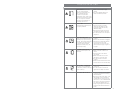
T R O U B L E S H O O T I N G
ERROR
WHAT DOES IT MEAN
WHAT CAN I DO?
Under Pressure: The Control
Unit can’t reach its target
maximum compression. This
often indicates that there
is a leak in the pneumatic
compression circuit, either in the
Connector Hose, Wrap or Control
Unit. Or it may occur because
the hook and loop fastener on
your Wrap has worn out.
• Make sure the Wrap is tightly
applied.
• Try using a different Wrap and
Hose to isolate the problem.
Deflation Error: The Control Unit
has detected that the Wrap has
not properly deflated.
• Turn the Control Unit off.
• If there is air left in the Wrap,
disconnect the Wrap from the
Connector Hose and manually
deflate the Wrap.
• Reconnect the Hose to the Wrap
and reapply the Wrap to the body.
• Turn the Control Unit on and press
play/pause.
Pump Performance Error : The
Control Unit has determined that
the fluid pump may be working
too hard. This could be caused by
ice or debris in the fluid circuit.
In order to prevent possible
damage to the fluid pump, the
unit will stop therapy.
• Turn the Control Unit off and back
on again.
• Check to see if the filter is clogged.
• If that does not solve the problem
turn the Control Unit off for
20 minutes (to let the pump cool
down) before turning it on again to
try again.
Low Flow: Control Unit has
detected an interruption in the
water flow.
• Check all hose connections
• Make sure there is water in the
ice box.
• Verify that the ice box filter is
not clogged.
• Make sure there are no kinks in
the Wrap or Connector Hose.
• Turn the Control Unit off and
on again.
• Disconnect and reconnect the hose
from the Control Unit and the Wrap.
Self-Test Error – Fluid Circuit:
The Control Unit has detected
an electronic problem in the fluid
circuit on start-up.
• Disconnect the Wrap from the
Control Unit.
• Turn the Control Unit off and on
again without a Wrap connected.
Control Unit will not turn on:
• Check to make sure the AC Adapter
is securely plugged into a working
electrical outlet.
• Press the power button again. If the
orange LED on the control panel
is illuminated, but the Control Unit
will not turn on, call 1.888.426.3732
from the U.S. and from outside the
U.S. dial 001.510.868.2100. If no
orange or green light is illuminated,
check that the electrical outlet has
power.
19
T R O U B L E S H O O T I N G
ERROR
WHAT DOES IT
MEAN
WHAT CAN I DO?
Air Pressure Sensor:
The Control Unit
has detected a
problem calibrating
the pneumatic
compression circuit
on start-up.
• This is most likely to occur if you have restarted
Self-Test Error –
Air Pump: The
Control Unit has
detected an electronic
problem in the air
circuit on start-up.
• Disconnect the Wrap from the Control Unit.
• Turn the Control Unit off and on again without
a Wrap connected.
Dry Pump: The
Control Unit has
detected a dry pump.
In order to prevent
possible damage to
the fluid pump, the
unit will stop therapy.
• Make sure there is water in the ice box.
• Verify that the ice box filter is not clogged.
• Make sure there are no kinks in the Wrap or
Connector Hose.
• Turn the Control Unit off and on again.
• Disconnect and reconnect the hose from the
Control Unit and the Wrap.
• Prime the Wrap using the following steps:
- Select “No Pressure.”
- Attach the largest Wrap available.
- Lay the Wrap open (not on the body).
- Run the System for 1 minute.
• Prime the System using the following steps:
- Disconnect the hose from the Control Unit.
- Now, look at the Wrap connection location
on the Control Unit. On the top valve,
push the white prong in so that it is even
with the metal connector.
- Make sure you are not fully covering the
opening in the prong.
- Push start, and water should squirt out of
the valve.
- Restart the System.
Over Pressure:
Indicates that the
Control Unit has
exceeded the target
pressure.
T H E
G A M E
R E A D Y
D I F F E R E N C E
T H E
G A M E
R E A D Y
D I F F E R E N C E
the System with an inflated Wrap attached.
• Detach the Wrap and try again.
• Turn the Control Unit off and back on.
• Apply the same Wrap more tightly.
• Apply a different Wrap.
Game Ready™ was built upon the concept that the principles behind spacesuit
technology could be used to develop an injury treatment system. As a designer for
the National Aeronautics and Space Administration (NASA) and an inductee into the U.S.
Space Foundation’s Hall of Fame, our founder helped pioneer the technology involved
in controlling pressure and temperature within a flexible garment. In 1998, we began
working with athletes, athletic trainers, doctors, and veterinarians to expand breakthrough
discoveries into the realm of sports medicine for both people and animals.
R E G I S T E R
Y O U R
P R O D U C T
Please complete your Warranty Registration for both the Game Ready Control Unit
and the Wraps online at www.gamereadyveterinary.com. The Wrap registration card is
packaged with the Heat Exchanger of each Wrap. You must register within 30 days from
the date of purchase in order to receive warranty service.
Let us know what you think of our products. We’d love to hear from you.
Game Ready
CoolSystems Inc.
1201 Marina Village Pkwy, Suite 200
Alameda, CA 94501
In the United States call toll-free:
1.888.GameReady
1.888.426.3732
Outside of the U.S. call:
001.510.868.2100
www.gamereadyveterinary.com
18
3
C L E A N I N G
C O N T I N U E D
CARRY BAG
The Carry Bag should be cleaned using a soft cloth or brush and a mild detergent.
Febreeze™ or the equivalent can be used on the Bag if desired. If the carry bag has
a biological material on the surface, Sterifab™ may be used to decontaminate those
surfaces.
Be sure to test any product on a small portion of the Bag to make sure that it will not
damage the Bag.
M A I N T E N A N C E
Inspect and clean or replace the ice box filter as necessary. Remove the filter by rotating
it counter clockwise. No product maintenance should be performed by the user. If your
Game Ready System requires maintenance, please contact Game Ready Customer
Service; from the U.S. call toll-free at 1.888.426.3732, from outside of the U.S. call
001.510.868.2100.
S T O R A G E
When you are done using the System for the day:
• Unplug the AC Adapter and the Connector Hose from the Control Unit.
• Push the door release button to open the door.
• Carefully dump the ice and water into the sink.
• Wipe off any excess water.
• Store the Control Unit in the Carry Bag or in another safe location. Store the Control Unit
with the lid fully open to allow the interior to dry and preserve the ice box seal.
• Remember that your Game Ready Control Unit is a valuable piece of equipment and
should be treated like a laptop computer, with great care.
Storage Temperature Conditions: 1o - 50o C (33o - 122o F)
Relative Humidity: 10% - 95% non-condensing
Caution: Do not keep in extreme hot or cold temperatures (above 122°F or below 33°F).
Do not leave in a hot or freezing car. Do not leave the Control Unit in direct sunlight.
The UV light may damage or discolor the Control Unit.
S P E C I F I C A T I O N S
Size: 16.25” length x 7.75” width x 9.25” height (413 x 197 x 235) mm, not including
carrying case
Weight: 7.3 lb. empty, approximately 18 lb. full of ice and water
Pressure level: cycles from 5mm Hg up to 75mm Hg
AC power: 100-240 V~, 50-60 Hz, 1.0A
DC input: 12V/2.5 A
A C C E S S O R I E S
The Game Ready Control Unit can be used with any of the following accessories:
• Any Game Ready Wrap. Wraps made by any other manufacturer CANNOT be used with
this system.
• A Game Ready supplied Power Supply (Ault Model MW128 or GlobTek Model
GTM-21097-5012) and Hospital Grade Power Cord
• A Game Ready Connector Hose (Not included) • A Game Ready Carry Bag
• A Game Ready supplied battery and charger
4
17
I N D I C A T I O N S
C L E A N I N G
CONTROL UNIT
The exterior of the Control Unit and the visible interior surfaces of the ice box can be
cleaned with a soft cloth and one of the following cleaning agents:
• Mild detergent
• 5% Bleach solution
• 6% Hydrogen peroxide
• 70% Isopropyl alcohol
DO NOT USE
• Phenolic-based disinfectants (such as Amphyl).
• Quaternary Ammonium (such as Virex)
• Any solvent-based cleaners on the Control Unit. Doing so will damage the
plastics and will void your warranty.
• Abrasive materials to clean the Control Unit. Doing so will damage the
plastics and will void your warranty.
Caution: The Control Unit is not a waterproof device. Do not apply a direct stream of any
liquid onto the Control Unit, submerge the Control Unit, or allow any liquid to pool on the
surface of the front panel of the Control Unit.
Procedure:
• Follow the manufacturer’s instructions and precautions for the cleaning agent you select.
• Apply the selected cleaner to a soft cloth and wipe down all surfaces of the Control Unit.
• Allow the Control Unit to dry thoroughly before storing it in the bag.
• The Control Unit should be cleaned as needed.
F O R
U S E
• Follow the recommendations of your veterinarian.
The Game Ready System combines cold and compression therapies. It is intended to
prevent injuries, treat post-surgical and acute injuries to reduce edema, swelling, and pain
where cold and compression are indicated.
G E N E R A L
W A R N I N G S
A N D
P R E C A U T I O N S
Thank you for choosing the Game Ready System. To assure you have the best experience
possible, please be sure to read the entire User’s Manual prior to use of the product.
WARNINGS
• Improper placement or prolonged use of Game Ready could result in tissue
damage such as frostbite.
• During the course of Game Ready therapy, the treatment provider should monitor
the tissue surrounding the treated region or the extremities of the treated limb for any
abnormal appearance, increased swelling, or pain. If any of these signs present, or any
changes in skin appearance occur (such as increased redness, discoloration, or other
noticeable skin changes), you are advised to discontinue use and consult a veterinarian.
• The Game Ready Wrap is not sterile; do not place directly against open wounds, sores,
rashes, infections, or stitches. May be applied over dressing.
CONNECTOR HOSE
• The Game Ready wraps are available in multiple configurations but are not intended
for all possible uses. Use caution when selecting a particular wrap for use
on anatomic regions other than that for which the wrap is indicated and closely
supervise the animal’s status.
We do not recommend the use of Quaternary Ammonium (such as Virex).
• To avoid the risk of electrical shock, do not remove any panels from the Control Unit.
For all servicing and repair, please contact Game Ready Customer Service; from the
U.S. call toll-free at 1.888.426.3732, from outside the U.S. call 001.510.868.2100.
Opening the case will void the Game Ready warranty.
The Connector Hose can be cleaned using a soft cloth and one of the following:
• Mild detergent
• 70% Isopropyl alcohol
DO NOT USE:
• Phenolic-based disinfectants (such as Amphyl).
• Any solvent based cleaners on the Connector Hose. Doing so will damage
the plastics and will void your warranty.
• Abrasive materials to clean the Connector Hose. Doing so will damage the
plastics and will void your warranty.
• Any petroleum based lubricants on the Connector Hose. Doing so will
damage the o-rings and will void your warranty. If lubrication is required, the use of
silicone spray is recommended. The following silicone sprays have been successfully
tested with our o-rings:
• DuPont Teflon Silicone Spray (DuPont Part# DS0614101)
• 3M Silicone Spray (3M Part# 62-4678-4930-3)
• 500 PSI Silicone Pump Spray (Game Ready Part# 302056)
• To avoid the risk of electrical shock, always turn off the System and disconnect the
power cord from its electrical outlet when not in use or before adding or emptying
ice and water.
• Do not use any adapter other than that provided by Game Ready. Use of other adapters
may result in electrical shock and will void the Game Ready warranty.
WRAPS
Gently remove Heat Exchanger from the Sleeve. Hand wash the sleeve in cold water,
using a mild detergent or antibacterial soap. Do not use fabric softener. Hang to dry.
If needed, the external surface of the Heat Exchanger may be cleaned by wiping down
with commercial non-bleach cleaning wipes or hand washed using a very small amount of
mild detergent or antibacterial soap. DO NOT MACHINE WASH. Periodically run Hydrogen
Peroxide through your Game Ready System to keep the interior of your wrap clean.
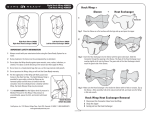
Refer to the Wrap Use Guide for more specific Wrap care instructions.
16
5
PRECAUTIONS
U S I N G
• Caution: This product is for veterinary use only and is not indicated for human use.
• Caution: Always attend the animal while the Game Ready Veterinary System is being
used, in the case that the animal needs to be quickly disconnected from the Control Unit.
STEP 11:
• Do not operate the System without any water in the ice box.
• Never operate the System with damaged power cords or Connector Hoses, or other
mechanical damage, or if the unit is otherwise not fully operational.
• Do not pour hot water into the ice box. The System was not designed to operate, and
has not been tested, with hot water.
G A M E
R E A D Y
S Y S T E M
You can choose to operate in either Manual Mode or Program Mode.
Manual Mode allows you to adjust time and pressure settings.
Program Mode allows you to choose one of six programs that provide
treatment for a set time then sleep (no treatment) for a set time,
continuously, at a specific pressure setting. The unit will default to
Manual Mode.
Manual Mode:
Set the time by pushing the +/- buttons.
• Do not pick up the Control Unit by the lid. Carry using the handle only.
• Do not use other manufacturers’ wraps with the Game Ready System.
Set the pressure by pushing the pressure button. You can select
from 4 pressure settings: No pressure, Low Pressure (5-15 mmHg),
Medium Pressure (5-50 mmHg), High Pressure (5-75 mmHg).
• Do not operate the Control Unit without a Connector Hose attached.
• Be careful not to trip over the System’s power cords and Connector Hose, or use the
product where these are likely to trip an animal.
• The Game Ready Control Unit is a veterinary medical device. Handle it with the same
care as you would a laptop computer. Do not drop it, kick it or otherwise abuse
it unnecessarily. Such abuse will void all Game Ready warranties. Do not place the AC
Adapter or battery pack inside the ice box for storage or transport.
Y O U R
Program Mode:
Push the program button to enter Program Mode. In Program
Mode, the unit will operate continuously according to the selected
program. You will need to add ice peridically for optimal cooling.
In addition to the precautions listed above, additional warnings and safety precautions
are posted throughout this manual. Read and carefully follow these instructions prior to
operating the System.
You can select from the following programs: (Push the Program
Button to scroll through the available programs.)
Program
Program
Program
Program
Program
Program
Program
STEP 12:
1: 30 minutes on, 30 minutes sleep. No pressure.
2: 30 minutes on, 30 minutes sleep. Low pressure.
3: 30 minutes on, 30 minutes sleep. Medium pressure.
4: 30 minutes on, 60 minutes sleep. No pressure.
5: 30 minutes on, 60 minutes sleep. Low pressure.
6: 30 minutes on, 60 minutes sleep. Medium pressure.
d: Drain Mode. Please refer to page 9 in this manual
for details.
Press play/pause button.
NOTE:
To operate the Game Ready System, you do not need to remove it from the Bag. Simply
unzip the Bag’s main compartment and end panel. Fill the ice box with ice and water.
Attach the Connector Hose and the AC Adapter to the end panel of the Control Unit and
plug the AC Adapter into an electrical outlet.
6
15
U S I N G
STEP 7:
Y O U R
G A M E
R E A D Y
S Y S T E M
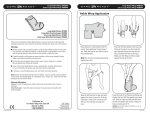
Apply the selected Wrap (consult the Use Guide for each Wrap for application
instructions).
Warning: Do not place directly against open wounds, sores, rashes,
infections, or stitches. May be applied over clothing or dressing.
Caution: If applying the same Wrap to another animal, make sure the
Wrap is deflated before the next application.
STEP 8:
Connect the smaller end of the Connector Hose to the Wrap. Make sure
you hear it click. To disconnect, simply press the button and remove the
connector from its port.
Click
Disconnect Button
If you have any problems with the set-up of your Game Ready System, please contact
Game Ready Customer Service; from the U.S. call Toll-free at 1.888.426.3732, from
outside of the U.S. call 001.510.868.2100.
Warnings:
• Follow the recommendations of your veterinarian.
• Improper placement or prolonged use of Game Ready could result in tissue
damage such as frostbite.
• For additional warnings and precautions, please refer to pages 5-6 of this manual.
STEP 9:
STEP 10:
14
Press the power button. The screen should light up and the
Control Unit should beep once. The power indicator light
should turn from orange to green.
Adjust the temperature by turning the temperature knob. Turning
the knob right, toward 3 snowflakes, will provide more cold therapy.
Turning the knob left, toward 1 snowflake, will provide less cold
therapy.
D E V I C E
C L A S S I F I C A T I O N
Protection against electric shock (5.1):
The Game Ready System is considered to be Class I (protective earth) when connected to
the Ault Model MW 128 power supply, and Class II (double insulated) when connected to
the GlobTek Model GTM-21097-5012 power supply.
Protection against harmful ingress of water (5.3):
This product provides ordinary protection against ingress of water.
Degree of safety in the presence of flammable anesthetics or oxygen (5.5):
Not suitable for use in an oxygen enriched environment or in the presence of flammable
anesthetics.
Electromagnetic interference:
This equipment has been tested and found to comply with the limits for medical devices
in IEC 60601-1-2:2001. These limits are designed to provide reasonable protection against
harmful interference in a typical medical installation. This equipment generates, uses and
can radiate radio frequency energy and, if not installed and used in accordance with the
instructions, may cause harmful interference to other devices in the vicinity. However,
there is no guarantee that interference will not occur in a particular installation. If this
equipment does cause harmful interference to other devices, which can be determined by
turning the equipment off and on, the user is encouraged to try to correct the interference
by one or more of the following measures:
• Reorient or relocate the receiving device.
• Increase the separation between the equipment.
• Connect the equipment into an outlet on a circuit different
from that to which the other device(s) are connected.
• Consult the manufacturer or field service technician for help.
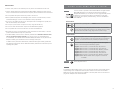
Powered by Direct Current
Type BF Applied Parts
Attention: Consult accompanying documents before use.
Manufacturer
7
D E S C R I P T I O N
O F
D E V I C E
U S I N G
Connect the AC Adapter to the Control Unit and the grounded electrical outlet.
The power indicator light (orange color) on the Control Unit should illuminate.
If it does not illuminate, check to make sure that the AC Adapter is firmly
connected in all locations and that the outlet is receiving power. If necessary,
try an alternate outlet or power supply. If the light is still not illuminated and
the Control Unit will not turn on, please contact Game Ready Customer
Service; from the U.S. call toll-free at 1.888.426.3732, or from outside of the
U.S. call 001.510.868.2100.
50/10
40/5
ºF/ºC
p
Slee
Time
Run
Time
Bath
Ice p.
Tem
Power Cord
Welcome
Packet
Control Unit
Note: The Control Unit should be powered up prior to attaching a Wrap.
Wrap
Heat Exchanger
S Y S T E M
STEP 5:
55/13
45/7
R E A D Y
Place the Control Unit in the location where you plan to use it.
The Control Unit should only be used in the upright orientation as shown.
The Control Unit will leak if placed on its side.
Wrap
Avg. p.
Tem
High
Med
Low
Off
G A M E
STEP 4:
AC Adapter
sure
Pres
Y O U R
Sleeve
AC Adapter
Game Ready System: The following items are included in your Game Ready System: a
Control Unit, an AC Adapter, a Power Cord, and a Welcome Packet. In addition to these
items, a Hose, Heat Exchanger and Sleeve are required to operate the system. These items
may be purchased seperately.
to electrical outlet
Volume
Pressure Backlight
Pressure
Indicator
Average Wrap
Temperature
Pressure
Off
Low
Med
High
Average
Wrap Temp.
55/13
Power
STEP 6:
Connect the larger end of the Connector Hose to the Control Unit. Make sure
you hear it click. To disconnect, simply press the button and remove the
connector from its port.
50/10
45/7
Program
40/5
ºF/ºC
Play/
Pause
Sleep
Time
Temperature
Knob
Disconnect
Button
Coldest
Wrap Temp.
Run
Time
C/F(Celsius/Fahrenheit)
Coldest Wrap
Temperature
Subtract Add
Time
Time
MODES OF OPERATION
(Manual Mode)
Manual Mode: The System defaults to this mode, and allows the user to adjust time and
pressure settings.
Program Mode: This mode allows the user to choose one of six programs that provide
treatment for a set time then sleep (no treatment) for a set time, continuously, at a specific
pressure setting.
8
Click
Connector Hose
to Wrap
13
U S I N G
Y O U R
G A M E
R E A D Y
S Y S T E M
Warning:
Your Game Ready Control Unit should be plugged into a grounded electrical outlet prior to
operation.
Precautions:
• Failure to properly follow the set-up instructions may result in inadequate therapy.
• Unplug the Control Unit from the electrical outlet prior to filling the Control Unit with ice
and water.
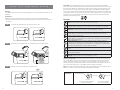
STEP 1:
Push the door release button to open the ice box door.
Drain Mode: This mode allows a user to connect a Hose with a special Hose Adapter
to the unit, enter Drain Mode and have the unit empty the water out of the ice box through
the Hose. Drain Mode can be accessed by pressing the program key and toggling through
all six programs. To empty water in the System while in Drain Mode, press the program
key until you reach Drain Mode, attach the Hose Adapter to the Connector Hose, place the
Hose Adapter over a sink, and press the play button. Drain Mode will run the Control Unit’s
fluid pump for up to six minutes (long enough to fully empty the ice box). Drain Mode is
indicated by the following icons:
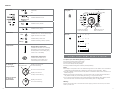
BUTTONS
Power: Use this button to turn the Control Unit on and off.
Program: Use this button to select one of the available Programs or to return
to Manual Mode. See page 15 in this manual for more information on Programs.
Play/Pause: Use this button to start or pause a treatment or to stop.
STEP 2: Fill the ice box completely with ice, and at least ½ full with clean water.
Add Time: Use this button to add time in Manual Mode (does not work in
Program Mode). You can add up to 90 minutes. Treatment must be paused
in order to add or subtract time.
Subtract Time: Use this button to reduce time in Manual Mode (does not work in
Program Mode). You can subtract up to 90 minutes. Treatment must be paused in
order to add or subtract time.
Pressure Selection: Use this button to select one of four pressure settings:
No Pressure, Low Pressure (5-15 mmHg), Medium Pressure (5-50 mmHg), and
High Pressure (5-75 mmHg). Pressure selection is not available in Program Mode.
Treatment must be paused to change pressure settings.
Volume: Use this button to select the option of sound or no sound. Alarms will still
sound.
C/F Button: Use this button to select either Celsius or Fahrenheit on
the temperature display.
Backlight: Use this button to turn the backlight on or off.
Adjusting Temperature: The Control Unit cools the Wrap by pumping water from the ice
box into the Wrap; therefore, the temperature of the Wrap will never be colder than the
water in the ice box. If the knob is turned to three (3) snowflakes, the Control Unit will
provide the coldest possible therapy based on the temperature of the water in the ice box.
Turning the knob towards one (1) snowflake will provide less cold therapy.
1
2
STEP 3: Close the ice box door. Make sure you hear it click.
Click
Note: The unit should always be started on full cold (3 snowflakes), and run that way for at
least two minutes. The user can then adjust temperature as desired.
Adjusting
Temperature:
Temperature Knob
Less Cold
More Cold
Full Cold
Turn knob counter-clockwise
for less cold therapy
12
Turn knob clockwise
for more cold therapy
9
DISPLAY
Status bar:
Off (Mute)
Displays pressure
When selecting
a program:
Pressure
On
Low
Off
Med
High
Average Wrap
Temp.
55/13
50/10
45/7
Indicates selected mode
40/5
ºF/ºC
Indicates unit is paused
Sleep
Time
Indicates unit is playing
Other Icons:
Error
Indicates an error. See troubleshooting
pages 18-19 for error codes
Displays amount of
time unit will sleep
Pressure:
Indicates sleep mode time
Battery
Temperature:
Average Wrap Temperature:
Indicates an estimate of the average
temperature of the Wrap (averages
the temperature of the water going
into and out of the Wrap)
Sleep time
count-down bars
Displays the amount of
run time remaining
Run time count-down bars
Displays the amount
of sleep time remaining
When the System
is running in
Manual Mode:
10
Off
Low
Med
High
Off
Low
Med
High
Off
Low
Med
High
Off
Low
Med
High
Coldest Wrap
Temp.
Displays amount of
time unit will run
Indicates remaining battery capacity
Coldest Wrap Temperature:
Indicates an estimate of the
temperature of the water going
into the Wrap from the ice box
When the System
is running in
Program Mode:
Run
Time
Displays the amount
of run time remaining
U S I N G
Y O U R
G A M E
R E A D Y
S Y S T E M
To operate your Game Ready System, you need:
• A Control Unit filled with ice and water
• A Game Ready supplied power supply
• A Connector Hose (Sold seperately)
• A Wrap (a Heat Exchanger and Sleeve) (Sold seperately)
Notes:
• The Wrap is comprised of an inner Heat Exchanger and an outer Sleeve. The combination
of Sleeve and Heat Exchanger is referred to throughout this manual as a “Wrap.”
• The Game Ready Control Unit should be placed on a stable surface (such as the floor or a
table) during use.
• Please note that using the System in an environment with a high ambient temperature
may affect its ability to provide adequate cooling, or may limit the ice life.
• If you will be using the System with a Game Ready supplied battery pack please consult
the instructions for use that accompanied that battery pack for usage details.
Warning:
Position the Control Unit to minimize the risk of tripping over the Control Unit, Connector
Hose or power cord.
11