1
CALIBRATION
STANDARD SOLUTIONS: A Standard Solution has a known
conductivity and ppm value. Your meter was calibrated at the factory
using Myron L Company 442-1000 Standard Solution. You can keep
your meter accurate by using this same Standard Solution (see
ACCESSORIES).
How often you calibrate your meter depends on how much you
use it. For once a day use, recalibrate it every three months.
CHECKING CALIBRATION
1. Test a sample of Myron L 442-1000 Standard Solution.
CAUTION: Throw the Standard Solution away as you use it. Don't
put the used samples back in the bottle.
2. If the Meter does not indicate the 1000 ppm value on the Standard
Solution bottle's label, first clean the cell. For directions on how
to do this see CELL CUP inside. Rinse the cell thoroughly and
test the Standard Solution again. If the Meter still does not indicate
the correct value, recalibrate it as described below.
TO RECALIBRATE THE METER
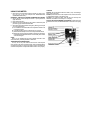
1. Remove the bottom cover using fingernails or a small screwdriver
to loosen the front or rear edge. Identify the Calibration Control
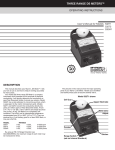
and "S" button (see photo below left) so you can find them by
touch while calibrating.
2. Test another sample of the Standard Solution (be careful to not
splash solution inside the meter).
3. Adjust the Calibration Control until the meter indicates the 1000
ppm value on the Standard Solution label.
4. Press the internal "S" button. Compare the meter reading to the
INTERNAL STANDARD value on the meter's bottom label. If
they are noticeably different, mark the new value in place of the
old one.
NOTE
The feature described below is intended as a quick field calibration
check. It is not a replacement for calibration with Myron L 442-1000
Standard Solution.
INTERNAL STANDARD: An INTERNAL STANDARD value for each
meter is on the label on the bottom cover of each meter. Use it
between normal calibrations as a field check of your meter's accuracy.
To verify your meter's calibration:
1. Press the internal "S" button.
2. If the reading matches the INTERNAL STANDARD value on the
bottom label, your meter is in calibration. If not, see FIELD
CALIBRATION.
FIELD CALIBRATION/MAINTENANCE
1. Remove the bottom cover using fingernails or a small screwdriver
to loosen the front or rear edge.
2. Press the internal "S" button and adjust the Calibration Control
until the meter reading is the same as the INTERNAL STANDARD
value.
NOTE:
If the meter will not adjust to the INTERNAL STANDARD value the
battery should be replaced. See MAINTENANCE above right.
3. Replace the bottom cover.
MAINTENANCE
BATTERY CHECK
Press the internal "S" button. If the pointer does not reach the
INTERNAL STANDARD value, readjust the "S" (see FIELD
CALIBRATION). If the pointer will not reach the INTERNAL
STANDARD value, the battery should be replaced.
BATTERY REPLACEMENT
Detach the battery connector. Pull on the plastic strap to remove
the battery. Replace with a fresh zinc carbon or alkaline 9 volt battery.
Reinsert the plastic strap to secure battery. Replace the bottom cover.
CELL CUP
Self-conditioning of the built-in electrodes occurs each time the
button is pressed with a sample in the cell cup. This ensures
consistent results each time. With some samples a small downward
swing of the pointer is a result of this conditioning action. This action
is powerful and removes normal films of oil and dirt. However, if very
dirty samples - particularly scaling types - are allowed to dry in the
cell cup, a film will build up. This film reduces accuracy. When there
are visible films of oil, dirt, or scale in the cell cup or on the electrode,
scrub them lightly with a small brush and household cleanser. Rinse
out the cleanser and the meter is ready for accurate measurements.
WATER INSIDE THE METER
Your Myron L meter is a rugged instrument and will withstand water
exposure around its cell, meter movement, and switches. However,
care should be taken to keep water from leaking in around the bottom
cover. It is not sealed (to prevent condensation from forming).
If the water is relatively clean (i.e., tap water or better), and there
are only a few drops inside the meter, dry it as described below.
Large amounts of water, or corrosive or very dirty solutions will almost
certainly damage the meter movement or electronics. Such meters
should be returned to the Myron L Company for repair.
To dry your meter:
1. Shake excess water out of the inside of the meter.
2. Dab the exposed surfaces dry with an absorbent cloth or tissue.
Avoid pushing any water into the Calibration Control or either of
the switches.
3. Air dry the meter in a warm area with the bottom cover off. Allow
several hours for thorough drying.
If the water entered through a leak in the case or cell, or if the
instrument shows erratic readings or other unusual behavior, return
it to the Myron L Company for servicing.