1
Menu Operation
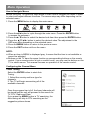
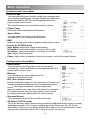
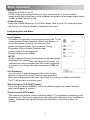
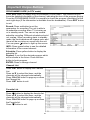
Configuring the Timer Menu
• Clock
You can display either the DTV Signal stream Time or set
the System Time.
• Off Time
Set the time for the TV to switch off.
• On Time
Set the time for your TV to turn on.
The TV must be in standby mode for the On Time to work.
• Sleep
Select the time to turn the TV to standby
mode automatically.
• Auto Sleep
Select the Auto Sleep time you want.
The TV will enter into standby mode automatically when
there is no any operation in set time (the set time is
4 hours when leave the factory).
• Time Adjust
If the signal time is different from the actual time, you can adjust it through this
function.
• Time Zone
Display the current time zone.
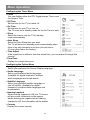
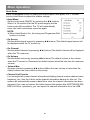
Configuring the Option Menu
• Language
Select your preferred On Screen Display language.
• Audio Language
Select your preferred audio language.
(Available for digital channels if multiple
audio languages are broadcasted.)
• Subtitle Language
Select your preferred subtitle language or
turn off subtitle. (Available for digital
channels if multiple subtitle languages are
broadcasted.)
• Hearing Impaired
When hearing Impaired is ON, the TV screen
will give some information to the people
whose hearing are impaired when Hearing
Impaired is Off, the information will be hidden.
• Country
Display the current country.
15