1
1. SKP16C26 StarterKit Plus Software Install
a) Please insert the enclosed CD into your computer’s CD-ROM drive. The CD should auto-start, displaying the SKP Picker
Install Screen. Follow the directions in the installation windows to install the Renesas tools.
i) If the installation screen does not appear, please browse the CD root folder and double-click on “SKP-Installer.exe”.
– Do not plug the In-Circuit Debugger into your USB port until instructed to in Section 2, USB Driver Installation.
– The installation process requires a valid SKP serial number. Locate the label on the PC board or on the side
of your box.
– During the installation process, you may be prompted to restart your computer. Do not restart until the SKP installer
has completed installation of all of the software items.
– During the SKP install, dialog boxes will appear asking if you would like to install the development tools or not.
The development tools will allow you to evaluate the different features of the M16C/26 MCU and the software
development environment (debugger, compiler, linker, etc…).
2. USB Driver Installation
When you connect the RTA-FoUSB-MON In-Circuit Debugger (ICD) to your computer for the first time, Windows will recognize
this new device and will request the drivers. Follow the steps below to install the drivers. Administrator privileges are
required to install the driver on a Windows 2000/XP machine.
a) Plug one end of the USB cable into the RTA-FoUSB-MON and the other into a USB socket on your PC (the supplied USB
cable is keyed for the mini USB connector on the FoUSB-MON). The “Found New Hardware Wizard” window will appear.
b) If using Windows XP, skip to step 2 c); otherwise, click <Next>.
c) Verify the (Recommended) option is selected and click <Next>.
d) Select “Specify a location” and leave all other options un-checked; click <Next>.
e) Browse to the “C:\MTOOL\FOUSB\USB Drivers” folder.
f) Select the file “fousb.inf” and click <Open>.
g) Click <Ok> to install the USB Driver.
– For Windows XP, a dialog box is displayed warning that the driver has not been tested for Windows XP compatibility.
Please disregard this warning and continue driver installation.
– You can verify that the driver is installed properly by looking at how fast the Status (yellow) LED is blinking on the
RTA-FoUSB-MON. If the driver is loaded correctly, the Status LED will be blinking once every second. If not, the Status
LED will blink 2-3 times a second (if you continue having driver installation problems, see SKP16C26 User’s Manual,
Appendix A. Troubleshooting).
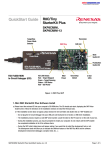
SKP16C26
PC with Windows® 98SE,
2000, Me, or XP
Mini USB
Cable
ICD
10-pin
Target
Cable
Figure 2. SKP16C26 System Connectivity
SKP16C26 StarterKit Plus QuickStart Guide
Downloaded from Elcodis.com electronic components distributor
Page 2 of 5