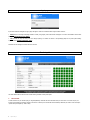
1
2.
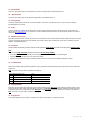
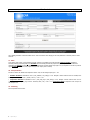
Voltage
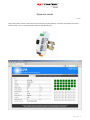
Shows the power supply voltage for Sigma. Nanos could have different voltages than Sigma, if different power supplies were used for trackers.
3.
Current
It is sum of all currents from all Nanos (trackers - motors). This is used for monitoring maximum allowed current, which can be set in »controller«
tab. Suitable when there is one power supply for many trackers and has some current limitation. Trackers will be controlled not to exceed a
maximum permited current. Sigma's current is too low and is not included.
4.
Wind speed, solar radiation and temperature
Shows weather data directly from external sensors, if they were in use. Setup can be done in »weather« tab.
5.
Angle A, B
Currently calculated angle of the Sun. Zero degrees mean true South, negative values are East side, positive West side. For one and two axis
trackers.
6.
Destination A, B
Calculated number which is send to tracker's network. It is strongly depended on a geometry in use. Destination has diagnostic purpose.
7.
Operating mode
Informs in which mode Sigma (and trackers) are.
Tracking mode means normal following the Sun. Calculations are proper. If motor does not run and there are no errors, it could be, that Sun is
still not inside the moving range of the tracker geometry (morning, afternoon).
♦
Night mode means that trackers are moved into night position and will not track the Sun, while the Sun is below the horizon. Night mode times
can be set in “Controller” tab (see chapters 13, 14).
♦
Wind mode is automatically entered when there is too high wind outside and tracker needs to be moved into the wind safe position. For this
feature wind sensor must be installed and parameters need to be set (“weather” tab).
♦
8.
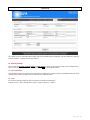
Tracker status
Each tracker represent one cube, coloured according to the status of that tracker (to clear status, see chapter 25):
♦
Green: tracker is OK.
♦
Red: tracker has some errors and therefore it is not moving
♦
Grey: there is no response from that tracker. Status can not be read. Communication problem or no power on the tracker.
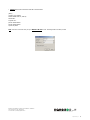
By clicking on each cube a pop-up window opened showing current values and descrption of the status.
Sigma user manual_rev1
3