1
Placement Test
SOS Placement Test Installation Guide
Installing Switched-On Schoolhouse®
Switched-On Schoolhouse® 2012 (SOS) is easy to install on your computer since most of the components install themselves. The
others have wizards to walk you through each step.
Before inserting the installation disc, make sure your computer meets the recommended minimum system requirements, ensuring
that the program can run at it’s best.
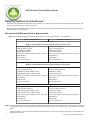
Recommended Minimum System Requirements
Note: Only English language versions of Microsoft® XP, Vista, and Windows 7 are supported.
Minimum Requirements
Optimal Performance
XP - Service Pack 3
MUST be installed PRIOR to installing Switched-On Schoolhouse 2012
Microsoft IE 7 or higher
1 GHz or higher processor
512 MB Memory (RAM)
1 GB hard drive space
1024 X 768 or higher resolution monitor, 16 bit color
CD-ROM drive
Adobe Reader
Printer recommended
Microsoft IE 7 or higher
1 GHz or higher processor
1 GB Memory (RAM)
1 GB hard drive space
1024 X 768 or higher resolution monitor, 16 bit color
CD-ROM drive
Adobe Reader
Printer recommended
Vista - Service Pack 1
MUST be installed PRIOR to installing Switched-On Schoolhouse 2012
Microsoft IE 7 or higher
1 GHz or higher processor
1 GB Memory (RAM) (2GB for 64-bit)
1 GB hard drive space (2GB for 64-bit)
1024 X 768 or higher resolution monitor, 16 bit color
CD-ROM drive
Adobe Reader
Printer recommended
Microsoft IE 7 or higher
1.5 GHz or higher processor
2 GB Memory (RAM)
2 GB hard drive space
1024 X 768 or higher resolution monitor, 32 bit color
CD-ROM drive
Adobe Reader
Printer recommended
Windows 7
Microsoft IE 7 or higher
1 GHz or higher processor
1 GB Memory (RAM) (2 GB for 64-bit)
1 GB hard drive space (2GB for 64-bit)
1024 X 768 or higher resolution monitor, 16 bit color
CD-ROM drive
Adobe Reader
Printer recommended
Microsoft IE 7 or higher
1.5 GHz or higher processor
2 GB Memory (RAM)
2 GB hard drive space
1024 X 768 or higher resolution monitor, 32 bit color
CD-ROM drive
Adobe Reader
Printer recommended
Note: The requirements in the first row of the table above are minimal. Depending on the configuration of your computer, you may find
you need to run SOS on a computer that exceeds these requirements, giving you more memory and a faster processing
speed.
Vista & Windows 7 Aero Users: We strongly recommend that you use a computer meeting the requirements for
optimal performance.
2 • SOS Placement Test Installation Guide