1
4.3 Mounting
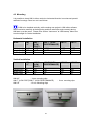
It is possible to insert HMI in either vertical or horizontal direction in enclosures/ panels/
cabinets/ housings. Panel cut out is as follows.
If HMI to be installed vertically, while creating new project in HMI editor software,
select resolution carefully at the beginning and then select the angle correctly during
HMI start up at the panel. Please refer section “Instrument” at “HMI startup” about how
to select angle for vertical installation.
Horizontal Installation
Model
HMI
4.3”
Width (mm)
Height (mm)
Depth (mm)
123
99+1
51
+1
HMI 7”
(LOW
COST)
+1
197
141+1
51
HMI 7” (HIGH
HMI 10”
PERFORMANCE)
+1
197
141+1
51
+1
310
248+1
50
HMI 15”
+1
367
289+1
50
Vertical Installation
Model
HMI
4.3”
Height (mm)
Width (mm)
Depth (mm)
99+1
123+1
51
HMI 7”
(LOW
COST)
141+1
197+1
51
HMI 7” (HIGH
HMI 10”
PERFORMANCE)
HMI 15”
141+1
197+1
51
289+1
367+1
50
HMI 4.3”
: 4 nos. mounting clips
HMI 7” (LOW COST)/HMI 7” (HIGH PERFORMANCE)
HMI 10”
: 10 nos. Mounting clips
HMI 15”
: 12 nos. Mounting clips
21
248+1
310+1
50
: 6 nos. mounting clips