1
CODESSA PRO User’s Manual
2.2.3 Property Window
The item selected determines the contents of the property window. If a folder or
list is selected in the workspace, the number of artifacts contained is displayed. If an
artifact is selected, the property window will provide varying information, depending on
the type of artifact.
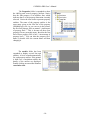
The picture on the left shows the
information given in the property
window when a structure artifact is
selected. It will also show the
experimental value and calculated value of
the property of the current structure, which
are not shown in the picture now.
The picture shows the information provided
when a descriptor artifact is selected in the
workspace.
When a property artifact is
selected, information from the prp file is
displayed.
This
includes
name,
comments and the number of structures.
The property window for correlation
artifacts lists the details of the correlation.
Details displayed include the properties used in
the correlation.
- 21 -