1
User Guide
SERIAL COMMANDS
RS-232 Commands
! - Command, ? - Query, ~ Response
<cr> = 0x0D Hex / 13 Decimal
20 = Fixed Address for DXW. DXW will not pass through serial to other port when it sees it is a
specific command intended for the DXW. Command will work without address, however, the
response will appear on both ports.
Please note if you are working with firmware below revision 1.21 the fixed address will not work
and must be sent without the “20”.
Command
String Format
Baud Rate Setup
Command
!20BRy,a,b<cr>
Button LED Setup
!20BLy,z1,z2 <cr>
Button Push
!20BPx<cr>
Information
y = port number = 1 or 2 (1 is HDBaseT, 2 is Rear Port)
a = baud rate = 2400, 4800, 9600, 19200, 38400, 57600,
115200
b = bits, parity, stop = 8N1, 8E1, 8O1
Factory Default is 9600 8N1
y = 1-3 (1 is VGA, 2 is HDMI, 3 is DisplayPort)
z1 = Released LED State = R, G, B, N (R = Red, G = Green,
B = Blue, N = None)
z1 = Pushed LED State = R, G, B, N (R = Red, G = Green,
B = Blue, N = None)
Factory Default is off for release and blue for push.
x = 1-3 (1 is VGA, 2 is HDMI, 3 is DisplayPort) power up
default is HDMI
Auto Sense mode
!20ASx<cr>
X = 1 (on) or 0 (off)
AWV™ Mode
!20AWx<cr>
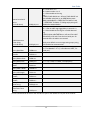
USB Length
!20ULx<cr>
X = 1 (on) or 0 (off) Factory Default is disabled.
X = 1-3
1 = < 197’ (60m)
2 = 180’ (60m) to 220’ (67m)
3 = 220’ (67m) to 262’ (80m)
Distances longer than 220’ require cable grade 6A or
higher.
HDMI IN HDCP Disable
(v1.21 & above)
!20DHx<cr>
X=0 (Normal) or 1 (HDCP Input disable)
Button Press Disable
(v1.21 & above)
!20NPx<cr>
X=0 (Normal) or 1 (Disable Physical Button Press)
12
Factory Default is enabled.