1
User Guide
APPENDIX 2
Firmware Update
DXW-3 Update Utility
DXW-3 Update Software requires a serial cable connected in a null (RX to TX, TX to RX, GND to GND)
configuration to a PC. The firmware can be updated directly at the DXW-3 rear serial port or it can be
updated via HDBaseT receiver RS-232 port. To force update mode press and hold both front buttons
while applying power. Then use utility to transfer file which can be found at www.auroramm.com
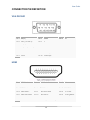
PC DB-9 RS-232 Serial Port
18