1
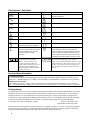
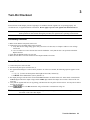
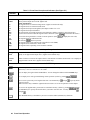
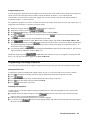
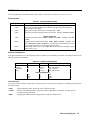
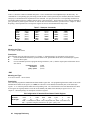
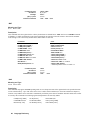
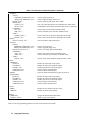
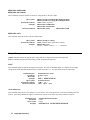
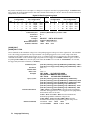
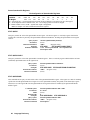
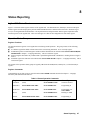
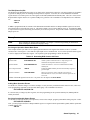
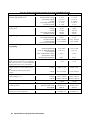
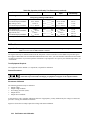
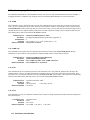
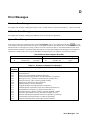
Error
No.
El
E2
E3
E4
E5
E6
E7
Display
FP RAM
FP ROM
EE CHKSUM
PRI XRAM
PRI IRAM
PRI ROM
GPIB
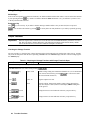
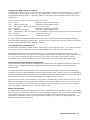
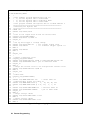
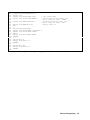
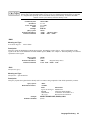
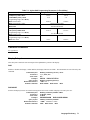
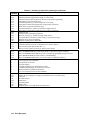
Table 3-3. Power-On Selftest Errors
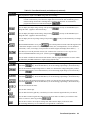
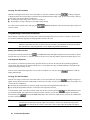
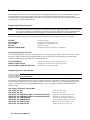
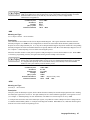
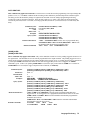
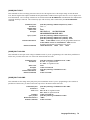
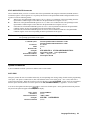
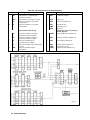
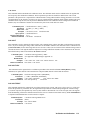
Failed Test
Error
Display
No.
SEC RAM
Front Panel RAM
E8
SEC ROM
Front Panel ROM checksum
E9
SEC 5V
EEPROM
E10
TEMP
Primary external RAM
Ell
Primary internal RAM
DACS
Primary ROM checksum
E12
GPB R/W to serial poll
Failed Test
Secondary RAM
Secondary ROM checksum
Secondary 5 V ADC reading
Secondary ambient
thermistor reading
Secondary VDAC/IDAC
readback
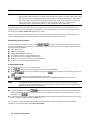
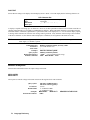
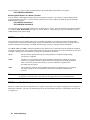
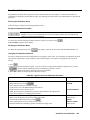
Checksum Errors.
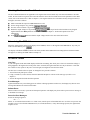
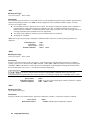
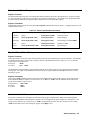
If the display shows EE CHKSUM, the Agilent SAS has detected an EEPROM checksum error. A checksum error can
occur due to the following conditions:
■ Excessive number of write cycles to an EEPROM (see "Supplemental Characteristics"). This condition, which would
appear only after extended use, is not recoverable and requires service.
■ Loss of ac input power during a checksum calculation. This condition, which is very unlikely, is recoverable.
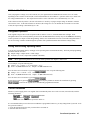
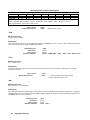
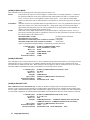
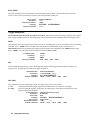
You may be able to recover from a checksum error by writing to the EEPROM while the Agilent SAS is in the calibration
mode. To do this, proceed as follows:
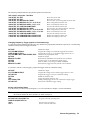
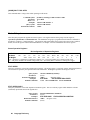
1. Enable the calibration mode by pressing
.
2. PASWD will appear on the display.
. The Cal annunciator will go on.
3. Press the number keys corresponding to the password, followed by
Note
On new equipment, the default calibration password corresponds to the model number (such as 4350). See
appendix B under Changing the Calibration Password for more information.
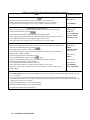
4. Save any operating state (for example, press
5. Turn the power off and then back on.
).
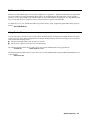
A normal display free of error messages should appear. If not, the Agilent SAS requires service.
Runtime Error Messages
Under unusual operating conditions, the VOLT or AMPS display may show +OL or -OL. This indicates that either the
output voltage or current is beyond the range of the meter readback circuit, or that the value that is programmed is out of
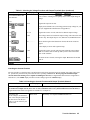
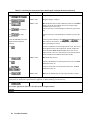
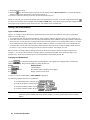
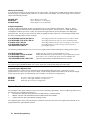
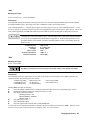
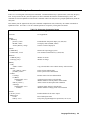
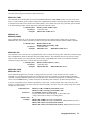
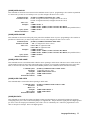
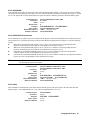
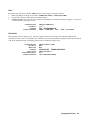
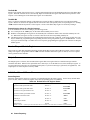
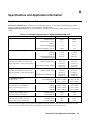
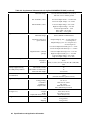
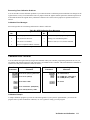
range. Table 3-4 shows other error messages that may appear at runtime.
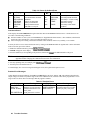
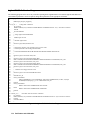
Display
EE WRITE ERR
SBUF FULL
SERIAL DOWN
STK OVERFLOW
28
Table 3-4. Runtime Errors
Meaning
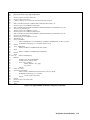
Display
UART FRAMING
EEPROM status timeout
UART OVERRUN
Message too long for buffer
UART PARITY
Failed communication with
front panel
Front panel stack overflow
Turn-On Checkout
Meaning
UART byte framing error
Overfilled UART receive buffer
UART byte parity error panel