1
Optica Reader
USER’S MANUAL
4.4.3.
Doc. 600.6000
Rev.00
Date:24-March-2004
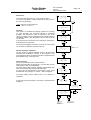
Quantitative assay set up
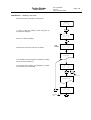
Number of the blank replicates
Select the assay to be processed and enter the number of blank
repetitions. The instrument automatically calculates the absorbance
average of the blank samples of the strip under process. Press 0 to
jump the blank processing.
Press ENTER to confirm the displayed option then the next menu is
displayed.
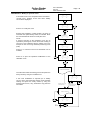
Number of standards
A new calibration (increasing or decreasing) curve can be set using
up to 12 standards. The instrument curve is a point-to point type on
the optical density-concentration relation.
To set the number of standards for the instrument calibration, enter
the wanted number and press ENTER.
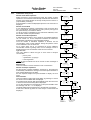
Number of standard repetitions
A calibration with a single or up to maximum 12 standard repetitions
can be carried out; for the dispensed standard the instrument
automatically calculates the optical densities average.
Once the number of standards repetitions is entered, set the
concentrations value of each calibrator. During this phase a control
on the calibration curve is carried out.
For a correct assay set up it is requested to set the calibrator
concentration values in growing order, if not a message of error is
displayed and a new concentration value has to be entered.
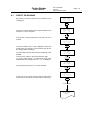
Type of curve
This menu allows to select the type of curve used to compute
concentration:
point to point.
4 parameters (Log logit) *.
Linear regression.
* Note: at least 4 calibrator has to be choosen to take advantage of
this selection
Measure unit
This menu allows to choose measure unit for concentration.
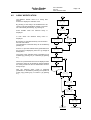
Number of sample repetitions
Set the number of sample repetitions, maximum 12; the instrument
automatically calculates the average of the read optical densities of
each sample dispensed in the plate.
Set the required samples and press ENTER to display the next
menu.
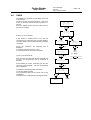
Filter selection
This menu allows to select and set the filters; by pressing F1 and F2
the value of each available filter is displayed.
Once selected the primary filter press ENTER it then the next menu
to select and set the secondary filter is displayed.
To set the absorbance monochromatic mode press ENTER when
the message “Filt. sec. = no” is displayed
The plate shaking before reading has to be selected, if necessary.
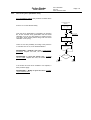
At the end of the set up phase of a new assay it is memorized and
displayed.
Page 21
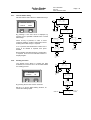
BLANK REPET. = _
( from 0 to 12)
-------------------------------F1
F2
ENTER
# OF STANDAR. = _
( from 2 to 12 )
-------------------------------F1
F2
ENTER
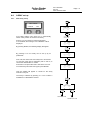
STAND. REPET. = _
( from 1 to 12 )
-------------------------------F1
F2
ENTER
CONC. 1 = _
CONC. 1 = _
CONC. 2 = _
-------------------------------F1
F2
CONC. 3 = _
----CONC. n = _
ENTER
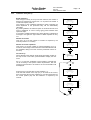
CURVE: POINT
accept
next
-------------------------------F1
F2
F2
SELECT CURVE
F1
SAMPLE REPET. = _
( from 1 to 12)
-------------------------------F1
F2
ENTER
PRIM. FILTER= 450
next
previous
-------------------------------F1
F2
ENTER
SEC. FILTER = NO
next
previous
-------------------------------F1
F2
ENTER
SHAKING?
yes
no
-------------------------------F1
F2
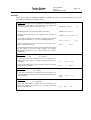
N.1 "NAME"
copy
modify
-------------------------------F1
F2
F1
AFTER COPYING,
GO BACK TO
THE ASSAY SET UP
PROCEDURE
F1/F2
F2
GO TO PROCEDURE
ASSAY MODIFICATION
(SEE TABLE A3
AND PARA. 5.5)