1
How to run:
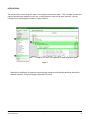
Upon opening the report, the user will be prompted (see Figure 2) to specify parameters which control
the data returned by the report. Once the user has provided these parameters by responding to the
user prompts, a green check-mark will appear next to each field to indicate that a selection has been
made. The user should then single-click the “Run Query” button to generate the report.
Figure 2
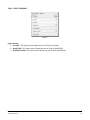
The three user prompts contained in this report are:
1. EDA Provider: The user should select the EDA provider to run the report as, or leave it at the "Default Provider-" if the default has the appropriate security level.
1. Enter Start Date: The user should enter (or select from the calendar) the first day of the report
date range.
2. Enter End Date PLUS 1 Day: The user should enter (or select from the calendar) the day
immediately following the last day of the report date range.
3. Select Provider(s): Click the “refresh list” icon and wait for the left window to refresh. Now
select the providers to include by highlighting them in the left window and moving them into
the right window using the right selection arrow.
Bowman Systems
ART Gallery Report
Page 3 of 14
0243 – Data Completeness Report Card
v9