1
Touch and hold: Touch and hold the screen for 2 or
more seconds to open the control options for the current
screen.
Slide/swipe: Slide the screen up, down, left and right to
view information, applications, web pages, etc.
Drag: Touch and hold the selected application and drag
it to another location.
Pinch/spread: Place two fingers on the screen and draw
them apart to zoom in or together to zoom out.
Rotate: Automatically change the screen
orientation from portrait to landscape by turning
the phone sideways.
1.8 Using the hard keys
(Back key): Touch the back key to view the screen
for the previous operation.
(Home key): Touch the home key to view the
homescreen. Press and hold the home key to open
Google Now TM.
(Menu key): Touch the menu key to display or hide
the menu of applications. Press and hold the menu key
to view the multiple applications.
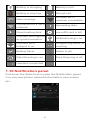
1.9 Notification and status icons
No signal
No network
Signal strength
Aeroplane mode
HSDPA in use
EDGE in use
GPRS in use
Roaming
GPS is on
Bluetooth is on
5