1
CONNECTING THE KEYBOARD
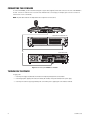
To connect the KBD5000, you must attach the USB Type B-to-Type A cable (supplied) from the USB connector on the rear of the KBD5000 to
the USB connector on either the front or rear of the Pelco VCD5202 video console display. (For example, Figure 5 shows a connection to
either the rear or front of a VCD5202.)
NOTE: Any USB cable attached to the keyboard must be no longer than 16.4 feet (5.0 m).
VCD5202 FRONT PANEL (BEZEL OFF)
OR
VCD5202 REAR PANEL
Figure 5. Connecting the KBD5000 to a VCD5202
TURNING ON THE POWER
To apply power:
1. Insert the power supply cord (attached) into the back of the keyboard, and tighten the connector barrel.
2. Insert the appropriate supplied power cord (USA standard, UK standard, or European standard) into the power supply.
3. Insert the power cord into a properly grounded power socket. When power is applied, lights on the modules illuminate.
10
C1620M-G (11/10)