1
20
REMOTE CONTROL
REMOTE CONTROL
The descriptions in this manual are based on the buttons on the remote control.
Please read this manual carefully and use the TV correctly.
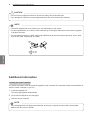
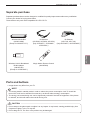
To replace batteries, open the battery cover, replace batteries (1.5 V AAA) matching
and ends to the label inside the compartment, and close the battery cover. Be
sure to point the remote control toward the remote control sensor on the TV.
To remove the batteries, perform the installation actions in reverse.
CAUTION
Do not mix old and new batteries, as this may damage the remote control.
yy
In Analogue TV and some countries, some remote control keys may not work.
yy
Image shown may
yy
differ from your TV.
LZ9600/LW9500/LW7700/LW6500/LW5700
ENERGY
AV MODE
INPUT
2 ABC 3 DEF
GHI
7PQRS 8 TUV 9 WXYZ
LIST
0
PQRS
Q.VIEW
P
3D
ENGLISH
ENG
DELETE
P
A
G
E
MUTE
SMART TV
3D OPTION
Q.MENU
or
INPUT
TV/
RAD
2 ABC 3 DEF
4 GHI 5 JKL 6 MNO
4 GHI 5 JKL 6 MNO
7PQRS 8 TUV 9 WXYZ
7PQRS 8 TUV 9 WXYZ
Q.VIEW
LIST
MARK
3D
DELETE
0
Q.VIEW
MARK
FAV
CHAR/NUM
FAV
P
CHAR/NUM
P
A
G
E
RATIO
DELETE
MUTE
P
MUTE
SMART TV
3D OPTION
SMART TV
Premium Home
Q.MENU
Premium Home
Q.MENU
OK
OK
BACK GUIDE EXIT
BACK GUIDE EXIT
REC
LIVE TV
INFO
RATIO
REC
LIVE TV
INFO
Q.MENU
P
A
G
E
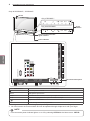
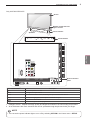
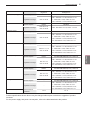
Turns the TV on or off.
Adjusts the brightness of the screen to reduce energy
consumption .
Selects an AV mode.
Changes the input source; Turns the TV on .
Selects Radio, TV and DTV programme.
Enters letters and numbers.
Accesses the saved programme list.
Returns to the previously viewed programme.
Adjusts the volume level.
Selects a menu or option.
Accesses your favourite programme list.
CHAR/NUM
Switches between Letter and Number input modes.
3D
RATIO
DELETE
MUTE
P
PAGE
Premium
Home
Q. MENU
3D OPTION
Navigation buttons
(up/down/left/right)
OK
BACK
GUIDE
INFO
EXIT
Coloured buttons
TELETEXT BUTTONS
Used for viewing 3D video.
Resizes an image.
Deletes letters and numbers.
Mutes all sounds.
Scrolls through the saved programmes.
Moves to the previous or next screen.
Accesses the Premium menus.
Accesses the Home menus.
Accesses the quick menus.
Used for viewing 3D video.
Scrolls through menus or options.
LIVE TV
SAVING
0
DELETE
REC
RATIO
INFO
TV/
RAD
LIST
P
A
G
E
RATIO
BACK GUIDE EXIT
LV5500/LV3700/LV370S
1
CHAR/NUM
OK
REC
2 ABC 3 DEF
WXYZ
Q.VIEW
SMART TV
BACK GUIDE EXIT
1
TUV
Premium Home
OK
AV MODE
MNO
MUTE
Premium Home
ENERGY
DEF
JKL
FAV
CHAR/NUM
LIVE TV
ABC
MARK
FAV
INPUT
INPUT
LIST
MARK
AV MODE
AV MODE
TV/
RAD
4 GHI 5 JKL 6 MNO
SAVING
AV MODE
INPUT
TV/RAD
1Alphanumeric
2 3
but4tons
5 6
7 8 9
LIST
0
Q.VIEW
+ -P
MARK
FAV
SAVING
1
ENERGY
LV5500/LV3700/LV370S
ENERGY
TV/
RAD
SAVING
LZ9600/LW9500/LW7700/LW6500/LW5700
(POWER)
ENERGY SAVING
INFO
SUBTITLE
Control buttons
( , , ,
,
)
LIVE TV
REC
SIMPLINK
Selects menus or options and confirms your input.
Returns to the previous level.
Shows programme guide.
Views the information of the current programme and screen.
Clears all on-screen displays and return to TV viewing.
These access special functions in some menus.
These buttons are used for teletext.
For further details, see the ‘Teletext’ section.
Recalls your preferred subtitle in digital mode.
Controls the Premium contents, DVR or Smart Share menus or
the SIMPLINK compatible devices (USB or SIMPLINK or DVR).
Return to LIVE TV.
Use to adjust DVR menu.
Accesses the AV devices connected to the TV;
Opens the SIMPLINK menu.