1
ASSEMBLING AND PREPARING
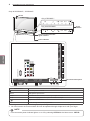
Only 32/42/47LV37**
11
/DVI
USB Apps
USB IN
H/P
Screen
IN 2
/DVI
IN 3
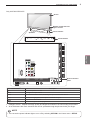
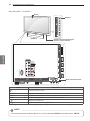
Remote control and intelligent1 sensors
/DVI
IN 1 (ARC)
Power indicator
Speakers
P
HOME
OK
Only 32/42/47LV370S
Except for 32/42/47LV370S
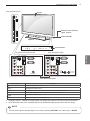
LAN
AUDIO IN(RGB/DVI)
AUDIO IN(RGB/DVI)
ENG
ENGLISH
LAN
Touch buttons2
INPUT
COMPONENT
IN
COMPONENT
IN
AUDIO OUT
RS-232C IN (CONTROL & SERVICE)
2
1
RGB IN (PC)
AUDIO OUT
RS-232C IN (CONTROL & SERVICE)
AV IN 2
R
ANTENNA / CABLE IN
OPTICAL DIGITAL
VIDEO L/MONO AUDIO R
L
AUDIO
AV IN 2
R
VIDEO L/MONO AUDIO R
L
AUDIO
1
RGB IN (PC)
VIDEO
VIDEO
2
OPTICAL DIGITAL
13/18V
700mA Max
LNB IN
Satellite
ANTENNA
/ CABLE IN
Rear Connection panel
Touch button2
Description
/I
Turns the power on or off.
INPUT
Changes the input source.
HOME
Accesses the Home menu, or saves your input and exits the menus.
OK ꔉ
Selects the highlighted menu option or confirms an input.
Adjusts the volume level.
vP^
Scrolls through the saved programmes.
1 Intelligent sensor - Adjusts the image quality and brightness based on the surrounding environment.
2 All of the buttons are touch sensitive and can be operated through simple touch with your finger.
NOTE
yy
You can set the power indicator light to on or off by selecting OPTION in the Home menu - SETUP.