1
Music Studio Lite
Version 2.0
User Manual
Music Studio is available on the App Store
for all iPhone, iPod Touch and iPad models
Table of Contents
Limitations of the Lite version
1
What’s new?
2
Version 2.0
2
Quick Start Guide
Playing on the keyboard and pads
Recording a song
Audio tracks and recording
Writing notes
Performance considerations
3
3
4
5
6
7
FAQ (Frequently Asked Questions)
8
Keyboard and Drum Pads
9
Keyboard
Scrolling and resizing
Key velocity
Keyboard Menu
Play button
Pause button (iPad only)
Loop button
Record button
Undo button
Display
Metronome button
Tempo Button (iPad only)
Keyboard layout button
Drum pads button
LiveTools button
Pitch wheel button
Accelerometer button
Sustain button
Chord buttons
Keyboard layout mode
Music Studio Lite 2.0
9
9
9
10
10
10
10
10
10
10
10
10
10
11
11
11
11
11
11
12
i
Octave buttons Fullscreen button (iPhone only)
Keyboard map
Keyboard rows button (iPhone only)
Key label button (iPhone only)
Drum pads
Pad edit button
Drum pad edit mode
Playhead mode
Rewind button
Transport buttons
Navigation map
Marker buttons
Instruments
Instrument list
Volume fader
Offset fader
Attack fader
Release fader
Keyboard row selector
Preview button
Keep attack/release times (iPad only)
Tracks
Track list
Track view switch
Scrolling and selecting
What is a track?
Track screen menu
Zoom buttons Tempo button
Ruler
Markers
Add bar button
Track Editor
Track list icons
Note area
Rearranging tracks and changing the color
Filter track
Add track buttons
Mute button
Solo button
FX button
Music Studio Lite 2.0
12
12
12
12
12
13
13
13
14
14
14
14
14
15
15
15
15
15
15
16
16
16
17
17
17
17
17
18
18
18
18
19
19
20
20
21
21
21
21
21
21
21
ii
Edit button
Duplicate button
Delete button
Pan knob/fader
Volume fader
Bar Editor
Selecting
New selection button
Change selection button
Clipboard (copy and paste)
Move button
Duplicate button
Repeat button
Transpose button
Volume button (iPad only)
Quantization button
Edit button
Delete button
Bar insert/cut button
Piano roll editor
Piano roll view
New selection button
Change selection button
Draw button
Move button
Duplicate button
Repeat button (iPad only)
Length button
Volume button
Quantize button
Delete button
Quantization popup
Note buttons
Dotted button
Triplet button
Quantize note lengths Soft (quantize 50%)
Wave editor
22
22
22
22
22
23
23
23
23
23
23
24
24
24
24
24
24
24
24
25
25
25
26
26
26
27
27
27
27
27
27
28
28
28
28
28
28
29
Save button
29
30
31
31
Music Studio Lite 2.0
iii
Wave editor menu
Record button
Load button
Delete file button (iPad only)
Selection buttons
Trim button
Delete button
Insert silence button
Reverse button
Normalization button
Fade buttons
Effects
Effect routing and busses
Common Controls
Power button
Limit to FX tracks checkbox
Default button
Preview button
Limiter
Master gain
Device volume
Reverb
Reverb size
Reverb brightness
Reverb stereo spread
Reverb mix
Reverb style
Reverb quality
Remember settings for each style (iPad only)
Filter
Resonance and frequency panel
Snap back
Filter type
Filter accelerometer control
Pitch
Pitch bend semitones
Pitch bend sensitivity
Pitch bend accelerometer control
Pitch bend record mode
Projects
File list
Beats
New project button
Load button
Music Studio Lite 2.0
31
32
32
32
32
32
32
32
33
33
34
34
34
34
34
34
34
34
35
35
35
35
35
35
35
35
36
36
36
36
36
37
37
37
37
37
38
38
39
39
39
iv
Transfer files to full version
Setup
39
40
General setup
40
Latency
40
40
40
41
41
41
Polyphony
Lock interface orientation
Continuous playhead movement
Remember reverb settings (iPhone only)
Keep attack/release times (iPhone only)
Keyboard setup
Snap to white keys
Allow touches between black keys
Allow touches on key borders
German key labeling
Velocity control
Mod wheel instead of pitch wheel (iPhone only)
Auto quantization
Transposition
Accelerometer setup
Threshold
Reactivity
Calibration
Metronome setup
Volume
Style
Count in
Troubleshooting Guide
Four steps to resolve most issues
There is a long delay between pressing a key and the audio output
Audio stuttering occurs
The audio output sounds noisy
Some notes end too early during playback
Music Studio Lite 2.0
42
42
42
42
42
42
42
42
42
43
43
43
43
44
44
44
44
45
45
45
45
45
45
v
Limitations of the Lite version
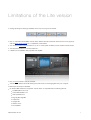
• Saving, exporting and sharing is disabled, hence only one song can be created.
• Only 11 instruments are available. The full version features 65 free instruments and 60 more in the in-app shop.
Visit the Music Studio website for a complete list of instruments.
• The number of audio tracks is limited to 2. Up to 127 tracks (audio and MIDI) can be created in the full version.
• The keyboard is limited to 5 octaves instead of 7.
• 3 Effects are not available: delay, equalizer and amplifier.
• Only 10 beats (instead of 100) are included.
• The full version features iTunes file sharing and a WiFi server for exchanging files with your computer.
• MIDI import and export is disabled.
• No external MIDI hardware is supported. The full version is compatible with the following devices:
• CoreMIDI (MIDI in and out)
• Line 6 MIDI Mobilizer I & II
• Akai SynthStation 25
• iRig, iRig Mic, iRig MIDI
• Ampkit Link
• Apogee Jam
• Alesis IO Dock
• iConnectMIDI
Music Studio Lite 2.0
1
What’s new?
Version 2.0
Released in October 2011
Audio tracks
• Microphone recording
• AudioCopy & AudioPaste
• iPod library and wav/mp3/AAC/ogg file import
• Waveform and audio-region editing
Major new features
• 35 new instruments: 24 synths, 9 orchestral and 2 drum kits
• Drum pads, chord pads and chord programming
• Pitch wheel, filter wheel
• File sharing via email and SoundCloud
• New look & feel
Hardware support
• iRig, iRig Mic, Ampkit Link, Apogee Jam, Alesis IO Dock, iConnectMIDI and Line 6 MIDI Mobilizer II
• Keyboard split point setting
• MIDI Thru
• Muted tracks can now be sent to MIDI OUT
• CoreMIDI compatibility improved
Many new small features
• Volume gradient in the piano roll editor
• Attack offset time configurable for every instrument
• Keyboard sustain button
• Export to compressed format (AAC)
• Export every track into a separate file
• Import songs and midi files (iPad only)
• Performance improvements and small enhancements in all areas
Music Studio Lite 2.0
2
Quick Start Guide
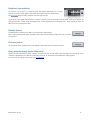
Playing on the keyboard and pads
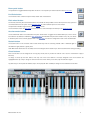
You can adjust the size and position of the keyboard by making a slide or pinch gesture anywhere on the menu bar. This also
works in the Tracks screen.
• Select the instrument of your choice from the Instruments screen and adjust the attack/release faders to change the fade in/
out times.
• Back in the Keyboard screen, tap the “...” button on the right to toggle the LiveTools menu. It contains a
switch for the pitch bend wheel (and filter wheel on the iPad) and assignable chord buttons.
• The blue pads button switches to chord pads if you selected an instrument, or drum pads if you
selected a drum kit. The pad edit mode allows you to rearrange, add and delete pads, and to assign
different chords or drum kit samples to each pad.
• In the keyboard view on the iPhone, tapping the keys button brings up a menu for switching to 2
keyboard rows, changing the key labels, and a keyboard map which allows you to position the
keyboard with a single tap. On the iPad, these buttons are always visible.
• Go to the Effects screen and play around with the reverb and delay settings. Adjust the reverb type and size to simulate a
specific room. High quality reverb sounds better but may introduce playback stuttering on older devices. Many synths sound
great with a delay set to 1/8 and dotted.
Music Studio Lite 2.0
3
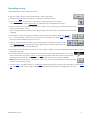
Recording a song
Follow these steps to create a song from scratch.
• Open the Projects screen and tap the New button to create a new project.
• Double tap the Beats folder, find a beat of your liking and double tap to load it.
• In the Tracks screen you will see one or more tracks containing the beat you just loaded.
If it’s too slow or to fast, tap the tempo button to change the tempo and signature of the song.
• Select the empty track (or tap the “+ Piano” button to create a new one), then go to the Instruments screen and
select your instrument of choice.
Note: The Keyboard and Instruments screens always apply to the active track, so make sure that your new track
is selected.
• In the Keyboard screen (or maybe you switched to pads), tap the record button, wait for the counter to
hit 1.1 and start playing. Hit the record or the stop button if you’re done, or hit the undo button right
away if you made a mistake and want to re-record.
• Switch to the Tracks screen to review what you just recorded. To repeat your melody or beat,
tap the bar editor button in the upper right corner, select the bars you just recorded and tap the
repeat button in the bottom menu several times.
• Switch back to the track editor and tap the “+ Piano” button to create a new track. Repeat the previous steps to record
something on this track.
• Let's assume that your song has a duration of 20 bars and you want to start recording at bar 10. Go to the
Tracks screen where you’ll notice 2 markers on the ruler. Move the left marker to the 10th bar and recording
will always start from there. Tap the loop button to loop the area between the two markers indefinitely.
Hint: Enable the loop button prior to recording to create a loop. You can even add tracks and switch instrument
to record a complex loop in one go.
• Tune the reverb in the Effects screen, try out the delay effect and maybe play around with the other effects. Set the master
gain fader in the Limiter screen so that the decibel meters barely hit the red areas for the loudest part of your song.
Music Studio Lite 2.0
4
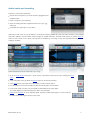
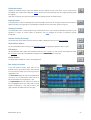
Audio tracks and recording
There are 4 ways to fill an audio track:
• Record with a microphone or an audio accessory plugged into the
headphone jack.
• Import a song from your iPod library
• Import an existing audio file. Supported formats: wav, mp3, ogg,
AAC (m4a)
• AudioPaste from other apps on your device
Note that an audio track can only be linked to one audio file. Opening another file in the wave editor will link it to the selected
audio track. Editing in the wave editor always changes the original audio file in the Audio folder, unless you tap the “Save as”
button to save it under a new name. This improves the workflow by not having to save and type filenames every time you
change an audio file.
Follow these steps to add an audio track to your song:
• Go to the Tracks screen and tap the “+ Audio” button at the bottom of the track list, which will open the wave
editor.
• In the wave editor menu, tap either the Record button for microphone recording
• or the Open button on the right, which will present you with the other options.
• Use the bottom menu in the wave editor to select and modify parts of the audio file.
• In the Tracks screen, the track you just created has been filled with an audio region.
Tip: Double tapping an audio track takes you right to the wave editor.
• Switch to the bar editor to move, duplicate, repeat, quantize or delete audio regions. In other words, the
bar editor treats audio regions as if they were notes.
Music Studio Lite 2.0
5
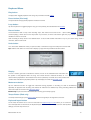
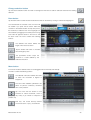
Writing notes
Notes can be drawn and edited in the piano roll editor, where they are represented as blocks.
• In the Tracks screen, tap the “+ Piano” button to create a new (MIDI type) track.
• Double tap the track or tap the Edit button to enter the piano roll editor.
• Tap the Draw button and select the desired note length. Move the crosshair and tap OK to draw a few
notes. Tap the OK button in the lower right corner when you’re done.
• By default, all notes are selected and every edit operation will modify all notes. Draw a rectangle over the notes to
select a few of them, then try out the buttons in the bottom menu: move, duplicate, length, velocity (volume),
quantize and delete.
• The undo button in the top menu is handy if you made a mistake. To redo, tap and hold the undo button for 2
seconds and tap Redo.
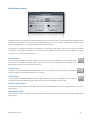
Quantization
It’s very hard to play in perfect timing. Notes you played on the keyboard will
often be off by a fraction of a beat, that’s where quantization comes in handy. It’s
best to try out different quantization parameters (1/8, then 1/16, maybe 1/32)
and hit the undo button if you are not satisfied with the result.
Red notes
Congruent notes, i.e. notes that are placed at the same position and have the
same length, are displayed red in the piano roll editor. In most cases they are
unwanted and should be deleted because they result in the note being played back with
increased volume.
Tip: Legato
If you want a melody sound legato, increasing the release time in the Instruments screen is
often faster than changing the length of all notes.
Music Studio Lite 2.0
6
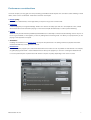
Performance considerations
The more complex your song gets, the more processing power Music Studio requires. This can lead to audio stuttering on older
device, which can be counteracted. These factors have the most impact:
• Reverb quality
Set it to low on older devices, and to high before you export a song to wav or AAC format.
• Polyphony
Lower the polyphony in the general settings. While a 2011 device can easily cope with 32 or 64 samples at a time, a 2008
device would have to be restricted to playing no more than 8 samples simultaneously in order to prevent stuttering.
• Latency
While ultra low provides the best possible keyboard feedback, it is also likely to introduce audio stuttering. Set it to very low or
low for a good tradeoff, or even higher if you are only editing tracks and writing notes. Low latency is only important if you are
playing on the keyboard or the pads.
• Animations
Disabling the animations in the general setup can improve the performance. The setting Continuous playhead movement
should be enabled only on last generation devices.
• Release time
In order to keep the polyphony low, reduce the release time of the tracks as much as possible on older devices. For example,
an guitar playing a fast riff with 1 second release time can drive up the polyphony to 32 or 64. Lowering the release time to
0.1s has a positive impact on performance with almost no impact on quality, depending on the music of course.
Music Studio Lite 2.0
7
FAQ (Frequently Asked Questions)
For support-related discussions, visit the forum at the Music Studio website.
How to maximize the sound quality of the instruments?
To get the most out of the high quality studio-recorded instruments, use earphones, headphones or external speakers. Most
instruments are designed for a specific tonal range, an E-Bass sounds as unreal in the 4th octave as a flute in the lowest octave.
Some instruments also benefit from a higher or lower release time.
• Wind and brass instruments sound best with a low release time and a large reverb.
• A great effect for synths is to set the delay to 1/8th and dotted.
• String instruments sound best with a medium attack time (around 0.5s) and a high release time.
• Guitars, plucked and percussion instrument can be played one-shot with a high release time of about 1s.
If I select and edit bars in the bar editor, why are some notes ignored?
Selected notes are colored dark blue. If you select a bar but a note starts a few ticks earlier than this bar, it will not be selected. If
possible, quantize the track, thereby aligning the notes to simplify further editing.
Why are the drum kit's sounds arranged in such a strange way?
This "strange way" is called the "General MIDI Level 1 Percussion Key Map". It is commonly used on nearly every hardware
keyboard/synthesizer to retain full MIDI compatibility.
Why is the default instrument volume 80% and not 100%?
This way you don't have to change all the other track's volumes if you want one track to be louder.
Why doesn't the preview button play a nice melody?
Because it would be distracting for a musician who has a melody in mind while composing music.
Which features will be included in future updates?
Please visit the forum on the Music Studio website for feature-related discussions.
Music Studio Lite 2.0
8
Keyboard and Drum Pads
Keyboard
Music Studio features a 85-key clavier (limited to 60 keys in the Lite version) capable of handling up to 5 simultaneous touches
(10 on the iPad). Not every instrument has the full tonal range, hence the number of playable octaves varies from instrument to
instrument.
If you are uneasy with the way the keys react to your touch input, the keyboard setup offers some handy preferences.
Scrolling and resizing
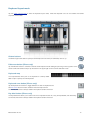
The keyboard position and width can be adjusted via the scroll and pinch gestures. Either tap the keyboard layout button or
simply do the gesture on the top menu bar: move one finger left or right to slide the keyboard, pinch with two fingers to adjust
the key width.
Key velocity
In the keyboard setup, enable Velocity to control the note volume with the touch position, the accelerometer or the mod wheel.
Music Studio Lite 2.0
9
Keyboard Menu
Play button
The play button toggles playback of the song. Stop rewinds to the left marker.
Pause button (iPad only)
The pause button simply pauses playback and doesn’t rewind.
Loop button
Tap the loop button to toggle looping the song (or more precisely, the area between the markers).
Record button
The record button start or stop a new recording. Tap it, then wait for the counter to hit 1.1 (this is called count-in)
and start playing. Hit the record or the stop button if you’re done, or hit the undo button right away if you made a
mistake and want to re-record.
Note: recording is always done on the selected track. To record with another instrument on top of your current song, create a
new track, select it and record.
Undo button
The undo button deleted the notes you just recorded, or reverts the song to the state prior to the last edit.
Tip: Hold the undo button for 2 seconds to display a popup with the possible undo/redo actions.
Display
The LCD contains gain bars to indicate the volume, the icon of the selected track’s instrument and
the position of the playhead within the song. The number format is measure-dot-beat, so “7.2”
means that the playhead is in the 2nd beat of the 7th bar (measure). The small dot on the bar below the
numbers also indicates the playhead position. Tap the display it to enter the playhead mode.
Metronome button
Tap the metronome button to toggle the metronome during playback or recording. Its state is remembered
separately for playback and recording. Per default, the metronome is enabled only during recording. Metronome
volume and style can be set in the metronome setup.
iPhone only: tap and hold the metronome button to bring up the tempo popup.
Tempo Button (iPad only)
The tempo button brings up the tempo popup where the song tempo and signature can be set.
Keyboard layout button
On the iPad, this button has a zoom icon because the keyboard layout mode allows you to scroll and
zoom the keyboard. On the iPhone, the keyboard layout mode also holds the keyboard rows and key label
settings, hence the keys in the icon.
Music Studio Lite 2.0
10
Drum pads button
The pads button toggles between keyboard and drum or chord pad input. See the section about drum pads.
LiveTools button
The LiveTools menu contains the pitch wheel, sustain and chord buttons.
Pitch wheel button
On the iPad, both the pitch bend wheel and the mod wheel are always visible. On the iPhone, there is only space for
one wheel and there is an option in the keyboard setup to switch between pitch and mod wheel.
The pitch bend wheel’s range can be set in the Effects screen.
The mod wheel controls the filter effect, but can be set to control the keyboard velocity in the keyboard setup.
Accelerometer button
The accelerometer button is located below the pitch bend wheel. It toggles the accelerometer input, which can be
recorded too. By default, it enables the pitch bend effect (and disables the pitch bend wheel in turn). Tilt your device
to bend the pitch of the currently played notes. The filter effect can also be configured to react to the accelerometer.
Sustain button
The sustain button in the LiveTools menu holds all the keys that are currently pressed until it it released again. It
simulates the right pedal of a grand piano.
Note: MIDI CC64 events are not recorded, but the note lengths are increased if you use the sustain button during recording.
Chord buttons
Each chord button can be configured to not only play chords, but any number of notes at once. Touch a chord button to play it
like a key.
To assign a chord, tap the SET button, then tap one of the chord buttons. The keys assigned to this chord button are
highlighted blue. Tap a key to assign or remove it from the chord. When you’re done, tap the set button again.
Tip (iPad only): if chord pads are enabled, tap a chord pad (with SET enabled) to assign it to the selected chord button.
Music Studio Lite 2.0
11
Keyboard layout mode
Tap the button with the keys to enter the keyboard layout mode, where the keyboard rows can be scrolled and resized
anywhere on the screen.
Octave buttons
The left and right octave buttons quickly scroll the keyboard one octave (12 semitones) down or up.
Fullscreen button (iPhone only)
Tap the fullscreen button to switches to the full screen keyboard mode. Sliding and pinching in the top portion of the
screen scrolls and resizes the keys. Tap the button in the upper right corner to exit the fullscreen mode.
Keyboard map
The map illustrates which part of the keyboard is currently visible.
Slide or tap it to quickly scroll the keyboard.
Keyboard rows button (iPhone only)
Tap the keyboard rows button to toggle between one and two keyboard rows.
See this section about the track created for the lower keyboard row.
On the iPad, this button is always visible in the Keyboard screen’s menu bar.
Key label button (iPhone only)
The key label button allows you to select one of the 4 key label modes: off, C only, all keys labeled, and colored key
On the iPad, this button is always visible in the Keyboard screen’s menu bar.
Music Studio Lite 2.0
12
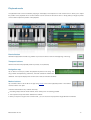
Drum pads
Depending on the instrument selected, the pads either play drum samples or chords.
Pad edit button
The pad edit button makes all the pads wiggle. Tap and move a pad to rearrange the pads, or tap the X in the
corner of a pad to remove it. The Plus button in the lower right corner adds a new pad, until the maximum number
of pads is reached.
Drum pad edit mode
If a drum kit is selected, each pad will play a different sample of the kit. Tap a pad to display the list of samples, where the ones
that are already mapped to a pad are greyed out.
Chord pad edit mode
If an instrument (as opposed to a kit) is selected, each pad plays a chord. Tap a pad and the bottom menu indicates the chord’s
key, octave, quality and inversion. These parameters can be configured arbitrarily.
Tip (iPad only): if the LiveTools menu with the chord buttons is visible, tap the SET button in the menu, tap a chord button, then
tap a pad to assign its chord it to the selected chord button.
Music Studio Lite 2.0
13
Playhead mode
The playhead mode can be accessed by tapping on the display in the Keyboard or Track screen menu. It allows you to adjust
the position of the playhead and to set the markers. Use the controls in the bottom menu or simply slide your finger anywhere
on the screen to adjust the position of the playhead.
Rewind button
Rewinds the playhead to the left song marker. Tap it a second time to rewind to the beginning of the song.
Transport buttons
Rewind and forward the playhead position by exactly 1 bar (measure).
Navigation map
Tap or slide on the map to position the playhead anywhere in the song. The
song markers are depicted by yellow lines, the areas outside the markers are
darkened. The map also displays the current track's notes as white dots and lines.
Marker buttons
Tap a marker button to set the left or the right song marker to the current playhead position. The markers
must be at least 1 bar apart.
There are several reasons why markers are handy:
• Recording always starts at the left marker, which makes punch-in recording possible.
• The loop button loops the section between the markers.
• When you export a song into wav or AAC format , you can choose to only export the range between the markers.
Music Studio Lite 2.0
14
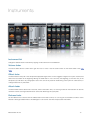
Instruments
Instrument list
Change the selected track's instrument by tapping an instrument from the scrollable list.
Volume fader
The volume fader sets the current track's gain from 0% to 100%. It has the same function as the volume fader in the track
editor.
Offset fader
The attack offset is the point in the sample where playback begins when a note is triggered. Imagine how a piano would sound
without the loud attack at the beginning. Moving the offset fader to 10% cuts away the beginning (i.e. the first 10%) of the
sample and you will hear a very strange piano sound. This can be very useful for transforming a slow synth into a lead sound, or
cutting the attack of any instrument.
Attack fader
The attack fader sets the attack time in seconds, which is the fade-in time, i.e. how long it takes for the instrument to reach its
maximum volume. Use longer attack times for soft sounds like strings and synth pads.
Release fader
Set the release time in seconds with the release fader. It’s the fade-out time, i.e. how long the sound fades out after a note is
released. Use longer release times to simulate legato or one-shot for drum kits and percussive instruments.
Music Studio Lite 2.0
15
Keyboard row selector
Tap the lower row to switch to 2 keyboard rows. This selector then allows you to switch
between the rows to select different instruments for the upper and lower keyboard row.
See this section about the track created for the lower keyboard row.
On the iPad, a lock beside the keyboard row selector indicates if the two keyboard rows are linked. If the lock is closed, the
settings (instrument, volume, attack and release time) of both keyboard rows will be held in sync. Every change you make will
affect both rows (meaning two tracks).
Default button
The default button resets the four faders to the instrument's default preset.
Note: If "Keep attack/release times" is disabled, this button is automatically pressed each time you select
an instrument.
Preview button
Tap the preview button multiple times to hear different notes played with the current instrument.
Keep attack/release times (iPad only)
Enable the Keep attack/release times checkbox to freeze the state of said faders while browsing the instrument list. If this
checkbox is disabled and you select an instrument from the list, its default attack and release time will be applied.
On the iPhone, this setting can be found in the general setup.
Music Studio Lite 2.0
16
Tracks
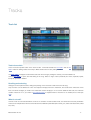
Track list
Track view switch
This is the most important button in the Tracks screen. It switches between the track editor and the bar
editor. These two editing modes are the key to Music Studio’s fast and easy editing workflow.
The track editor is designed to edit whole tracks and mix the song by setting the volume, pan and the effect bus.
Use the bar editor for quick, bar-wise editing of the song. Select a range of bars (measures) and move, duplicate, repeat,
transpose, quantize or delete it.
Scrolling and selecting
Analogous to the Keyboard screen, sliding and pinching on the menu bar scrolls and zooms the song.
Only one track can be selected at a time. The keyboard will play this track's instrument, the record button will record on this
track, and all the changes you make in the Instruments screen will apply to it. You cannot delete the first track, the maximum
number of tracks is 127. If you switch to two keyboard rows, a separate track for the lower row is created (more on this topic
here).
What is a track?
Think of a track as one instrumentalist in a band or an orchestra. It holds recorded notes, one instrument and some parameters.
There can be multiple tracks with the same instrument but different parameters (like volume, pan, attack and release time, effect
bus, color).
Music Studio Lite 2.0
17
Note: A recorded note places 2 events on a track: key-down and key-up (also called note-on and note-off). The position of an
event is stored with a resolution of 48 ticks per beat, which equals to 192 ticks per bar at a signature of 4/4, meaning that the
shortest note can be a 1/192th.
Track screen menu
The menu buttons to the left to the display, and the LCD featuring the playhead mode, are the same as in the Keyboard screen.
Zoom buttons
On the iPhone, the zoom button toggles the zoom mode, where the view can be scrolled and resized anywhere on
the screen. Tap or slide on the map at the bottom to quickly position the view. The map also displays the markers
as yellow lines.
On the iPad, there are 3 zoom buttons for zooming in, out and fully out with one tap.
Tempo button
The tempo button brings up the tempo popup where the song tempo and signature can be set.
Tap or hold the +/- buttons to change the tempo in the range of 40 to 240 bpm (beats per minute) with a precision of 0.1 bpm.
A faster way to set the tempo is to tap and slide the value on the display. An alternative tempo input method is to tap the Tap
Tempo button with the desired tempo at least two times. Hold down the Preview button to hear a metronome preview of the
current tempo and signature. The signature can be set to a value between 2/4 and 7/4. Most songs have a signature of 4/4,
meaning that 1 bar has 4 beats (i.e. the length of 4 quarter notes).
The tempo is also displayed to the left of the ruler. Double tap it to open the tempo popup.
Ruler
The numbers and the vertical lines on the ruler indicate the
measures (bars). The short vertical lines are the beats within each
bar. The ruler also holds the playhead (white vertical line) and the two markers. Slide anywhere on the ruler to position the
playhead. As you scroll the playhead left/right, a preview of the current position of the playhead is played back.
Music Studio Lite 2.0
18
Markers
The left and right song makers are located on the ruler and can be moved. The markers must always be
positioned at least 1 bar apart from each other. An alternative method for positioning the markers is via the
playhead mode.
There are several reasons why markers are handy:
• Recording always starts at the left marker, which makes punch-in recording possible.
• The loop button loops the section between the markers.
• When you export a song into wav or AAC format , you can choose to only export the range between the markers.
Add bar button
The plus icon appears on the right side of the screen if the ruler is scrolled to the end of the song. Tap it to extend the
song by one bar.
Music Studio Lite 2.0
19
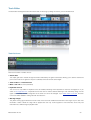
Track Editor
The track editor is designed to edit whole tracks and mix the song by setting the volume, pan and the effect bus.
Track list icons
Each track contains a number of icons:
• Volume bars
The output gain sent to the left and right channels is indicated by the green volume bars, allowing you to see the volume and
pan for each track at one glance. If the pan is centered, both bars have the same height.
• Track number and instrument icon
• Mute / solo / FX bus icons (see below)
• Keyboard row icon
The row icon is only visible if 2 keyboard rows are enabled, indicating which keyboard row the track is assigned to. If you
switch to two keyboard rows, a separate track for the new row will be created. Selecting a track will always assign it to the
upper row. However, the track assignment of the lower row cannot be changed. If you switch back to one row, the lower
row's track will be deleted if nothing has been recorded on it.
• Warning triangle
The yellow warning sign indicates that some notes on the track are outside the instrument's note range. Tap it to see more
information. Notes outside the range will be played back but may sound atypical for this instrument, since every real
instrument has a limited range of playable notes.
Music Studio Lite 2.0
20
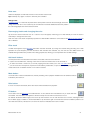
Note area
Notes are displayed as white lines and dots in the note area of each track.
Tip: Double tap any region of a track to enter the piano roll editor.
Orange notes
Congruent notes, i.e. notes that are placed at the same position and have the same length, are drawn
orange in the track list. In most cases they are unwanted and should be deleted because they result in
the note being played back with increased volume.
Rearranging tracks and changing the color
Tap and hold a track’s instrument icon for 1 second. A box will appear, instructing you to slide vertically to move the track or
horizontally to change the track’s color.
Note: The order of the tracks is especially important if a external MIDI hardware is connected and the MIDI IN or OUT channel is
set to TRACKS.
Filter track
The filter track appears only if filter effect automation has been recorded, by moving the crosshair during recording. The 2 lines
represent the cutoff frequency and the resonance. With the filter track selected, only the mute and the delete buttons are
enabled. Muting the filter track prohibits it from being played back, allowing you to experiment with new filter settings.
Add track buttons
The add piano track and add audio track buttons are located at the end of the track list:
• A piano track is a MIDI track, meaning a track with an instrument where notes can be recorded on.
• An audio track holds a wave form (a .wav file). Tapping this button takes you to the wave editor where
you can record from microphone, import from the iPod library, AudioPaste, or open an audio (wav/mp3/ogg/AAC) file.
These buttons are not visible if the limit of 127 tracks is reached.
Mute button
The mute button mutes the selected track, thereby excluding it from playback. Muted tracks are darkened and are
indicated by the mute icon.
Solo button
If one or more tracks are soloed, all the other tracks will be excluded from playback.
FX button
The FX button sets the effect bus of the selected track. In short, effects with FX enabled act only on tracks that have
FX enabled. The other effects are applied on all tracks except the ones with the crossed out FX icon.
Per default, all standard effects apply to the track. Tap the FX button once to mark the track as an FX track, meaning that also
the FX effects apply, in addition to the standard effects. Tap the button again to exclude the track from all effects (useful for raw
drum and base sounds). The blue FX icon next to the track icon indicates each track's FX state.
Music Studio Lite 2.0
21
Edit button
Tap the edit button with a piano track selected to enter the piano roll editor, or with an audio track selected to enter
the wave editor.
Tip: Double tapping a track has the same effect as tapping the edit button. The piano roll editor will also zoom in on the area
you double tapped.
Duplicate button
The duplicate button places a copy of the selected track directly beneath it, thereby copying its parameters and
recorded notes. If an audio track is duplicated, the linked .wav file is also duplicated and renamed, e.g.
RobotVoice.wav to RobotVoice 2.wav, so you can edit one track’s wave form without affecting the other one.
Delete button
The delete button shows a popup with the options to delete or clear a track.
• Clear deletes all of the track’s content (notes or audio regions) but leave the track in the list.
Note: Since an audio track must always have at least one audio region, the first one will remain even if you clear the track.
• Delete removes the track from the list. If it contains pitch bended notes, a checkbox for clearing only the pitch bend data
appears.
Pan knob/fader
The pan knob (or pan fader on the iPad) controls the track's stereo pan. Touch it and move your finger left or right to change the
selected track's pan. The LCD displays the current value (left is -127, center is 0, right is +127). You can also inspect the
changes by looking at the volume bars to the left of the track icon.
Volume fader
The volume fader displays and sets the track's volume. Its function is identical to the Instruments screen's volume fader. The
LCD displays the current value, ranging from 0 to 100%.
Music Studio Lite 2.0
22
Bar Editor
The bar editor is designed for quick, bar-wise editing of the song. Select any number of bars (measures) and move, duplicate,
repeat, transpose, quantize or delete it.
Selecting
In contrast to the track editor, tracks cannot be selected in the bar editor and the currently selected track is not highlighted.
Tapping a track's instrument icon selects all bars of the track.
New selection button
The left of the two selection buttons clears the current selection and starts a new one. Tap it, then draw a rectangle
on the note area in order to select bars. Selected bars are highlighted.
Tip: tap a track's instrument icon to select the whole track.
Change selection button
The second selection button adds or subtracts bars from the existing selection. Tap the button, then tap an
unselected bar to add it to the selection, or a selected bar to deselect it. Tap a track's instrument icon to (de)select
the whole track.
Clipboard (copy and paste)
The clipboard holds a selection of bars which is retained even if another project is loaded. To copy bars
from one song into another, make a selection, then tap and hold until the copy button appears. Tap copy,
load the other song and go to the bar editor again. Tap and hold where you want to paste the contents of the clipboard, then
tap the paste button.
Note: the clipboard buttons won’t show up if an audio region is selected.
Move button
In the move mode, the selected bars can be dragged around. The song length will increase if you move bars past
the end of the song.
The snap button, located to the left of the OK button, aligns the selection to bars if enabled, and allows free
movement if disabled, which is especially handy for adjusting the position of audio regions.
Music Studio Lite 2.0
23
Duplicate button
Tapping the duplicate button copies the selected bars and selects the new ones which can be moved around
immediately. The copied notes will appear orange until they are moved, because they are congruent (identical) with
the originals.
Note: Not moving the new notes will cause them to be played back with increased volume.
Repeat button
The repeat button copies the selected bars and automatically moves them to the right so that they start where the
selection ended. The song length is automatically increased if the new notes reach past the song end.
Transpose button
The transposition menu contains semitone and octave buttons to de- and increase the selected note’s keys by one
semitone or octave. An octave equals 12 semitones. The LCD displays the number of semitones currently
transposed.
Volume button (iPad only)
On the iPad, the volume button’s function in the bar editor is identical to the one in the piano roll editor.
Quantization button
Tap the quantization button to bring up the quantization popup for aligning the selected notes on a grid.
Edit button
Tap the edit button with a piano track selected to enter the piano roll editor, or with an audio track selected to enter
the wave editor. This button is disabled if the selection encompasses more than one track.
Delete button
The delete button deletes the notes in the selected bars.
Bar insert/cut button
In the bar insert/cut mode, whole bars can be
inserted and cut across all the tracks. Tap anywhere
in the note area to select a bar of the song, which is
highlighted in red.
The cut button deletes all notes in the selected bar
and cuts it out, i.e. shifts all later notes one bar to
left and decreases the song length by 1 bar.
The insert button inserts an empty bar to the left of
the red highlighted area. This means that the song
length is increased by 1 bar and all notes to the
right of the line are shifted one bar to the right.
Music Studio Lite 2.0
24
Piano roll editor
Piano roll view
In contrast to the track and the bar editor, the piano roll editor displays only one track. The ruler is still the same,
but the vertical axis now represents keys. The bright and dark stripes in the background make it easy to see if a
note is on a white or a black key. White horizontal lines between the B and C keys mark the octaves. Notes are
displayed as blocks, the color indicates the volume (velocity) from violet (silent) to green (default) to orange
(loudest).
Vertical zoom
Slide and pinch on the mini keyboard to scroll and zoom vertically. Tap the zoom button (to the right of the LCD) to
bring up vertical zoom buttons on top of the mini keyboard.
Red notes
Congruent notes, i.e. notes that are placed at the same position and have the same length,
are displayed red in the piano roll editor. In most cases they are unwanted and should be
deleted because they result in the note being played back with increased volume.
Pitch bend
Pitch bend is indicated by a line for each note block. Pitch bend can be recorded with the
pitch bend wheel or the accelerometer. However, once recorded it cannot be edited. To rerecord pitch bend for existing notes, select the overwrite recording mode in the pitch
section of the Effects screen.
New selection button
By default, all notes are selected and every edit operation will modify all notes. Tap the left selection button and
draw a rectangle over the notes to select a few of them. Selected notes are highlighted and the note range of the
whole selection is displayed in the LCD.
Music Studio Lite 2.0
25
Change selection button
Tap the second selection button and draw a rectangle over the notes to adds or subtracts notes from the existing
selection.
Draw button
Tap the draw button to enter the draw mode where notes can be drawn by moving a crosshair and tapping OK.
The note beneath the crosshair is the one which will
be created if you press the OK button. Move the
crosshair to the desired location and tap OK (next to
the crosshair) to create the note. The song length can
be increased by dragging the crosshair past the song
end. Press the rightmost button in the menu to exit
the draw mode. The menu contains the following
buttons:
The selected note button defines the
length of the note to be drawn.
Tap the dotted note button to increase
the note length by 50%.
The quantization button snaps the
crosshair to a raster defined by the
selected note button.
Move button
In the move mode the selected notes can be dragged around horizontally and vertically.
The menu contains the following buttons:
The selected note button defines the raster
on which the movement is aligned or
snapped to.
The OFF button disables quantization and
allows for (almost continuous) movement
with 1/192th precision.
Tap one of the the lock buttons to lock
horizontal or vertical movement, which is
very handy if you intend to transpose or
position only.
iPad only: The octave down/up buttons
move notes down or up by 12 semitones.
Music Studio Lite 2.0
26
Duplicate button
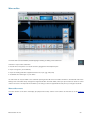
The duplicate button copies the selected notes and selects the new ones which can be moved around immediately.
The copied notes will appear red until they are moved, because they are congruent (identical) with the originals.
Note: Not moving the new notes will cause them to be played back with increased volume.
Repeat button (iPad only)
The repeat button copies the selected notes and automatically moves them to the right so that they start where the
selection ended. The song length is automatically increased if the new notes reach past the song end.
Length button
The buttons in the note length menu have the same functions as in the draw mode. Either tap a note button to set
the length of all selected notes, or move your finger horizontally in the note area to de- or increase the length.
Volume button
Tap the volume button and move your finger vertically in the note area (or move the fader below) to change the
note’s velocity (meaning volume).
The menu contains buttons and faders for more precise velocity editing:
• The average button on the left averages the velocities of all the selected notes and applies it to them.
• The gradient button toggles the velocity gradient mode, in which the two faders set the first and the last note’s velocity.
The LCD displays the average velocity of the selected notes, or the velocity range in gradient mode, ranging from 0 to 127
(default is 100). The note color indicates the volume from violet (silent) to green (default) to orange (loudest).
Quantize button
Tap the quantization button to bring up the quantization popup for aligning the selected notes on a grid.
Delete button
Deletes the selected notes.
Music Studio Lite 2.0
27
Quantization popup
Quantization is the most important step after recording because it corrects the timing. If the quantization raster (resolution) is one
quarter note, every selected note is moved to the nearest raster point in a 1/4 note raster. Finding the right raster is crucial,
therefore you might want to try out different settings and tap undo in between.
For example, if you played a fast melody and quantized it to 1/4, the timing will be ruined - in this case, just tap the undo button
and try again with a higher resolution like 1/16. On the other hand, quantizing notes with a high resolution might not correct all
timing errors you made when recording them.
Note buttons
Set the quantization raster (or resolution) by selecting a note. In practice, low resolutions like 1/4 are the right choice
for slow notes. 1/16 fits most melodies, while at 1/32 you will only notice the difference if you recorded fast notes
(like a fast drum pattern) or if the song tempo is very low.
Dotted button
The dotted note button increases the quantization raster by 50%. For example if the 1/8 note button and the dotted
button are enabled, the quantization resolution is 1/6 of a bar.
Triplet button
The note triplet button treats the notes as triplets, meaning that the raster interval is multiplied by 2/3. This is good
for swing and Jazz style melodies. Naturally, dotted and triplet cannot be enabled at the same time.
Quantize note lengths
Quantized note lengths means that that every note’s end point will be quantized too. This is especially handy if you want to
achieve legato.
Soft (quantize 50%)
Soft quantization is good for keeping a human touch to the recording. It shifts every note by only 50%, keeping it slightly off the
perfect timing.
Music Studio Lite 2.0
28
Wave editor
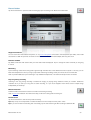
The wave editor can be entered by double tapping an existing or adding a new audio track.
There are 4 ways to fill an audio track:
• Record with a microphone or an audio accessory plugged into the headphone jack.
• Import a song from your iPod library
• Import an existing audio file. Supported formats: wav, mp3, ogg, AAC (m4a)
• AudioPaste from other apps on your device
An audio track can only be linked to one audio file. Opening another file in the wave editor will link it to the selected audio track.
Editing in the wave editor always changes the original audio file in the Audio folder, unless you tap the “Save as” button to save it
under a new name. This improves the workflow by not having to save and type filenames every time you change an audio file.
Wave editor menu
The menu buttons to the left to the display (for playback and undo) and the zoom buttons are the same as in the Keyboard
screen.
Music Studio Lite 2.0
29
Record button
Tap the record button to open the audio recording popup for recording a wav file into the Audio folder.
Supported hardware
You can record from the internal microphone, or any mono microphone connected to the head-phone jack. Many mono USB
accessories or USB microphones connected to the Camera Connection Kit’s USB adapter (iPad only) also work.
Filename textfield
By default, a file name that doesn’t exist yet in the Audio folder is displayed. Tap it to change the name of the file you are going
to record.
Monitoring
Input monitoring routes the incoming audio signal through the effect bus of the selected track and outputs it. This way you can
listen with headphones to what you sing or play before and during recording, exactly as it will sound on the track later.
Note: to prevent feedback, input monitoring is only available if headphones or an external microphone are connected.
Play song during recording
Listening to the song during recording is essential for singing or playing along. Situations where you wouldn’t enable this
checkbox are if you start your song with an audio recording, or if you record snippets which will be used in multiple songs
independently of the tempo.
Metronome button
Enable the metronome button to listen to the metronome during recording.
Note: If count-in is enabled in the metronome setup, it will kick in during audio recording too.
Record button
Tap the record button to start and stop audio recording.
Tip: Keep an eye on the input levels. Increase the distance to the microphone if they reach 100%.
Tip: If you want to trash the recording and re-recording, tap the undo button right after recording to delete the file.
Music Studio Lite 2.0
30
Load button
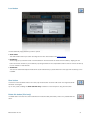
The load audio file popup presents you with 3 options:
• Audio folder
The Audio folder holds all your audio recordings and can also be browsed in the Projects screen.
• iPod library
All the songs you synced with iTunes or downloaded from the iTunes Store are stored in the iPod library. Tapping the OK
button shows the contents of your iPod library. Importing the file from the compressed format into the wav format can take up
to a few minutes on older devices.
• AudioPaste
The Sonoma AudioPaste clipboard holds all the audio material that you placed there from other apps with AudioCopy or the
PasteBin.
Save button
To save the current audio file under a new name, tap the save button and enter a file name. The original audio file
will remain unchanged.
Tip: In many cases, enabling the “Save selection only” checkbox is more handy than using the trim button.
Delete file button (iPad only)
The delete button removes the current audio file from the Audio folder permanently. Undo is not possible after this
action.
Music Studio Lite 2.0
31
Selection buttons
Tap the leftmost selection button and slide over an area in the wave form to select it. Use the
markers on the ruler to adjust the selection, or tap one of the other two selection buttons to
extend the selection to the beginning or the end of the audio file.
Trim button
The trim button cuts the areas outside of the selection away from the audio file.
Delete button
The delete button cuts the selected area from the audio file.
Insert silence button
Place the playhead at the point where you wish to insert silence, by moving your finger on the ruler. Then tap the
insert silence button and enter the length in seconds.
Tip: tap and slide your finger on the display to quickly adjust the length of the silence.
Reverse button
The reverse button reverts the selected area of the audio file, so that it sounds backwards when played back.
Normalization button
Normalization modifies the audio file’s volume to that the peak is at the desired percentage of the maximum volume.
Here are a few examples:
• Normalizing a quiet recording to 100% will boost its volume without clipping the wave form.
• If a quiet recording contains a spike that has a peak value of 100%, normalizing to 100% won’t change the file.
• Normalizing to 50% will set the peak to 50% of the maximum available volume. Repeating this procedure won’t change the
file because the peak will already be at 50%.
Limiter (soft knee)
The limiter checkbox becomes available at a percentage of over 100%, where clipping would occur. Applying a soft knee limiter
prevents clipping (crackling), but it introduces some artifacts that reduce the quality of the audio file.
Fade buttons
Tapping the fade in or out button unfolds a sub menu with 3 choices for the gradient: slow, linear, or fast.
The two most common cases are fading in the beginning and fading out the ending of an audio file. Try out
the different gradients and tap the undo button in between.
Music Studio Lite 2.0
32
Effects
Effect routing and busses
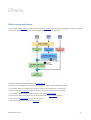
In short, effects with FX enabled act only on tracks that have FX enabled. The other effects are applied on all tracks except the
ones with the crossed out FX icon. The following diagram illustrates the audio signal flow:
Tracks are treated separately depending on the FX bus setting:
• Effects are always applied in the following order: pitch bend, amplifier, delay, equalizer, filter, reverb.
• The amplifier effect is a pre-fader effect in order to achieve a high overdrive even on quiet tracks.
• All effects with the FX checkbox enabled are applied to the mix of all tracks with FX bus setting.
• This is added together with the rest of the tracks (those without FX bus setting)
• The rest of the effects are applied to the mix (those effects with the FX checkbox disabled)
• The tracks with a no-FX setting are now added to the mix.
• The limiter is applied, according to the master gain.
Music Studio Lite 2.0
33
Common Controls
Power button
The power button enables or disables the effect. Disabled effects require no processing power.
Limit to FX tracks checkbox
“Limit to FX tracks” puts the effect into the FX bus, meaning that it will be applied only to those tracks which have FX enabled
(blue FX icon in the track list). All the other effects are still applied to all tracks after the FX effects are processed.
Default button
The default button resets the effect's settings to the preset values.
Preview button
Tap the preview button multiple times to hear different notes played with the current instrument.
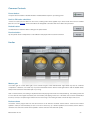
Limiter
Master gain
The master gain is not the device gain, but it controls the gain of the internal limiter. High values may lead to unwanted
compression or distortion, low values may not produce the desired volume. Set the master gain fader so that the decibel meters
barely hit the red areas for the loudest part of your song.
Note: In technical terms, this setting is required because if all playing instruments are mixed (added up), the resulting values will
in most cases be much higher than 65535 (the 16 bit border) and clipping would occur. The limiter uses a smooth mathematical
function (a curve) to compress larger numbers into the 16 bit range. The master gain fader controls the slope of this curve.
Device volume
The device volume popup’s fader has the same function as the iPhone's hardware volume buttons. If the iPhone's internal
speaker is used (not recommended), be sure not to turn it all the way up. If external speakers are connected, set this fader to
maximum and control the volume via the speaker's volume controls for the best audio quality.
Music Studio Lite 2.0
34
Reverb
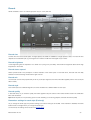
Reverb simulates a room of a certain type (hall / canyon / room) and size.
Reverb size
Controls the size of the sound space. In larger spaces, the reverb is audible for a longer period of time. The total size also
depends on the selected style, e.g. the largest room reverb is smaller than the largest canyon reverb.
Reverb brightness
Lower brightness gives the impression of a darker room (using a low pass filter), while maximum brightness leaves all the high
frequencies in the reverb.
Reverb stereo spread
Stereo spread results in the perception of stereo wideness of the reverb space. In technical terms, this fader sets the delay
between the reverb reaching the left and the right channel.
Reverb mix
The mix fader controls the proportionality of the dry sound (the original sound without the effect applied) and the wet sound (the
effect's result).
Reverb style
Each reverb style uses a different algorithm, thus the size fader has a different effect for each style.
Reverb quality
In technical terms, as you lower the quality, the reverb algorithm stays the same but the number of filters used in the reverbation
filter chain decreases.
Tip: Reverb requires a lot of processing power. If audio stuttering occurs during playback, decrease the reverb quality.
Remember settings for each style (iPad only)
As you change the reverb type, the previous settings you made for this type are recalled. If this checkbox is disabled, the reverb
faders remain unchanged when you change the reverb type.
On the iPhone, this setting can be found in the general setup.
Music Studio Lite 2.0
35
Filter
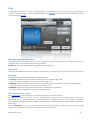
The filter effect is a resonant low-, high-, or band-pass filter. The cutoff frequency and the resonance can be set by moving the
crosshair, or by tilting the device if the accelerometer is enabled. The filter track in the track list holds the recorded events, which
can be edited in the bar editor.
Resonance and frequency panel
The crosshair indicates the current values of the cutoff frequency (x axis) and the resonance (y axis). Move the crosshair to
change the values. This can also be performed during recording.
Beware: high resonance values may lead to unpleasantly loud and high tones.
Snap back
If snap back is enabled and the crosshair is moved, it snaps back to its original location when you lift your finger from the screen.
Filter type
The filter type defines how the cutoff frequency influences the sound.
• Lowpass: All frequencies above the selected cutoff frequency are dampened (attenuated).
The sound remains unchanged if the crosshair is in the lower right corner.
• Highpass: The effect behaves inverse to the lowpass. All frequencies below the selected cutoff frequency are dampened.
The sound remains unchanged if the crosshair is in the lower left corner.
• Bandpass: Frequencies above and below the selected cutoff frequency are dampened.
The sound remains unchanged if the crosshair is at the bottom center.
Filter accelerometer control
If the accelerometer is enabled, tilting it in any direction changes the cutoff and the resonance.
The axis can be set to X, Y or X+Y. For X or Y axis, both the frequency and the resonance change if the device is tilted in the
selected axis. In X+Y mode, tilting along the x axis changes the cutoff frequency, while the y axis changes the resonance.
Starting from the centered position, all 4 quadrants are symmetrical, i.e. tilting the device to the far left has the same effect as
the far right.
With the sensitivity set to low, the device needs to be tilted almost 90 degrees to achieve the maximum effect. At high
sensitivity, small movements are sufficient to set the filter values to their maximum.
Music Studio Lite 2.0
36
Pitch
Pitch bend can be applied when playing live or recording with the pitch bend wheel or the accelerometer. In the piano roll editor,
pitch bend is indicated with lines emerging from the notes.
If the pitch bend effect and the accelerometer button in the Keyboard screen are enabled, the pitch of the currently played notes
can be influenced by tilting the device.
Note: Unlike most MIDI sequencers, Music Studio stores pitch bend data per note, not just per track. This means that two
simultaneous notes on the same track can have different pitch bend data (events). The big advantage of this method is that
editing a note automatically affects the pitch bend data for this note, but does not affect any other notes on the track (other
software sequencers commonly ask if you want to move the pitch bend data too, this is obsolete with this method).
Pitch bend semitones
The pitch bend range fader sets the number of semitones from 0.25 to 24 in both directions. This applies to the pitch bend
wheel as well as the accelerometer.
Pitch bend sensitivity
The sensitivity fader only applies to accelerometer controlled pitch bend. It sets the tilt angle required to bend the full semitone
range. The text to the right of the faders clarifies the behavior of the current setting (e.g. the device needs to be tilted 49 degrees
to achieve a pitch bend of 4 semitones).
Pitch bend accelerometer control
Select OFF to disable accelerometer control and enable the pitch bend wheel, or select an axis and tilt the device to pitch bend.
Invert axis reverses the behavior of the accelerometer, e.g. moving down (instead of up) will increase the pitch.
Adaptive calibration starts the pitch bend at zero for each note that you trigger, regardless of the current device tilt.
Pitch bend record mode
The recording mode controls how existing pitch bend data is treated during recording:
• Overwrite means that existing pitch bend events on the recorded track are overwritten by the new ones.
• Overdub mode preserves existing pitch bend data and stores the new pitch bend events only for newly recorded notes.
Music Studio Lite 2.0
37
Projects
File list
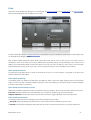
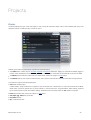
The file list displays the type, name and length (or size) of every file and folder. Select a file to view its details (date, size) in the
area below the list. Double tap a file or a folder to open it.
Different types of files are automatically organized into separate folders:
• The Audio folder contains all your recorded, imported and exported audio files. Tapping an audio file immediately triggers a
preview, which simplifies the process of finding the file you are looking for. Audio files are automatically moved into this folder.
• The Beats folder contains the preset and user created beats, see the the chapter on beats below.
• The Demos folder is read-only and holds the factory demo projects and instrument demos (if instruments were purchased).
The full version supports the following file types:
• xms: Music Studio project
In Music Studio, songs are referred to as projects. They are stored in the .xms file format, a custom and small format for Music
Studio which cannot be opened with any other software. It contains the tracks, song parameters, effect settings, keyboard
layout, metronome and some user interface settings. Preferences from the Setup screen are not stored in the project.
• beat: Music Studio beat, see the the chapter on beats below.
• wav, mp3, ogg, m4a (AAC): audio files
• mid, midi: MIDI file
• zip: compressed archive
Music Studio Lite 2.0
38
Beats
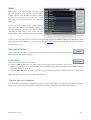
Beats contain one or more loop-able drum tracks which
can be appended to a song. Tapping a beat immediately
triggers a preview, which simplifies the process of finding
the beat you are looking for. Tap the save button in the
Beats folder to save the current song’s drum tracks as a
beat.
If the current song is empty, loading a beat applies its
tempo and reverb settings and enables loop playback and
recording. Otherwise, a popup lets you choose between
appending the beat tracks to the current song and
replacing all the current drum tracks with the beat’s tracks.
In practice, beats are great to start a song with, and are also handy for trying out different rhythms for an existing song. When
appending a beat to an existing song, you may want to use the bar editor’s repeat button to manually loop (extend) the beat to
the duration of the song.
New project button
Tap the New button to creates a new project. This action will remove all current all tracks and reset all
effects, keyboard and drum pad settings.
Load button
Select a file and tap the load button to open it:
• Loading an xms file dismisses your current project. If the project requires instruments which are not
present in your instrument list (i.e. not purchased), they are substituted by the closest matches from the available instruments
and a popup informs you about that.
• Loading an audio file adds a new audio track to your song. The file is also moved into the Audio folder if it’s not already there.
Tip: Double tapping a file has the same effect as the load button.
Transfer files to full version
If you purchased the full version, you might want to copy your song and all the files in the Audio folder from Music Studio Lite to
the full version on the same device. Tap the “Transfer files to full version” button and wait for the full version to launch.
Music Studio Lite 2.0
39
Setup
General setup
Latency
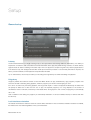
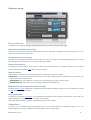
The time interval between your finger touching a key or drum pad and the sound being audible is called latency. Low latency is
required for a musician to feel connected to the virtual instrument and to play with perfect timing. However, on slower devices,
high CPU load can lead to stuttering in the audio output. This can happen if a complex song with many tracks is played back or
if the device is busy with background tasks like mobile phone network processes. To avoid these performance dropouts, the
latency can be increased, but the keyboard's responsiveness will suffer.
Tip: on older devices, choose very low latency for recording and a high latency for stutter-free editing and playback.
Polyphony
Polyphony defines the maximum number of notes that Music Studio can play simultaneously. High polyphony requires more
CPU and can lead to stuttering during playback, while low polyphony can result in notes stopping too soon.
If it is set to 16 and at one point during playback, the song would require 17 notes to be played simultaneously, the oldest note
will quickly be faded out to allow the new one to play. The required polyphony of a song depends on the number of
simultaneous notes on all tracks, and heavily on the release times. During export to wav or AAC, the polyphony is automatically
set to 128.
Note: In addition to this setting, the polyphony is automatically restricted to 16 for each individual track (8 on devices older than
the iPhone 4).
Lock interface orientation
Per default, the interface is rotated to match the current device orientation. If the Lock interface orientation checkbox is enabled,
the interface won’t be rotated regardless of how you tilt the device.
Music Studio Lite 2.0
40
Continuous playhead movement
In order to save CPU power, continuous playhead movement is off by default and the playhead in the Tracks screen moves only
at every beat. Enable this checkbox to trade a lot of CPU power for more precise playhead movement. It may lead to playback
stuttering.
Note: This checkbox is available only on the iPad, iPhone 3GS, iPod Touch 3rd generation and newer devices.
Remember reverb settings (iPhone only)
As you change the reverb type, the previous settings you made for this type are recalled. If this checkbox is disabled, the reverb
faders remain unchanged when you change the reverb type.
On the iPad, this setting is located in the reverb screen.
Keep attack/release times (iPhone only)
If this setting is disabled, each time you select an instrument its default attack and release time are set. If enabled, the current
track's attack and release times are kept when you select another instrument.
On the iPad, this setting is located in the Instruments screen.
Music Studio Lite 2.0
41
Keyboard setup
Snap to white keys
The keyboard can snap after scrolling so that it always starts with a white key at the left screen edge.
Allow touches between black keys
White keys can be touched in the area between the black keys if this setting is enabled. Otherwise, white keys can only be
touched on the area below the black keys.
Allow touches on key borders
By default, a tiny invisible border between the white keys won’t react to touches. This minimizes accidental touches. If you find
that the keyboard often doesn’t react to your input, enable this checkbox.
German key labeling
The German key naming system uses the letter H instead of B and B instead of A#. If enabled, key labels on the Keyboard
screen and the piano roll editor's LCD use this naming convention.
Velocity control
Enable velocity to control the note volume while playing on the keyboard. There are 4 options:
• Mod wheel: on the iPhone, the “Mod wheel instead of pitch wheel” setting needs to be enabled for the mod wheel to be
visible and utilized for velocity control.
• Touch position: the volume depends on where a key is touched (upper end quiet, lower end forte).
• Accelerometer X/Y: Velocity can be control by tilting the device in the selected axis.
Mod wheel instead of pitch wheel (iPhone only)
By default, the pitch wheel is displayed in the Keyboard screen. Enable this setting to change it to the mod wheel which controls
the filter effect or the keyboard velocity.
Auto quantization
To speed up your workflow, quantization can automatically be applied after each recording on the keyboard or drum pads. The
default setting is off. It is recommended for bass and drum recording.
Note: Automatic quantization can lead to undesirable results and is not undoable.
Transposition
If you tap a C on the keyboard with the transposition set to +2, a D will be played. The transposition range of -24 to +24
semitones allows you to play in a different key without having to learn the melody again.
Music Studio Lite 2.0
42
Accelerometer setup
Pitch bend, the filter effect and the keyboard velocity can be controlled via the accelerometer. The global settings in this screen
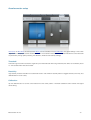
might come in handy if you use the accelerometer a lot. The crosshair in the accelerometer panel indicates the current device tilt
as perceived by the app (after processing the calibration, threshold and reactivity settings).
Threshold
Device tilt is ignored until it reaches the angle set by the threshold fader. With a high threshold, the device can be tilted by about
15° until accelerometer vales are recorded.
Reactivity
High reactivity increases the effect of accelerometer sensor noise while low reactivity leads to sluggish behavior (which may be a
desirable effect in some cases).
Calibration
Tap the calibrate button to set the current device tilt as the center position. The Reset Calibration button restores the original
center setting.
Music Studio Lite 2.0
43
Metronome setup
Volume
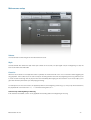
The volume fader controls the gain of the metronome tick sound.
Style
Choose between five metronome style. Each style consists of two sounds, one (the higher one) for the beginning of a bar, the
lower sound marks the other beats.
Count in
When the record button in the Keyboard screen is pressed, the metronome will count one or more bars before triggering the
song playback. This is called “count-in” and is handy for recording the first note at the very beginning of the song. Without count
in, there wouldn't be enough time to play the first note immediately after tapping the record button. Count-in also helps you to
get in line with the rhythm before you start playing (recording).
For example if count-in is set to 2 bars, the playhead position is at the beginning of the song (1.1) and you tap the record button,
the playhead will count 2 bars from -2.1, -1.1 until the recording starts at 1.1.
Count in only at the beginning of the song
If this checkbox is enabled, count-in is only applied if the recording starts at the beginning of the song.
Music Studio Lite 2.0
44
Troubleshooting Guide
For support-related discussions, visit the forum at the Music Studio website.
Four steps to resolve most issues
1.
Quit Music Studio Lite
Tap the home button to get to the home screen, then double tap the home
button to display the multitask bar. Close Music Studio (tap and hold the
icon, then tap the red minus icon to close it).
2.
Reboot your device
Press and hold the Home and the Power buttons for about 10 seconds until the Apple logo appears. Don't slide to power
off, hold longer!
3.
Disable iOS zoom
Launch the Settings app from the home screen. Go to General, Accessibility, and turn off the Zoom.
4.
Disable iOS multitasking gestures (iOS 5 and later)
Launch the Settings app from the home screen. Go to General and turn off the Multitasking Gestures.
There is a long delay between pressing a key and the audio output
Switch to a lower latency in the general setup and reboot your device as described above.
Audio stuttering occurs
Decrease the reverb quality, decrease the polyphony and increase the latency to reduce the CPU load. If the playback requires
more CPU speed than your device can provide, audio stuttering occurs. Read more on this topic in the quick start guide.
The audio output sounds noisy
• Use headphones or speakers because the device's internal speaker cannot cope with the broad frequency spectrum of the
instruments.
• Decrease the Limiter’s master gain to prevent clipping.
Some notes end too early during playback
Increase the polyphony in the Setup screen, but keep in mind that this may lead to stuttering with complex songs on older
devices.
Music Studio Lite 2.0
45