1
SetDAG User Manual
Folio :21/31
Date : 08/04/08
Diffusion :
external
Remarks: To view the complete list of the written bibs, you must ask for the ‘
programming report’.
3.9.1.
Programming report
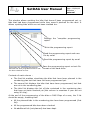
The programming report is a sum up version of the numbering verification
window and of the race information. It is possible to print the report, to save it
on the hard drive or to send it by email.
When saving on the hard drive, the report is automatically saved in the same
folder as the race file; it has the same name except that it has a ‘.doc’
extension.
To send it by email, 2 options: sending the report alone or along with the race
file (*.cou). During the sending process, an email address is asked for the
report’s addressee. It is possible to add others addressees by separating the
email addresses with ‘;”.
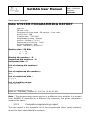
Information contained in a race report:
Name of the race
Number of programmed bibs
The repartition, based on the programming method: manual = bib
number fixed by SetDAG, according to the numbering plan; barcode =
bib number fixed by a barcode value.
Type of coded chip for this race: V4 or V6B
Race file creation date
Name of the person in charge
SetDAG software version
Time spent on programming these bibs
The client affectation account
Name and date of race
Numbering plan
List of the bibs that have not been checked (only for V6 programming).
The order followed during checking (only for V6 programming).