1
Zero Menu
The PosiTector SPG has only one adjustment point at zero. The
zero point can be set using one of two methods. Both methods are
found under the Zero menu option.
Glass Plate Zero
Setting the Gage to zero on the glass plate is the preferred zero
adjustment method:
1.Select
Zero
from the menu.
2.Press the (+) button to select the number of readings to be
used to obtain an average, typically 3.
3.Repeatedly measure the glass plate. After the last
measurement the gage will calculate a Zero which represents the
average of all the Zero readings taken.
Factory Zero
If a glass plate or suitable smooth, hard surface is not available,
the factory zero setting can be restored:
1. Select
Zero
from the menu.
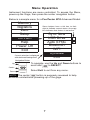
2. Press the down button to select “Reset” and press the center
navigation button
. The factory calibration icon
will appear
on the LCD.
NOTE: -The factory zero setting is restored during a RESET
(below)
-The factory zero setting may not always be precise,
particularly after a probe tip exchange. For best accuracy,
the gage should be zeroed on the included glass plate.
8