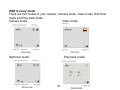
1
screen. This will activate the automatic flash.
3. Press Flash/Exit button repeatedly, select
icon appear on the LCD
screen. This will activate the reduction red eyes function.
4. Press Flash/Exit button repeatedly until the
icon appears. This will
turn off the flash function.
Self-timer
You can include yourself in a photo by using this feature to delay the time
between your pressing the Shutter and when the photo is actually taken.
1. Press the M button leftward repeatedly to exchange Self-timer and
Camera mode. The icon
will appear on the LCD screen.
2. Press Shutter button to start a 10 second count down (the count down will
appear on the LCD). After 10 seconds, a photo is taken.
Video Mode
Press M button rightward repeatedly to exchange Video and Camera mode.
The icon
will appear on the LCD screen.
You can take VGA/QVGA pixels digital video clips with your camera. Without
20