1
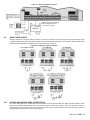
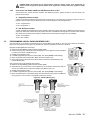
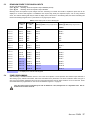
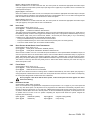
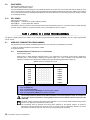
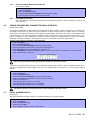
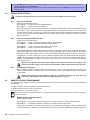
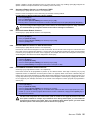
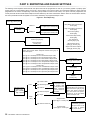
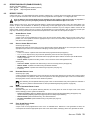
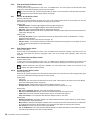
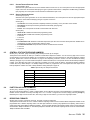
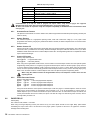
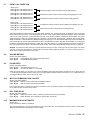
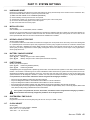
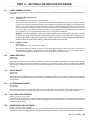
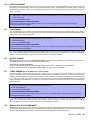
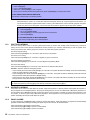
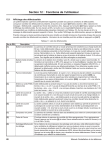
Figure 5.1: Spectra Zone Programming
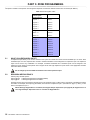
[001] = Zone 1
[002] = Zone 2
[003] = Zone 3
[004] = Zone 4
[005] = Zone 5
[006] = Zone 6
[007] = Zone 7
[008] = Zone 8
Press the
[ENTER] key
Enter the
[INSTALLER CODE]
Zone Definitions
1 - Entry Delay 1
2 - Entry Delay 2
3 - Follow
4 - Instant
5 - 24Hr. Burglary
6 - 24Hr. Buzzer
Additional definitions for
on-board terminals:
7 - Keyswitch
8 - 24Hr. Fire
9 - 24Hr. Delayed Fire
Zone Partition Assignment
Key in 3-digit
[SECTION]
Select
one
Zone Definition
First Digit
[009] = Zone 9
[010] = Zone 10
[011] = Zone 11
[012] = Zone 12
[013] = Zone 13
[014] = Zone 14
[015] = Zone 15
1 - Zone Assigned to Partition 1
2 - Zone Assigned to Partition 2
3 - Zone Assigned to both Partitions
Select
one
Zone Partition
Assignment
Second Digit
Keypads beep twice
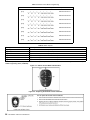
Zone Options
Feature Select
Zone Options
[1] Auto Zone Shutdown Enabled
[2] Bypass Enabled
[3] Stay Zone
[4]
OFF
OFF
ON
ON
[5]
OFF
ON
OFF
ON
Zone Alarm Type
Audible Alarm (steady)
Audible Alarm (pulsed)
Silent Alarm
Generates only a report
[6] Intellizone
[7] Delay alarm transmission
[8] Force Zone
Keyswitch Options
[1]
Press [ENTER]
5.5
[2]
OFF= Maintained
ON = Momentary
OFF = Regular Arm
ON = Stay Arm
ZONE DEFINITIONS
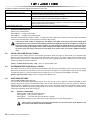
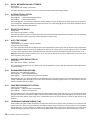
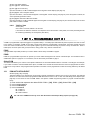
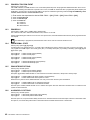
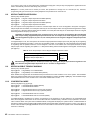
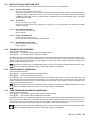
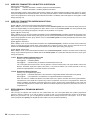
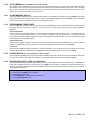
As demonstrated in Figure 5.1, sections [001] to [015] represent zones 1 through 15 respectively, where the first digit in each of
these sections represents the zone's definition. Also, refer to Zone Speed on page 22. To disable a zone, clear the contents of
the section corresponding to the desired zone by pressing the [FORCE] key 3 times and pressing [ENTER]. There are 9 available
Zone Definitions, which are described as follows.
5.5.1
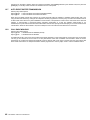
ENTRY D ELAY 1
Sections [001] to [015]: Zones 1 to 15, First Digit = 1
When the system is armed and a zone defined with Entry Delay 1 opens, the control panel will generate an alarm after
the programmed Entry Delay 1 Timer elapses. This is to provide users with enough time to enter the protected area
and disarm the system. To program the Entry Delay 1 Timer, key in the desired 3-digit delay value (000 to 255
seconds, Default = 45 seconds) into section [069]. Entry Delay zones are commonly used at the entry/exit points of the
protected area (i.e. front/back door, garage, etc.). Using different Entry Delays (see Entry Delay 2) is useful when, for
example, one entry point requires a longer delay than the other entry point or in a partitioned system where each
partition may require a different Entry Delay.
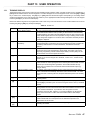
5.5.2
ENTRY D ELAY 2
Sections [001] to [015]: Zones 1 to 15, First Digit = 2
Entry Delay 2 zones are identical to the Entry Delay 1 zones (see section 5.5.1), except it uses a separate Entry Delay
Timer. To program the Entry Delay 2 Timer, key in the desired 3-digit delay value (000 to 255 seconds, Default = 45
seconds) into section [070].
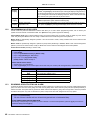
This timer is also used as the Stay Delay timer (see section 7.2).
18
REFERENCE & INSTALLATION MANUAL